

Firewall Rules Module Documentation
Table of Contents
Section titled “Table of Contents”- Navigation & Access
- Screenshots & Visual Interface
- Module Overview (Technical)
- Module Overview (Commercial/Business)
- Module Overview (End User/Administrator)
- User Roles & Key Capabilities
- Configuration Sections
- Settings Reference
- Common Scenarios & Examples
- Model Context Protocol (MCP) AI Integration
- Limitations & Important Notes
- Troubleshooting Tips
- Glossary
Navigation & Access
Section titled “Navigation & Access”To access the Firewall Rules module:
- Log in to the Ring2All Web Portal (
https://<domain-or-ip>/login) with administrative credentials. - In the left navigation sidebar, locate and expand Admin.
- Under the Firewall section, click Rules (
/admin/firewall/rules). - To add a new packet filtering rule, click the + Add button at the top right of the toolbar.
- To apply all active database rules directly into the host operating system’s nftables firewall tables, click Apply Rules.
- To modify or delete an existing rule, use the edit or trash icons in the corresponding table row.
Screenshots & Visual Interface
Section titled “Screenshots & Visual Interface”Firewall Rules List View
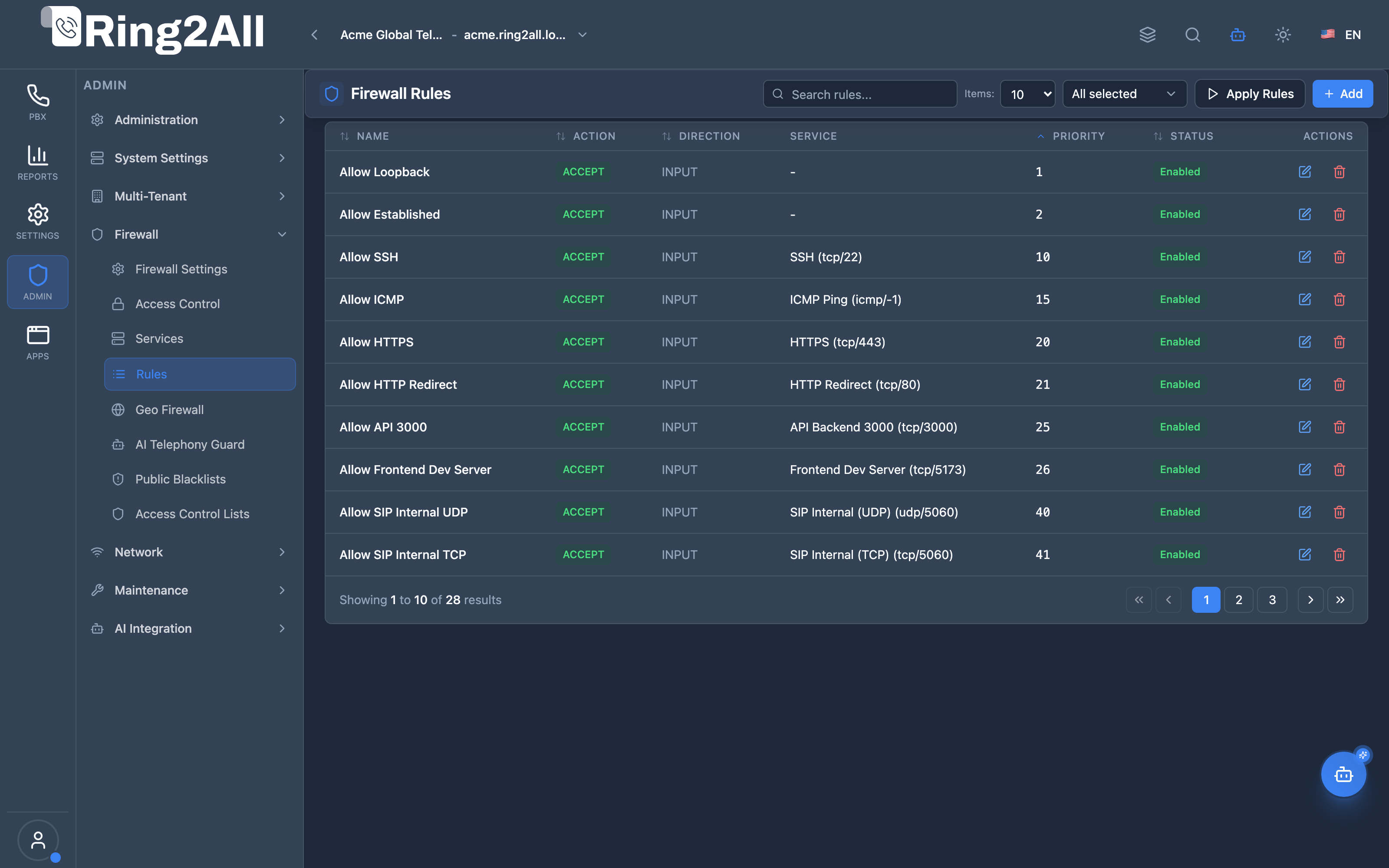
Section titled “Firewall Rules List View”The Firewall Rules interface displays all active packet filtering policies with their rule names, dispositions (ACCEPT, DROP, REJECT), traffic directions, associated services, rule priorities, operational states, and action triggers.
Add / Edit Firewall Rule Modal
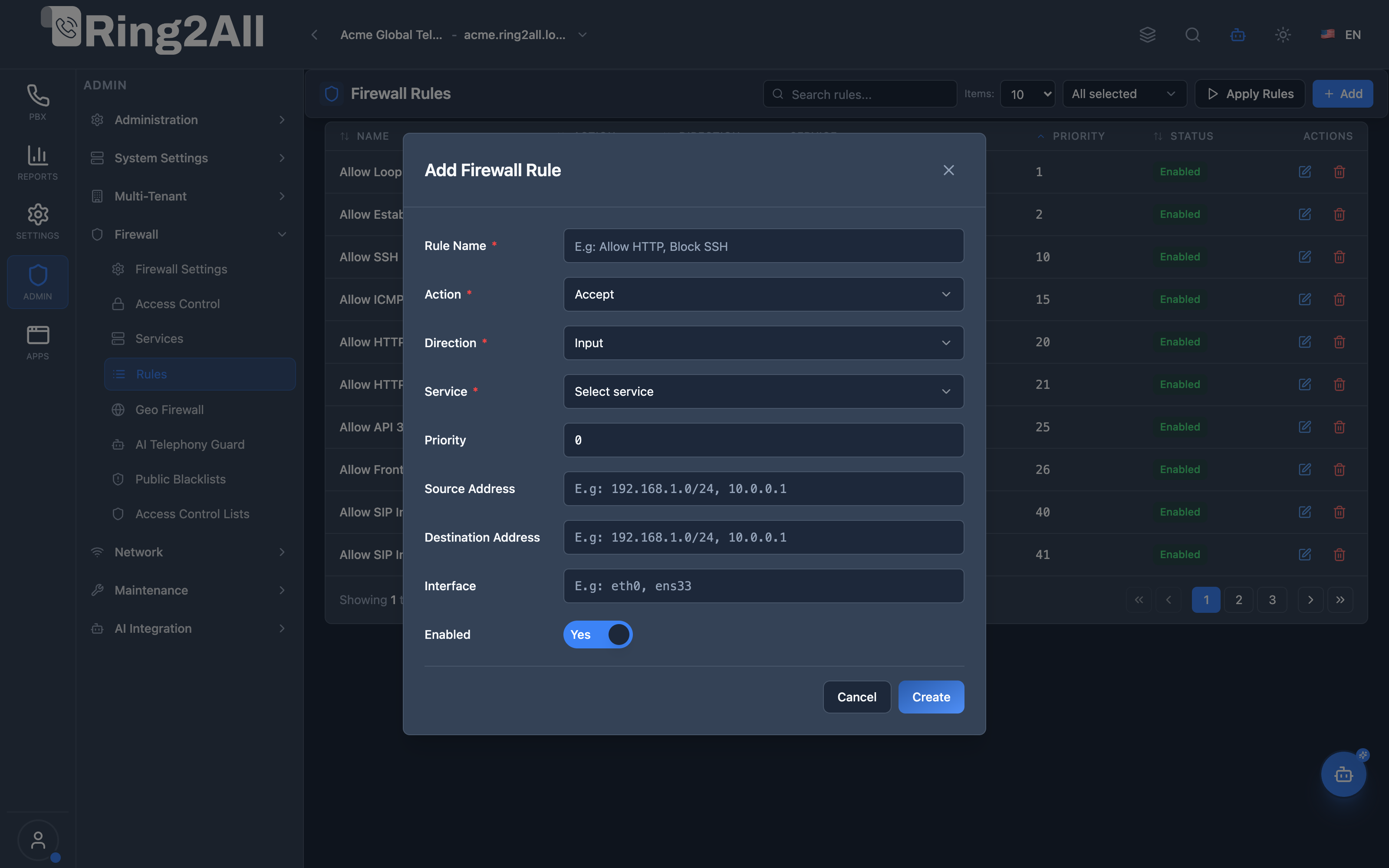
Section titled “Add / Edit Firewall Rule Modal”The rule configuration dialog enables administrators to define rule labels, select disposition actions (Accept, Drop, Reject), traffic direction (Input, Forward, Output), target service definitions, rule priorities, source/destination CIDRs, network interface constraints, and enabled states.
1. Module Overview (Technical)
Section titled “1. Module Overview (Technical)”What Are Firewall Rules?
Section titled “What Are Firewall Rules?”Firewall Rules is a traffic control module that creates nftables rules for accepting, dropping, or rejecting network traffic. Rules reference Firewall Services and are evaluated in priority order.
Architecture
Section titled “Architecture”┌─────────────────────────────────────────────────────────────────┐│ Firewall Rules Architecture │├─────────────────────────────────────────────────────────────────┤│ ││ Rule Definitions ││ ┌──────────────────────────────────────────────────────────┐ ││ │ │ ││ │ Priority: 10 Priority: 20 │ ││ │ ┌────────────────────┐ ┌────────────────────┐ │ ││ │ │ Allow Admin SSH │ │ Allow HTTP │ │ ││ │ │ Action: Accept │ │ Action: Accept │ │ ││ │ │ Direction: Input │ │ Direction: Input │ │ ││ │ │ Service: SSH │ │ Service: HTTP │ │ ││ │ │ Source: 10.0.0.5 │ │ Source: any │ │ ││ │ └────────────────────┘ └────────────────────┘ │ ││ │ │ ││ │ Priority: 100 Priority: 200 │ ││ │ ┌────────────────────┐ ┌────────────────────┐ │ ││ │ │ Allow SIP LAN │ │ Block SSH External │ │ ││ │ │ Action: Accept │ │ Action: Drop │ │ ││ │ │ Direction: Input │ │ Direction: Input │ │ ││ │ │ Service: SIP │ │ Service: SSH │ │ ││ │ │ Source: 192.168.x │ │ Source: any │ │ ││ │ └────────────────────┘ └────────────────────┘ │ ││ │ │ ││ └──────────────────────────────────────────────────────────┘ ││ │ ││ ▼ [Apply Rules] ││ ┌──────────────────────────────────────────────────────────┐ ││ │ nftables Configuration │ ││ │ │ ││ │ table inet filter { │ ││ │ chain input { │ ││ │ # Priority 10: Allow Admin SSH │ ││ │ ip saddr 10.0.0.5 tcp dport 22 accept │ ││ │ # Priority 20: Allow HTTP │ ││ │ tcp dport 80 accept │ ││ │ # Priority 100: Allow SIP LAN │ ││ │ ip saddr 192.168.0.0/16 udp dport 5060 accept │ ││ │ # Priority 200: Block SSH External │ ││ │ tcp dport 22 drop │ ││ │ } │ ││ │ } │ ││ │ │ ││ └──────────────────────────────────────────────────────────┘ ││ │└─────────────────────────────────────────────────────────────────┘2. Module Overview (Commercial/Business)
Section titled “2. Module Overview (Commercial/Business)”Business Value
Section titled “Business Value”Firewall Rules provides network traffic control:
| Without Rules | With Rules |
|---|---|
| Open access | Controlled traffic |
| No priority | Ordered evaluation |
| Manual nftables | Web interface |
| Complex syntax | Simple forms |
Use Cases
Section titled “Use Cases”-
Allow Services
- Web traffic (HTTP/HTTPS)
- SIP/RTP for telephony
-
Block Attacks
- Drop external SSH
- Reject scanners
-
LAN Access Only
- SIP from internal only
- Admin from VPN only
-
Priority Control
- Allow before block
- Specific before general
Feature Highlights
Section titled “Feature Highlights”| Feature | Benefit |
|---|---|
| Accept/Drop/Reject | Flexible actions |
| Priority Order | Controlled evaluation |
| Service Reference | Reusable definitions |
| Source/Dest Filter | IP-based access |
| Interface Binding | Per-interface rules |
| Apply Button | Controlled deployment |
3. Module Overview (End User/Administrator)
Section titled “3. Module Overview (End User/Administrator)”What Can You Do?
Section titled “What Can You Do?”- Create traffic rules
- Allow or block traffic
- Set priority order
- Filter by IP address
- Bind to interfaces
- Apply rules to nftables
- Enable/disable rules
Firewall Rules Interface
Section titled “Firewall Rules Interface”┌─────────────────────────────────────────────────────────────────┐│ Firewall Rules │├─────────────────────────────────────────────────────────────────┤│ ││ Manage firewall rules for nftables (Debian 13) ││ ││ [+ Add Rule] [Apply Rules] ││ ││ [🔍 Search rules...] ││ ││ ┌───────────────────────────────────────────────────────────┐ ││ │ Name │ Action│ Direction│ Service│ Priority│ St │ ││ ├───────────────┼───────┼──────────┼────────┼─────────┼────┤ ││ │ Allow Admin │ Accept│ Input │ SSH │ 10 │ ● │ ││ │ Allow HTTP │ Accept│ Input │ HTTP │ 20 │ ● │ ││ │ Allow HTTPS │ Accept│ Input │ HTTPS │ 30 │ ● │ ││ │ Allow SIP LAN │ Accept│ Input │ SIP │ 100 │ ● │ ││ │ Allow RTP │ Accept│ Input │ RTP │ 110 │ ● │ ││ │ Block SSH Ext │ Drop │ Input │ SSH │ 200 │ ● │ ││ │ Block All │ Drop │ Input │ - │ 9999 │ ○ │ ││ └───────────────────────────────────────────────────────────┘ ││ ││ ⚠️ Click "Apply Rules" after changes ││ │└─────────────────────────────────────────────────────────────────┘Add/Edit Rule
Section titled “Add/Edit Rule”┌─────────────────────────────────────────────────────────────────┐│ Add Firewall Rule │├─────────────────────────────────────────────────────────────────┤│ ││ Rule Name: [Allow SIP from LAN ] ││ Descriptive name for the rule (must be unique) ││ ││ Action: [Accept ▼] ││ Accept (allow) | Drop (silent block) | Reject (block+respond)││ ││ Direction: [Input ▼] ││ Input (to server) | Output (from server) | Forward (routed) ││ ││ Service: [SIP ▼] ││ Associated firewall service (required) ││ The rule will use the selected service's protocol and port ││ ││ Priority: [100 ] ││ Rule priority (0-9999). Lower numbers are evaluated first ││ ││ ──────────────────────────────────────────────────────────────││ ││ Source Address: [192.168.1.0/24 ] ││ Optional: Source IP address or CIDR network ││ ││ Destination Address: [ ] ││ Optional: Destination IP address or CIDR network ││ ││ Interface: [eth0 ] ││ Optional: Network interface (e.g., eth0, ens33) ││ ││ ──────────────────────────────────────────────────────────────││ ││ Enabled: ✓ ││ Disabled rules will not be applied to nftables ││ ││ [Save] [Cancel] ││ │└─────────────────────────────────────────────────────────────────┘Quick Tips
Section titled “Quick Tips”[!TIP] Priority: Lower numbers execute first. Allow admin access at low priority!
[!TIP] Apply Rules: Always click after making changes.
[!CAUTION] Don’t Block Yourself: Create allow rule for your IP before blocking!
🎯 User Roles & Key Capabilities
Section titled “🎯 User Roles & Key Capabilities”The Firewall Rules module manages kernel packet filtering policies, delineating capabilities across administrative tiers:
| User Role | Key Permissions & Responsibilities | Common Tasks & Workflows |
|---|---|---|
| System Super Administrator | Total control over host nftables tables, rule chains, and packet admission/rejection actions. |
Create and delete packet filtering rules, reorder rule evaluation priorities, apply database rules to host kernel tables, safeguard administrative SSH/HTTPS access. |
| VoIP / Network Engineer | Constructing fine-grained packet filters for telephony carriers, inter-PBX trunks, and remote office SBCs. | Allow SIP 5060 traffic from carrier subnets, open RTP port ranges (16384-32768) to media gateways, drop unauthenticated SIP probes on public interfaces. |
| NOC / Support Engineer | Troubleshooting blocked audio/signaling and monitoring dropped packet metrics. | Inspect rule hit counters, verify rule execution order (allow rules before default drop), test IP subnet reachability, temporarily disable rules during troubleshooting. |
| Information Security Auditor | Validating that network boundary defenses adhere to the principle of least privilege. | Audit firewall rules against CIS benchmarks, verify that public interfaces enforce a default DROP policy, check that administrative ports are restricted to management subnets. |
4. Configuration Sections
Section titled “4. Configuration Sections”Rule Fields
Section titled “Rule Fields”| Field | Description |
|---|---|
| Rule Name | Unique identifier |
| Action | Accept, Drop, Reject |
| Direction | Input, Output, Forward |
| Service | Service reference (required) |
| Priority | Order (0-9999) |
| Source Address | Source IP/CIDR (optional) |
| Destination Address | Dest IP/CIDR (optional) |
| Interface | Network interface (optional) |
| Enabled | Active/Inactive |
5. Settings Reference
Section titled “5. Settings Reference”Actions
Section titled “Actions”| Action | Behavior | Response | Use Case |
|---|---|---|---|
| Accept | Allow traffic | - | Permitted traffic |
| Drop | Block silently | None | Stealth blocking |
| Reject | Block with response | ICMP error | Inform sender |
Directions
Section titled “Directions”| Direction | Description | Example |
|---|---|---|
| Input | Traffic TO server | Web requests |
| Output | Traffic FROM server | API calls |
| Forward | Routed traffic | NAT/routing |
Priority Guidelines
Section titled “Priority Guidelines”| Priority Range | Use |
|---|---|
| 1-50 | Critical allows (admin access) |
| 51-100 | Standard allows (web, API) |
| 101-200 | Service allows (SIP, RTP) |
| 201-500 | Specific blocks |
| 501-9999 | Broad blocks, catch-all |
Priority Examples
Section titled “Priority Examples”Priority 10: Allow Admin SSH (source: admin IP)Priority 20: Allow HTTP (any source)Priority 100: Allow SIP LAN (source: 192.168.x)Priority 200: Block SSH External (any source)Priority 9999: Block All (catch-all)6. Common Scenarios & Examples
Section titled “6. Common Scenarios & Examples”Scenario 1: Allow HTTP/HTTPS
Section titled “Scenario 1: Allow HTTP/HTTPS”- Add Rule
- Name = “Allow HTTP”
- Action = Accept
- Direction = Input
- Service = HTTP
- Priority = 20
- Save
- Repeat for HTTPS (Priority 30)
- Apply Rules
Scenario 2: Allow SIP from LAN Only
Section titled “Scenario 2: Allow SIP from LAN Only”- Add Rule
- Name = “Allow SIP LAN”
- Action = Accept
- Direction = Input
- Service = SIP
- Priority = 100
- Source = 192.168.1.0/24
- Save
- Apply Rules
Scenario 3: Block External SSH
Section titled “Scenario 3: Block External SSH”- First: Create “Allow Admin SSH” (Priority 10, Source: your IP)
- Add Rule
- Name = “Block SSH External”
- Action = Drop
- Direction = Input
- Service = SSH
- Priority = 200
- (No source = all sources)
- Save
- Apply Rules
Scenario 4: Complete PBX Ruleset
Section titled “Scenario 4: Complete PBX Ruleset”Priority 10: Allow Admin SSH (Source: admin IP)Priority 20: Allow HTTP (Any - redirect to HTTPS)Priority 30: Allow HTTPS (Any - includes WebRTC WSS proxy)Priority 100: Allow SIP UDP (Source: LAN + Trunks)Priority 110: Allow SIP TLS (Source: LAN + Trunks)Priority 120: Allow RTP (Any)Priority 130: Allow STUN (Any - NAT traversal)Priority 131: Allow TURN TLS (Any - NAT traversal)Priority 200: Block SSH External (Any)Priority 300: Block SIP External (Any)7. Limitations & Important Notes
Section titled “7. Limitations & Important Notes”Technical Notes
Section titled “Technical Notes”[!NOTE] Apply Required: Rules don’t take effect until applied.
[!NOTE] Priority Order: Lower numbers are processed first.
[!CAUTION] Lock-Out Risk: Always allow admin access before blocking!
Best Practices
Section titled “Best Practices”- Admin First: Always create allow rule for admin access first
- Specific Before General: Narrow rules before broad blocks
- Meaningful Names: Clear, descriptive rule names
- Document Purpose: Use consistent naming convention
- Test Changes: Verify access after applying
- Backup Access: Have console/IPMI access available
Rule Evaluation Order
Section titled “Rule Evaluation Order”1. Enabled rules only2. Sorted by priority (ascending)3. First matching rule wins4. If no match, default policy appliesCommon Mistakes
Section titled “Common Mistakes”| Mistake | Result | Prevention |
|---|---|---|
| Block before allow | Locked out | Lower priority for blocks |
| No admin allow | Can’t access | Priority 1-10 admin rules |
| Forgot Apply | Rules inactive | Always click Apply |
| Wrong direction | Not matching | Verify Input vs Output |
Model Context Protocol (MCP) AI Integration
Section titled “Model Context Protocol (MCP) AI Integration”The Firewall Rules module connects directly to the Ring2All Platform Copilot MCP Server, enabling natural language network packet filtering operations:
🛠️ Available MCP Tools
Section titled “🛠️ Available MCP Tools”| Tool Name | Operation | Access Level | Description | Key Parameters |
|---|---|---|---|---|
list_firewall_rules |
Read | SuperAdmin / Auditor | Lists all network Firewall Rules (port, protocol: TCP/UDP, action: ACCEPT/DROP, source IP/CIDR subnet). | search (string, optional) |
create_firewall_rule |
Write | SuperAdmin Only | Creates a new network firewall rule to allow or block access to specific PBX ports (SIP 5060, Web 443, RTP ranges). | name (string), action (accept, drop, reject), protocol (tcp, udp, all), port (string), sourceIp (string) |
delete_firewall_rule |
Delete (Guarded) | SuperAdmin Only | Deletes a firewall rule from the PBX database and unbinds it from the running nftables kernel filter. | ruleId (string/number, required) |
get_firewall_settings |
Read | SuperAdmin / Auditor | Returns overarching host firewall state and intrusion detection parameters. | None |
diagnose_ip_security |
Diagnostic / Query | Security Operator | Performs comprehensive perimeter security diagnosis on an IP address: inspects Fail2ban jails (telephony, sip, web, sshd), kernel nftables drop rules, DB firewall rules, ACL deny lists, and threat reputation feeds. | ipAddress (string, required) |
📋 JSON Tool Schemas & Sample Executions
Section titled “📋 JSON Tool Schemas & Sample Executions”list_firewall_rules
Section titled “list_firewall_rules”{ "name": "list_firewall_rules", "arguments": { "search": "Carrier" }}Sample Successful Response:
{ "success": true, "data": { "total": 1, "rules": [ { "id": 4, "name": "Allow SIP Carrier Trunks", "action": "accept", "protocol": "udp", "port": "5060", "sourceIp": "198.51.100.0/24", "enabled": true } ] }}create_firewall_rule
Section titled “create_firewall_rule”{ "name": "create_firewall_rule", "arguments": { "name": "Allow Branch PBX SIP", "action": "accept", "protocol": "udp", "port": "5060", "sourceIp": "192.0.2.50/32" }}Sample Successful Response:
{ "success": true, "data": { "message": "Firewall rule \"Allow Branch PBX SIP\" (ACCEPT from 192.0.2.50/32) created successfully!", "name": "Allow Branch PBX SIP", "id": 8 }}💬 Natural Language Prompt Examples
Section titled “💬 Natural Language Prompt Examples”English Prompts
Section titled “English Prompts”- “List all firewall rules configured for SIP port 5060.”
- “Show all active rules that drop or reject inbound traffic.”
- “Create an ACCEPT rule for branch office IP ‘192.0.2.50/32’ on port 5060 UDP.”
- “Delete firewall rule with ID 8.”
- “Verify if any firewall rule permits SSH traffic from 0.0.0.0/0.”
Ejemplos en Español (Spanish Prompts)
Section titled “Ejemplos en Español (Spanish Prompts)”- “Lista todas las reglas del firewall configuradas para el puerto SIP 5060.”
- “Muestra todas las reglas activas que descartan (DROP) o rechazan (REJECT) tráfico entrante.”
- “Crea una regla de ACEPTAR para la IP de la sucursal ‘192.0.2.50/32’ en el puerto 5060 UDP.”
- “Elimina la regla de firewall con ID 8.”
- “Comprueba si alguna regla de firewall permite tráfico SSH desde cualquier origen (0.0.0.0/0).”
diagnose_ip_security
Section titled “diagnose_ip_security”{ "name": "diagnose_ip_security", "arguments": { "ipAddress": "198.51.100.50" }}Sample Successful Response:
{ "success": true, "data": { "ipAddress": "198.51.100.50", "isBanned": true, "jails": ["sip-auth-failure"], "nftablesStatus": "Blocked by filter input", "threatReputation": "Listed on VoIPBL (high malicious score)", "recommendation": "Review IP authentication logs before unbanning via unban_ip_address" }}🛡️ Enterprise Safeguards & Best Practices
Section titled “🛡️ Enterprise Safeguards & Best Practices”- Protected System Rules: Core protection rules marked as
is_system = true(such as anti-lockout SSH rules or localhost loopback rules) cannot be deleted via MCP. - Rule Priority Hierarchy: Rules are assigned numerical priorities (1-1000). Lower numbers are evaluated first in
nftables, ensuring explicit ACCEPT overrides take precedence before DROP rules. - CIDR Subnet Validation: Any source IP provided must be a valid IPv4 host (
1.2.3.4) or CIDR subnet (1.2.3.0/24); invalid notations are rejected before touching kernel tables.
8. Troubleshooting Tips
Section titled “8. Troubleshooting Tips”Common Issues
Section titled “Common Issues”| Symptom | Possible Cause | Solution |
|---|---|---|
| Rule not working | Not applied | Click Apply Rules |
| Blocked traffic | Priority wrong | Check priority order |
| Can’t connect | Locked out | Console access |
| Service not in list | Disabled service | Enable in Services |
Check Rules
Section titled “Check Rules”SELECT name, action, direction, priority, source_address, is_enabledFROM public.firewall_rulesORDER BY priority;nftables Commands
Section titled “nftables Commands”# View current rulesnft list ruleset
# View input chainnft list chain inet filter input
# Flush rules (emergency)nft flush rulesetEmergency Recovery
Section titled “Emergency Recovery”# If locked out via SSH:# 1. Access server console (IPMI, KVM, physical)# 2. Disable firewall temporarilysystemctl stop nftables
# 3. Fix rules via admin panel# 4. Re-enable firewallsystemctl start nftables9. Glossary
Section titled “9. Glossary”| Term | Definition |
|---|---|
| Rule | Traffic control statement |
| Action | What to do (accept/drop/reject) |
| Direction | Traffic flow direction |
| Priority | Rule evaluation order |
| nftables | Linux firewall framework |
| Chain | Rule processing group |
Documentation last updated: January 2026