

HTTP/HTTPS Server Module Documentation
Table of Contents
Section titled “Table of Contents”- Navigation & Access
- Screenshots & Visual Interface
- Module Overview (Technical)
- Module Overview (Commercial/Business)
- Module Overview (End User/Administrator)
- Configuration Sections
- Settings Reference
- Common Scenarios & Examples
- Limitations & Important Notes
- Troubleshooting Tips
- Glossary
Navigation & Access
Section titled “Navigation & Access”To access the HTTP/HTTPS Server module:
- Log in to the Ring2All Web Portal (
https://<domain-or-ip>/login). - In the left navigation sidebar, expand Administration.
- Under Network, click HTTP/HTTPS Server (
/admin/system-settings/http-server). - Configure HTTP/HTTPS listener ports, TLS protocols, cipher suites, HSTS, security headers, logging parameters, and default SSL certificate assignments.
Screenshots & Visual Interface
Section titled “Screenshots & Visual Interface”Web Engine & Reverse Proxy Parameters
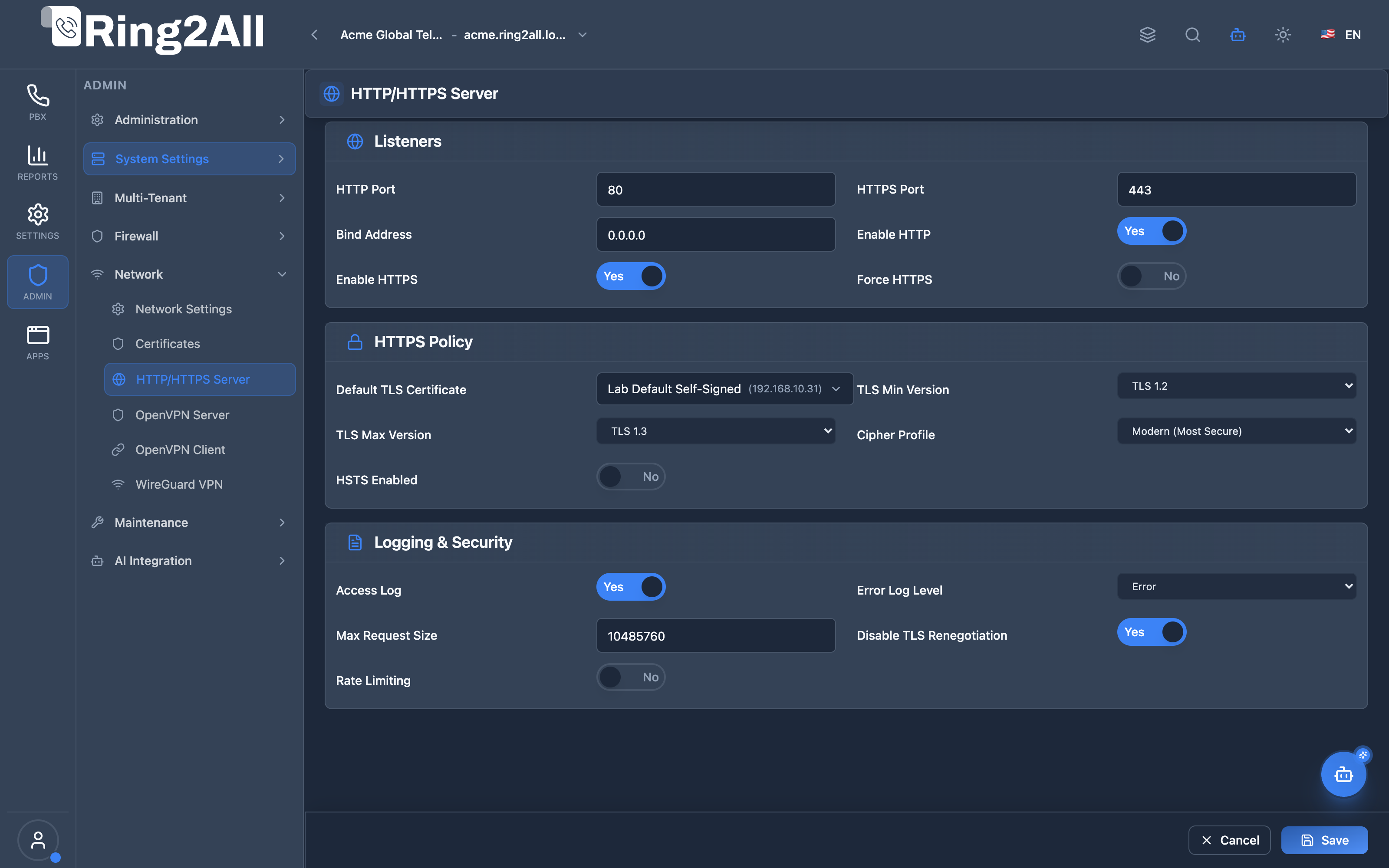
Section titled “Web Engine & Reverse Proxy Parameters”Comprehensive web server configuration console governing HTTP/HTTPS listener ports, minimum and maximum TLS protocol versions (TLS 1.2 and TLS 1.3), Modern cipher profiles, HSTS policy enforcement, rate limiting, and SSL/TLS certificate selection.
1. Module Overview (Technical)
Section titled “1. Module Overview (Technical)”What Is the HTTP/HTTPS Server Module?
Section titled “What Is the HTTP/HTTPS Server Module?”HTTP/HTTPS Server is a web server configuration module that manages Nginx settings for the admin panel and API. It controls listeners, TLS policies, HSTS, logging, and rate limiting.
Architecture
Section titled “Architecture”┌─────────────────────────────────────────────────────────────────┐│ HTTP/HTTPS Server Architecture │├─────────────────────────────────────────────────────────────────┤│ ││ HTTP Server Configuration ││ ┌──────────────────────────────────────────────────────────┐ ││ │ Nginx Configuration │ ││ │ │ ││ │ Listeners: │ ││ │ ├─ HTTP: 0.0.0.0:80 │ ││ │ └─ HTTPS: 0.0.0.0:443 │ ││ │ │ ││ │ HTTPS Policy: │ ││ │ ├─ TLS Min: 1.2 │ ││ │ ├─ TLS Max: 1.3 │ ││ │ ├─ Cipher: Modern │ ││ │ └─ HSTS: Enabled (1 year) │ ││ │ │ ││ │ Security: │ ││ │ ├─ Force HTTPS: ✓ │ ││ │ ├─ Max Request: 10MB │ ││ │ └─ Rate Limit: 100 req/10s │ ││ │ │ ││ │ Default Certificate: Production SSL │ ││ │ │ ││ └──────────────────────────────────────────────────────────┘ ││ │ ││ ▼ Applied to Nginx ││ ┌──────────────────────────────────────────────────────────┐ ││ │ Nginx Web Server │ ││ │ │ ││ │ Serves: │ ││ │ ├─ Admin Panel (React App) │ ││ │ ├─ API Endpoints │ ││ │ ├─ Provisioning Files │ ││ │ └─ Static Assets │ ││ │ │ ││ └──────────────────────────────────────────────────────────┘ ││ │└─────────────────────────────────────────────────────────────────┘2. Module Overview (Commercial/Business)
Section titled “2. Module Overview (Commercial/Business)”Business Value
Section titled “Business Value”HTTP/HTTPS Server provides secure web access:
| Without Configuration | With Configuration |
|---|---|
| Default settings | Optimized security |
| Basic TLS | Modern ciphers |
| No HSTS | Browser enforcement |
| No rate limits | Attack protection |
Use Cases
Section titled “Use Cases”-
Security Hardening
- Enforce HTTPS only
- Modern TLS settings
-
Compliance
- PCI DSS requirements
- TLS 1.2+ enforcement
-
Performance
- Optimized settings
- Rate limiting
-
Flexibility
- Custom ports
- Multi-interface binding
Feature Highlights
Section titled “Feature Highlights”| Feature | Benefit |
|---|---|
| Force HTTPS | Secure all traffic |
| TLS Version Control | Modern security |
| Cipher Profiles | Easy configuration |
| HSTS | Browser enforcement |
| Rate Limiting | Attack protection |
| Access Logs | Request tracking |
3. Module Overview (End User/Administrator)
Section titled “3. Module Overview (End User/Administrator)”What Can You Do?
Section titled “What Can You Do?”- Configure HTTP/HTTPS ports
- Enable/disable protocols
- Force HTTPS redirect
- Set TLS version limits
- Choose cipher profile
- Configure HSTS
- Set default certificate
- Enable rate limiting
- Configure logging
HTTP/HTTPS Server Interface
Section titled “HTTP/HTTPS Server Interface”┌─────────────────────────────────────────────────────────────────┐│ HTTP/HTTPS Server │├─────────────────────────────────────────────────────────────────┤│ ││ Global listeners, TLS policies, and security settings ││ ││ [Reset to Defaults] ││ ││ ▼ Listeners ││ Configure server ports and binding ││ ││ ┌─────────────────────────────────────────────────────────────┐││ │ │││ │ Enable HTTP: ✓ Enable HTTPS: ✓ │││ │ │││ │ HTTP Port: [80 ] HTTPS Port: [443 ] │││ │ │││ │ Bind Address: [0.0.0.0 ] │││ │ IP address to bind to (0.0.0.0 for all interfaces) │││ │ │││ └─────────────────────────────────────────────────────────────┘││ ││ ──────────────────────────────────────────────────────────────││ ││ ▼ HTTPS Policy ││ TLS settings and security policies ││ ││ ┌─────────────────────────────────────────────────────────────┐││ │ │││ │ Force HTTPS: ✓ │││ │ Redirect all HTTP traffic to HTTPS │││ │ │││ │ TLS Min Version: [TLS 1.2 ▼] TLS Max Version: [TLS 1.3 ▼]│││ │ │││ │ Cipher Profile: [Modern (Most Secure) ▼] │││ │ Modern | Intermediate | Legacy │││ │ │││ │ ────────────────────────────────────────────────────────── │││ │ │││ │ HSTS Enabled: ✓ │││ │ │││ │ HSTS Max Age: [31536000 ] seconds (1 year) │││ │ │││ │ Include Subdomains: ✓ HSTS Preload: ☐ │││ │ │││ │ Disable TLS Renegotiation: ✓ │││ │ │││ └─────────────────────────────────────────────────────────────┘││ ││ ──────────────────────────────────────────────────────────────││ ││ ▼ Default Certificate ││ Fallback certificate when no domain match is found ││ ││ ┌─────────────────────────────────────────────────────────────┐││ │ │││ │ Default TLS Certificate: [Production SSL ▼] │││ │ Used when accessing by IP or when domain is not │││ │ configured │││ │ │││ └─────────────────────────────────────────────────────────────┘││ ││ ──────────────────────────────────────────────────────────────││ ││ ▼ Logging & Security ││ Access logging and security settings ││ ││ ┌─────────────────────────────────────────────────────────────┐││ │ │││ │ Access Log: ✓ Error Log Level: [warn ▼] │││ │ │││ │ Max Request Size: [10485760 ] bytes (10MB) │││ │ │││ │ ────────────────────────────────────────────────────────── │││ │ │││ │ Rate Limiting: ✓ │││ │ │││ │ Max Requests: [100 ] Time Window: [10 ] sec │││ │ │││ └─────────────────────────────────────────────────────────────┘││ ││ [Save Configuration] ││ │└─────────────────────────────────────────────────────────────────┘Quick Tips
Section titled “Quick Tips”[!TIP] Force HTTPS: Always enable for production.
[!TIP] Modern Ciphers: Best security for current browsers.
[!WARNING] HSTS Preload: Irreversible - test thoroughly first.
4. Configuration Sections
Section titled “4. Configuration Sections”Listeners
Section titled “Listeners”| Field | Description |
|---|---|
| Enable HTTP | Allow HTTP connections |
| Enable HTTPS | Allow HTTPS connections |
| HTTP Port | HTTP port (default 80) |
| HTTPS Port | HTTPS port (default 443) |
| Bind Address | Interface to bind |
HTTPS Policy
Section titled “HTTPS Policy”| Field | Description |
|---|---|
| Force HTTPS | Redirect HTTP to HTTPS |
| TLS Min Version | Minimum TLS (1.2 recommended) |
| TLS Max Version | Maximum TLS (1.3) |
| Cipher Profile | Cipher suite selection |
| HSTS Enabled | Strict Transport Security |
| HSTS Max Age | HSTS duration (seconds) |
| Include Subdomains | Apply to subdomains |
| HSTS Preload | Browser preload list |
| Disable TLS Renegotiation | Prevent attacks |
Default Certificate
Section titled “Default Certificate”| Field | Description |
|---|---|
| Default TLS Certificate | Fallback certificate |
Logging & Security
Section titled “Logging & Security”| Field | Description |
|---|---|
| Access Log | Log all requests |
| Error Log Level | Minimum log severity |
| Max Request Size | Body size limit |
| Rate Limiting | Enable rate limits |
| Max Requests | Requests per window |
| Time Window | Rate limit window |
5. Settings Reference
Section titled “5. Settings Reference”TLS Versions
Section titled “TLS Versions”| Version | Status | Recommendation |
|---|---|---|
| TLS 1.0 | Deprecated | ❌ Don’t use |
| TLS 1.1 | Deprecated | ❌ Don’t use |
| TLS 1.2 | Current | ✓ Minimum |
| TLS 1.3 | Modern | ✓ Preferred |
Cipher Profiles
Section titled “Cipher Profiles”| Profile | Security | Compatibility |
|---|---|---|
| Modern | Highest | Current browsers |
| Intermediate | High | Older browsers |
| Legacy | Medium | Very old clients |
HSTS Max Age Values
Section titled “HSTS Max Age Values”| Duration | Seconds | Use |
|---|---|---|
| 1 day | 86400 | Testing |
| 1 week | 604800 | Initial |
| 1 month | 2592000 | Transitional |
| 1 year | 31536000 | Production |
| 2 years | 63072000 | Long-term |
Error Log Levels
Section titled “Error Log Levels”| Level | Description |
|---|---|
| debug | Very verbose |
| info | Informational |
| warn | Warnings (recommended) |
| error | Errors only |
| crit | Critical only |
6. Common Scenarios & Examples
Section titled “6. Common Scenarios & Examples”Scenario 1: Secure Production Setup
Section titled “Scenario 1: Secure Production Setup”- Enable HTTP and HTTPS
- Force HTTPS = ✓
- TLS Min = 1.2, Max = 1.3
- Cipher = Modern
- HSTS Enabled, Max Age = 1 year
- Include Subdomains = ✓
- Select default certificate
- Save
Scenario 2: Development Setup
Section titled “Scenario 2: Development Setup”- Enable HTTP and HTTPS
- Force HTTPS = ☐
- TLS Min = 1.2
- Cipher = Intermediate
- HSTS = ☐ (disabled)
- Save
Scenario 3: Enable Rate Limiting
Section titled “Scenario 3: Enable Rate Limiting”- Rate Limiting = ✓
- Max Requests = 100
- Time Window = 10 seconds
- Save
- (100 requests per 10 seconds per IP)
Scenario 4: Change Ports
Section titled “Scenario 4: Change Ports”- HTTP Port = 8080
- HTTPS Port = 8443
- Bind Address = 0.0.0.0
- Save
- Restart Nginx
7. Limitations & Important Notes
Section titled “7. Limitations & Important Notes”Technical Notes
Section titled “Technical Notes”[!NOTE] Port Changes: May require service restart.
[!NOTE] Bind Address: 0.0.0.0 = all IPv4, :: = all IPv6.
[!WARNING] HSTS Preload: Permanent inclusion - test first!
Best Practices
Section titled “Best Practices”- Always Force HTTPS: Security baseline
- TLS 1.2 Minimum: Industry standard
- Modern Ciphers: When possible
- Enable HSTS: After HTTPS stable
- Rate Limiting: Protect against abuse
Security Recommendations
Section titled “Security Recommendations”| Setting | Production Value |
|---|---|
| Force HTTPS | ✓ Enabled |
| TLS Min | 1.2 |
| Cipher Profile | Modern |
| HSTS | ✓ Enabled, 1 year |
| TLS Renegotiation | ✓ Disabled |
| Rate Limiting | ✓ Enabled |
8. Troubleshooting Tips
Section titled “8. Troubleshooting Tips”Common Issues
Section titled “Common Issues”| Symptom | Possible Cause | Solution |
|---|---|---|
| Can’t connect | Wrong port | Check ports |
| SSL error | No certificate | Set default cert |
| HSTS issue | Preload stuck | Wait or use different domain |
| Rate limited | Too many requests | Adjust limits |
Test Configuration
Section titled “Test Configuration”# Test Nginx confignginx -t
# Check listening portsss -tlnp | grep nginx
# Test TLS versionopenssl s_client -connect localhost:443 -tls1_2
# Check HTTPS headerscurl -I https://localhostCheck Nginx Status
Section titled “Check Nginx Status”# Service statussystemctl status nginx
# Reload configsystemctl reload nginx
# View access logtail -f /var/log/nginx/access.log
# View error logtail -f /var/log/nginx/error.log9. Glossary
Section titled “9. Glossary”| Term | Definition |
|---|---|
| TLS | Transport Layer Security |
| HSTS | HTTP Strict Transport Security |
| Cipher | Encryption algorithm |
| Rate Limiting | Request throttling |
| Preload | Browser built-in HSTS |
| Bind Address | Interface IP |
Documentation last updated: January 2026