

Change History Module Documentation
Table of Contents
Section titled “Table of Contents”- Navigation & Access
- Screenshots & Visual Interface
- Module Overview (Technical)
- Module Overview (Commercial/Business)
- Module Overview (End User/Administrator)
- Change Fields Reference
- Common Scenarios & Examples
- Limitations & Important Notes
- Troubleshooting Tips
- Glossary
- Model Context Protocol (MCP) AI Integration
Navigation & Access
Section titled “Navigation & Access”To access the Configuration Change History viewer:
- Log in to the Ring2All Web Portal (
https://<domain-or-ip>/login). - In the left navigation sidebar, expand Reports.
- Under System Reports, click Change History (
/reports/system/change-history). - Inspect recorded configuration mutation events, filter by affected entity, and review before/after attribute diffs.
Screenshots & Visual Interface
Section titled “Screenshots & Visual Interface”System Configuration Change History
Section titled “System Configuration Change History”Specialized configuration diff log displaying modification timestamps, author identities, targeted tables/entities, change operation types (CREATE, UPDATE, DELETE), and field-level alteration summaries.
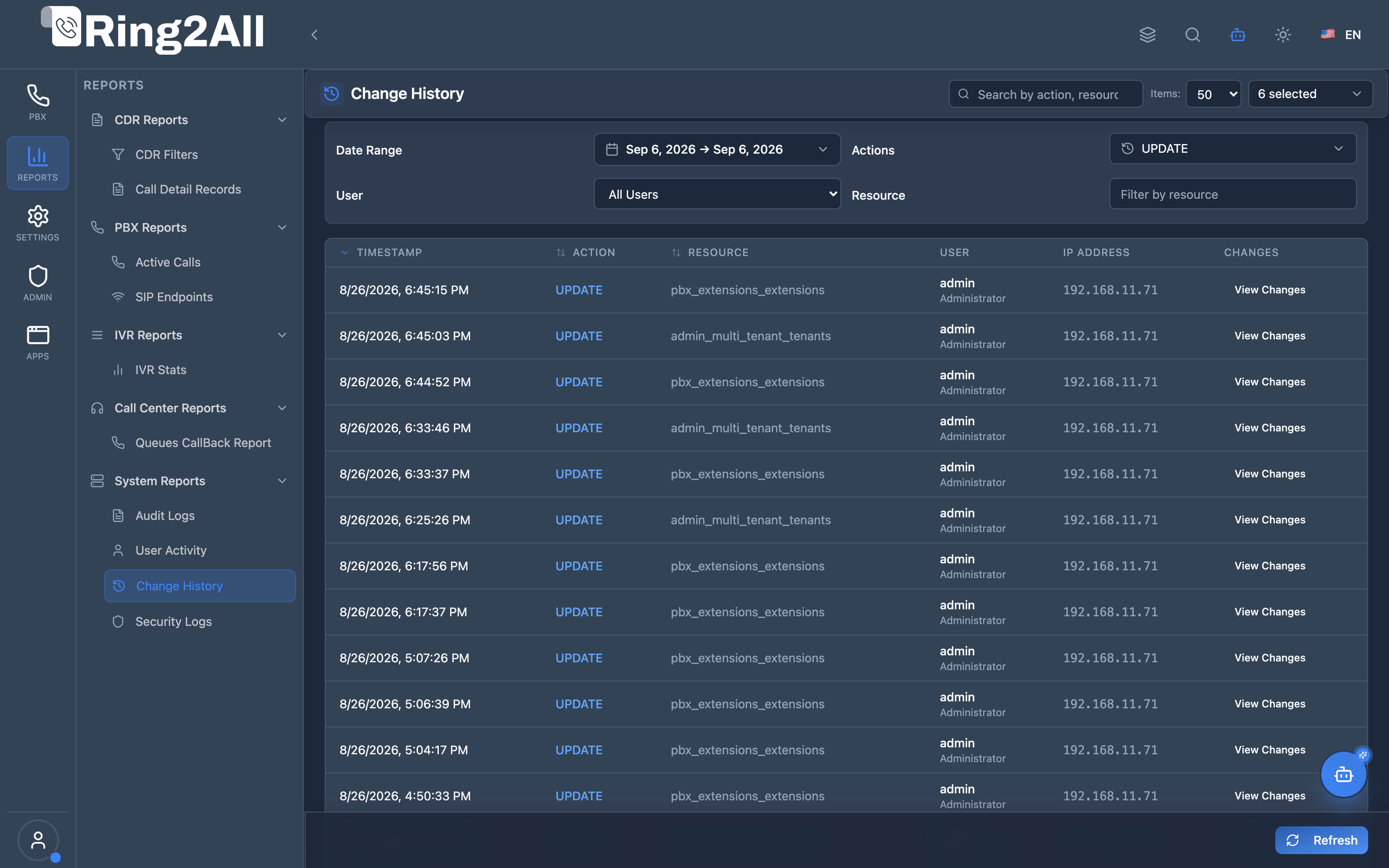
1. Module Overview (Technical)
Section titled “1. Module Overview (Technical)”What Is Change History?
Section titled “What Is Change History?”Change History is a configuration change tracking module that records all modifications to system configuration. Unlike Audit Logs (which tracks all activity including logins), Change History focuses specifically on CREATE, UPDATE, and DELETE operations, storing the actual data changes (before/after values).
Architecture
Section titled “Architecture”┌─────────────────────────────────────────────────────────────────┐│ Change History Architecture │├─────────────────────────────────────────────────────────────────┤│ ││ Configuration Change ││ ┌──────────────────────────────────────────────────────────┐ ││ │ Any Module (Extensions, Gateways, Routes, etc.) │ ││ │ │ ││ │ Before: After: │ ││ │ ├─ Name: "John Doe" ├─ Name: "Jane Doe" │ ││ │ ├─ Number: 1001 ├─ Number: 1001 │ ││ │ └─ Enabled: true └─ Enabled: false │ ││ │ │ ││ └──────────────────────────────────────────────────────────┘ ││ │ ││ ▼ Logged with old/new values ││ ┌──────────────────────────────────────────────────────────┐ ││ │ public.change_history │ ││ │ │ ││ │ | action | resource | user | old_values | new_values | │ ││ │ │ ││ └──────────────────────────────────────────────────────────┘ ││ │ ││ ▼ Displayed in Viewer ││ ┌──────────────────────────────────────────────────────────┐ ││ │ Change History Page │ ││ │ │ ││ │ ┌─────────────────────────────────────────────────────┐ │ ││ │ │Time │Action │Resource│User │ Changes │ │ ││ │ ├───────┼───────┼────────┼─────┼────────────────────┤ │ ││ │ │10:30 │UPDATE │extensn │admin│ Name: John→Jane │ │ ││ │ │ │ │ │ │ Enabled: true→false│ │ ││ │ └─────────────────────────────────────────────────────┘ │ ││ │ │ ││ └──────────────────────────────────────────────────────────┘ ││ │└─────────────────────────────────────────────────────────────────┘2. Module Overview (Commercial/Business)
Section titled “2. Module Overview (Commercial/Business)”Business Value
Section titled “Business Value”Change History provides configuration visibility:
| Without Change History | With Change History |
|---|---|
| Unknown who changed what | Full attribution |
| Lost previous settings | Before/after values |
| Can’t undo changes | Reference old values |
| No change documentation | Complete record |
Use Cases
Section titled “Use Cases”-
Configuration Recovery
- Find previous settings
- Reference old values
-
Troubleshooting
- “What changed?”
- Identify breaking changes
-
Accountability
- Who made the change
- When it was changed
-
Auditing
- Review configuration changes
- Compliance documentation
Feature Highlights
Section titled “Feature Highlights”| Feature | Benefit |
|---|---|
| Before/After | See exact changes |
| User Attribution | Know who changed |
| Resource Tracking | What was modified |
| Date Filtering | Find by time |
| User Filtering | Find by person |
| Action Filtering | Create/Update/Delete |
3. Module Overview (End User/Administrator)
Section titled “3. Module Overview (End User/Administrator)”What Can You Do?
Section titled “What Can You Do?”- View all configuration changes
- See before and after values
- Filter by date range
- Filter by action type
- Filter by resource type
- Filter by user
- Search across changes
Change History Interface
Section titled “Change History Interface”┌─────────────────────────────────────────────────────────────────┐│ Change History │├─────────────────────────────────────────────────────────────────┤│ ││ Filters: ││ ├─ Range: [Today ▼] ││ ├─ Actions: [All Actions ▼] ││ ├─ Resource: [ ] ││ ├─ User: [All Users ▼] ││ └─ [🔄 Refresh] [Clear Filters] ││ ││ 🔍 [Search by action, resource, or user... ] ││ ││ ┌───────────────────────────────────────────────────────────┐ ││ │ Time │Action │Resource │Res ID│ User │Changes │ ││ ├──────────┼───────┼──────────┼──────┼───────┼─────────────┤ ││ │ 10:30 │Update │extension │ 123 │ admin │ [View ▼] │ ││ │ │ │ │ │ │ Name: J→J │ ││ │ │ │ │ │ │ Ena: T→F │ ││ │ 10:28 │Create │user │ 456 │ admin │ [View ▼] │ ││ │ 10:25 │Delete │gateway │ 789 │ super │ [View ▼] │ ││ │ 10:20 │Update │queue │ 101 │ admin │ [View ▼] │ ││ └───────────────────────────────────────────────────────────┘ ││ ││ Showing 1-25 of 567 records ││ │└─────────────────────────────────────────────────────────────────┘Change Details View
Section titled “Change Details View”┌─────────────────────────────────────────────────────────────────┐│ Change Details │├─────────────────────────────────────────────────────────────────┤│ ││ Resource: extension #123 ││ Action: UPDATE ││ User: admin@company.com ││ Date: 2026-01-16 10:30:45 ││ IP: 192.168.1.100 ││ ││ ┌─────────────────────────────────────────────────────────────┐││ │ Field │ Old Value │ New Value │││ ├────────────────────┼────────────────┼─────────────────────┤││ │ effective_name │ John Doe │ Jane Doe │││ │ enabled │ true │ false │││ │ forward_enabled │ false │ true │││ │ forward_destination│ (empty) │ 1002 │││ └─────────────────────────────────────────────────────────────┘││ ││ [Close] ││ │└─────────────────────────────────────────────────────────────────┘Quick Tips
Section titled “Quick Tips”[!TIP] View Changes: Click “View Changes” to see old/new values side-by-side.
[!TIP] Recovery: Use before values to restore previous configuration.
[!NOTE] Data Changes Only: Login/logout not tracked here (see Audit Logs).
4. Change Fields Reference
Section titled “4. Change Fields Reference”Display Columns
Section titled “Display Columns”| Column | Description |
|---|---|
| ID | Unique change ID |
| Timestamp | When change occurred |
| Action | Create/Update/Delete |
| Resource | Type of object |
| Resource ID | Specific record ID |
| User | Who made the change |
| IP Address | Source IP |
| Changes | View details button |
Action Types
Section titled “Action Types”| Action | Description |
|---|---|
| Create | New record created (new values only) |
| Update | Record modified (old + new values) |
| Delete | Record removed (old values only) |
Change Details
Section titled “Change Details”| Field | Description |
|---|---|
| Field Name | What was changed |
| Old Value | Previous value |
| New Value | Current value |
5. Common Scenarios & Examples
Section titled “5. Common Scenarios & Examples”Scenario 1: Find What Changed on Extension
Section titled “Scenario 1: Find What Changed on Extension”- Filter Resource by “extension”
- Search for extension number
- View change history
- Click “View Changes” for details
Scenario 2: Recover Old Setting
Section titled “Scenario 2: Recover Old Setting”- Find the UPDATE record
- View Changes
- Note the Old Value
- Manually restore if needed
Scenario 3: Investigate Breaking Change
Section titled “Scenario 3: Investigate Breaking Change”- Set date range to when issue started
- Filter by relevant resource type
- Review recent changes
- Identify problematic change
Scenario 4: User Change Audit
Section titled “Scenario 4: User Change Audit”- Filter by specific User
- Set date range
- Review all their changes
- Export if needed
6. Limitations & Important Notes
Section titled “6. Limitations & Important Notes”Technical Notes
Section titled “Technical Notes”[!NOTE] Configuration Only: Tracks data changes, not logins/access.
[!NOTE] Read-Only: History cannot be modified.
[!WARNING] Sensitive Data: Old values may contain passwords (masked).
Comparison: Change History vs Audit Logs
Section titled “Comparison: Change History vs Audit Logs”| Feature | Change History | Audit Logs |
|---|---|---|
| Focus | Data changes | All activity |
| Actions | Create/Update/Delete | All actions + Login |
| Values | Before/After stored | Metadata only |
| Purpose | Config recovery | Compliance |
Best Practices
Section titled “Best Practices”- Review Regularly: Check for unexpected changes
- Filter Smart: Use resource type to narrow results
- Document Rollbacks: Record manual reversions
- Archive Important: Export critical change records
- Use for Recovery: Reference old values carefully
7. Troubleshooting Tips
Section titled “7. Troubleshooting Tips”Common Issues
Section titled “Common Issues”| Symptom | Possible Cause | Solution |
|---|---|---|
| No records | Too restrictive filter | Clear filters |
| Missing change | Not tracked resource | Some resources may not be tracked |
| Values masked | Sensitive fields | Passwords intentionally hidden |
| Slow loading | Large date range | Reduce date range |
| No old values | CREATE action | Creates only have new values |
Diagnostic SQL
Section titled “Diagnostic SQL”Recent configuration changes:
SELECT timestamp, action, resource, resource_id, user_email, old_values, new_valuesFROM public.change_historyORDER BY timestamp DESCLIMIT 50;Changes by resource type:
SELECT resource, action, COUNT(*) as countFROM public.change_historyWHERE timestamp >= NOW() - INTERVAL '7 days'GROUP BY resource, actionORDER BY count DESC;8. Glossary
Section titled “8. Glossary”| Term | Definition |
|---|---|
| Change | Single configuration modification |
| Old Value | Previous field value |
| New Value | Current field value |
| Resource | Type of configuration object |
| Resource ID | Specific record identifier |
| Diff | Difference between old/new |
9. Model Context Protocol (MCP) AI Integration
Section titled “9. Model Context Protocol (MCP) AI Integration”The Ring2All Platform Copilot connects directly with the configuration change audit trail in ss_logs.audit_logs via the Model Context Protocol (MCP). Telephony engineers, operations leads, and security teams can track parameter mutations, verify who modified dialplan routes or extensions, and view before/after configuration state diffs conversationally.
Exposed MCP Tools
Section titled “Exposed MCP Tools”| Tool Name | Operation | Primary Parameters | Description |
|---|---|---|---|
get_change_history |
Configuration Mutation Ledger | resource (string, optional), resourceId (string, optional), limit (number, default: 25) |
Queries configuration changes (CREATE, UPDATE, DELETE, TOGGLE), returning the modified resource, affected record ID, editor identity, and metadata diff. |
query_audit_logs |
Platform Audit Search | search (string, optional), action (string, optional), limit (number) |
Retrieves audit events across all categories with full-text search capability. |
Operational Safeguards & Data Integrity
Section titled “Operational Safeguards & Data Integrity”- Tenant Scope Enforcement: Queries are automatically bounded by
tenant_id(WHERE tenant_id = :tenant_id), preventing visibility into other customer environments. - Strictly Non-Destructive: Querying change history executes read-only queries. Historical changes cannot be rolled back or mutated without explicit administrative configuration actions.
- Audit Field Masking: Security-sensitive attributes (such as SIP device authentication secrets or user login hashes) are withheld from metadata payloads.
Example MCP Payloads
Section titled “Example MCP Payloads”1. Checking Modification History for Inbound Routes (get_change_history)
Section titled “1. Checking Modification History for Inbound Routes (get_change_history)”{ "resource": "inbound_routes", "limit": 10}Response:
{ "success": true, "data": { "total": 1, "changes": [ { "id": "78a1bc44-5511-4091-bf9a-ef1029384756", "action": "UPDATE", "resource": "inbound_routes", "resourceId": "12", "user": "Carlos Mendez (admin)", "ipAddress": "190.212.45.18", "details": { "field": "destination_type", "old": "extension", "new": "ivr", "destination_id": 4 }, "timestamp": "2026-09-08T07:45:10.000Z" } ] }}2. Investigating Specific Entity Changes (get_change_history)
Section titled “2. Investigating Specific Entity Changes (get_change_history)”{ "resource": "sip_extensions", "resourceId": "1002"}Copilot Natural Language Prompts
Section titled “Copilot Natural Language Prompts”- “Who changed the destination for inbound DID +13055550100?”
- “Show me all configuration changes made to extension 1002 in the last 7 days.”
- “What dialplan routes or IVRs were modified this morning?”
- “Show me any deleted PBX resources recorded in the change history.”
Documentation last updated: January 2026