

Provisioning Devices Module Documentation
Table of Contents
Section titled “Table of Contents”- Navigation & Access
- Screenshots & Visual Interface
- Module Overview (Technical)
- Module Overview (Commercial/Business)
- Module Overview (End User/Administrator)
- User Roles & Key Capabilities
- Configuration Sections
- Settings Reference
- Common Scenarios & Examples
- Limitations & Important Notes
- Model Context Protocol (MCP) AI Integration
- Troubleshooting Tips
- Glossary
Navigation & Access
Section titled “Navigation & Access”To access the Provisioning Devices configuration module:
- Log in to the Ring2All Web Portal (
https://<domain-or-ip>/login). - In the left navigation sidebar, expand Settings.
- Under Provisioning, click Devices (
/settings/provisioning/provisioning-devices). - To register a new IP phone, click + Add (
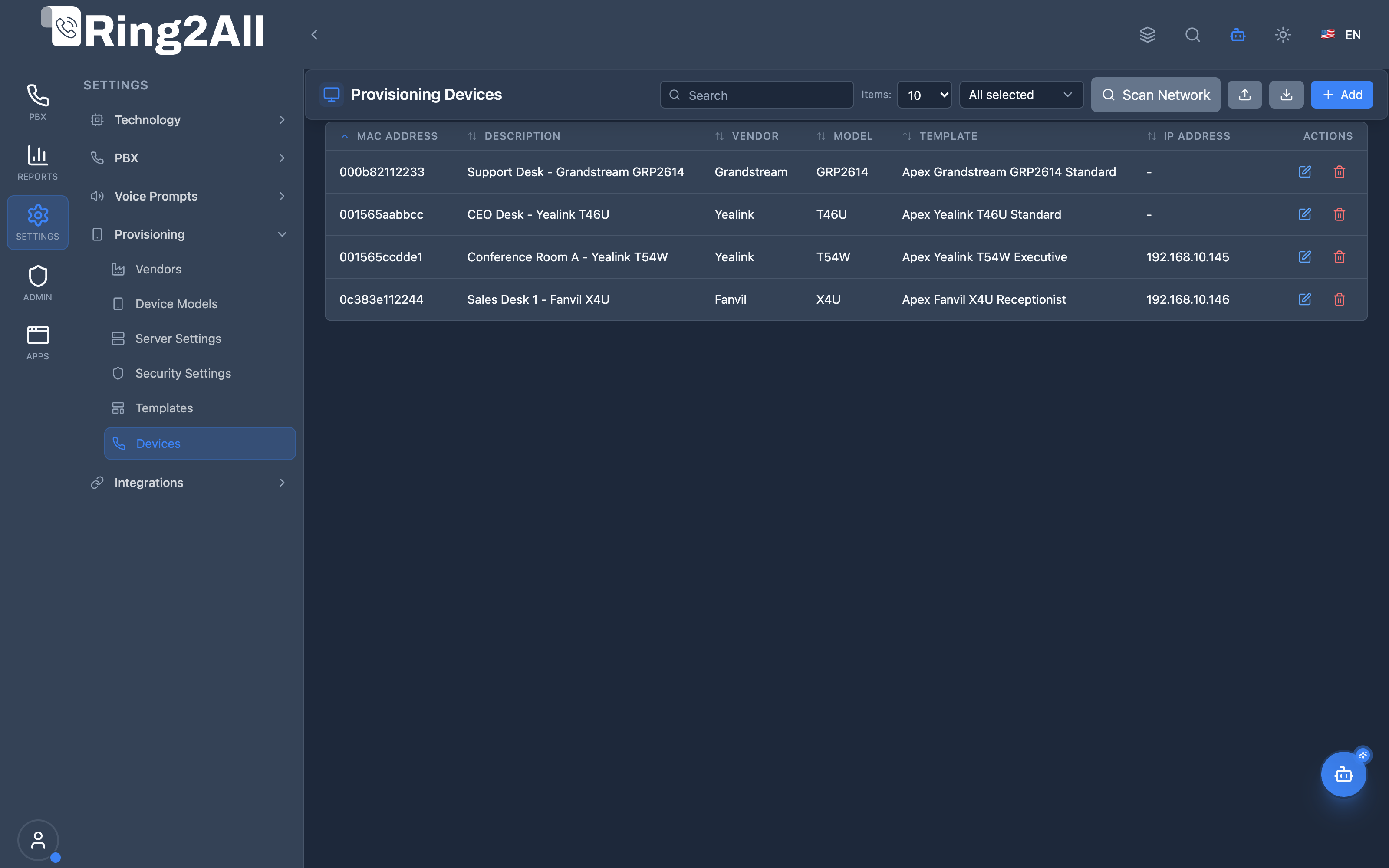
/settings/provisioning/provisioning-devices/new) or use Scan Network to discover local phones. To inspect or modify an existing device configuration, click the Edit button on any device row.
Screenshots & Visual Interface
Section titled “Screenshots & Visual Interface”Provisioning Devices Inventory & Network Discovery
Section titled “Provisioning Devices Inventory & Network Discovery”Comprehensive terminal registry displaying hardware MAC addresses, device descriptions, manufacturers, hardware models, bound provisioning templates, detected IP addresses, and management controls.
Provisioning Device Configuration & Endpoint Binding
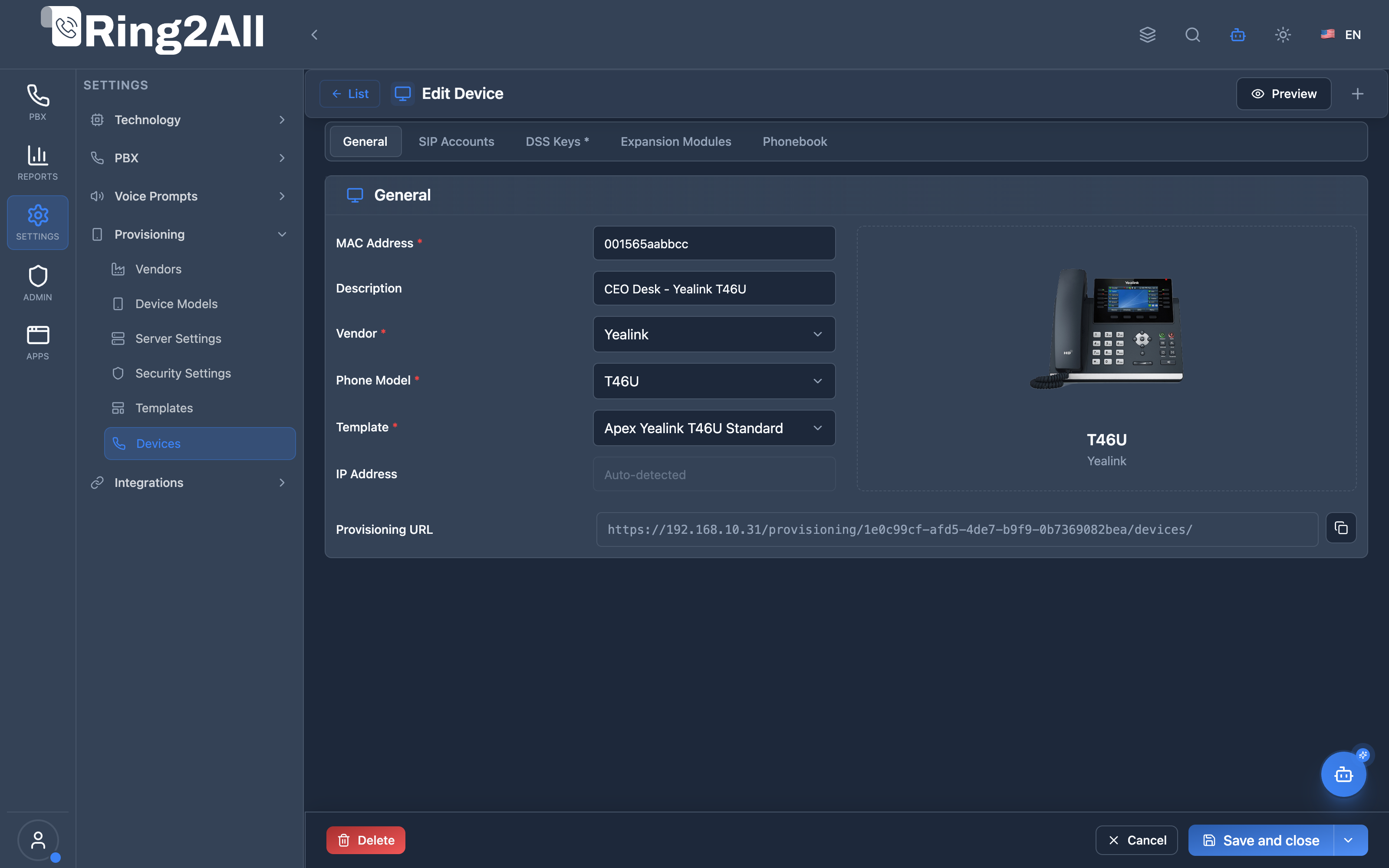
Section titled “Provisioning Device Configuration & Endpoint Binding”Individual device editor allowing administrators to bind hardware MAC addresses to base templates, inspect auto-generated provisioning URLs, configure line accounts, customize programmable DSS keys, and attach expansion modules.
1. Module Overview (Technical)
Section titled “1. Module Overview (Technical)”What Are Provisioning Devices?
Section titled “What Are Provisioning Devices?”Provisioning Devices is a device inventory and configuration module that manages individual IP phones. Each device is identified by MAC address, linked to a template, and can have SIP accounts and custom configuration overrides.
Architecture
Section titled “Architecture”┌─────────────────────────────────────────────────────────────────┐│ Provisioning Devices Architecture │├─────────────────────────────────────────────────────────────────┤│ ││ Admin Panel ││ ┌──────────────────────────────────────────────────────────┐ ││ │ Provisioning Devices │ ││ │ │ ││ │ Device Entry: │ ││ │ ├─ MAC Address: AA:BB:CC:DD:EE:FF │ ││ │ ├─ Vendor/Model: Yealink T54W │ ││ │ ├─ Template: Sales Team │ ││ │ ├─ SIP Accounts: Line 1 → Ext 1001 │ ││ │ └─ Custom Overrides (optional) │ ││ │ │ ││ └──────────────────────────────────────────────────────────┘ ││ │ ││ ▼ Template + Device variables ││ ┌──────────────────────────────────────────────────────────┐ ││ │ Configuration Generator │ ││ │ │ ││ │ Template (Jinja2) + Device Data → Config File │ ││ │ │ ││ └──────────────────────────────────────────────────────────┘ ││ │ ││ ▼ Stored for retrieval ││ ┌──────────────────────────────────────────────────────────┐ ││ │ Provisioning Server │ ││ │ │ ││ │ /provisioning/AABBCCDDEEFF.cfg │ ││ │ │ ││ │ Phone boots → Requests config → Gets personalized file │ ││ │ │ ││ └──────────────────────────────────────────────────────────┘ ││ │└─────────────────────────────────────────────────────────────────┘2. Module Overview (Commercial/Business)
Section titled “2. Module Overview (Commercial/Business)”Business Value
Section titled “Business Value”Provisioning Devices provides centralized device management:
| Without Devices | With Devices |
|---|---|
| Manual config | Auto-provisioning |
| No inventory | Complete inventory |
| Static configs | Dynamic templates |
| Unknown IPs | Auto-detected IPs |
Use Cases
Section titled “Use Cases”-
Device Inventory
- Track all phones
- Record MAC addresses
-
Template Assignment
- Apply standard config
- Customize per device
-
SIP Account Setup
- Assign extensions
- Multi-line support
-
Network Discovery
- Scan for devices
- Auto-detect phones
Feature Highlights
Section titled “Feature Highlights”| Feature | Benefit |
|---|---|
| MAC Registration | Device identification |
| Template Linking | Consistent config |
| SIP Accounts | Line assignment |
| Custom Overrides | Per-device changes |
| Network Scan | Device discovery |
| Config Preview | Verify before deploy |
3. Module Overview (End User/Administrator)
Section titled “3. Module Overview (End User/Administrator)”What Can You Do?
Section titled “What Can You Do?”- Add devices by MAC address
- Assign vendor/model/template
- Configure SIP accounts per line
- Override DSS keys, phonebook, expansion
- Scan network for devices
- Import devices in bulk
- Preview generated configuration
Provisioning Devices Interface
Section titled “Provisioning Devices Interface”┌─────────────────────────────────────────────────────────────────┐│ Provisioning Devices │├─────────────────────────────────────────────────────────────────┤│ ││ [+ Add Device] [🔍 Scan Network] [📥 Import] ││ ││ ┌───────────────────────────────────────────────────────────┐ ││ │ MAC Address │ Vendor │ Model │ Template │ IP │ ││ ├──────────────────┼───────────┼────────┼────────────┼───────┤ ││ │ AA:BB:CC:DD:EE:01│ Yealink │ T54W │ Sales Team │ Auto │ ││ │ AA:BB:CC:DD:EE:02│ Yealink │ T54W │ Sales Team │ Auto │ ││ │ 11:22:33:44:55:01│ Grandstream│ GXP2170│ Reception │ Auto │ ││ │ CC:DD:EE:FF:00:01│ Polycom │ VVX450 │ Conf Room │ Auto │ ││ └───────────────────────────────────────────────────────────┘ ││ │└─────────────────────────────────────────────────────────────────┘Add/Edit Device
Section titled “Add/Edit Device”┌─────────────────────────────────────────────────────────────────┐│ Add Device │├─────────────────────────────────────────────────────────────────┤│ ││ MAC Address: [AA:BB:CC:DD:EE:FF ] ││ Format XX:XX:XX:XX:XX:XX ││ ││ Description: [John Smith's desk phone] ││ ││ Vendor: [Yealink ▼] ││ Model: [T54W ▼] ││ Template: [Sales Team ▼] ││ ││ IP Address: [192.168.1.100 ] (Auto-detected) ││ ││ Provisioning URL: https://pbx.example.com/provisioning/ ││ AABBCCDDEEFF.cfg [📋 Copy] ││ ││ ──────────────────────────────────────────────────────────────││ ││ SIP Accounts ││ This model supports 16 SIP account(s) ││ ││ ┌─────────────────────────────────────────────────────────────┐││ │ Line │ Extension │ │││ ├──────┼───────────────┼─────────────────────────────────────┤││ │ 1 │ [1001 ▼] │ John Smith │││ │ 2 │ [Select ▼] │ - │││ │ 3 │ [Select ▼] │ - │││ └─────────────────────────────────────────────────────────────┘││ ││ 2 of 16 accounts configured ││ ││ ──────────────────────────────────────────────────────────────││ ││ Configuration: ││ DSS Keys: ○ Using Template Configuration ● Custom ││ Phonebook: ● Using Template Phonebook ○ Custom ││ Expansion: ● Using Template Expansion ○ Custom ││ ││ [👁 Preview Config] [Save] [Cancel] ││ │└─────────────────────────────────────────────────────────────────┘Network Scan
Section titled “Network Scan”┌─────────────────────────────────────────────────────────────────┐│ Scan Network │├─────────────────────────────────────────────────────────────────┤│ ││ Scan your network CIDR range to discover compatible devices. ││ ││ CIDR Range: [192.168.1.0/24 ] [🔍 Scan] ││ ││ Detected Devices: ││ ┌─────────────────────────────────────────────────────────────┐││ │ ☐ │ MAC Address │ IP │ Vendor │ Model │││ ├───┼───────────────────┼─────────────┼───────────┼─────────┤││ │ ✓ │ AA:BB:CC:DD:EE:10 │ 192.168.1.50│ Yealink │ T54W │││ │ ✓ │ AA:BB:CC:DD:EE:11 │ 192.168.1.51│ Yealink │ T46U │││ │ ☐ │ 11:22:33:44:55:10 │ 192.168.1.60│ Grandstream│ Unknown│││ └─────────────────────────────────────────────────────────────┘││ ││ [Import Selected] ││ │└─────────────────────────────────────────────────────────────────┘Quick Tips
Section titled “Quick Tips”[!TIP] MAC Format: Use XX:XX:XX:XX:XX:XX format exactly.
[!TIP] Preview First: Preview config before deploying to phone.
[!NOTE] Template Inheritance: Customize only when needed.
🎯 User Roles & Key Capabilities
Section titled “🎯 User Roles & Key Capabilities”| Role | Key Capabilities & Permissions | Operational Scope |
|---|---|---|
| PBX Super Administrator | • Global MAC address inventory administration and manufacturer OUI validation • Cross-tenant device reallocation and mass auto-discovery orchestration • Provisioning file generation engine diagnostics and Nginx reverse-proxy cache monitoring • Bulk SIP NOTIFY check-sync broadcast execution |
Platform-Wide |
| Tenant Administrator | • Physical device registration (MAC entry, vendor/model selection, template binding) • Line account assignment linking physical buttons to PBX SIP extensions • Custom DSS key and sidecar overrides per executive deskphone • Remote re-synchronization ( check-sync) triggering firmware or dialplan reloads |
Domain Scope |
| Field Engineer / VoIP Installer | • Physical hardware deployment, MAC barcode scanning, and network discovery scans (CIDR) • Verification of DHCP Option 66 retrieval and HTTPS configuration download • Immediate handset validation and remote reboot testing |
On-Premise / Domain |
| AI Copilot / MCP Agent | • Autonomous device inventory discovery (list_provisioning_devices)• Detailed hardware status and configuration inspection ( get_provisioning_device_status)• Automated handset registration ( create_provisioning_device)• Remote device re-synchronization and reboot triggers ( resync_phone_device)• Safe device decommissioning and cleanup ( delete_provisioning_device) |
Autonomous Assistant |
4. Configuration Sections
Section titled “4. Configuration Sections”Basic Information
Section titled “Basic Information”| Field | Description |
|---|---|
| MAC Address | Device unique identifier |
| Description | User/location notes |
| Vendor | Phone manufacturer |
| Model | Specific phone model |
| Template | Configuration template |
| IP Address | Auto-detected IP |
SIP Accounts
Section titled “SIP Accounts”| Field | Description |
|---|---|
| Line | Phone line number |
| Extension | Assigned SIP extension |
Configuration Overrides
Section titled “Configuration Overrides”| Section | Options |
|---|---|
| DSS Keys | Template or Custom |
| Phonebook | Template or Custom |
| Expansion | Template or Custom |
5. Settings Reference
Section titled “5. Settings Reference”MAC Address Format
Section titled “MAC Address Format”| Format | Example |
|---|---|
| Colon-separated | AA:BB:CC:DD:EE:FF |
| Hyphen-separated | AA-BB-CC-DD-EE-FF |
| No separator | AABBCCDDEEFF |
Template vs Custom
Section titled “Template vs Custom”| Mode | Description |
|---|---|
| Template | Inherits from template |
| Custom | Device-specific overrides |
Provisioning URL
Section titled “Provisioning URL”https://server/provisioning/{MAC}.cfg6. Common Scenarios & Examples
Section titled “6. Common Scenarios & Examples”Scenario 1: Add Single Device
Section titled “Scenario 1: Add Single Device”- Click “Add Device”
- Enter MAC address
- Select vendor, model, template
- Assign SIP account(s)
- Preview and save
Scenario 2: Network Discovery
Section titled “Scenario 2: Network Discovery”- Click “Scan Network”
- Enter CIDR range (e.g., 192.168.1.0/24)
- Click Scan
- Select discovered devices
- Click Import Selected
Scenario 3: Custom DSS Keys
Section titled “Scenario 3: Custom DSS Keys”- Edit device
- Change DSS Keys to “Custom”
- Configure keys specific to this device
- Save
Scenario 4: Preview Configuration
Section titled “Scenario 4: Preview Configuration”- Edit device
- Click “Preview Config”
- Verify generated configuration
- Save if correct
7. Limitations & Important Notes
Section titled “7. Limitations & Important Notes”Technical Notes
Section titled “Technical Notes”[!NOTE] Auto-IP: IP address updates when phone contacts server.
[!NOTE] Model Required: Select model before configuring accounts.
[!WARNING] MAC Unique: Each MAC address must be unique.
Best Practices
Section titled “Best Practices”- Use Templates: Override only when necessary
- Description: Add meaningful descriptions
- Preview: Always preview before saving
- Scan Regularly: Find new devices
- Document: Keep inventory current
Network Scan Requirements
Section titled “Network Scan Requirements”| Requirement | Notes |
|---|---|
| Same Network | Server must reach devices |
| CIDR Format | Use 192.168.1.0/24 format |
| MAC Prefixes | Vendors must have OUI configured |
Model Context Protocol (MCP) AI Integration
Section titled “Model Context Protocol (MCP) AI Integration”The Provisioning Devices module provides a complete suite of Model Context Protocol (MCP) telephony tools enabling AI Copilots, auto-provisioning bots, and remote support technicians to inspect, register, re-synchronize, and manage physical IP terminals.
Available MCP Telephony Tools
Section titled “Available MCP Telephony Tools”| Tool Name | Action Type | Access Level | Description |
|---|---|---|---|
list_provisioning_devices |
READ |
Read-Only |
Lists all provisioned hardware devices in the PBX domain with MAC, IP, vendor, model, template, and primary extension. |
get_provisioning_device_status |
READ |
Read-Only |
Retrieves detailed configuration, assigned SIP lines, DSS key overrides, and network status of a device by MAC or ID. |
create_provisioning_device |
WRITE |
Admin |
Registers a new physical IP terminal with MAC address, model, template, and optional primary extension. |
resync_phone_device |
EXECUTE |
Operator |
Triggers a SIP NOTIFY check-sync event via Telephony Server to force an IP phone to re-download its configuration or reboot. |
diagnose_provisioning |
DIAGNOSTIC |
Read-Only |
Performs deep operational diagnostic on IP phone auto-provisioning: validates MAC address mapping, vendor/model template syntax, HTTP/HTTPS provisioning port reachability, Basic Auth credentials, Fail2ban jail status for the device IP, and web server provisioning access logs. |
delete_provisioning_device |
DESTRUCTIVE |
Admin |
Unregisters a physical device from the PBX auto-provisioning registry and cleans up associated configurations. |
Tool Schemas & Input Parameters
Section titled “Tool Schemas & Input Parameters”list_provisioning_devices
Section titled “list_provisioning_devices”Retrieves all provisioned handsets within the active tenant domain.
{ "name": "list_provisioning_devices", "description": "Lists all provisioned hardware devices in the PBX domain with MAC, IP, vendor, model, template, and assigned extension.", "parameters": { "type": "object", "properties": { "domain_id": { "type": "number", "description": "Optional domain ID (defaults to active tenant domain)" } }, "additionalProperties": false }}get_provisioning_device_status
Section titled “get_provisioning_device_status”Queries complete configuration details and registered status for a single terminal.
{ "name": "get_provisioning_device_status", "description": "Retrieves detailed configuration, SIP accounts, and network status of a provisioned device by MAC address or ID.", "parameters": { "type": "object", "properties": { "mac_address": { "type": "string", "description": "Device MAC address (e.g., '00:15:65:aa:bb:cc' or '001565aabbcc')" }, "device_id": { "type": "number", "description": "Internal device ID" } }, "additionalProperties": false }}create_provisioning_device
Section titled “create_provisioning_device”Registers a new terminal hardware profile and binds it to a configuration template.
{ "name": "create_provisioning_device", "description": "Registers a new physical phone device for auto-provisioning with MAC address, model, template, and assigned extension.", "parameters": { "type": "object", "properties": { "mac_address": { "type": "string", "description": "Hardware MAC address (e.g., '00:15:65:12:34:56')" }, "model_id": { "type": "number", "description": "Target device model ID" }, "template_id": { "type": "number", "description": "Base provisioning template ID" }, "extension_id": { "type": "number", "description": "Optional PBX extension ID to assign to Line 1" }, "description": { "type": "string", "description": "Friendly label or location description" }, "ip_address": { "type": "string", "description": "Initial IP address if known" } }, "required": ["mac_address", "model_id", "template_id"], "additionalProperties": false }}resync_phone_device
Section titled “resync_phone_device”Sends a SIP NOTIFY check-sync packet directly to the registered IP phone.
{ "name": "resync_phone_device", "description": "Sends a SIP NOTIFY check-sync event to force an IP phone to re-read its provisioning configuration or reboot.", "parameters": { "type": "object", "properties": { "mac_address": { "type": "string", "description": "MAC address of the phone to re-sync" }, "reboot": { "type": "boolean", "description": "Whether to force an immediate hardware reboot (default: false, check-sync only)" } }, "required": ["mac_address"], "additionalProperties": false }}diagnose_provisioning
Section titled “diagnose_provisioning”Conducts comprehensive troubleshooting on terminal configuration retrieval, credential authorization, network port access, and Fail2ban blocks.
{ "name": "diagnose_provisioning", "description": "Perform deep diagnostic on IP phone auto-provisioning (MAC mapping, template syntax, ports, Basic Auth, Fail2ban, and web server logs).", "parameters": { "type": "object", "properties": { "identifier": { "type": "string", "description": "The device MAC address, extension number, or device IP address to diagnose" } }, "required": ["identifier"], "additionalProperties": false }}delete_provisioning_device
Section titled “delete_provisioning_device”Removes an IP phone from the provisioning database.
{ "name": "delete_provisioning_device", "description": "Deletes a provisioned device from the system.", "parameters": { "type": "object", "properties": { "device_id": { "type": "number", "description": "Device ID to delete" }, "mac_address": { "type": "string", "description": "Device MAC address to delete" } }, "additionalProperties": false }}Natural Language Prompt Examples
Section titled “Natural Language Prompt Examples”English Prompts
Section titled “English Prompts”💬 “List all provisioned phones in our domain with their assigned extensions and IP addresses.” 💬 “Get the provisioning status and line configuration for phone MAC 00:15:65:4B:22:91.” 💬 “Diagnose why phone MAC 00:15:65:4B:22:91 is failing to download its provisioning XML file.” 💬 “Register a new Yealink T54W phone with MAC 80:5E:C0:11:22:33, assign it to Extension 1004, and apply the Executive template.” 💬 “Send a check-sync re-sync notification to phone 00:15:65:4B:22:91 so it loads the updated BLF keys.” 💬 “Decommission phone MAC AA:BB:CC:DD:EE:FF from the provisioning registry.”
Spanish Prompts (Español)
Section titled “Spanish Prompts (Español)”💬 “Lista todos los teléfonos aprovisionados en el dominio con su extensión asignada y dirección IP.” 💬 “Consulta el estado de aprovisionamiento y configuración de líneas del teléfono con MAC 00:15:65:4B:22:91.” 💬 “Diagnostica por qué el teléfono con MAC 00:15:65:4B:22:91 no puede descargar su archivo de aprovisionamiento.” 💬 “Registra un nuevo teléfono Yealink T54W con MAC 80:5E:C0:11:22:33, asignado a la extensión 1004 y usando la plantilla Ejecutiva.” 💬 “Envía una notificación check-sync al teléfono 00:15:65:4B:22:91 para que recargue las teclas BLF.” 💬 “Elimina el teléfono con MAC AA:BB:CC:DD:EE:FF del registro de aprovisionamiento.”
Enterprise Safeguards & Compliance
Section titled “Enterprise Safeguards & Compliance”- MAC Address Normalization: The API automatically normalizes all MAC formats (colons, hyphens, lowercase/uppercase, or unseparated 12 hex digits) preventing duplicate registrations.
- Domain Scope Enforcement: Handsets can only be listed, created, resynced, or deleted within the authenticated tenant domain.
- SIP NOTIFY Rate Limiting: The
resync_phone_devicecommand throttles bulk re-sync requests to prevent SIP signaling flooding against local network switches. - Audit Trails: All registration, configuration modification, and deletion actions are recorded in the PBX audit log with administrative credentials and timestamp.
8. Troubleshooting Tips
Section titled “8. Troubleshooting Tips”Common Issues
Section titled “Common Issues”| Symptom | Possible Cause | Solution |
|---|---|---|
| Phone not provisioning | Wrong MAC | Verify MAC address |
| Config not applied | Template error | Preview config |
| Scan finds nothing | Wrong CIDR | Check network range |
| Extension not working | Account not assigned | Check SIP accounts |
Check Device
Section titled “Check Device”SELECT d.mac_address, m.model_name, t.name AS template, d.settingsFROM public.provisioning_devices dJOIN public.provisioning_device_models m ON m.id = d.model_idJOIN public.provisioning_templates t ON t.id = d.template_idWHERE d.mac_address = 'AA:BB:CC:DD:EE:FF';Test Provisioning URL
Section titled “Test Provisioning URL”# Test device config retrievalcurl https://server/provisioning/AABBCCDDEEFF.cfgPhone-side Verification
Section titled “Phone-side Verification”- Access phone web interface
- Check provisioning URL setting
- Verify credentials (if auth enabled)
- Force provisioning/reboot
9. Glossary
Section titled “9. Glossary”| Term | Definition |
|---|---|
| MAC Address | Hardware identifier |
| Provisioning | Auto-configuration |
| Template | Configuration base |
| Override | Device-specific change |
| CIDR | Network range notation |
| SIP Account | Extension registration |
Documentation last updated: January 2026