

Backup & Restore Module Documentation
Table of Contents
Section titled “Table of Contents”- Module Overview (Technical)
- Module Overview (Commercial & Business Value)
- 🎯 User Roles & Key Capabilities
- Visual Interface & Form Structure
- Architectural Flow & Security Governance
- Common Scenarios & Operational Playbooks
- Troubleshooting & Diagnostic Commands
- Model Context Protocol (MCP) AI Integration
- Glossary
1. Module Overview (Technical)
Section titled “1. Module Overview (Technical)”The Backup & Restore module (public.backup_jobs, public.backup_history) provides enterprise-grade disaster recovery, state preservation, and automated archive management for Ring2All Billing. In telecommunications billing systems, historical rated Call Detail Records (CDRs), tax invoices, customer balance ledgers, TLS/SSL certificates, and carrier rating decks represent legally audited, mission-critical assets.
This subsystem provides configurable snapshot definitions, scheduled cron-based executions, modular data scope selection, multi-destination storage targets (Local encrypted filesystem and Amazon S3), and controlled point-in-time restoration.
Data Model & Architecture Diagram
Section titled “Data Model & Architecture Diagram” ┌────────────────────────────────────────────────────────────────────────┐ │ Backup Jobs (public.backup_jobs) │ │ • id: bigint (Primary Key) │ │ • name: VARCHAR(255) (e.g., 'Daily Full System Backup') │ │ • schedule_type: 'daily' | 'weekly' | 'monthly' | 'custom_cron' │ │ • schedule_time: '02:00:00' │ │ • retention_count: integer (e.g., 5 or 30 generations) │ │ • storage_destination: 'local' | 's3' │ │ • s3_bucket / s3_region / s3_path / s3_access_key / s3_secret_key │ │ • scope_database / scope_invoices / scope_cdrs / scope_rates │ │ • scope_certificates / scope_openvpn: boolean │ │ • is_active: boolean │ └───────────────────────────────────┬────────────────────────────────────┘ │ Triggered By Cron Daemon / User ▼ ┌────────────────────────────────────────────────────────────────────────┐ │ Backup History (public.backup_history) │ │ • id: bigint (Primary Key) │ │ • job_id: bigint (FK to public.backup_jobs, NULL for manual) │ │ • file_name: VARCHAR(255) (e.g., 'backup-full-2026-09-06.tar.gz') │ │ • file_size: bigint (Bytes) │ │ • storage_destination: 'local' | 's3' │ │ • scope: jsonb (Array of included system components) │ │ • status: 'success' | 'running' | 'failed' │ │ • error_message: text │ │ • created_at: timestamptz │ └────────────────────────────────────────────────────────────────────────┘Modular Data Scope Architecture
Section titled “Modular Data Scope Architecture”Administrators can selectively package specific subsystems based on recovery time objectives (RTO) and storage constraints:
- Database (
ss_billing): Complete relational schema dump (pg_dump -Fc) encompassing customer accounts, wallets, subscriptions, rate tables, users, and audit profiles. - PDF Invoices & Receipts: Generated customer billing invoices and receipts stored in local file storage.
- Rated CDRs History: Historical call detail records and rating transactions.
- Rate Cards & Plans: Telephony destination rate decks, prefix trees, and catalog plans.
- Certificates & Keys: NGINX SSL/TLS certificates, intermediate chains, and ACME keys.
- OpenVPN Server: Server configurations, CA roots, server private keys, and client connection profiles.
2. Module Overview (Commercial & Business Value)
Section titled “2. Module Overview (Commercial & Business Value)”- Business Continuity & Zero Data Loss: Protects telecom operations against catastrophic hardware failures, ransomware incidents, accidental administrative deletion, or datacenter outages.
- Regulatory Compliance & Tax Auditing: Telecommunications carriers are legally bound by national regulatory agencies (e.g., FCC, OFCOM, CRC) to preserve billing CDRs and fiscal invoice records for a statutory period (typically 3 to 7 years).
- Automated Retention Management: Automatic purging of snapshots exceeding the configured generation threshold (e.g., keep last 5 daily backups) prevents local disk exhaustion.
- Offsite Air-Gapped Archival: Native integration with Amazon S3 ensures critical billing archives are replicated off-premises to an isolated cloud environment.
3. 🎯 User Roles & Key Capabilities
Section titled “3. 🎯 User Roles & Key Capabilities”| Role | Key Capabilities & Permissions in Backup & Restore |
|---|---|
| System Administrator | Complete control over backup job definitions, S3 storage credentials, retention rules, point-in-time restorations, and emergency manual backups. |
| NOC Engineer | Monitors scheduled backup job execution, reviews status badges (Success, Failed), and downloads recent archive bundles for staging testing. |
| Database Administrator (DBA) | Validates SQL dump integrity, configures database scopes, and oversees restore verification drills. |
| Compliance Officer | Audits historical backup records, verifies offsite S3 replication compliance, and ensures data retention schedules meet legal requirements. |
4. Visual Interface & Form Structure
Section titled “4. Visual Interface & Form Structure”The Backup & Restore interface provides a comprehensive suite of tools organized across textual tabs: Backup Jobs, Backup History, Restore System, and System Maintenance.
4.1 Backup Jobs Listing
Section titled “4.1 Backup Jobs Listing”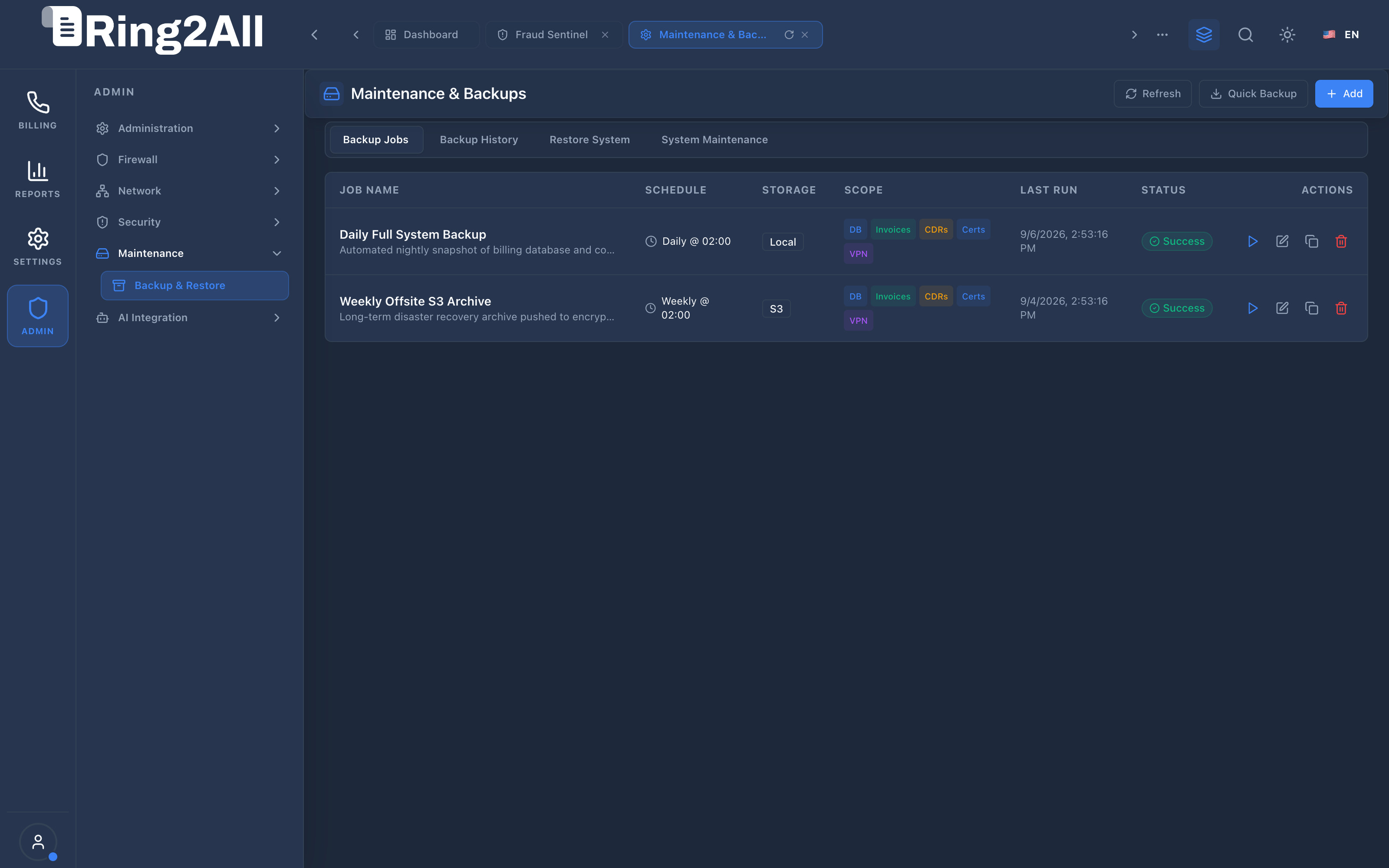
The Backup Jobs view lists all configured recurring automated backup tasks:
- Header Controls:
Refresh: Re-queries active backup job schedules and current status.Quick Backup: Immediately triggers a manual on-demand database snapshot without altering scheduled jobs.+ Add: Opens the full Level 2 creation view.
- Data Grid Columns:
Job Name: Name and description of the backup job (e.g., “Daily Full System Backup”, “Weekly Offsite S3 Archive”).Schedule: Frequency and execution time (e.g.,Daily @ 02:00,Weekly @ 02:00).Storage: Destination target badge (Local,S3).Scope: Color-coded pills indicating included components (DB,Invoices,CDRs,Certs,VPN).Last Run: Timestamp of the most recent execution.Status: Health status badge (Success,Failed).Actions: Direct inline actions to trigger immediate execution (Play), edit configuration (Pencil), duplicate job (Copy), or delete (Trash).
4.2 Create / Edit Backup Job Form
Section titled “4.2 Create / Edit Backup Job Form”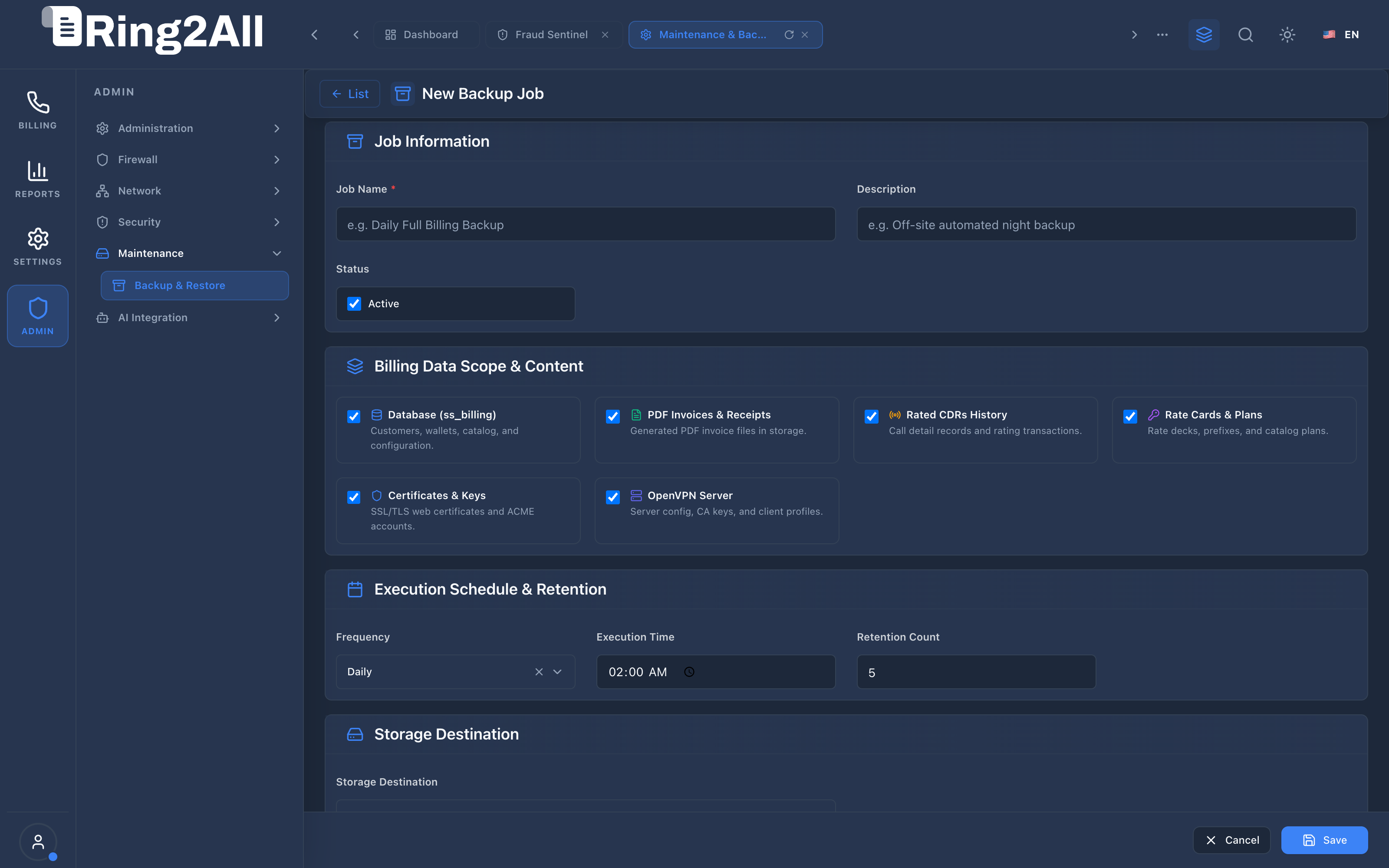
The Level 2 form adheres to the canonical form layout with back navigation (< List) and a sticky bottom action bar (FixedActionBar):
- Job Information:
Job Name *: Unique identifier (e.g.,Daily Full Billing Backup).Description: Operational notes.Status: Active checkbox.
- Billing Data Scope & Content (Modular Checkboxes):
Database (ss_billing): Core PostgreSQL database.PDF Invoices & Receipts: Generated customer invoice PDFs.Rated CDRs History: Call records and rating mediation tables.Rate Cards & Plans: Wholesale rate sheets and customer catalog plans.Certificates & Keys: Web and signaling SSL certificates.OpenVPN Server: VPN configurations and client keys.
- Execution Schedule & Retention:
Frequency:Daily,Weekly,Monthly, orCustom Cron.Execution Time: Time of execution (e.g.,02:00 AM).Retention Count: Maximum archived snapshots retained before auto-purge (e.g.,5).
- Storage Destination:
Storage Destination: Selection betweenLocal Server StorageandAmazon S3 Storage. When S3 is selected, fields for bucket name, region, path prefix, Access Key ID, and Secret Access Key appear.
4.3 Backup History Listing
Section titled “4.3 Backup History Listing”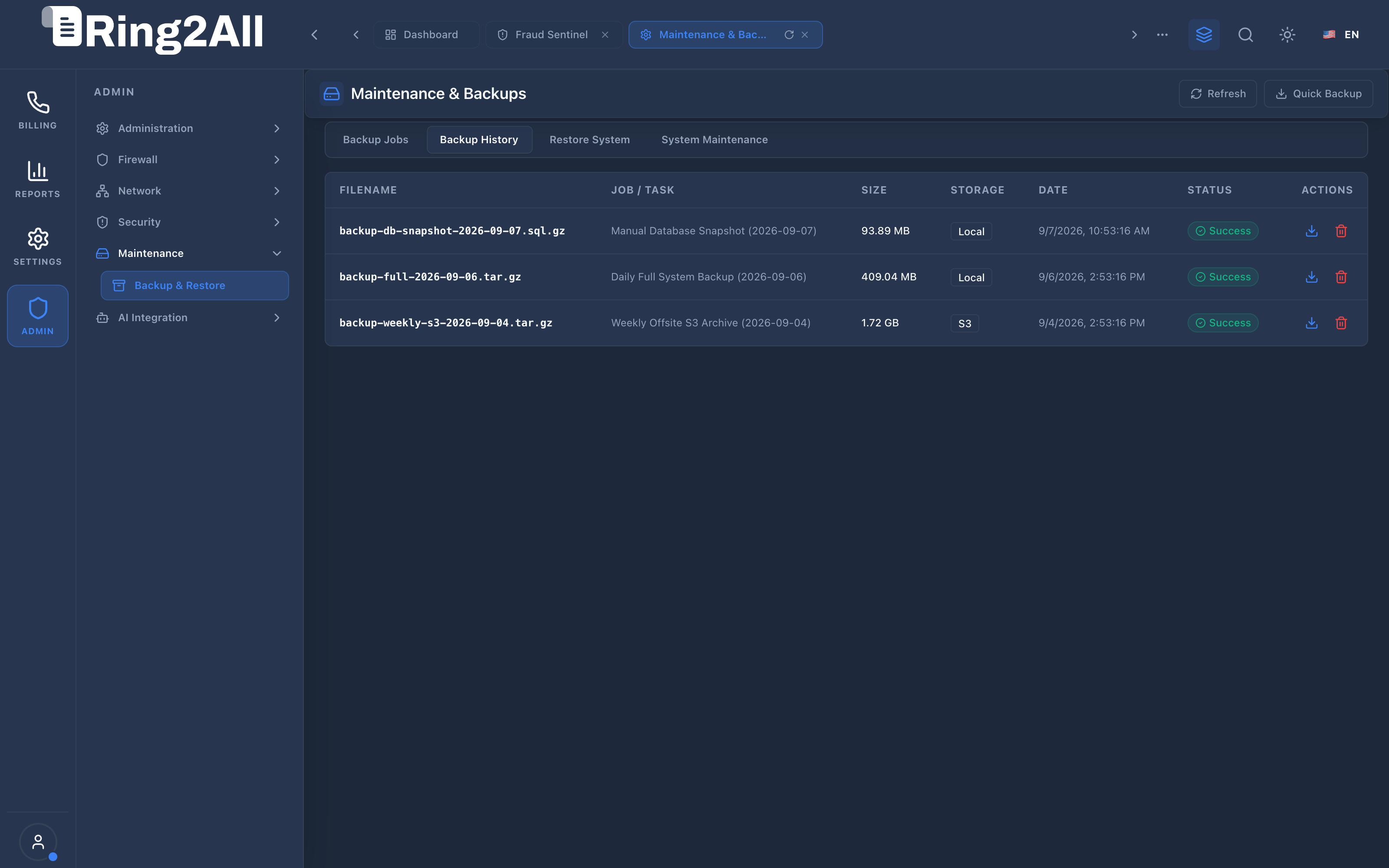
The Backup History tab provides an immutable audit log of every archive generated:
- Filename: Exact archive artifact (e.g.,
backup-full-2026-09-06.tar.gz,backup-db-snapshot-2026-09-07.sql.gz). - Job / Task: Originating job name or manual trigger label.
- Size: Compressed archive size on disk (e.g.,
93.89 MB,409.04 MB,1.72 GB). - Storage: Storage medium badge (
Local,S3). - Date: Timestamp of creation.
- Status: Execution state badge (
Success). - Actions: Immediate download icon (
Download) and archive deletion icon (Trash).
5. Architectural Flow & Security Governance
Section titled “5. Architectural Flow & Security Governance” ┌───────────────────┐ │ Cron Trigger / │ │ User On-Demand │ └─────────┬─────────┘ │ ▼ ┌────────────────────────────────────────────────────────┐ │ Maintenance Backup Worker │ │ 1. Evaluates scope flags (DB, Invoices, CDRs, etc.) │ │ 2. Executes pg_dump with custom compression (-Fc) │ │ 3. Packages designated filesystem assets into tarball │ │ 4. Calculates SHA256 checksum and file size │ └─────────────────────────┬──────────────────────────────┘ │ ┌─────────────┴─────────────┐ ▼ ▼ [ Destination: Local ] [ Destination: S3 ] │ │ ▼ ▼ Write /var/backups/ Stream to AWS S3 Bucket Enforce Retention Count Write public.backup_history- Isolation & Non-Blocking Dumps: Database dumps use PostgreSQL’s snapshot isolation (
--serializable-deferrable), ensuring active billing operations and rating queries are never locked during archive creation. - Permission Guardrails: System files and database dumps are generated with strict
0600Linux permissions, restricted to therootorpostgressystem accounts. - Retention Pruning: After each successful execution, the worker inspects the count of historical files belonging to the job. Older archives exceeding the retention ceiling are pruned automatically.
6. Common Scenarios & Operational Playbooks
Section titled “6. Common Scenarios & Operational Playbooks”Playbook A: Performing a Pre-Upgrade Manual Snapshot
Section titled “Playbook A: Performing a Pre-Upgrade Manual Snapshot”- Navigate to Maintenance > Backup & Restore.
- In the top toolbar, click Quick Backup.
- The platform initiates an immediate database snapshot.
- Switch to the Backup History tab and confirm that
backup-db-snapshot-[DATE].sql.gzshowsSuccess.
Playbook B: Configuring Nightly Offsite Disaster Recovery to Amazon S3
Section titled “Playbook B: Configuring Nightly Offsite Disaster Recovery to Amazon S3”- In Backup Jobs, click + Add.
- Name the job
Weekly Offsite S3 Archive. - Check all scope boxes (
Database,Invoices,CDRs,Rate Cards,Certificates,OpenVPN). - Set Frequency to
Weeklyat02:00 AM. - Set Retention Count to
12(retaining 3 months of weekly snapshots). - Under Storage Destination, select
Amazon S3 Storage. - Enter S3 Bucket Name, Region, and IAM credentials with
s3:PutObjectpermission. - Click Save.
7. Troubleshooting & Diagnostic Commands
Section titled “7. Troubleshooting & Diagnostic Commands”Checking Local Backup Storage Directory
Section titled “Checking Local Backup Storage Directory”ls -lh /var/backups/billing/df -h /var/backups/Inspecting Backup Jobs & History via SQL
Section titled “Inspecting Backup Jobs & History via SQL”SELECT id, name, schedule_type, schedule_time, storage_destination, retention_count, is_activeFROM public.backup_jobs;
SELECT id, file_name, file_size, storage_destination, status, created_atFROM public.backup_historyORDER BY created_at DESCLIMIT 5;Manually Testing Database Dump Creation via Terminal
Section titled “Manually Testing Database Dump Creation via Terminal”pg_dump -U postgres -d ss_billing -Fc -f /tmp/test_dump.sql.gzls -lh /tmp/test_dump.sql.gzrm -f /tmp/test_dump.sql.gz8. Model Context Protocol (MCP) AI Integration
Section titled “8. Model Context Protocol (MCP) AI Integration”The Backup & Restore module connects directly to the Ring2All BSS MCP Server, enabling automated system administrators and AI maintenance agents to monitor disk usage, query snapshot archives, and initiate on-demand backups before executing configuration updates.
Available MCP Tools
Section titled “Available MCP Tools”| Tool Name | Access Role | Description & Primary Function | Example Arguments |
|---|---|---|---|
get_system_maintenance_status |
Super Administrator |
Retrieves system maintenance status, database disk usage, active background jobs, and uptime. | {} |
list_backup_history |
Super Administrator |
Lists historical backup archive snapshots, file sizes, and storage locations. | {"limit": 10} |
create_system_backup |
Super Administrator |
Triggers an immediate system snapshot and backup archive creation. | {"backupType": "full", "notes": "Pre-upgrade checkpoint"} |
Sample MCP Tool Execution: get_system_maintenance_status
Section titled “Sample MCP Tool Execution: get_system_maintenance_status”Request Payload
Section titled “Request Payload”{ "name": "get_system_maintenance_status", "arguments": {}}Response Payload
Section titled “Response Payload”{ "uptimeSeconds": 1284500, "databaseDiskUsage": "4.2 GB", "totalBackupsCount": 8, "lastBackupAt": "2026-09-08T02:00:00Z", "lastBackupStatus": "completed", "activeJobsCount": 0}Conversational AI Prompts for Copilot
Section titled “Conversational AI Prompts for Copilot”- “Check overall system maintenance health and database disk consumption.”
- “Show the last 5 backup archives created and their storage destinations.”
- “Create an immediate full backup snapshot before applying rate card changes.”
9. Glossary
Section titled “9. Glossary”- RTO (Recovery Time Objective): The maximum acceptable duration of platform downtime between a service disruption and full recovery.
- RPO (Recovery Point Objective): The maximum tolerable age of files or data transactions that may be lost in the event of disaster.
- Point-in-Time Restore (PITR): The capability to recover a relational database to an exact historical timestamp.
- Retention Count: The maximum number of historical backup generations preserved before older snapshots are automatically purged.
- Model Context Protocol (MCP): Open protocol standard that enables secure, controlled integration between Large Language Models and external tools, databases, and telecom rating engines.