

Role Profiles Module Documentation
Table of Contents
Section titled “Table of Contents”- Navigation & Access
- Screenshots & Visual Interface
- 🎯 User Roles & Key Capabilities
- Module Overview (Technical)
- Module Overview (Commercial/Business)
- Module Overview (End User/Administrator)
- Configuration Sections
- Settings Reference
- Common Scenarios & Examples
- Model Context Protocol (MCP) AI Integration
- Limitations & Important Notes
- Troubleshooting Tips
- Glossary
Navigation & Access
Section titled “Navigation & Access”To access the Role Profiles module:
- Log in to the Ring2All Web Portal (
https://<domain-or-ip>/login). - In the left navigation sidebar, expand Admin.
- Under Administration, click Role Profiles (
/role-profiles). - To create a new role profile, click the + Add Role Profile button (
/role-profiles/new). - To view, edit, or clone an existing role profile, click on the profile name or the action icons in the table row (
/role-profiles/:id).
Screenshots & Visual Interface
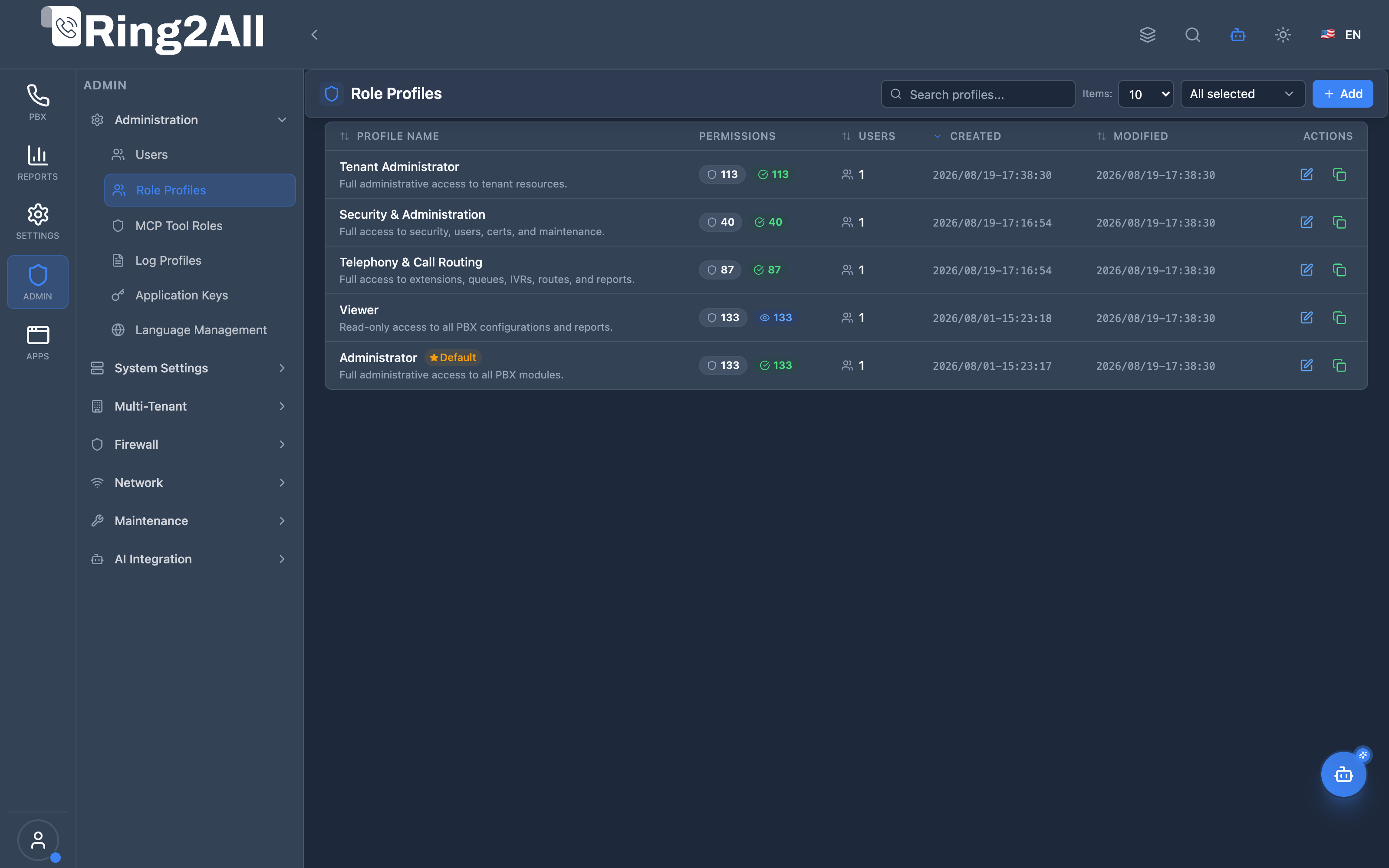
Section titled “Screenshots & Visual Interface”Role Profiles List View
Section titled “Role Profiles List View”The Role Profiles list view displays all predefined system role templates (Administrator, Tenant Administrator, Security & Administration, Telephony & Call Routing, Viewer) and custom role profiles with their permissions counters, default flags, and clone/edit actions.
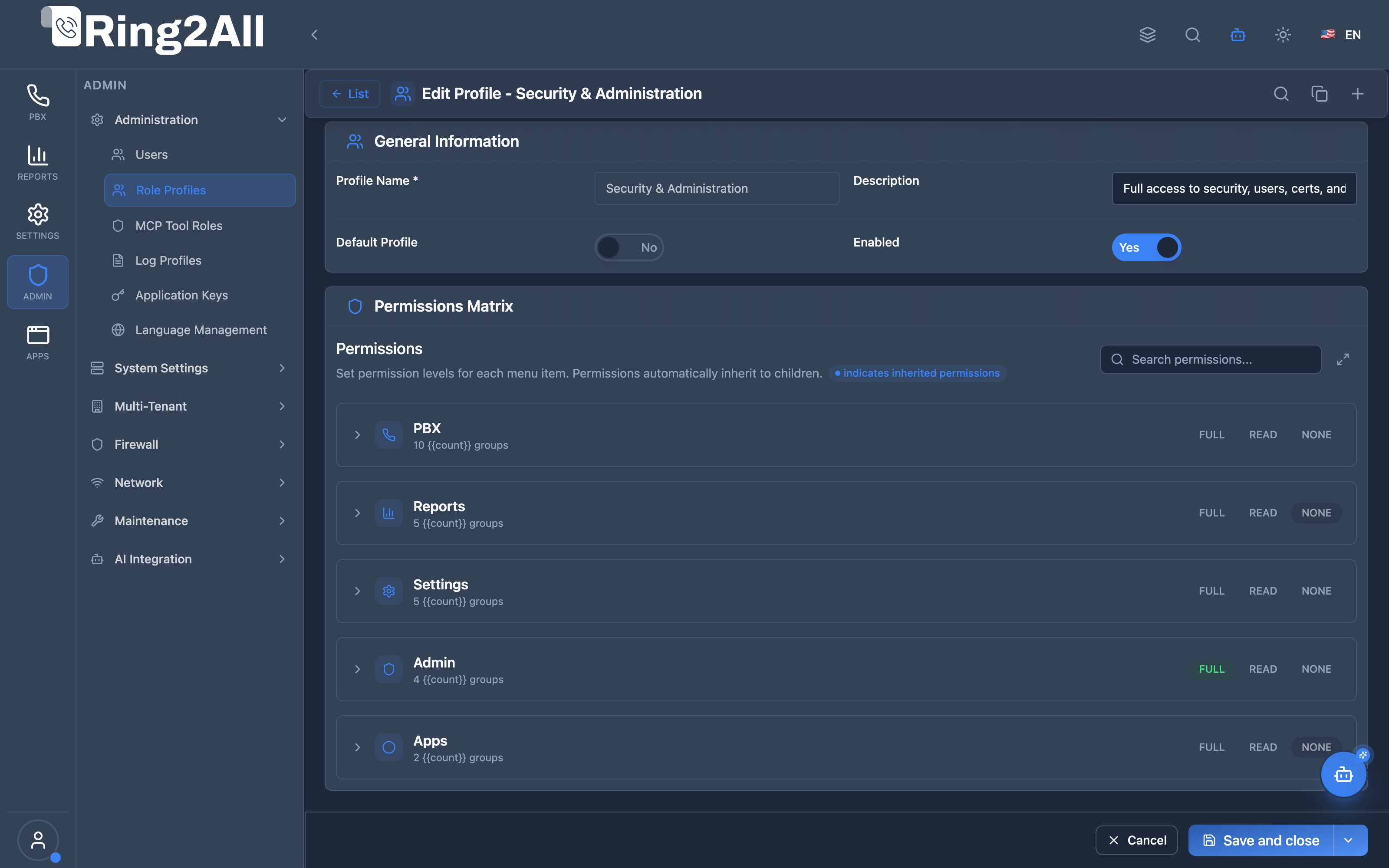
Role Profile Configuration Form & Permissions Matrix
Section titled “Role Profile Configuration Form & Permissions Matrix”The role profile editor features a granular module-by-module permission matrix allowing administrators to define explicit Read, Create, Edit, and Delete authorizations across all system capabilities.
🎯 User Roles & Key Capabilities
Section titled “🎯 User Roles & Key Capabilities”Role Profiles define the operational boundaries and authorization matrices for all operators across the platform:
| Role | Key Capabilities & Operational Scope |
|---|---|
| Super Administrator | Configures global and custom role profiles, customizes module-level CRUD permissions, establishes baseline template roles, and manages system-wide authorization policies. |
| Security & Compliance Officer | Audits permissions matrices across custom roles, validates least-privilege compliance, verifies user assignment counts, and prevents unauthorized privilege escalation. |
| Tenant Administrator | Tailors department-specific role profiles (e.g. Sales Manager, Support Lead, Billing Clerk) within their tenant partition to delegate administrative duties safely. |
| VoIP / PBX Administrator | Configures technical roles restricting access strictly to telephony dialplans, extensions, SIP gateways, and IVRs without granting access to core billing or user administration. |
| Telephony Auditor (Read-Only) | Reviews the configured permissions matrices, active user assignment counts, and system role profiles without modification capabilities. |
1. Module Overview (Technical)
Section titled “1. Module Overview (Technical)”What Are Role Profiles?
Section titled “What Are Role Profiles?”Role Profiles is a permission management module that defines access levels for admin panel users. Each role profile contains a permissions matrix specifying access (Full Control, Read Only, No Access) for every module in the system.
Architecture
Section titled “Architecture”┌─────────────────────────────────────────────────────────────────┐│ Role Profiles Architecture │├─────────────────────────────────────────────────────────────────┤│ ││ Role Profiles Definition ││ ┌──────────────────────────────────────────────────────────┐ ││ │ Role Profile: Operator │ ││ │ │ ││ │ Permissions Matrix: │ ││ │ ├─ Dashboard → Full Control │ ││ │ ├─ Extensions → Full Control │ ││ │ ├─ Ring Groups → Read Only │ ││ │ ├─ Queues → Read Only │ ││ │ ├─ System Settings → No Access │ ││ │ ├─ Users → No Access │ ││ │ └─ ... │ ││ │ │ ││ └──────────────────────────────────────────────────────────┘ ││ │ ││ ▼ Assigned to users ││ ┌──────────────────────────────────────────────────────────┐ ││ │ Users │ ││ │ │ ││ │ User: jsmith → Role: Operator │ ││ │ User: admin → Role: Administrator │ ││ │ │ ││ └──────────────────────────────────────────────────────────┘ ││ │ ││ ▼ Applied at runtime ││ ┌──────────────────────────────────────────────────────────┐ ││ │ Access Control │ ││ │ │ ││ │ Menu visibility based on permissions │ ││ │ API access based on permissions │ ││ │ UI actions based on permissions │ ││ │ │ ││ └──────────────────────────────────────────────────────────┘ ││ │└─────────────────────────────────────────────────────────────────┘2. Module Overview (Commercial/Business)
Section titled “2. Module Overview (Commercial/Business)”Business Value
Section titled “Business Value”Role Profiles provides granular access control:
| Without Role Profiles | With Role Profiles |
|---|---|
| All or nothing | Granular control |
| Single admin type | Multiple roles |
| No customization | Custom permissions |
| Security risk | Least privilege |
Use Cases
Section titled “Use Cases”-
Operator Role
- Day-to-day operations
- Limited system access
-
Support Role
- Read-only diagnostics
- No configuration changes
-
Department Admin
- Full access to subset
- Restricted system settings
-
Auditor Role
- Read-only everything
- Compliance review
Feature Highlights
Section titled “Feature Highlights”| Feature | Benefit |
|---|---|
| Permissions Matrix | Per-module control |
| Three Levels | Full, Read, None |
| Custom Roles | Create any role |
| User Assignment | Link profiles to users |
| Inheritance | Visual inherited markers |
| Duplicate | Clone and modify |
3. Module Overview (End User/Administrator)
Section titled “3. Module Overview (End User/Administrator)”What Can You Do?
Section titled “What Can You Do?”- Create custom role profiles
- Set permissions per module
- Choose Full Control, Read Only, or No Access
- Assign profiles to users
- Duplicate existing profiles
- Search and filter permissions
Role Profiles Interface
Section titled “Role Profiles Interface”┌─────────────────────────────────────────────────────────────────┐│ Role Profiles │├─────────────────────────────────────────────────────────────────┤│ ││ [+ Create Profile] ││ ││ [🔍 Search role profiles...] ││ ││ ┌───────────────────────────────────────────────────────────┐ ││ │ Profile Name │ Description │ Users │ Permissions│ ││ ├────────────────┼──────────────────────┼───────┼────────────┤ ││ │ Administrator │ Full system access │ 2 │ 45 items │ ││ │ Operator │ Day-to-day ops │ 5 │ 30 items │ ││ │ Support │ Read-only access │ 3 │ 20 items │ ││ │ Billing │ CDR and reports │ 2 │ 8 items │ ││ └───────────────────────────────────────────────────────────┘ ││ │└─────────────────────────────────────────────────────────────────┘Create/Edit Role Profile
Section titled “Create/Edit Role Profile”┌─────────────────────────────────────────────────────────────────┐│ Edit Role Profile │├─────────────────────────────────────────────────────────────────┤│ ││ ▼ Basic Information ││ ││ Profile Name: [Operator ] ││ Name displayed in role selectors ││ ││ Description: [Day-to-day operations ] ││ Optional description to clarify this role profile ││ ││ ──────────────────────────────────────────────────────────────││ ││ ▼ Permissions Matrix ││ ││ Select the permission level for each module. ││ 🔵 Blue dots indicate inherited permissions. ││ ││ [🔍 Search modules...] ││ ││ ┌─────────────────────────────────────────────────────────────┐││ │ Module / Feature │ Full │ Read │ None │ │││ ├─────────────────────────┼──────┼──────┼──────┼─────────────┤││ │ ▼ Dashboard │ ● │ ○ │ ○ │ │││ │ ▼ Telephony │ │ │ │ 5 groups │││ │ ├─ Extensions │ ● │ ○ │ ○ │ │││ │ ├─ Ring Groups │ ○ │ ● │ ○ │ │││ │ ├─ Queues │ ○ │ ● │ ○ │ │││ │ └─ Conferences │ ● │ ○ │ ○ │ │││ │ ▼ Routing │ │ │ │ 3 groups │││ │ ├─ Inbound Routes │ ● │ ○ │ ○ │ │││ │ ├─ Outbound Routes │ ○ │ ○ │ ● │ │││ │ └─ IVR │ ● │ ○ │ ○ │ │││ │ ▼ System │ │ │ │ 4 groups │││ │ ├─ System Settings │ ○ │ ○ │ ● │ │││ │ ├─ Users │ ○ │ ○ │ ● │ │││ │ └─ Role Profiles │ ○ │ ○ │ ● │ │││ └─────────────────────────────────────────────────────────────┘││ ││ [Save] [Cancel] ││ │└─────────────────────────────────────────────────────────────────┘Quick Tips
Section titled “Quick Tips”[!TIP] Duplicate: Clone existing profile as starting point.
[!TIP] Search Modules: Find specific modules quickly.
[!WARNING] Users Assigned: Cannot delete profile with assigned users.
4. Configuration Sections
Section titled “4. Configuration Sections”Basic Information
Section titled “Basic Information”| Field | Description |
|---|---|
| Profile Name | Display name |
| Description | Purpose explanation |
Permissions Matrix
Section titled “Permissions Matrix”| Column | Description |
|---|---|
| Module | System module/feature |
| Full Control | Create, read, update, delete |
| Read Only | View only, no changes |
| No Access | Hidden from user |
5. Settings Reference
Section titled “5. Settings Reference”Permission Levels
Section titled “Permission Levels”| Level | Icon | Capabilities |
|---|---|---|
| Full Control | ● | Create, Read, Update, Delete |
| Read Only | ● | Read only |
| No Access | ● | Hidden |
Module Groups
Section titled “Module Groups”| Group | Modules |
|---|---|
| Dashboard | Main dashboard, widgets |
| Telephony | Extensions, Ring Groups, Queues |
| Routing | Inbound, Outbound, IVR |
| Gateways | Trunks, Carriers |
| Reports | CDR, Statistics |
| System | Settings, Users, Profiles |
Default Profiles
Section titled “Default Profiles”| Profile | Description |
|---|---|
| Administrator | Full access to everything |
| Operator | Day-to-day operations |
| User | Basic read access |
6. Common Scenarios & Examples
Section titled “6. Common Scenarios & Examples”Scenario 1: Create Operator Role
Section titled “Scenario 1: Create Operator Role”- Click “Create Profile”
- Name = “Operator”
- Description = “Day-to-day operations”
- Set Extensions = Full Control
- Set Ring Groups = Full Control
- Set System Settings = No Access
- Set Users = No Access
- Save
Scenario 2: Read-Only Auditor
Section titled “Scenario 2: Read-Only Auditor”- Click “Create Profile”
- Name = “Auditor”
- Set all modules = Read Only
- Save
Scenario 3: Duplicate and Modify
Section titled “Scenario 3: Duplicate and Modify”- Find existing profile
- Click Duplicate
- Rename to new name
- Adjust permissions
- Save
Scenario 4: Department-Specific Role
Section titled “Scenario 4: Department-Specific Role”- Create new profile
- Name = “Sales Manager”
- Full Control: Extensions, Queues, CDR
- Read Only: Ring Groups
- No Access: System, Gateways
- Save
Model Context Protocol (MCP) AI Integration
Section titled “Model Context Protocol (MCP) AI Integration”The Ring2All PBX platform provides specialized Model Context Protocol (MCP) tools for inspecting RBAC Role Profiles and permission matrices via AI assistants.
MCP Tools Reference
Section titled “MCP Tools Reference”| Tool Name | Operation | Description | Risk Level |
|---|---|---|---|
list_role_profiles |
Read | Lists all RBAC Role Profiles with user count, system flags, and descriptions. | Low |
get_role_profile_status |
Read | Retrieves detailed module-by-module permission rules and assignment metrics for a specific role. | Low |
JSON Schema Definitions
Section titled “JSON Schema Definitions”list_role_profiles
Section titled “list_role_profiles”{ "name": "list_role_profiles", "description": "Lists all RBAC Role Profiles configured for the tenant, including system status and user counts.", "parameters": { "type": "object", "properties": { "search": { "type": "string", "description": "Filter by role profile name or description" } } }}get_role_profile_status
Section titled “get_role_profile_status”{ "name": "get_role_profile_status", "description": "Retrieves detailed configuration and permissions matrix of an RBAC Role Profile.", "parameters": { "type": "object", "properties": { "role_id": { "type": "number", "description": "Internal numeric role profile identifier" }, "name": { "type": "string", "description": "Role profile name (e.g. 'Administrator', 'Standard User')" } } }}Natural Language Prompt Examples
Section titled “Natural Language Prompt Examples”English
Section titled “English”- “List all role profiles and show how many users are assigned to each.”
- “Check the permissions matrix of the ‘VoIP Technician’ role profile.”
- “Which role profiles have Full Control access to the Gateways and Outbound Routes modules?”
Spanish
Section titled “Spanish”- “Muestra todos los perfiles de roles y cuántos usuarios tienen asignados.”
- “Consulta la matriz de permisos para el perfil ‘Operador de Call Center’.”
- “¿Qué perfiles de rol tienen permisos de eliminación en el módulo de Extensiones?”
Enterprise Safeguards & Guardrails
Section titled “Enterprise Safeguards & Guardrails”- System Profile Immutability: Built-in system profiles (such as
Super Administrator) cannot be modified or deleted through programmatic tools. - Referential Integrity Enforcement: A role profile cannot be deleted if active users remain assigned to it.
- Tenant Boundary Enforcement: Queries are automatically filtered by
tenant_id, preventing cross-tenant inspection of custom role structures.
7. Limitations & Important Notes
Section titled “7. Limitations & Important Notes”System Protections & Referential Integrity
Section titled “System Protections & Referential Integrity”[!IMPORTANT] Strict System Role Immutability: Core system profiles (such as
Super AdministratorandDefault Admin) are protected system entities. They cannot be deleted or renamed.
[!WARNING] Referential Integrity on Deletion: The API strictly enforces referential integrity. A Role Profile cannot be deleted if it is currently assigned to one or more active users in the system. The platform will block the deletion request and inform the administrator of how many active user accounts are currently bound to that profile. To delete a profile, you must first reassign its users to an alternative profile.
Dual-Layer Security: Role Profiles vs. AI Tool Profiles
Section titled “Dual-Layer Security: Role Profiles vs. AI Tool Profiles”Role Profiles operate hand-in-hand with AI Tool Profiles (Admin → AI → Tool Profiles):
- Role Profiles: Govern what the human user can view, edit, or delete through the Web UI and Fastify REST API endpoints.
- AI Tool Profiles: Govern what the AI Platform Copilot is authorized to execute autonomously on behalf of that user via Model Context Protocol (MCP) tools.
Best Practices
Section titled “Best Practices”- Least Privilege Principle: Grant minimum required access per operational responsibility.
- Document Roles: Provide concise, clear descriptions for all custom profiles.
- Regular Audit: Review assigned user counts and permissions quarterly.
- Use Duplicate: Duplicate existing baseline profiles rather than creating complex matrices from scratch.
Permission Matrix Precedence
Section titled “Permission Matrix Precedence”| Selected Level | Menu Visibility | REST API Access | In-Form Actions |
|---|---|---|---|
| Full Control | Visible | GET, POST, PUT, DELETE | Create, Edit, Delete, Duplicate |
| Read Only | Visible | GET only | View details, copy, search (inputs disabled) |
| No Access | Completely Hidden | 403 Forbidden | Blocked |
8. Troubleshooting Tips
Section titled “8. Troubleshooting Tips”Common Issues
Section titled “Common Issues”| Symptom | Possible Cause | Solution |
|---|---|---|
| Can’t delete profile | Users assigned | Reassign users first |
| Menu not visible | No Access set | Grant Read or Full |
| Can’t edit | Read Only access | Need Full Control |
| Search not working | Wrong module name | Check spelling |
Check Profile Assignments
Section titled “Check Profile Assignments”SELECT u.username, r.name AS role_profileFROM public.users uJOIN public.role_profiles r ON r.id = u.role_profile_idORDER BY r.name;Verify Permissions
Section titled “Verify Permissions”- Assign role to test user
- Login as test user
- Verify menu visibility
- Test create/edit operations
9. Glossary
Section titled “9. Glossary”| Term | Definition |
|---|---|
| Role Profile | Permission set |
| Permissions Matrix | Module access grid |
| Full Control | Complete access |
| Read Only | View only access |
| No Access | Hidden/blocked |
| Inheritance | Permission from parent |
Documentation last updated: January 2026