

Weak Passwords Module Documentation
Table of Contents
Section titled “Table of Contents”- Navigation & Access
- Screenshots & Visual Interface
- Module Overview (Technical)
- Module Overview (Commercial / Business)
- Module Overview (End User / Administrator)
- Weakness Detection Rules & Algorithm
- SIP Device Credential Auditing Reference
- Vulnerability Remediation Workflow
- Common Scenarios & Attack Vectors
- Model Context Protocol (MCP) AI Integration
- Troubleshooting Tips
- Database Schema
- Glossary
Navigation & Access
Section titled “Navigation & Access”To access the Weak Passwords security scanner:
- Log in to the Ring2All Web Portal (
https://<domain-or-ip>/login). - In the left navigation sidebar, expand PBX Engine.
- Under PBX Tools, click Weak Passwords (
/pbx/tools/weak-password). - Review the detected vulnerable extensions and click the Refresh button on the toolbar to re-run the security scan.
Screenshots & Visual Interface
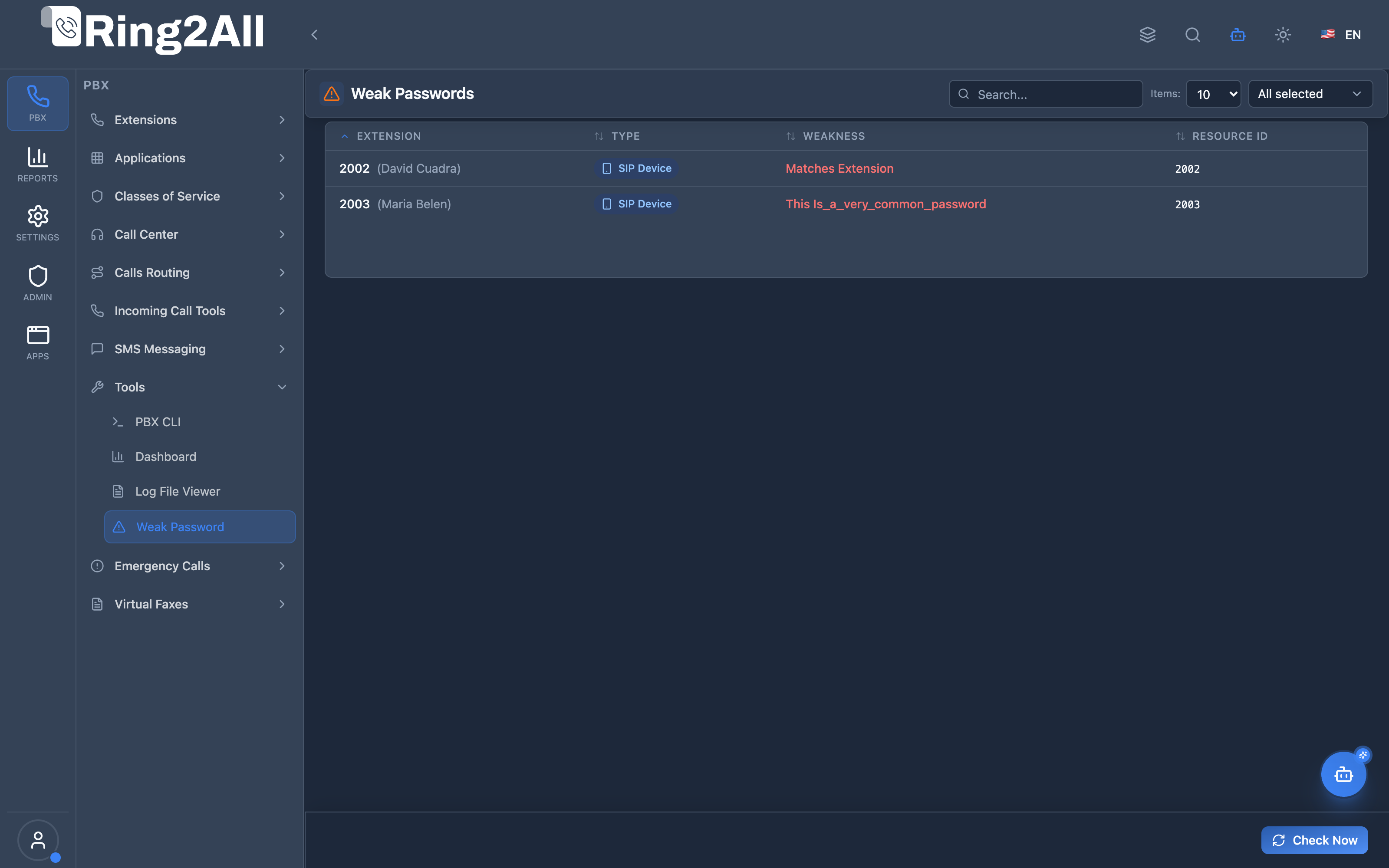
Section titled “Screenshots & Visual Interface”Weak Passwords Security Audit Overview
Section titled “Weak Passwords Security Audit Overview”Security dashboard table listing all SIP extensions with compromised, trivial, or predictable passwords, detailing extension number, extension name, resource type, and weakness classification.
1. Module Overview (Technical)
Section titled “1. Module Overview (Technical)”What is the Weak Passwords Module?
Section titled “What is the Weak Passwords Module?”The Weak Passwords module is an automated credential auditing and vulnerability detection tool designed specifically to protect PBX environments from International Revenue Sharing Fraud (IRSF), SIP brute-force cracking, and unauthorized SIP device registrations.
Technical Architecture
Section titled “Technical Architecture”- Scanning Engine: Executed by Fastify service (
GET /api/telephony/weak-passwords?domainId=:id), inspecting all provisioned SIP devices (sip_devices) belonging to the tenant domain. - Entropy & Pattern Analysis: Evaluates raw device passwords using the
zxcvbnrealistic password strength estimator alongside targeted telecom heuristic rules:- Extension Matching: Checks if
password === extension(e.g. extension2002with password2002). - Trivial Sequences: Detects ascending or descending sequences (
1234,123456,987654). - Dictionary & Default Keys: Checks against a dictionary of common PBX defaults (
password,admin,welcome,0000). - Length Threshold: Flags any device password with fewer than 8 characters.
- Extension Matching: Checks if
- Zero-Storage Auditing: Weakness evaluation is performed in-memory during scan execution; plaintext passwords are never transmitted across non-admin channels or written into unencrypted audit logs.
┌─────────────────────────────────────────────────────────────────┐│ Weak Password Detection Pipeline │├─────────────────────────────────────────────────────────────────┤│ ││ Fastify Telephony Service ││ ┌──────────────────────────────────────────────────────────┐ ││ │ 1. Fetch sip_devices joined with sip_extensions │ ││ │ filtered by domain_id │ ││ └─────────────────────────────┬────────────────────────────┘ ││ │ ││ ▼ ││ ┌──────────────────────────────────────────────────────────┐ ││ │ 2. Heuristic & Entropy Analysis Engine: │ ││ │ ├─ Rule 1: Password == Extension? │ ││ │ ├─ Rule 2: Trivial pattern (123456, aaaaa)? │ ││ │ ├─ Rule 3: Common dictionary / vendor default? │ ││ │ └─ Rule 4: zxcvbn entropy score < 2? │ ││ └─────────────────────────────┬────────────────────────────┘ ││ │ ││ ▼ ││ ┌──────────────────────────────────────────────────────────┐ ││ │ 3. WeakPasswordReport Array Generated │ ││ │ Rendered in WeakPasswordsPage.tsx DataGrid │ ││ └──────────────────────────────────────────────────────────┘ │└─────────────────────────────────────────────────────────────────┘2. Module Overview (Commercial / Business)
Section titled “2. Module Overview (Commercial / Business)”Business Value & Anti-Fraud Protection
Section titled “Business Value & Anti-Fraud Protection”- Prevention of International Toll Fraud (IRSF): Automated internet bots constantly scan SIP ports (5060, 5080) searching for extensions with weak passwords. Once compromised, hackers bridge hundreds of concurrent calls to premium-rate international numbers ($10 - $50/minute), resulting in catastrophic overnight telecom bills.
- Compliance & Cyber Insurance Eligibility: Many cyber liability policies and security certifications (SOC 2, ISO 27001, PCI-DSS) require regular automated credential audits across telephony systems.
- Brand Protection: Prevents hijacked business numbers from being used as caller IDs in illegal robo-calling and phishing schemes.
3. Module Overview (End User / Administrator)
Section titled “3. Module Overview (End User / Administrator)”Administrator Experience
Section titled “Administrator Experience”- Review flagged extensions in a clean, categorized table.
- Direct drill-down to remediate vulnerable credentials by clicking on the extension.
- Regular one-click audits during monthly maintenance schedules.
4. Weakness Detection Rules & Algorithm
Section titled “4. Weakness Detection Rules & Algorithm”| Weakness Rule | Trigger Criteria | Risk Level | Example |
|---|---|---|---|
| Matches Extension | Password identical to extension digits. | 🚨 Critical | Extension 2002 with secret 2002. |
| Trivial Sequence | Ascending/descending numerical runs. | 🚨 Critical | Password 123456 or 654321. |
| Common Default | Common word from telecom dictionary. | ⚠️ High | Password password123, admin, telephony. |
| Insufficient Length | Password length shorter than 8 characters. | ⚠️ High | Password abc12. |
| Low Entropy | Predictable pattern detected by zxcvbn. |
🟡 Medium | Password Spring2026!. |
5. SIP Device Credential Auditing Reference
Section titled “5. SIP Device Credential Auditing Reference”The Weak Passwords table displays the following columns:
| Column Name | Description | Example |
|---|---|---|
| Extension | Numeric extension identifier in the PBX. | 2002 |
| Extension Name | Descriptive label or employee name. | Tech Support Desk 2 |
| Type | Classification of audited entity. | SIP Device Password |
| Weakness | Specific detected vulnerability rule. | Matches Extension Number |
| Resource | Device username in SIP authentication. | 2002 |
6. Vulnerability Remediation Workflow
Section titled “6. Vulnerability Remediation Workflow”When vulnerable extensions are identified:
- Note the flagged extension number (e.g.
2002). - Navigate to PBX Engine → Extensions (
/pbx/extensions). - Click on the extension to open the configuration form.
- Navigate to the SIP Devices tab.
- In the device password field, click the Generate Strong Secret icon to assign a cryptographically random 16-character alphanumeric password (e.g.,
WfZNdHMNn8vFyJH). - Click Save Changes.
- Return to PBX Tools → Weak Passwords and click Refresh. The extension will immediately disappear from the report.
7. Common Scenarios & Attack Vectors
Section titled “7. Common Scenarios & Attack Vectors”Scenario 1: Provisioning Trivial Passwords for Quick Testing
Section titled “Scenario 1: Provisioning Trivial Passwords for Quick Testing”- During initial PBX setup, a technician provisions extension
2003with passwordpassword123for quick softphone testing. - The device remains active in production.
- The Weak Passwords module detects
password123on the next scan, preventing an attacker from finding the credential through SIP dictionary attacks.
Scenario 2: Auto-Provisioning Defaults
Section titled “Scenario 2: Auto-Provisioning Defaults”- Legacy IP deskphones provisioned using extension-matching credentials (
2002/2002). - The security scanner exposes all matching devices so the team can re-provision devices with unique randomized secrets.
8. Model Context Protocol (MCP) AI Integration
Section titled “8. Model Context Protocol (MCP) AI Integration”The Ring2All Platform Copilot integrates with the Credential Security Audit engine via the Model Context Protocol (MCP) to provide proactive brute-force vulnerability discovery and automated SIP security posture scoring.
Exposed MCP Tools
Section titled “Exposed MCP Tools”| Tool Name | Operation | Primary Parameters | Description |
|---|---|---|---|
check_weak_passwords |
Security Vulnerability Audit | (none) | Audits all SIP extensions in the active tenant domain against entropy checks, default dictionary lists, and sequential passwords. |
list_weak_credentials |
At-Risk Extension Directory | (none) | Returns a structured list of extensions with compromised or predictable passwords, detailing severity and reason. |
AI Safety Safeguards & Security Rules
Section titled “AI Safety Safeguards & Security Rules”- Zero-Cleartext Exposure: The AI Copilot NEVER outputs the raw plain-text password to conversational interfaces or logs. Only the extension number, username, entropy score, and reason (e.g.,
MATCHES_EXTENSION,TRIVIAL_DICTIONARY) are reported. - Tenant Isolation: Only extensions belonging to the authenticated tenant domain are audited. Cross-tenant credential inspection is prevented at the database boundary.
- Auditing: Every password scan initiated via Copilot creates an entry in
ss_admin.audit_logs.
Example MCP Payloads
Section titled “Example MCP Payloads”1. Running a Weak Password Scan (check_weak_passwords)
Section titled “1. Running a Weak Password Scan (check_weak_passwords)”{}Response:
{ "success": true, "data": { "totalAudited": 32, "vulnerabilitiesFound": 2, "weakExtensions": [ { "extension": "2002", "name": "Warehouse Desk", "username": "2002", "severity": "CRITICAL", "reason": "Password matches extension number exactly" }, { "extension": "2005", "name": "Temporary Test Agent", "username": "2005", "severity": "HIGH", "reason": "Common dictionary password (weak entropy)" } ] }}Copilot Natural Language Prompts
Section titled “Copilot Natural Language Prompts”- “Scan all extensions in this tenant for weak or default passwords.”
- “Are there any SIP accounts with passwords identical to their extension numbers?”
- “Provide a list of at-risk credentials that could be vulnerable to SIP dictionary attacks.”
9. Troubleshooting Tips
Section titled “9. Troubleshooting Tips”| Symptom | Probable Cause | Corrective Action |
|---|---|---|
| Report is empty after scan | All SIP devices have strong passwords | Expected behavior when all extensions meet security entropy standards. |
| Remediated extension still appears | Cached browser report | Click the Refresh button on the toolbar to re-trigger an active scan. |
| Scan fails with “Domain not found” | Domain context missing | Select an active domain in the top-bar domain switcher. |
10. Database Schema
Section titled “10. Database Schema”The scanner audits credentials stored in sip_devices joined with sip_extensions in ss_telephony:
SELECT se.extension, se.name AS extension_name, sd.username, sd.passwordFROM public.sip_devices sdINNER JOIN public.sip_extensions se ON se.id = sd.extension_idWHERE sd.domain_id = :domain_id;11. Glossary
Section titled “11. Glossary”- IRSF: International Revenue Sharing Fraud — monetization of stolen telecom minutes via unauthorized calls to premium-rate numbers.
- Entropy: Measure of randomness and unpredictability in a cryptographic secret.
- zxcvbn: Industry-standard realistic password strength estimator developed by Dropbox.
- SIP Device: Hardware IP phone, softphone app, or ATA registered to an extension.