

My Settings & Personal Profile
📖 Introduction
Section titled “📖 Introduction”The My Settings module empowers operators, receptionists, and supervisors to configure their individual identity credentials, desktop notification behavior, ringtone alerts, and remote corporate directories. Changes made here apply exclusively to the authenticated user’s session without impacting global tenant configurations.
User profile identity fields synchronize directly with the central SoftSwitch Identity Provider (IdP) service, ensuring consistency across the Ring2All Web Portal, Switchboard, and Mobile apps.
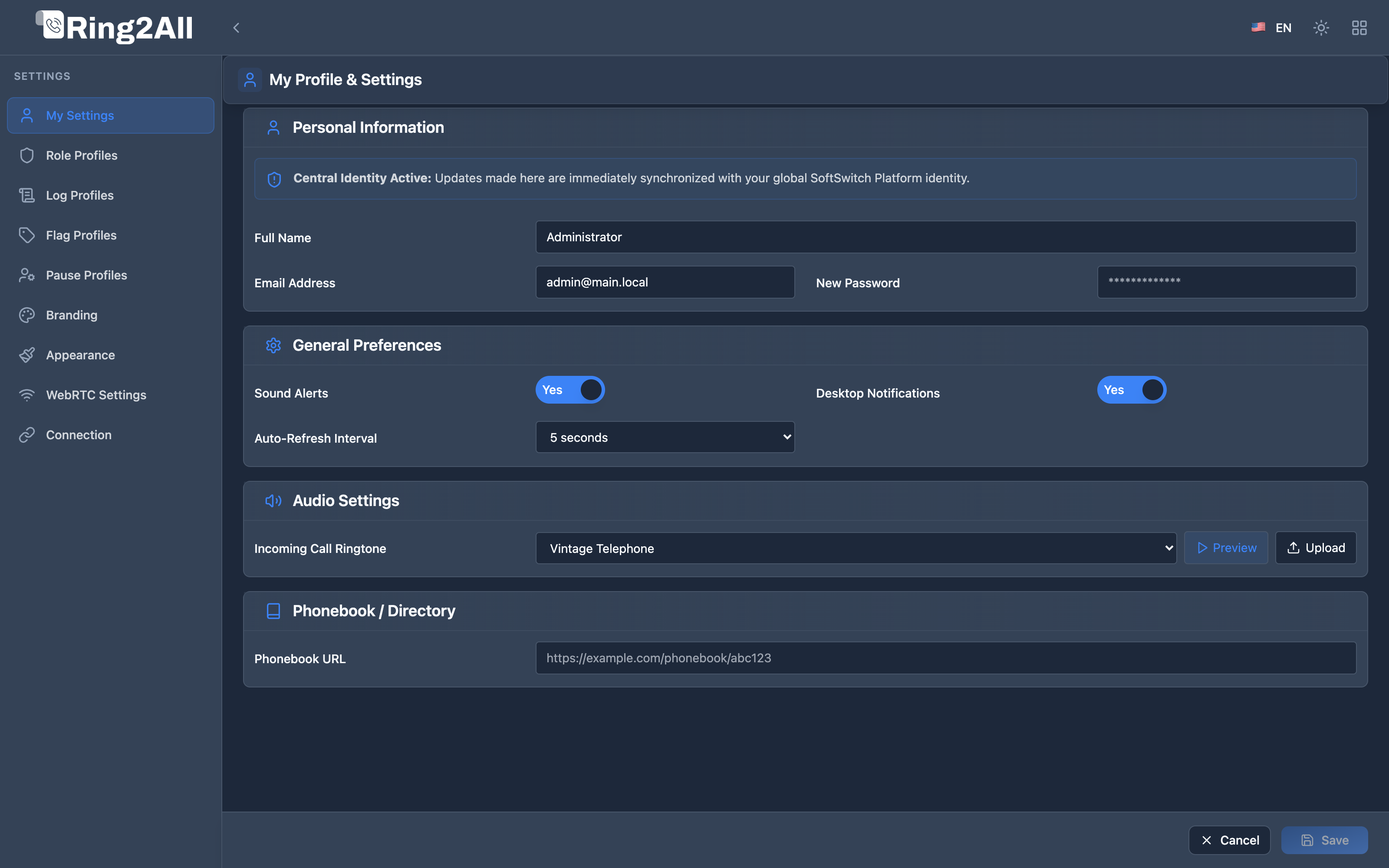
👤 Personal Information
Section titled “👤 Personal Information”The Personal Information card allows operators to review and maintain their core identity attributes:
| Field | Description | Synchronization Target |
|---|---|---|
| Full Name | The user’s complete legal or display name shown on operator activity logs and BLF caller transfers. | Central IdP (users.full_name) |
| Username | Unique alphanumeric account handle used during SSO and local login credentials. (Read-only after initial provisioning). | Central IdP (users.username) |
| Email Address | Primary corporate email address for password resets, voicemail-to-email notifications, and supervisor alerts. | Central IdP (users.email) |
| New Password | Secure password reset input. Enforces enterprise complexity policies (Argon2id hashing, minimum 8 characters). | Central IdP (users.password_hash) |
⚙️ General Preferences
Section titled “⚙️ General Preferences”Fine-tune the operator workstation responsiveness and ambient alerts:
| Preference | Type | Default | Operational Impact |
|---|---|---|---|
| Sound Alerts | Toggle | Enabled |
Enables auditory cues upon incoming calls, queue threshold warnings, and transfer completions. |
| Desktop Notifications | Toggle | Enabled |
Triggers browser Web Notifications when the Switchboard tab is in the background or minimized, showing caller ID and target extension. |
| Auto Refresh Interval | Dropdown | 5 seconds |
Frequency of background polling synchronization for non-WebSocket auxiliary feeds (Disabled, 3s, 5s, 10s, 30s, 1m). |
[!TIP] Always grant browser permissions for Notifications and Audio Autoplay when prompted. If notifications do not appear, verify that your operating system’s Do Not Disturb or Focus Assist mode is turned off.
🔔 Audio & Ringtone Settings
Section titled “🔔 Audio & Ringtone Settings”Operators working in open reception areas or quiet dispatch centers can personalize their ringing experience:
[ Sound Alerts: ON ] ──> [ Select Ringtone: Vintage Telephone ] ──> [ ▶ Test Playback ]Stock Ringtone Library
Section titled “Stock Ringtone Library”- Vintage Telephone: Classic dual-bell mechanical chime (
mixkit-vintage-telephone-ringtone-1356.wav). - Old Telephone: Traditional analog resonant pulse (
mixkit-old-telephone-ring-1357.wav). - Office Telephone: Subtle modern electronic warble (
mixkit-office-telephone-ring-1350.wav). - None (Silent): Visual-only flashing notifications without audio playback.
Custom Ringtone Upload
Section titled “Custom Ringtone Upload”Operators can upload customized WAV or MP3 audio files:
- Click Upload Custom Ringtone.
- Select an audio file (maximum file size:
5MB, recommended format:PCM 16-bit 48kHz WAV). - Once uploaded, the audio file is stored in
/var/www/softswitch/switchboard/audio/custom/and immediately available in the dropdown with instantaneous playback preview (▶ Play).
📖 Phonebook & Directory Integration
Section titled “📖 Phonebook & Directory Integration”Integrate the Switchboard search dock with external CRM or corporate LDAP/XML phonebooks:
| Configuration Parameter | Format | Description |
|---|---|---|
| Remote Phonebook URL | https://crm.company.com/api/contacts.json |
Remote endpoint serving structured JSON or Grandstream/Yealink XML contact directories. |
| Sync Protocol | HTTPS GET with Bearer / Basic Auth | Secure encrypted fetch scheduled automatically during user login sessions. |
When configured, the Switchboard extension search bar automatically aggregates remote phonebook entries, allowing operators to search external vendors, VIP clients, and partners alongside internal PBX extensions.
💾 Saving & Discarding Changes
Section titled “💾 Saving & Discarding Changes”The bottom Fixed Action Bar monitors form dirtiness:
- Save Changes: Persists all preferences to the backend database (
ss_switchboard.user_settings) and triggers notification confirmation. - Cancel: Reverts all fields back to their database values without persisting changes, keeping the user securely on the page.