

ESL Users Module Documentation
Table of Contents
Section titled “Table of Contents”- Navigation & Access
- Screenshots & Visual Interface
- Module Overview (Technical)
- Module Overview (Commercial/Business)
- Module Overview (End User/Administrator)
- User Roles & Key Capabilities
- Configuration Fields
- Common Scenarios & Examples
- Limitations & Important Notes
- Troubleshooting Tips
- Glossary
- Model Context Protocol (MCP) AI Integration
Navigation & Access
Section titled “Navigation & Access”To access the ESL Users configuration module:
- Log in to the Ring2All Web Portal (
https://<domain-or-ip>/login). - In the left navigation sidebar, expand Settings.
- Under PBX, click ESL Users (
/settings/pbx/esl-users). - To provision a new Event Socket Layer client credential, click + Add ESL User (
/settings/pbx/esl-users/new). To edit an existing connection, click on the row or the Edit action button.
Screenshots & Visual Interface
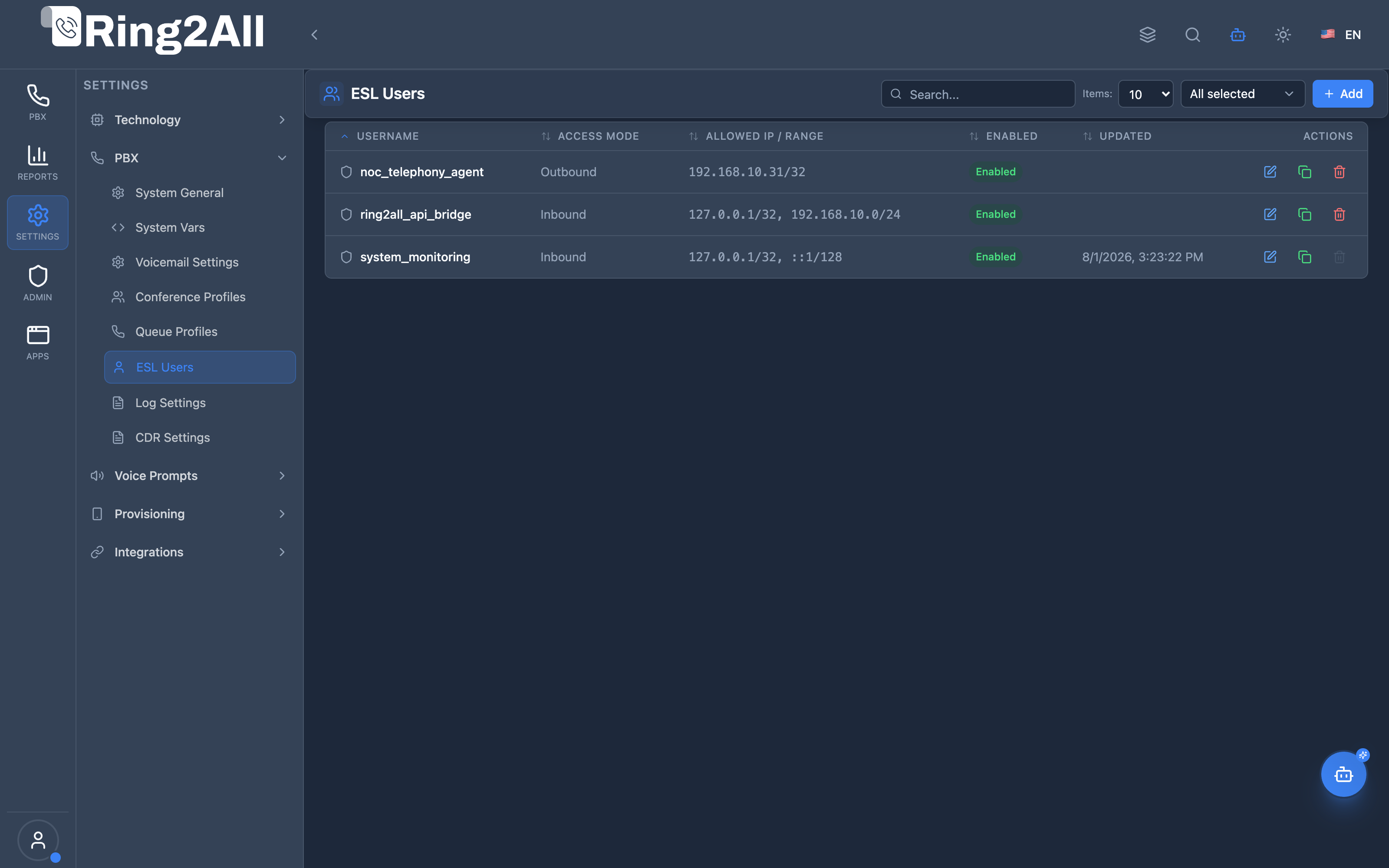
Section titled “Screenshots & Visual Interface”ESL Users Directory
Section titled “ESL Users Directory”Directory of Telephony Event Socket Layer programmatic users, showing username, access mode (inbound/outbound), allowed CIDR IP ranges, listening socket IP and port, and default profile indicators.
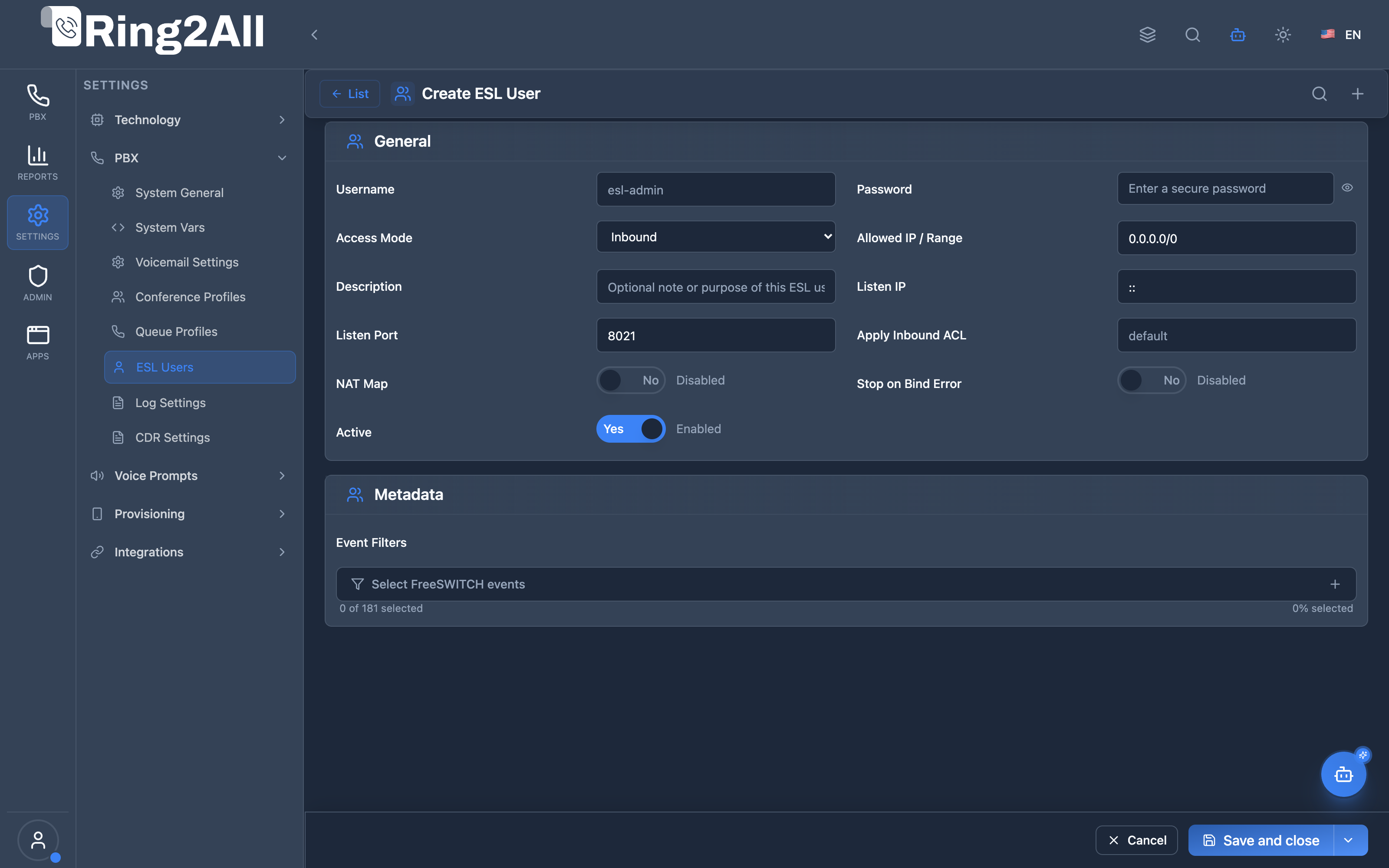
ESL User Configuration Form
Section titled “ESL User Configuration Form”Administrative setup form for securing Event Socket connections, configuring authentication passwords, IP whitelist masks, inbound ACL rules, NAT mapping options, and automatic error handling behaviors.
1. Module Overview (Technical)
Section titled “1. Module Overview (Technical)”What Are ESL Users?
Section titled “What Are ESL Users?”ESL Users is a Telephony Event Socket Layer configuration module that manages users who can connect to Telephony Server via the Event Socket interface. ESL provides programmatic access to Telephony Server for sending commands and receiving real-time events.
Architecture
Section titled “Architecture”┌─────────────────────────────────────────────────────────────────┐│ ESL Users Architecture │├─────────────────────────────────────────────────────────────────┤│ ││ External Applications ││ ┌──────────────────────────────────────────────────────────┐ ││ │ Call Center Dashboard │ ││ │ Real-time Monitoring │ ││ │ Custom Integrations │ ││ │ Third-party CRM │ ││ └──────────────────────────────────────────────────────────┘ ││ │ ESL Connection ││ ▼ ││ ┌──────────────────────────────────────────────────────────┐ ││ │ Telephony Event Socket │ ││ │ │ ││ │ Listen IP: :: (all interfaces) │ ││ │ Listen Port: 8021 │ ││ │ │ ││ │ Authentication: │ ││ │ ├─ Username / Password │ ││ │ ├─ Allowed IP / CIDR Range │ ││ │ └─ ACL Restrictions │ ││ │ │ ││ └──────────────────────────────────────────────────────────┘ ││ │ ││ ▼ Events & Commands ││ ┌──────────────────────────────────────────────────────────┐ ││ │ Telephony Core │ ││ │ │ ││ │ Channel Events → ESL Client │ ││ │ Commands ← ESL Client │ ││ │ API Responses → ESL Client │ ││ │ │ ││ └──────────────────────────────────────────────────────────┘ ││ │└─────────────────────────────────────────────────────────────────┘2. Module Overview (Commercial/Business)
Section titled “2. Module Overview (Commercial/Business)”Business Value
Section titled “Business Value”ESL Users provides secure programmatic access:
| Without ESL Users | With ESL Users |
|---|---|
| Single password | Per-user credentials |
| No IP restriction | IP-based security |
| All events | Filtered events |
| No audit trail | User tracking |
Use Cases
Section titled “Use Cases”-
Real-time Dashboards
- Live call monitoring
- Queue statistics
-
CRM Integration
- Click-to-call
- Screen pops
-
Custom Applications
- Call recording control
- IVR automation
-
Third-party Tools
- Billing systems
- Reporting tools
Feature Highlights
Section titled “Feature Highlights”| Feature | Benefit |
|---|---|
| Per-User Auth | Individual credentials |
| IP Restrictions | Network security |
| Access Modes | Inbound/Outbound/Embedded |
| Event Filters | Limit events received |
| ACL Support | Telephony Server ACL integration |
| Enable/Disable | Quick access control |
3. Module Overview (End User/Administrator)
Section titled “3. Module Overview (End User/Administrator)”What Can You Do?
Section titled “What Can You Do?”- Create ESL user accounts
- Set username/password credentials
- Configure allowed IP addresses
- Select access mode
- Filter event subscriptions
- Configure listen IP/port
- Enable/disable users
ESL Users Interface
Section titled “ESL Users Interface”┌─────────────────────────────────────────────────────────────────┐│ ESL Users │├─────────────────────────────────────────────────────────────────┤│ ││ Manage Event Socket Layer users for Telephony Server connections. ││ ││ [+ Add] ││ ││ ┌───────────────────────────────────────────────────────────┐ ││ │ Username │ Access Mode │ Allowed IP │ Enabled │ Updated│ ││ ├─────────────┼─────────────┼──────────────┼─────────┼───────┤ ││ │ dashboard │ Inbound │ 192.168.1.0/24│ ✓ │ 2h ago│ ││ │ crm-app │ Inbound │ 10.0.0.50 │ ✓ │ 1d ago│ ││ │ billing │ Inbound │ 0.0.0.0/0 │ ☐ │ 5d ago│ ││ └───────────────────────────────────────────────────────────┘ ││ │└─────────────────────────────────────────────────────────────────┘User Edit View
Section titled “User Edit View”┌─────────────────────────────────────────────────────────────────┐│ Edit ESL User │├─────────────────────────────────────────────────────────────────┤│ ││ General ││ ││ Username: [dashboard ] ││ ESL login name for Event Socket connection. ││ ││ Password: [•••••••••• ] ││ Leave empty to keep current password. ││ ││ Access Mode: [Inbound ▼] ││ ├─ Inbound (clients connect to Telephony Server) ││ ├─ Outbound (Telephony Server connects to clients) ││ └─ Embedded (within Telephony process) ││ ││ Allowed IP / Range: [192.168.1.0/24 ] ││ IP address or CIDR range allowed to connect. ││ ││ Enabled: ✓ ││ ││ ──────────────────────────────────────────────────────────────││ ││ Security ││ ││ Listen IP: [:: ] ││ IP address where ESL listener binds. ││ ││ Listen Port: [8021 ] ││ Port number used by ESL listener. ││ ││ NAT Map: ☐ ││ Apply Inbound ACL: [default ] ││ Stop on Bind Error: ✓ ││ ││ ──────────────────────────────────────────────────────────────││ ││ Event Filters: [🔧 Select Telephony Server events ] ││ 12 event(s) selected. ││ ││ Description: [Dashboard real-time monitoring] ││ ││ [Save] [Cancel] ││ │└─────────────────────────────────────────────────────────────────┘Quick Tips
Section titled “Quick Tips”[!TIP] IP Restriction: Always restrict IPs in production.
[!TIP] Event Filters: Only subscribe to needed events.
[!WARNING] Security: ESL provides full system access - protect credentials!
🎯 User Roles & Key Capabilities
Section titled “🎯 User Roles & Key Capabilities”| Role | Permissions | Key Capabilities |
|---|---|---|
| Super Administrator | Full Access (read, write, delete) |
Provision programmatic Event Socket Layer credentials, define network binding ports (8021), and manage master ACL filters. |
| Integrations / DevOps Engineer | Developer Access (read, write) |
Generate dedicated ESL accounts for CRM popups, CTI wallboards, call recording collectors, and Telephony Server event streams. |
| Security Auditor | Read & Compliance (read) |
Verify IP whitelist restrictions (CIDR masks), audit active socket credentials, and ensure no accounts use wildcard 0.0.0.0/0 in production. |
| Tenant Administrator | Restricted Read | View tenant-assigned ESL socket users in multi-tenant environments. |
4. Configuration Fields
Section titled “4. Configuration Fields”General Section
Section titled “General Section”| Field | Description |
|---|---|
| Username | ESL login name (unique) |
| Password | Authentication password |
| Access Mode | Inbound, Outbound, Embedded |
| Allowed IP / Range | CIDR or specific IP |
| Enabled | Account active/inactive |
Security Section
Section titled “Security Section”| Field | Description |
|---|---|
| Listen IP | Bind address (:: = all) |
| Listen Port | ESL port (default 8021) |
| NAT Map | Enable NAT mapping |
| Apply Inbound ACL | Telephony Server ACL name |
| Stop on Bind Error | Fail if port unavailable |
Metadata Section
Section titled “Metadata Section”| Field | Description |
|---|---|
| Event Filters | Telephony Server events to receive |
| Description | Purpose notes |
Access Modes
Section titled “Access Modes”| Mode | Description |
|---|---|
| Inbound | Clients connect to Telephony Server |
| Outbound | Telephony Server connects to external server |
| Embedded | Within Telephony process |
5. Common Scenarios & Examples
Section titled “5. Common Scenarios & Examples”Scenario 1: Dashboard User
Section titled “Scenario 1: Dashboard User”- Create new ESL user
- Username = dashboard
- Set secure password
- Allowed IP = dashboard server IP
- Access Mode = Inbound
- Select events: CHANNEL_ANSWER, CHANNEL_HANGUP
- Enable and save
Scenario 2: CRM Integration
Section titled “Scenario 2: CRM Integration”- Create new ESL user
- Username = crm-app
- Access Mode = Inbound
- Allowed IP = CRM server IP/24
- Event Filters = CHANNEL_CREATE, CHANNEL_CALLER_ID
- Enable and save
Scenario 3: Development User
Section titled “Scenario 3: Development User”- Create new ESL user
- Username = dev-test
- Allowed IP = 0.0.0.0/0 (open for dev)
- Event Filters = All events
- Save but keep Disabled until needed
Scenario 4: Restricted Admin
Section titled “Scenario 4: Restricted Admin”- Create new ESL user
- Username = esl-admin
- Allowed IP = specific admin workstation
- Access Mode = Inbound
- Apply Inbound ACL = admin-acl
- Enable and save
6. Limitations & Important Notes
Section titled “6. Limitations & Important Notes”Technical Notes
Section titled “Technical Notes”[!NOTE] Default Port: ESL uses port 8021 by default.
[!NOTE] Generate XML: ESL config generates event_socket.conf.xml.
[!WARNING] Security Critical: ESL provides full Telephony Server control.
Best Practices
Section titled “Best Practices”- Unique Usernames: One per application
- Strong Passwords: Use complex passwords
- IP Restrictions: Always restrict in production
- Minimal Events: Only subscribe to needed events
- Disable Unused: Keep unused accounts disabled
- Monitor Access: Review ESL connections regularly
Common Event Filters
Section titled “Common Event Filters”| Event | Purpose |
|---|---|
| CHANNEL_CREATE | New call started |
| CHANNEL_ANSWER | Call answered |
| CHANNEL_HANGUP | Call ended |
| CHANNEL_BRIDGE | Calls connected |
| DTMF | Key presses |
| RECORD_START | Recording began |
| RECORD_STOP | Recording ended |
7. Troubleshooting Tips
Section titled “7. Troubleshooting Tips”Common Issues
Section titled “Common Issues”| Symptom | Possible Cause | Solution |
|---|---|---|
| Connection refused | Port blocked | Check firewall |
| Auth failed | Wrong password | Verify credentials |
| Connection denied | IP not allowed | Check Allowed IP |
| No events | Filters too strict | Add event filters |
| Already in use | Port conflict | Change Listen Port |
Test ESL Connection
Section titled “Test ESL Connection”# Connect via telnettelnet <freeswitchip> 8021
# Authenticateauth <password>
# Subscribe to eventsevents plain ALL
# Send commandapi statusCheck ESL Users
Section titled “Check ESL Users”SELECT username, access_mode, allowed_ip, enabledFROM public.esl_usersWHERE enabled = true;8. Glossary
Section titled “8. Glossary”| Term | Definition |
|---|---|
| ESL | Event Socket Layer |
| Inbound | Clients connect to FS |
| Outbound | FS connects to clients |
| ACL | Access Control List |
| CIDR | IP range notation |
| Event Filter | Subscribed event types |
| Listen Port | ESL connection port |
Model Context Protocol (MCP) AI Integration
Section titled “Model Context Protocol (MCP) AI Integration”The Ring2All PBX platform integrates deep AI assistance via the Model Context Protocol (MCP). The ESL Users module allows the PBX AI Copilot to query configured Event Socket users, inspect IP whitelist masks, and audit CTI integrations for security compliance.
Available MCP Tools
Section titled “Available MCP Tools”| Tool Name | Operation Type | RBAC Risk Level | Description |
|---|---|---|---|
list_esl_users |
Read / Query | low |
Lists Event Socket Layer (ESL) authenticated users, network ACLs, and permission levels with passwords securely masked. |
Tool Input Schemas & Parameters
Section titled “Tool Input Schemas & Parameters”1. list_esl_users
Section titled “1. list_esl_users”{ "name": "list_esl_users", "description": "List Event Socket Layer (ESL) authenticated users, network ACLs, and permission levels for external CTI / Telephony Server socket integrations.", "inputSchema": { "type": "object", "properties": { "search": { "type": "string", "description": "Filter ESL users by username or allowed IP." } } }}Natural Language Prompts
Section titled “Natural Language Prompts”| User Request | Invoked MCP Tool | Expected AI Response |
|---|---|---|
| “List all Event Socket Layer (ESL) accounts configured in the system.” | list_esl_users |
Returns list of ESL accounts with allowed CIDRs and account status (passwords redacted). |
| “Is there an ESL user provisioned for our CRM wallboard?” | list_esl_users({ search: "wallboard" }) |
Checks matching user credentials and reports allowed connection IP range. |
| “Audit ESL accounts for insecure open IP configurations.” | list_esl_users |
Identifies accounts with unrestricted IP masks and warns about security exposure. |
Multi-Tenant & Security Safeguards
Section titled “Multi-Tenant & Security Safeguards”- Domain Isolation: ESL accounts are scoped strictly to the requesting tenant’s domain ID.
- Strict Password Redaction: Authentication passwords are encrypted and never returned in plaintext in tool results.
- CIDR Mask Enforcement: ESL accounts must have explicit IP subnet masks defined before connection is accepted by the daemon.
- Audit Logging: All ESL user queries and credential modifications are logged with administrator ID and timestamp.
Documentation last updated: January 2026