

Portal WebRTC Softphone
📖 Introduction
Section titled “📖 Introduction”The WebRTC Softphone is an enterprise-grade voice client built directly into the Ring2All User Portal. It allows extension subscribers to make and receive crystal-clear high-definition audio calls straight from their web browser—without installing third-party software, configuring desktop SIP clients, or connecting physical IP desk phones.
⚙️ Extension Configuration Linkage (PBX Admin)
Section titled “⚙️ Extension Configuration Linkage (PBX Admin)”Availability of the softphone is controlled by the PBX administrator under PBX > Extensions > Edit Extension > Advanced Tab:
| Attribute | Database Field | Impact on Portal Softphone |
|---|---|---|
| Softphone Enabled | softphone_enabled |
Master permission flag. When set to true, the User Portal initializes the WebRTC SIP stack, registers the subscriber’s credentials, and displays the softphone launcher. When false, all softphone components are completely omitted. |
| SIP Password | password |
Secure credentials negotiated over encrypted WSS for SIP digest authentication against Kamailio and Telephony Server. |
| AI Translator Profile | ai_translator_profile_id |
Attaches a bidirectional real-time audio translation model to calls conducted through this softphone. |
🟢 Floating Green Registration Tab
Section titled “🟢 Floating Green Registration Tab”A hallmark feature of the User Portal is the Floating Softphone Tab anchored on the right edge of the screen:
┌────────────────────────────────────────────────────────────┐│ Browser Window ││ ││ ╭───────────┤│ │ 📞 [Green]│ <- Floating Tab│ ╰───────────┤│ ││ (🤖) │ <- AI Copilot└────────────────────────────────────────────────────────────┘- Registered State (Online): When the softphone establishes a valid SIP registration over WebSocket (
RegistererState.Registered), the tab illuminates in vibrant Emerald Green (bg-emerald-600with subtle glow ring). This provides immediate visual peace-of-mind that the user is reachable. - Disconnected / Offline State: If the network connection drops or credentials fail, the tab reverts to a muted gray background (
bg-muted), signaling that the phone is offline. - Instant Drawer Toggle: Clicking the green tab smoothly slides the WebRTC Phone panel into view.
🎯 Softphone Interface & Features
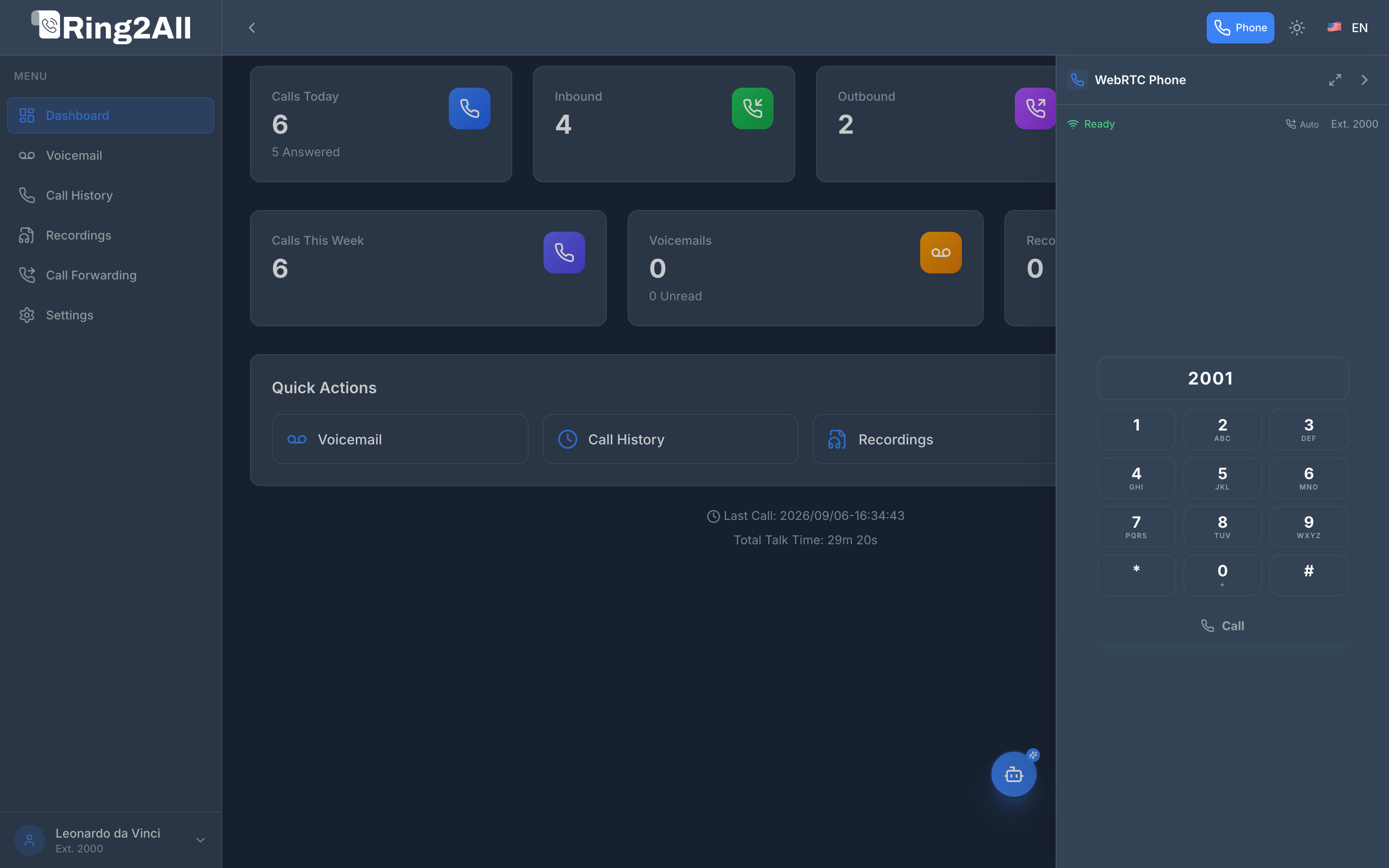
Section titled “🎯 Softphone Interface & Features”When opened, the slide-over drawer (384px standard, or up to 720px in wide mode) presents a complete telephony cockpit:
1. Status Bar & Telemetry
Section titled “1. Status Bar & Telemetry”- Registration Indicator:
🟢 Readywith Wi-Fi signal icon. - Auto-Answer Toggle (
Auto): Enables automatic call answering for high-volume support agents. - Extension Identifier: Displays the authenticated extension number (e.g.,
Ext. 2000). - View Controls: Toggle between standard compact view and expanded wide view (
Maximize / Minimize), or close the panel (>).
2. Digital Keypad & Dialing
Section titled “2. Digital Keypad & Dialing”- Number Input: Supports typing via physical keyboard (with
Enterto dial) or clicking on-screen digits. - DTMF Pad: High-contrast numeric grid (
1through9,*,0,#) with optional audible feedback tones configured in Settings. - Call Button (
📞 Call): Initiates outbound call routing via the PBX LCR and carrier trunks.
3. Active Call Management
Section titled “3. Active Call Management”When a call is connected, the dialer transitions into an active session controller:
- Mute / Unmute: Silences local microphone input.
- Hold / Resume: Places the remote party on PBX music on hold.
- Blind Transfer: Instantly transfers the active caller to another extension or external number.
- Attended Transfer: Consults with the target party before completing the call transfer.
- Hang Up: Safely releases RTP media relays and closes the session.
🤝 Seamless Coexistence with AI Chatbot Copilot
Section titled “🤝 Seamless Coexistence with AI Chatbot Copilot”The portal layout dynamically adapts when both the WebRTC Softphone and the AI Copilot are active:
- Automatic FAB Shift: When the phone drawer expands (
384pxwide), the floating AI Copilot button automatically shifts fromright-6toright-[404px]. - Zero Overlap: Both the conversational AI assistant and the voice softphone remain completely accessible side-by-side without covering controls or interfering with call audio.
🔒 Security and Media Encryption
Section titled “🔒 Security and Media Encryption”- Encrypted Signaling: All SIP signaling runs over secure WebSockets (
WSS). - Encrypted Media: Audio streams use Secure Real-Time Transport Protocol (
SRTP) with DTLS key exchange. - Carrier NAT Traversal: Backed by high-throughput RTPEngine relays, guaranteeing bidirectional voice traversal across firewalls and cellular networks without requiring complex client STUN/TURN setups.