

Fax Viewer Module Documentation
Table of Contents
Section titled “Table of Contents”- Navigation & Access
- Screenshots & Visual Interface
- Module Overview (Technical)
- Module Overview (Commercial/Business)
- Module Overview (End User/Administrator)
- Log Fields Reference
- Common Scenarios & Examples
- Limitations & Important Notes
- Model Context Protocol (MCP) AI Integration
- Troubleshooting Tips
- Glossary
Navigation & Access
Section titled “Navigation & Access”To access the Fax Viewer log and document repository:
- Log in to the Ring2All Web Portal (
https://<domain-or-ip>/login). - In the left navigation sidebar, expand PBX Engine.
- Under Virtual Faxes, click Fax Viewer (
/pbx/virtual-faxes/viewer). - Browse transmitted faxes, inspect delivery status, or preview and download received PDF/TIFF documents.
Screenshots & Visual Interface
Section titled “Screenshots & Visual Interface”Fax History & Activity Log
Section titled “Fax History & Activity Log”Interactive data grid showing incoming and outgoing fax logs, remote station IDs, page counts, delivery outcome flags, transfer bitrates, and direct download links.
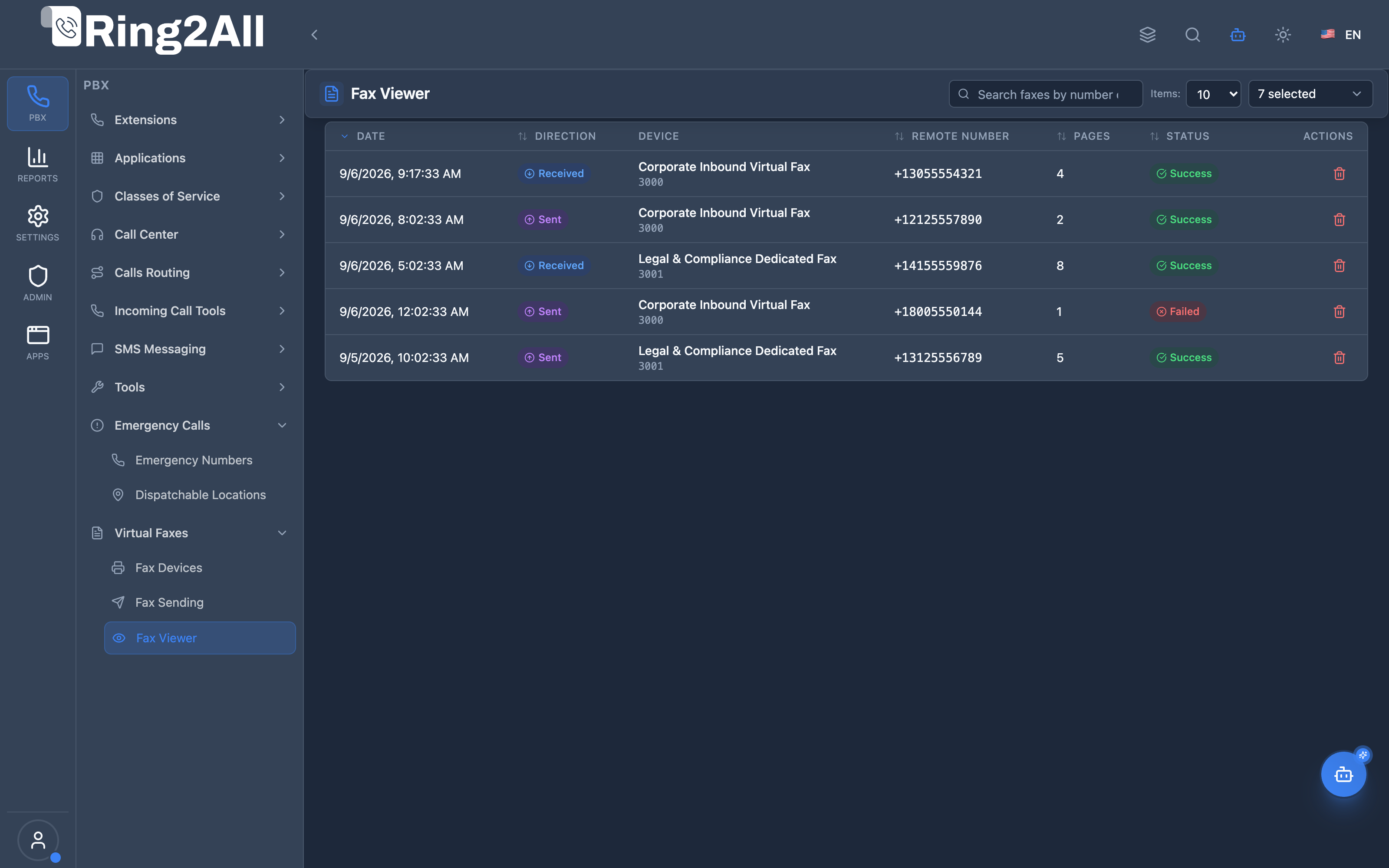
1. Module Overview (Technical)
Section titled “1. Module Overview (Technical)”What Is Fax Viewer?
Section titled “What Is Fax Viewer?”Fax Viewer is a log viewing interface that displays all inbound and outbound fax transmissions. It provides searchable access to fax history, status information, and the ability to view or download fax documents.
Architecture
Section titled “Architecture”┌─────────────────────────────────────────────────────────────────┐│ Fax Viewer Architecture │├─────────────────────────────────────────────────────────────────┤│ ││ Admin Panel ││ ┌──────────────────────────────────────────────────────────┐ ││ │ FaxViewerPage.tsx │ ││ │ │ ││ │ ┌─────────────────────────────────────────────────────┐ │ ││ │ │ Date │ Dir │ Device │ Remote │ Pages │ Status│ │ ││ │ ├─────────────────────────────────────────────────────┤ │ ││ │ │ 2026-01-16 │ ← IN │ Main │ +1555123 │ 3 │ ✓ │ │ ││ │ │ 2026-01-16 │ → OUT │ Sales │ +1555456 │ 2 │ ✓ │ │ ││ │ │ 2026-01-15 │ ← IN │ Main │ +1555789 │ 1 │ ✗ │ │ ││ │ └─────────────────────────────────────────────────────┘ │ ││ │ │ ││ │ [View] [Download] [Delete] │ ││ │ │ ││ └──────────────────────────────────────────────────────────┘ ││ │ ││ ▼ API Query ││ ┌──────────────────────────────────────────────────────────┐ ││ │ Backend API │ ││ │ │ ││ │ SELECT * FROM public.fax_logs │ ││ │ WHERE domain_id = ? │ ││ │ ORDER BY created_at DESC │ ││ │ │ ││ └──────────────────────────────────────────────────────────┘ ││ │└─────────────────────────────────────────────────────────────────┘2. Module Overview (Commercial/Business)
Section titled “2. Module Overview (Commercial/Business)”Business Value
Section titled “Business Value”Fax Viewer provides complete fax history:
| Without Fax Viewer | With Fax Viewer |
|---|---|
| No transmission history | Full audit trail |
| Unknown status | Success/failure visible |
| No document access | View/download documents |
| Manual tracking | Searchable logs |
Use Cases
Section titled “Use Cases”-
Audit Trail
- Track all fax activity
- Compliance documentation
-
Troubleshooting
- Identify failed transmissions
- Review error messages
-
Document Retrieval
- Find past faxes
- Download for records
-
Status Monitoring
- Check delivery status
- Confirm receipt
Feature Highlights
Section titled “Feature Highlights”| Feature | Benefit |
|---|---|
| Search | Find faxes quickly |
| Direction Filter | Inbound/Outbound |
| Status Display | Success/Failed |
| Document View | Preview faxes |
| Download | Save to local |
| Delete | Clean up history |
3. Module Overview (End User/Administrator)
Section titled “3. Module Overview (End User/Administrator)”What Can You Do?
Section titled “What Can You Do?”- View all fax transmissions
- Search by number or caller ID
- Filter by direction
- View document content
- Download fax files
- Delete old logs
Fax Viewer Interface
Section titled “Fax Viewer Interface”┌─────────────────────────────────────────────────────────────────┐│ Fax Viewer │├─────────────────────────────────────────────────────────────────┤│ ││ 🔍 [Search faxes by number or caller ID... ] ││ ││ ┌───────────────────────────────────────────────────────────┐ ││ │ Date │ Dir │ Device │ Remote │Pgs│Status│ ││ ├─────────────┼──────────┼──────────┼────────────┼───┼──────┤ ││ │ 01/16 10:30 │ Received │ Main Fax │+15551234567│ 3 │ ✓ │ ││ │ 01/16 09:15 │ Sent │ Sales │+15559876543│ 2 │ ✓ │ ││ │ 01/15 16:45 │ Received │ Main Fax │+15555551234│ 1 │ ✗ │ ││ │ 01/15 14:20 │ Sent │ Support │+15557771234│ 4 │ ✓ │ ││ │ 01/15 11:00 │ Received │ Main Fax │+15558881234│ 2 │ ✓ │ ││ └───────────────────────────────────────────────────────────┘ ││ ││ Row Actions: [👁️ View] [⬇️ Download] [🗑️ Delete] ││ ││ Showing 1-10 of 156 faxes ││ [< Previous] [Next >] ││ │└─────────────────────────────────────────────────────────────────┘Quick Tips
Section titled “Quick Tips”[!TIP] Search: Search by phone number or remote caller ID.
[!TIP] Download PDF: Successfully received faxes can be downloaded as PDF.
[!CAUTION] Delete: Deleting a log removes the document permanently.
4. Log Fields Reference
Section titled “4. Log Fields Reference”Display Columns
Section titled “Display Columns”| Column | Description |
|---|---|
| Date | Transmission date/time |
| Direction | Received (inbound) or Sent (outbound) |
| Device | Fax device used |
| Remote | Remote fax number |
| Pages | Number of pages |
| Status | Success or Failed |
| Size | File size |
Direction Types
Section titled “Direction Types”| Direction | Icon | Description |
|---|---|---|
| Received | ← | Inbound fax |
| Sent | → | Outbound fax |
Status Types
Section titled “Status Types”| Status | Description |
|---|---|
| Success | Transmission completed |
| Failed | Transmission failed |
Available Actions
Section titled “Available Actions”| Action | Description |
|---|---|
| View | Open fax document |
| Download | Save file locally |
| Delete | Remove log and file |
5. Common Scenarios & Examples
Section titled “5. Common Scenarios & Examples”Scenario 1: Find Recent Fax
Section titled “Scenario 1: Find Recent Fax”- Open Fax Viewer
- Look at recent entries
- Click View to preview
- Download if needed
Scenario 2: Search for Specific Sender
Section titled “Scenario 2: Search for Specific Sender”- Enter phone number in search
- Results filter automatically
- View matching faxes
Scenario 3: Check Failed Transmissions
Section titled “Scenario 3: Check Failed Transmissions”- Look for failed status entries
- Review error details
- Retry if outbound
Scenario 4: Archive Faxes
Section titled “Scenario 4: Archive Faxes”- Download important faxes
- Save to local storage
- Delete from system
6. Limitations & Important Notes
Section titled “6. Limitations & Important Notes”Technical Notes
Section titled “Technical Notes”[!NOTE] Read-Only Logs: This module views logs only. Sending is done via Send Fax module.
[!NOTE] File Storage: Documents stored on server filesystem.
[!WARNING] Delete Permanent: Deleting removes both log and document file.
Best Practices
Section titled “Best Practices”- Regular Review: Check for failed transmissions
- Archive Important: Download critical faxes
- Clean Up: Delete old unnecessary logs
- Search Smart: Use full phone numbers
7. Model Context Protocol (MCP) AI Integration
Section titled “7. Model Context Protocol (MCP) AI Integration”The Ring2All Platform Copilot integrates with the Fax Viewer archive via the Model Context Protocol (MCP) to audit incoming/outgoing fax transmissions, diagnose delivery errors, inspect transfer bitrates, and verify page delivery.
Exposed MCP Tools
Section titled “Exposed MCP Tools”| Tool Name | Operation | Primary Parameters | Description |
|---|---|---|---|
query_fax_history |
History Search | direction (“all”, “inbound”, “outbound”), search (string, optional), limit (number) |
Retrieves recent fax transmission logs, showing timestamp, remote phone number, caller ID, page count, and success status. |
get_fax_details |
Detailed Diagnostic Inspection | faxLogId (number) |
Fetches complete transmission diagnostics for a specific fax record, including result codes, transfer rate, and rendered PDF path. |
list_fax_devices |
Device Inventory | search (string, optional) |
Queries configured fax devices to correlate activity with specific endpoints. |
Operational Safeguards & Storage Privacy
Section titled “Operational Safeguards & Storage Privacy”- Domain Scope Isolation: Users and Copilot sessions can only query fax logs belonging to their authenticated tenant domain (
WHERE domain_id = :domain_id). - Read-Only Inspection: Querying fax history and viewing transmission details does not delete or truncate files on disk.
- Path Sanitization: Direct disk paths are never exposed to untrusted external callers; file retrieval relies on secure authenticated download tokens.
Example MCP Payloads
Section titled “Example MCP Payloads”1. Querying Recent Inbound Faxes (query_fax_history)
Section titled “1. Querying Recent Inbound Faxes (query_fax_history)”{ "direction": "inbound", "limit": 10}Response:
{ "success": true, "data": { "totalReturned": 2, "faxes": [ { "id": 892, "direction": "inbound", "remoteNumber": "+13055550180", "callerId": "Medical Records <+13055550180>", "pages": 4, "success": true, "resultText": "OK", "transferRate": 14400, "timestamp": "2026-09-08T14:15:22.000Z" }, { "id": 885, "direction": "inbound", "remoteNumber": "+17865550122", "callerId": "Apex Law <+17865550122>", "pages": 2, "success": true, "resultText": "OK", "transferRate": 14400, "timestamp": "2026-09-08T11:02:10.000Z" } ] }}2. Inspecting a Failed Fax Transmission (get_fax_details)
Section titled “2. Inspecting a Failed Fax Transmission (get_fax_details)”{ "faxLogId": 890}Copilot Natural Language Prompts
Section titled “Copilot Natural Language Prompts”- “Show me all faxes received today across our domain.”
- “Why did the fax transmission to +13055550199 fail? Look up the error details in the log.”
- “How many total pages of faxes were processed this week?”
- “Find the latest fax received from sender +13055550180.”
8. Troubleshooting Tips
Section titled “8. Troubleshooting Tips”Common Issues
Section titled “Common Issues”| Symptom | Possible Cause | Solution |
|---|---|---|
| No logs shown | No fax activity | Wait for fax transmissions |
| View fails | File deleted | File may have been cleaned up |
| Download fails | File missing | Check storage path |
| Search no results | Wrong format | Try full number with country code |
Diagnostic SQL
Section titled “Diagnostic SQL”View recent fax logs:
SELECT fl.direction, fl.remote_number, fl.pages, fl.success, fl.result_text, fl.file_path, fd.name as device_name, fl.created_atFROM public.fax_logs flJOIN public.fax_devices fd ON fl.fax_device_id = fd.idWHERE fl.domain_id = [domain_id]ORDER BY fl.created_at DESCLIMIT 20;Count by status:
SELECT success, COUNT(*) as countFROM public.fax_logsWHERE domain_id = [domain_id]GROUP BY success;9. Glossary
Section titled “9. Glossary”| Term | Definition |
|---|---|
| Fax Log | Record of fax transmission |
| Inbound | Received fax |
| Outbound | Sent fax |
| Remote Number | Other party’s fax number |
| Pages | Document page count |
| TIFF | Fax document format |
Documentation last updated: January 2026