

Voicemail Settings Module Documentation
Table of Contents
Section titled “Table of Contents”- Navigation & Access
- Screenshots & Visual Interface
- Module Overview (Technical)
- Module Overview (Commercial/Business)
- Module Overview (End User/Administrator)
- User Roles & Key Capabilities
- Configuration Fields
- Common Scenarios & Examples
- Limitations & Important Notes
- Troubleshooting Tips
- Glossary
- Model Context Protocol (MCP) AI Integration
Navigation & Access
Section titled “Navigation & Access”To access the Voicemail Settings configuration module:
- Log in to the Ring2All Web Portal (
https://<domain-or-ip>/login). - In the left navigation sidebar, expand Settings.
- Under PBX, click Voicemail Settings (
/settings/pbx/voicemail-settings). - Modify message thresholds, recording limits, email notification formats, and login attempt policies, then click Save Changes in the bottom action bar.
Screenshots & Visual Interface
Section titled “Screenshots & Visual Interface”Global Voicemail Configuration Form
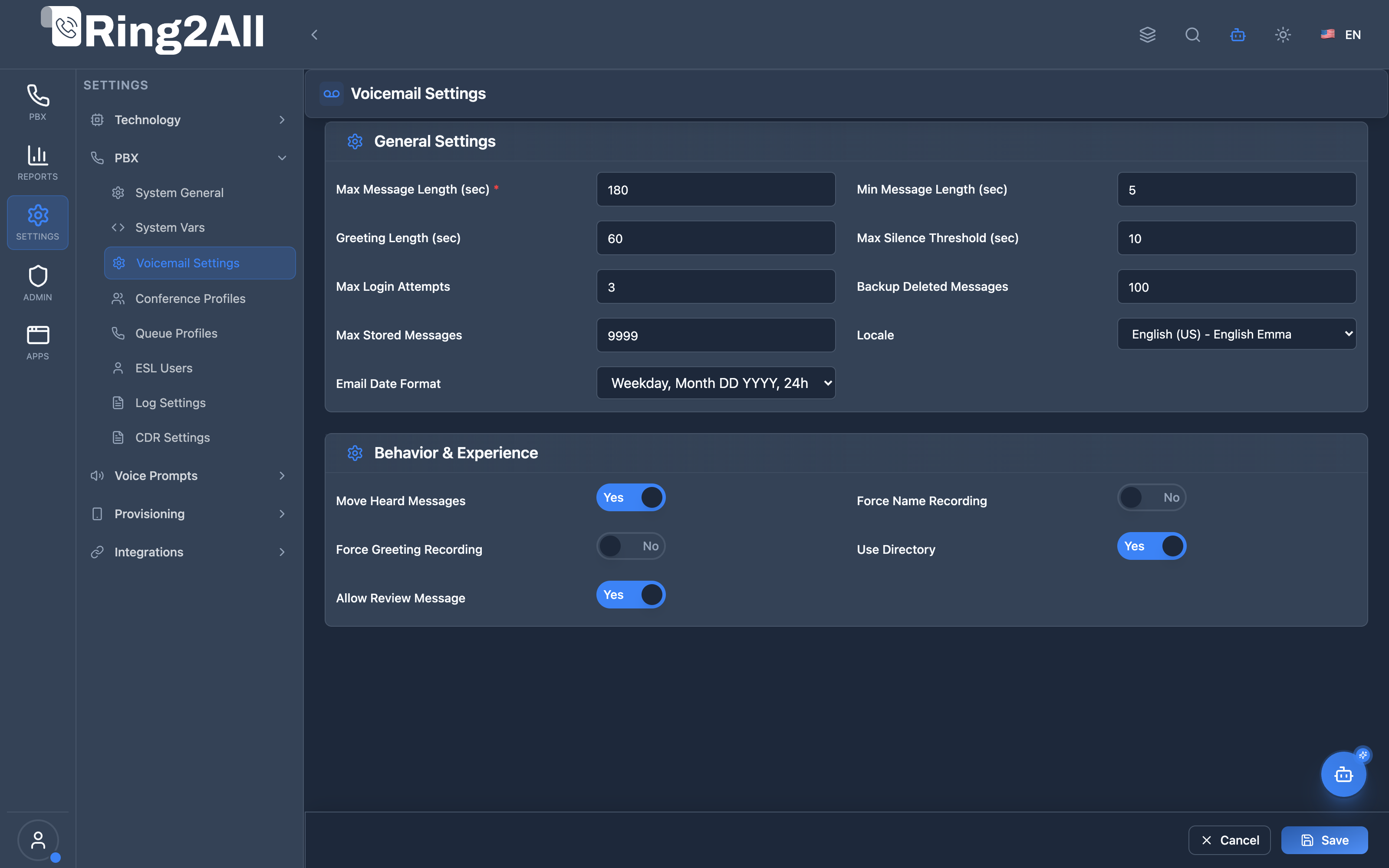
Section titled “Global Voicemail Configuration Form”Domain-wide voicemail control panel defining minimum and maximum message lengths, silence thresholds, maximum greetings duration, PIN retry lockouts, message review toggles, and email delivery date formatting.
1. Module Overview (Technical)
Section titled “1. Module Overview (Technical)”What Is Voicemail Settings?
Section titled “What Is Voicemail Settings?”Voicemail Settings is a domain-wide voicemail configuration module that manages global voicemail parameters. These settings control message duration limits, silence detection, login security, greeting requirements, and user experience options for all voicemail boxes in a domain.
Architecture
Section titled “Architecture”┌─────────────────────────────────────────────────────────────────┐│ Voicemail Settings Architecture │├─────────────────────────────────────────────────────────────────┤│ ││ Admin Panel ││ ┌──────────────────────────────────────────────────────────┐ ││ │ Voicemail Settings │ ││ │ │ ││ │ General Settings: │ ││ │ ├─ Max Message Length: 300 sec │ ││ │ ├─ Min Message Length: 3 sec │ ││ │ ├─ Max Silence: 5 sec │ ││ │ └─ Max Messages: 100 │ ││ │ │ ││ │ Behavior & Experience: │ ││ │ ├─ Force Name Recording │ ││ │ ├─ Force Greeting Recording │ ││ │ └─ Allow Message Review │ ││ │ │ ││ └──────────────────────────────────────────────────────────┘ ││ │ ││ ▼ Stored per domain ││ ┌──────────────────────────────────────────────────────────┐ ││ │ public.domain_voicemail_settings │ ││ │ │ ││ │ domain_id | settings (JSON) │ ││ │ │ ││ └──────────────────────────────────────────────────────────┘ ││ │ ││ ▼ Used by voicemail handlers ││ ┌──────────────────────────────────────────────────────────┐ ││ │ Voicemail Lua Handler │ ││ │ │ ││ │ Load settings → Apply to voicemail session │ ││ │ ├─ Record up to max_message_length │ ││ │ ├─ Stop on max_silence │ ││ │ ├─ Enforce login limits │ ││ │ └─ Apply behavior options │ ││ │ │ ││ └──────────────────────────────────────────────────────────┘ ││ │└─────────────────────────────────────────────────────────────────┘2. Module Overview (Commercial/Business)
Section titled “2. Module Overview (Commercial/Business)”Business Value
Section titled “Business Value”Voicemail Settings provides consistent voicemail behavior:
| Without Voicemail Settings | With Voicemail Settings |
|---|---|
| Default limits | Custom limits |
| No control | Full control |
| Inconsistent | Standardized |
| Fixed behavior | Configurable |
Use Cases
Section titled “Use Cases”-
Storage Management
- Limit message count
- Control message length
-
User Experience
- Force greetings
- Allow message review
-
Security
- Limit login attempts
- Control access
-
Compliance
- Message retention
- Backup deleted messages
Feature Highlights
Section titled “Feature Highlights”| Feature | Benefit |
|---|---|
| Message Limits | Control storage |
| Silence Detection | End recordings early |
| Login Security | Prevent brute force |
| Greeting Control | Force personalization |
| Backup Deleted | Recovery option |
| Locale Support | Multilingual |
3. Module Overview (End User/Administrator)
Section titled “3. Module Overview (End User/Administrator)”What Can You Do?
Section titled “What Can You Do?”- Set maximum message duration
- Set minimum message duration
- Configure silence detection
- Limit login attempts
- Set mailbox capacity
- Force name/greeting recording
- Enable message review
- Configure email date format
Voicemail Settings Interface
Section titled “Voicemail Settings Interface”┌─────────────────────────────────────────────────────────────────┐│ Voicemail Settings │├─────────────────────────────────────────────────────────────────┤│ ││ Manage global voicemail parameters for this domain. ││ ││ ▼ General Settings ││ Tune core voicemail limits and defaults. ││ ││ Max Message Length (sec): [300 ] ││ Maximum allowed message duration. ││ ││ Min Message Length (sec): [3 ] ││ Messages shorter than this are discarded. ││ ││ Greeting Length (sec): [60 ] ││ Maximum allowed greeting duration. ││ ││ Max Silence (sec): [5 ] ││ Stops recording after this many seconds of silence. ││ ││ Max Login Attempts: [3 ] ││ Allowed number of invalid PIN attempts before hangup. ││ ││ Backup Deleted (count): [10 ] ││ Number of deleted messages retained in backup. ││ ││ Max Messages: [100 ] ││ Maximum number of stored messages per mailbox. ││ ││ Locale: [en-US ▼] ││ Language and voice prompt pack used for voicemail. ││ │└─────────────────────────────────────────────────────────────────┘Behavior Settings
Section titled “Behavior Settings”┌─────────────────────────────────────────────────────────────────┐│ Voicemail Settings (continued) │├─────────────────────────────────────────────────────────────────┤│ ││ ▼ Behavior & Experience ││ Control how callers and users interact with voicemail. ││ ││ Move Heard Messages: ✓ ││ Move played messages to the 'old' folder. ││ ││ Force Name Recording: ☐ ││ Require users to record their spoken name. ││ ││ Force Greeting Recording: ☐ ││ Require users to record greetings. ││ ││ Use Directory: ✓ ││ Allow callers to search extensions by name. ││ ││ Allow Message Review: ✓ ││ Allow users to review messages before sending. ││ ││ Email Date Format: [%A, %B %d %Y, %R ] ││ Format used for date/time in voicemail notification emails. ││ ││ [Save Changes] ││ │└─────────────────────────────────────────────────────────────────┘Quick Tips
Section titled “Quick Tips”[!TIP] Short Silence: Lower max_silence to stop recording quickly after caller stops talking.
[!TIP] Message Review: Enable to let callers re-record before saving.
[!NOTE] Domain-Scoped: These settings apply to all mailboxes in the domain.
🎯 User Roles & Key Capabilities
Section titled “🎯 User Roles & Key Capabilities”| Role | Permissions | Key Capabilities |
|---|---|---|
| Super Administrator | Full Access (read, write) |
Configure tenant voicemail limits, set global storage thresholds, and define platform-wide audio attachment encoding policies. |
| Tenant / PBX Administrator | Domain Management (read, write) |
Manage max recording durations (e.g. 300s), email notification templates, silence timeout detection, and PIN lockout retry policies. |
| Support Specialist | Read & Diagnostic (read) |
Check domain voicemail thresholds, diagnose premature recording cutoffs, and verify email delivery formats. |
| End User / Extension Owner | Operational | Listen to recorded voicemails, manage mailbox greetings, and receive email WAV/MP3 notifications. |
4. Configuration Fields
Section titled “4. Configuration Fields”General Settings
Section titled “General Settings”| Field | Default | Description |
|---|---|---|
| Max Message Length | 300 sec | Maximum recording time |
| Min Message Length | 3 sec | Minimum to save (filter blanks) |
| Greeting Length | 60 sec | Maximum greeting duration |
| Max Silence | 5 sec | Stop recording on silence |
| Max Login Attempts | 3 | PIN entry attempts |
| Backup Deleted | 10 | Retained deleted messages |
| Max Messages | 100 | Mailbox capacity |
| Locale | en-US | Voice prompt language |
Behavior & Experience
Section titled “Behavior & Experience”| Field | Default | Description |
|---|---|---|
| Move Heard Messages | Yes | Move to ‘old’ folder |
| Force Name Recording | No | Require name recording |
| Force Greeting Recording | No | Require greeting |
| Use Directory | Yes | Dial-by-name enabled |
| Allow Message Review | Yes | Preview before save |
| Email Date Format | %A, %B %d %Y | Email timestamp format |
5. Common Scenarios & Examples
Section titled “5. Common Scenarios & Examples”Scenario 1: Short Messages Only
Section titled “Scenario 1: Short Messages Only”- Set Max Message Length = 60 sec
- Set Min Message Length = 5 sec
- Set Max Silence = 3 sec
- Save changes
Scenario 2: High Security
Section titled “Scenario 2: High Security”- Set Max Login Attempts = 2
- Enable Force Name Recording
- Enable Force Greeting Recording
- Save changes
Scenario 3: Large Mailboxes
Section titled “Scenario 3: Large Mailboxes”- Set Max Messages = 200
- Set Backup Deleted = 50
- Set Max Message Length = 600 sec
- Save changes
Scenario 4: Professional Setup
Section titled “Scenario 4: Professional Setup”- Enable Force Name Recording
- Enable Force Greeting Recording
- Enable Allow Message Review
- Enable Use Directory
- Save changes
6. Limitations & Important Notes
Section titled “6. Limitations & Important Notes”Technical Notes
Section titled “Technical Notes”[!NOTE] Domain-Scoped: Settings apply per domain/tenant.
[!NOTE] Existing Mailboxes: Changes affect all mailboxes immediately.
[!WARNING] Storage Impact: Increasing max messages increases storage usage.
Best Practices
Section titled “Best Practices”- Balance Length: Long enough for messages, short enough for storage
- Silence Detection: 3-5 seconds is typical
- Login Security: 2-3 attempts prevents brute force
- Force Greetings: Improves caller experience
- Backup Deleted: Keep some for recovery
Date Format Codes
Section titled “Date Format Codes”| Code | Meaning | Example |
|---|---|---|
%A |
Full weekday | Monday |
%B |
Full month | January |
%d |
Day of month | 15 |
%Y |
Four-digit year | 2026 |
%R |
Time (24h) | 14:30 |
%I:%M %p |
Time (12h) | 2:30 PM |
7. Troubleshooting Tips
Section titled “7. Troubleshooting Tips”Common Issues
Section titled “Common Issues”| Symptom | Possible Cause | Solution |
|---|---|---|
| Messages cut short | Max length too low | Increase max_message_length |
| Blank messages saved | Min length too low | Increase min_message_length |
| Recording stops early | Silence detection | Increase max_silence |
| User locked out | Login attempts | Check max_login_attempts |
| Mailbox full | Max messages | Increase max_messages |
Check Settings
Section titled “Check Settings”SELECT settingsFROM public.domain_voicemail_settingsWHERE domain_id = [domain_id];Common Values
Section titled “Common Values”| Setting | Recommended |
|---|---|
| Max Message | 180-300 sec |
| Min Message | 3-5 sec |
| Max Silence | 3-5 sec |
| Login Attempts | 2-3 |
| Max Messages | 50-200 |
8. Glossary
Section titled “8. Glossary”| Term | Definition |
|---|---|
| Max Message Length | Recording time limit |
| Min Message Length | Minimum to save |
| Max Silence | Silence before stop |
| Greeting | Personalized intro message |
| Message Review | Preview before saving |
| Locale | Language/region setting |
| Backup Deleted | Retained deleted messages |
Model Context Protocol (MCP) AI Integration
Section titled “Model Context Protocol (MCP) AI Integration”The Ring2All PBX platform integrates deep AI assistance via the Model Context Protocol (MCP). The Voicemail Settings module allows the PBX AI Copilot to safely query and modify global voicemail policies, inspect storage quotas, and adjust notification delivery parameters.
Available MCP Tools
Section titled “Available MCP Tools”| Tool Name | Operation Type | RBAC Risk Level | Description |
|---|---|---|---|
get_voicemail_settings |
Read / Query | low |
Retrieves global Voicemail system settings (max message duration, max messages per box, email notifications, audio attachment format). |
update_voicemail_settings |
Write / Update | medium |
Updates global Voicemail parameters (max duration, email notifications, email from address, audio format, delete after email). |
diagnose_voicemail |
Diagnostic / Query | low |
Performs deep operational diagnostic on an extension voicemail box: verifies DB mailbox settings, physical storage directory permissions on disk, custom greeting audio files, MWI state, and email notification delivery. |
Tool Input Schemas & Parameters
Section titled “Tool Input Schemas & Parameters”1. get_voicemail_settings
Section titled “1. get_voicemail_settings”{ "name": "get_voicemail_settings", "description": "Get global Voicemail system settings (max message duration, max messages per box, email notifications, audio attachment format).", "inputSchema": { "type": "object", "properties": {} }}2. update_voicemail_settings
Section titled “2. update_voicemail_settings”{ "name": "update_voicemail_settings", "description": "Update global Voicemail parameters (max duration, email notifications, email from address, audio format).", "inputSchema": { "type": "object", "properties": { "maxMessageLength": { "type": "number", "description": "Maximum message length in seconds (default: 300)." }, "maxMessagesPerBox": { "type": "number", "description": "Maximum messages per voicemail box (default: 100)." }, "emailAttachAudio": { "type": "boolean", "description": "Attach WAV/MP3 audio file to voicemail email notifications." }, "emailFrom": { "type": "string", "description": "Sender email address for voicemail notifications." }, "deleteAfterEmail": { "type": "boolean", "description": "Delete voicemail from PBX after emailing it to user." } } }}3. diagnose_voicemail
Section titled “3. diagnose_voicemail”{ "name": "diagnose_voicemail", "description": "Perform deep diagnostic on an extension voicemail box (DB settings, disk storage permissions, custom greetings, MWI status, and email delivery).", "inputSchema": { "type": "object", "properties": { "extension": { "type": "string", "description": "The extension number whose voicemail box to diagnose (e.g. '2001')." } }, "required": ["extension"] }}Natural Language Prompts
Section titled “Natural Language Prompts”| User Request | Invoked MCP Tool | Expected AI Response |
|---|---|---|
| “What is our maximum voicemail message length?” | get_voicemail_settings |
Returns maximum duration (e.g. 300 seconds) and silence timeout threshold. |
| “Enable audio file attachments for voicemail email notifications.” | update_voicemail_settings({ emailAttachAudio: true }) |
Enables email attachments and confirms setting update across the domain. |
| “What sender email address is used for voicemail notifications?” | get_voicemail_settings |
Reports the configured notification email from address and date formatting. |
Multi-Tenant & Security Safeguards
Section titled “Multi-Tenant & Security Safeguards”- Domain Partitioning: Voicemail settings are isolated to the caller’s authorized tenant and primary domain ID.
- Quota Protection: Upper limits on
maxMessagesPerBox(max 500) andmaxMessageLength(max 900s) prevent disk exhaustion attacks. - Email Sanitization: The
emailFromaddress is validated against RFC 5322 regex standards to prevent header injection. - Audit Logging: All changes to voicemail parameters are logged with user identity and previous/new values.
Documentation last updated: January 2026