

Role Profiles & RBAC Permissions
📖 Introduction
Section titled “📖 Introduction”The Role Profiles module provides granular, enterprise-grade Role-Based Access Control (RBAC) specifically tailored for the Switchboard console. It decouples user accounts from hardcoded privileges, enabling administrators to define distinct operational roles such as Operators, Supervisors, Call Center Agents, and System Administrators.
Each Role Profile defines two interconnected layers of authorization:
- Administrative Permissions: Access to console configuration, theming, layout management, and user provisioning.
- Switchboard Telephony Privileges: Granular authorization governing live call interception (Listen, Whisper, Barge), transfer capabilities, and resource visibility (Extensions, Queues, Conferences, Parking Lots, Trunks).
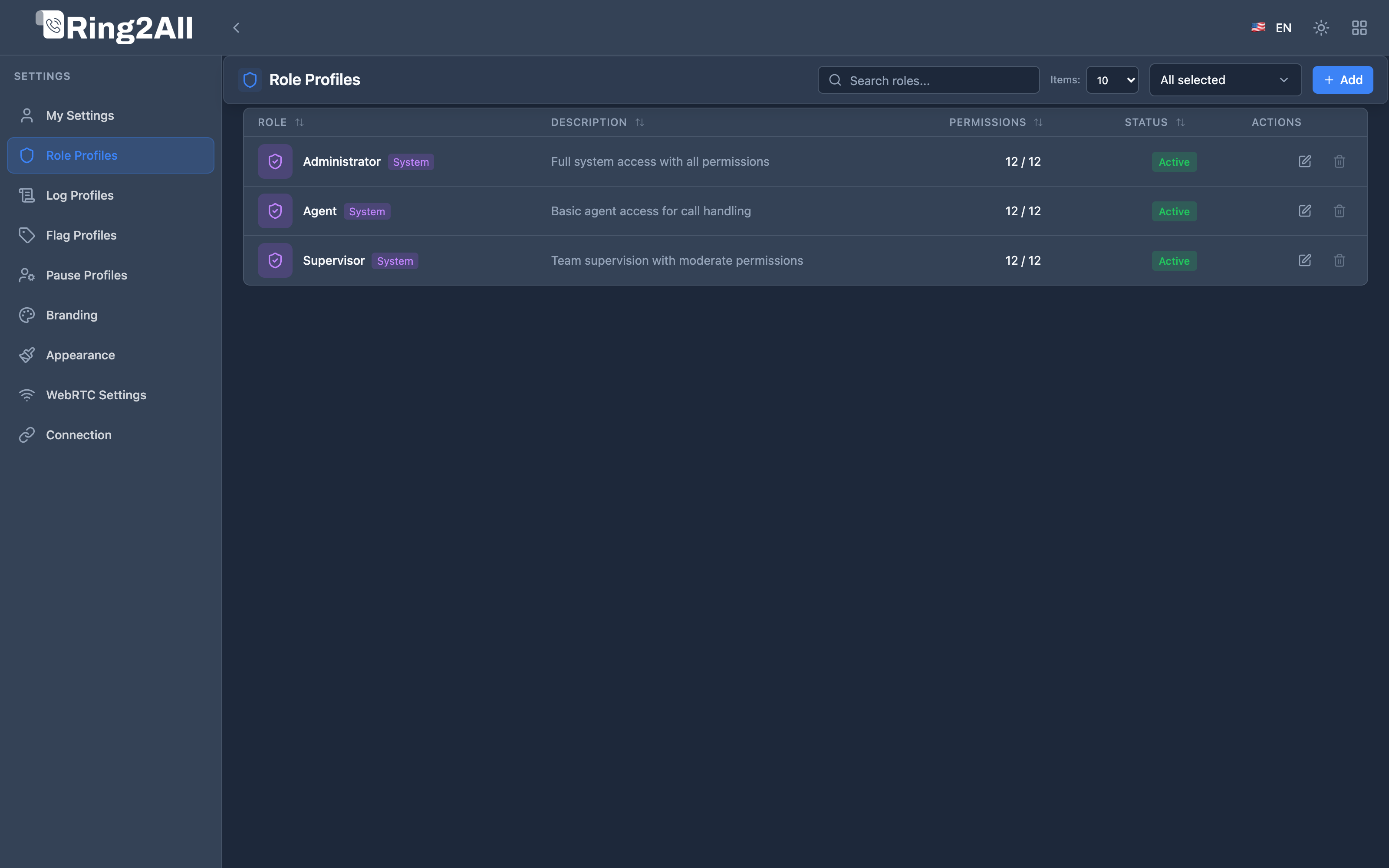
🛡️ Default System Roles
Section titled “🛡️ Default System Roles”The platform ships with pre-configured role profiles that serve as baselines:
| Role Name | Scope | Default Permissions | Intended Audience |
|---|---|---|---|
| Administrator | System (Protected) | FULL across all administrative modules and unrestricted telephony privileges. |
PBX System Admins & Telecom Engineers. |
| Supervisor | Enterprise Default | FULL on active calls, eavesdrop, whisper, and barge; READ on layouts and queues. |
Call Center Team Leads & QA Managers. |
| Agent / Operator | Standard Tenant | NONE on admin panels; FULL on My Settings; restricted to transfers and basic call handling. |
Front-desk receptionists, triage operators, agents. |
[!NOTE] System-designated roles (marked with a blue shield badge) cannot be deleted to prevent enterprise lockouts. Custom roles can be created, edited, duplicated, and assigned freely.
🎛️ Administrative Permissions Matrix
Section titled “🎛️ Administrative Permissions Matrix”Within the General Settings tab of a Role Profile, administrators configure access levels (FULL, READ, NONE) across 12 distinct functional modules:
| Permission Identifier | Module Label | Description & Security Impact |
|---|---|---|
manageRoles |
Manage Roles | Authority to create, modify, or delete Role Profiles and grant privileges. |
manageUsers |
Manage Users | Authority to provision Switchboard user accounts and assign role associations. |
manageLayouts |
Manage Global Layouts | Authority to publish and overwrite system-wide widget layouts. |
createLayouts |
Create Layouts | Permission for operators to generate personal, customized console layouts. |
editLayouts |
Edit Layouts | Permission to reposition, resize, and reconfigure widgets on existing layouts. |
addWidgets |
Add Widgets | Authority to add new telemetry cards from the Widget Catalog. |
accessSettings |
WebRTC / ICE Settings | Permission to modify global STUN, TURN, and ICE gathering timeouts. |
accessMySettings |
Access My Settings | Grants users the ability to manage their personal profile, ringtones, and sounds. |
manageAppearance |
Manage Appearance | Authority to customize color themes, dark mode variants, and UI scale. |
manageBranding |
Manage Branding | Authority to upload custom logos, favicons, and login welcome screens. |
managePauseCauses |
Manage Pause Causes | Authority to create and reorder agent break cause profiles. |
manageCallFlags |
Manage Flag Profiles | Authority to configure color-coded visual call classification flags. |
🎧 Switchboard Privileges & Telephony Authorization
Section titled “🎧 Switchboard Privileges & Telephony Authorization”The Switchboard Privileges tab regulates real-time telephony capabilities. It prevents unauthorized operators from listening to sensitive conversations or interfering with executive extensions.
graph LR
    User[Operator / Supervisor] --> Role[Role Profile]
    Role --> ResourceScope[Resource Scope: All vs Specific Items]
    Role --> ActionScope[Action Scope: Transfers, Eavesdrop, Whisper, Barge]
    ResourceScope --> FS[Telephony Event Socket (ESL) Control]
    ActionScope --> FS
1. Resource Visibility Scoping
Section titled “1. Resource Visibility Scoping”For each telephony object, administrators can set access to All Resources or restrict to Specific Items:
- Extensions: Restrict operator visibility to specific departments (e.g., only Sales extensions
1000-1099). - Call Queues: Limit monitoring to specific queues (e.g.,
Queue-Supportonly). - Parking Lots: Assign dedicated parking lots per team.
- Conference Rooms: Scoped visibility for executive boardrooms versus public audio bridges.
- SIP Trunks: Limit trunk telemetry to authorized network supervisors.
2. Live Action Privileges
Section titled “2. Live Action Privileges”Controls the real-time operational verbs that can be executed from call widgets:
| Telephony Action | Action Key | Functional Impact |
|---|---|---|
| Originate Call | call |
Ability to trigger outbound calls directly from the console interface. |
| Blind Transfer | blindTransfer |
Immediately redirects an active call to a new destination without announcement. |
| Attended Transfer | attendedTransfer |
Initiates a warm consultation call prior to completing the transfer. |
| Eavesdrop (Listen) | spy |
Silently joins an active audio channel via Telephony Server eavesdrop in listen-only mode. |
| Whisper (Coach) | whisper |
Speaks into an agent’s ear channel without customer audio bleed. |
| Barge-In (Conference) | barge |
Unmutes bidirectional audio, turning an active call into a 3-way conference. |
| Call Intercom / Paging | intercom |
Triggers auto-answer speakerphone paging on supported SIP desk phones. |
| Queue Call Pickup | stealQueueCall |
Intercepts a high-priority customer directly out of an ACD queue. |
🔗 Profile Associations
Section titled “🔗 Profile Associations”Each Role Profile can link directly to auxiliary profiles:
- Default Flag Profile: Assigns standard visual flags (e.g.,
VIP,Escalated,Urgent) for calls processed by users in this role. - Default Pause Cause Profile: Automatically provisions allowed break codes for call center agents assigned to this role.
- SSO Default Role: Automatically assigns newly authenticated Single Sign-On users into this role profile upon their first login.