

System Cleanup Module Documentation
Table of Contents
Section titled “Table of Contents”- Navigation & Access
- Screenshots & Visual Interface
- 🎯 User Roles & Key Capabilities
- Module Overview (Technical)
- Module Overview (Commercial/Business)
- Module Overview (End User/Administrator)
- Configuration Sections
- Settings Reference
- Model Context Protocol (MCP) AI Integration
- Common Scenarios & Examples
- Limitations & Important Notes
- Troubleshooting Tips
- Glossary
Navigation & Access
Section titled “Navigation & Access”To access the System Cleanup module:
- Log in to the Ring2All Web Portal (
https://<domain-or-ip>/login). - In the left navigation sidebar, expand Administration.
- Under Maintenance, click System (
/admin/maintenance/system). - Monitor tenant maintenance configurations, execution cadence (Daily, Weekly, Monthly), and active operational states.
- Select the edit icon on any tenant entry to modify data retention rules (CDRs, call recordings, voicemails, log events, SMS messages), audio encoding quality, or invoke the Execute Now action (
/admin/maintenance/system/:tenantId).
Screenshots & Visual Interface
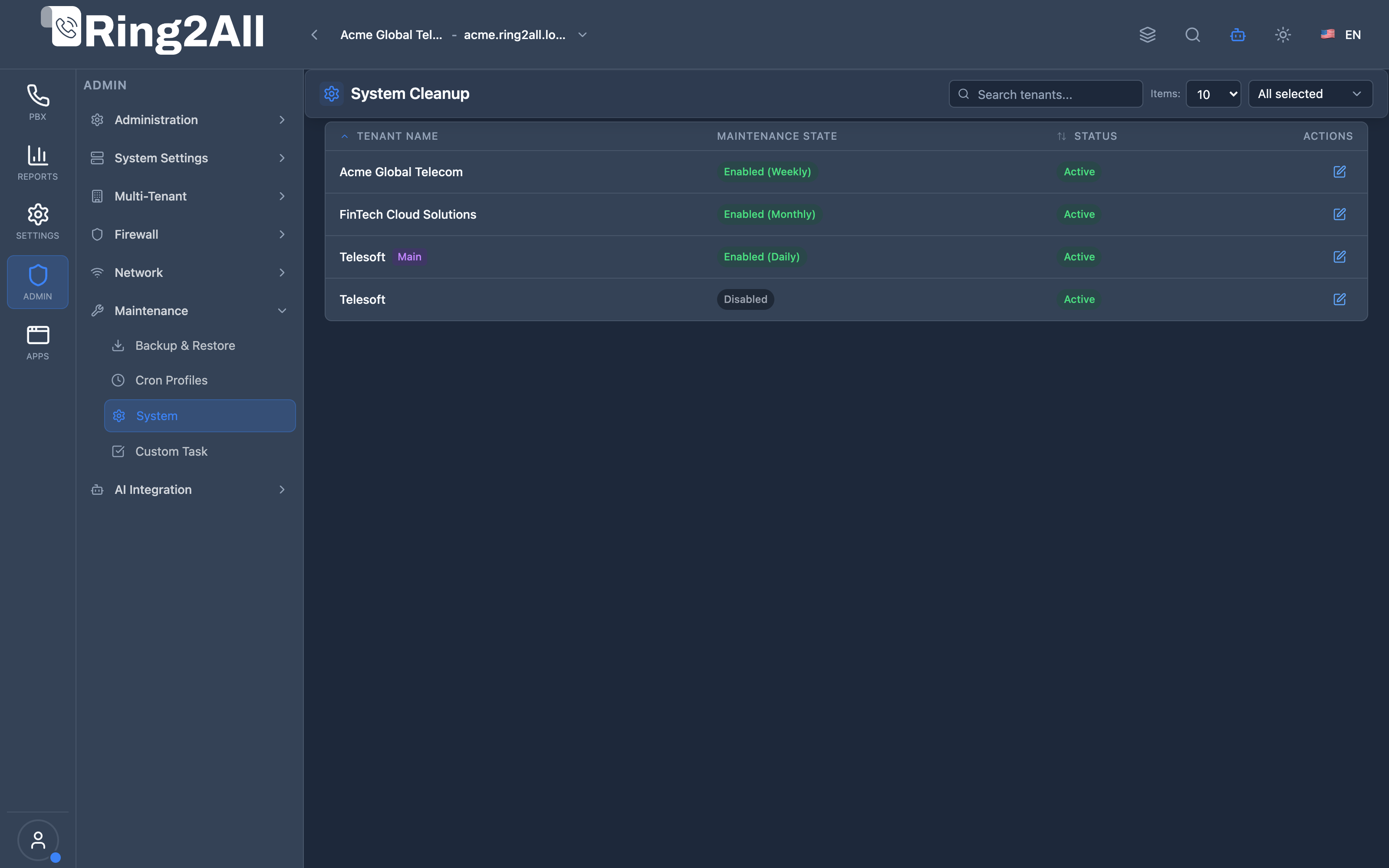
Section titled “Screenshots & Visual Interface”Multi-Tenant System Maintenance Directory
Section titled “Multi-Tenant System Maintenance Directory”Overview of provisioned tenants, individual cleanup enablement states, active execution intervals, and operational availability indicators.
Tenant System Cleanup & Retention Parameters
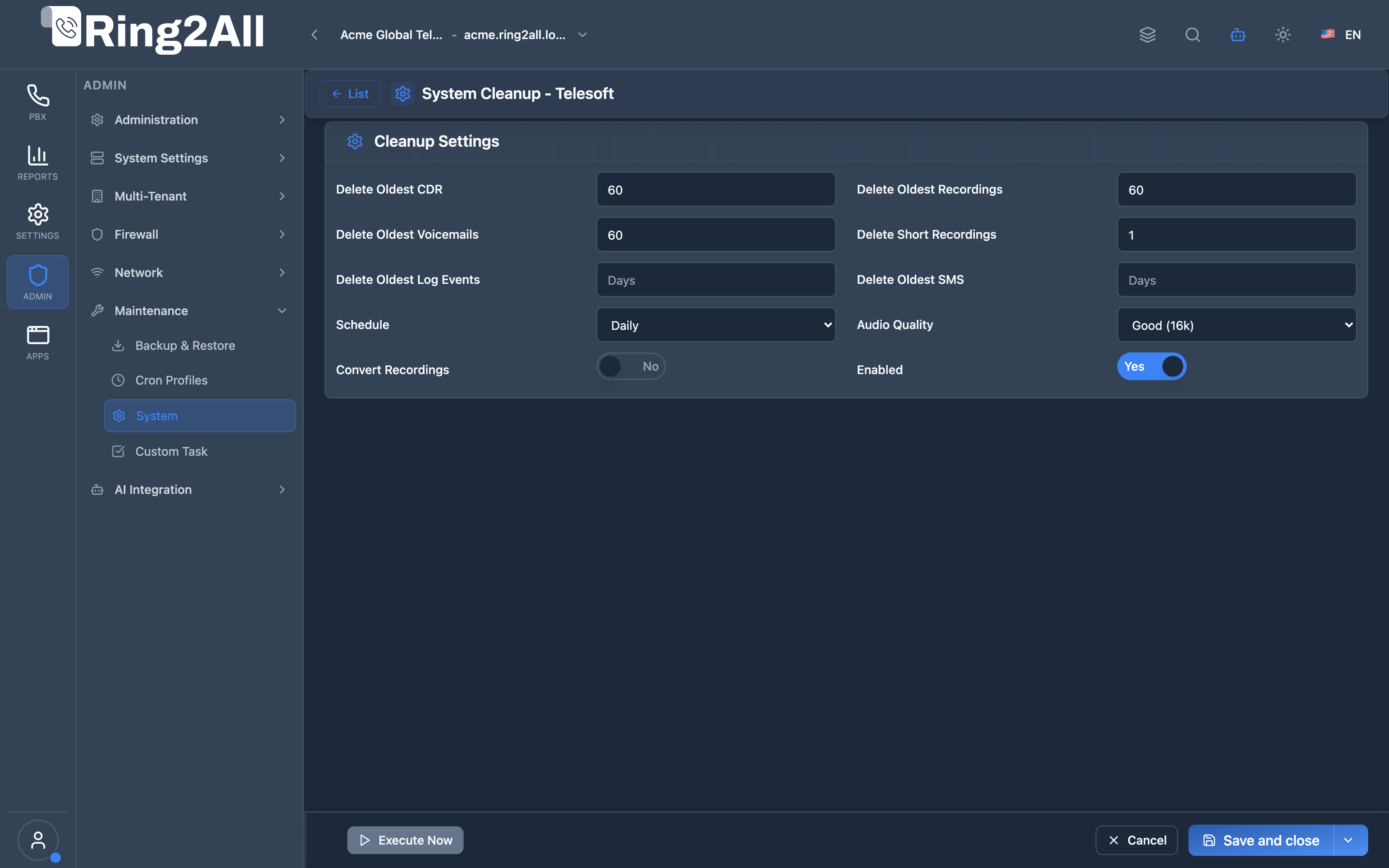
Section titled “Tenant System Cleanup & Retention Parameters”Detailed data lifecycle controller governing retention periods for CDRs, calls, voicemails, SMS, log streams, automatic audio transcoding (Good 16k, High 32k, Lossless WAV), and immediate execution controls.
🎯 User Roles & Key Capabilities
Section titled “🎯 User Roles & Key Capabilities”| Role | Access Level | Responsibilities & Capabilities |
|---|---|---|
| PBX Super Administrator | Full Access (RW) |
Configure global data retention thresholds, establish audio transcoding rules, audit disk consumption, and trigger emergency cleanup runs. |
| Data Compliance & Governance Lead | Policy Management (RW) |
Mandate statutory retention windows for call recordings and CDRs (e.g. 90 days vs 7 years) to comply with telecom regulations. |
| System Operations & SRE | Monitoring & Maintenance (RW) |
Prevent disk exhaustion on media storage volumes (/var/spool/freeswitch/recordings) and monitor automated cleanup cron executions. |
| AI Platform Copilot / MCP Agent | Telemetry & Audit (RO) |
Execute get_system_cleanup_status to evaluate active retention limits and audit compliance before executing storage modifications. |
1. Module Overview (Technical)
Section titled “1. Module Overview (Technical)”What Is System Cleanup?
Section titled “What Is System Cleanup?”System Cleanup is a maintenance module that automatically removes old system files and data to free up storage space. It supports per-tenant configuration for CDR, recordings, voicemails, SMS, and log events.
Architecture
Section titled “Architecture”┌─────────────────────────────────────────────────────────────────┐│ System Cleanup Architecture │├─────────────────────────────────────────────────────────────────┤│ ││ Per-Tenant Cleanup Settings ││ ┌──────────────────────────────────────────────────────────┐ ││ │ │ ││ │ Tenant: Acme Corporation │ ││ │ ┌────────────────────────────────────────────────────┐ │ ││ │ │ │ │ ││ │ │ Delete Oldest CDR: 90 days │ │ ││ │ │ Delete Oldest Recordings: 30 days │ │ ││ │ │ Delete Oldest Voicemails: 60 days │ │ ││ │ │ Delete Short Recordings: < 3 seconds │ │ ││ │ │ Delete Oldest Log Events: 30 days │ │ ││ │ │ Delete Oldest SMS: 90 days │ │ ││ │ │ │ │ ││ │ │ Schedule: Daily │ │ ││ │ │ Convert Recordings: Yes (16k quality) │ │ ││ │ │ │ │ ││ │ └────────────────────────────────────────────────────┘ │ ││ │ │ ││ └──────────────────────────────────────────────────────────┘ ││ │ ││ ▼ Scheduled execution ││ ┌──────────────────────────────────────────────────────────┐ ││ │ Cleanup Jobs │ ││ │ │ ││ │ Daily at 2:00 AM: │ ││ │ ├─ Delete CDR older than 90 days │ ││ │ ├─ Delete recordings older than 30 days │ ││ │ ├─ Delete recordings shorter than 3 seconds │ ││ │ ├─ Delete voicemails older than 60 days │ ││ │ ├─ Delete log events older than 30 days │ ││ │ ├─ Delete SMS older than 90 days │ ││ │ └─ Convert recordings to efficient format │ ││ │ │ ││ └──────────────────────────────────────────────────────────┘ ││ │ ││ ▼ Storage freed ││ ┌──────────────────────────────────────────────────────────┐ ││ │ Storage Space │ ││ │ │ ││ │ Before: █████████████████████ 85% used │ ││ │ After: ████████ 35% used │ ││ │ │ ││ └──────────────────────────────────────────────────────────┘ ││ │└─────────────────────────────────────────────────────────────────┘2. Module Overview (Commercial/Business)
Section titled “2. Module Overview (Commercial/Business)”Business Value
Section titled “Business Value”System Cleanup provides automated storage management:
| Without Cleanup | With Cleanup |
|---|---|
| Storage fills up | Auto-managed |
| Manual deletion | Scheduled jobs |
| Compliance risk | Retention policies |
| Server slowdown | Optimized storage |
Use Cases
Section titled “Use Cases”-
Storage Management
- Prevent disk full
- Automated cleanup
-
Compliance
- Retention policies
- Data lifecycle
-
Cost Control
- Reduce storage costs
- Optimize space
-
Performance
- Faster queries
- Less I/O load
Feature Highlights
Section titled “Feature Highlights”| Feature | Benefit |
|---|---|
| Per-Tenant | Individual policies |
| Multiple Types | CDR, recordings, etc. |
| Schedule | Daily/weekly/monthly |
| Short Recordings | Remove useless files |
| Audio Conversion | Save space |
| Execute Now | Manual trigger |
3. Module Overview (End User/Administrator)
Section titled “3. Module Overview (End User/Administrator)”What Can You Do?
Section titled “What Can You Do?”- Configure cleanup per tenant
- Set retention days for each data type
- Delete short recordings
- Schedule automatic cleanup
- Convert recordings to save space
- Run cleanup manually
- Enable/disable cleanup jobs
System Cleanup - Tenant List
Section titled “System Cleanup - Tenant List”┌─────────────────────────────────────────────────────────────────┐│ System Cleanup │├─────────────────────────────────────────────────────────────────┤│ ││ Configure automatic cleanup of old system files and recordings││ ││ [🔍 Search tenants...] ││ ││ ┌───────────────────────────────────────────────────────────┐ ││ │ Tenant Name │ Maintenance State│ Status │ ││ ├──────────────────┼──────────────────┼────────────────────┤ ││ │ Acme Corporation │ ● Enabled │ Last: Today 2:00 │ ││ │ Beta Company │ ● Enabled │ Last: Today 2:00 │ ││ │ Test Tenant │ ○ Disabled │ Never │ ││ │ Main │ ● Enabled │ Last: Today 2:00 │ ││ └───────────────────────────────────────────────────────────┘ ││ ││ Click a tenant to configure cleanup settings ││ │└─────────────────────────────────────────────────────────────────┘Cleanup Settings
Section titled “Cleanup Settings”┌─────────────────────────────────────────────────────────────────┐│ System Cleanup │├─────────────────────────────────────────────────────────────────┤│ ││ [← List] Tenant: Acme Corporation ││ ││ ▼ Cleanup Settings ││ ││ ┌─────────────────────────────────────────────────────────────┐││ │ │││ │ Enabled: ✓ │││ │ Enable or disable the automatic cleanup job │││ │ │││ │ Schedule: [Daily ▼] │││ │ None | Daily | Weekly | Monthly │││ │ │││ │ ────────────────────────────────────────────────────────── │││ │ │││ │ Delete Oldest CDR: [90 ] days │││ │ Delete CDR records older than this many days │││ │ (Leave empty to keep all records) │││ │ │││ │ Delete Oldest Recordings: [30 ] days │││ │ Delete call recordings older than this many days │││ │ │││ │ Delete Oldest Voicemails: [60 ] days │││ │ Delete voicemail messages older than this many days │││ │ │││ │ Delete Short Recordings: [3 ] seconds │││ │ Delete recordings shorter than this (removes empty files)│││ │ │││ │ Delete Oldest Log Events: [30 ] days │││ │ Delete log events older than this many days │││ │ │││ │ Delete Oldest SMS: [90 ] days │││ │ Delete SMS messages older than this many days │││ │ │││ │ ────────────────────────────────────────────────────────── │││ │ │││ │ Convert Recordings: ✓ │││ │ Convert recordings to efficient format to save space │││ │ │││ │ Audio Quality: [Good (16k) ▼] │││ │ Good (16k) | High (32k) | Lossless (WAV) │││ │ │││ └─────────────────────────────────────────────────────────────┘││ ││ [Save] [Execute Now] ││ │└─────────────────────────────────────────────────────────────────┘Quick Tips
Section titled “Quick Tips”[!TIP] Leave Empty: Leave days empty to keep all records.
[!TIP] Short Recordings: Set to 3 seconds to remove empty recordings.
[!WARNING] Permanent Deletion: Deleted data cannot be recovered!
4. Configuration Sections
Section titled “4. Configuration Sections”Data Type Settings
Section titled “Data Type Settings”| Field | Description |
|---|---|
| Delete Oldest CDR | CDR retention (days) |
| Delete Oldest Recordings | Recording retention |
| Delete Oldest Voicemails | Voicemail retention |
| Delete Short Recordings | Min duration (seconds) |
| Delete Oldest Log Events | Log retention |
| Delete Oldest SMS | SMS retention |
Schedule Settings
Section titled “Schedule Settings”| Field | Description |
|---|---|
| Enabled | Job on/off |
| Schedule | Run frequency |
Audio Settings
Section titled “Audio Settings”| Field | Description |
|---|---|
| Convert Recordings | Enable conversion |
| Audio Quality | Conversion quality |
5. Settings Reference
Section titled “5. Settings Reference”Schedule Options
Section titled “Schedule Options”| Option | Description |
|---|---|
| None | Manual only |
| Daily | Run every day |
| Weekly | Run every week |
| Monthly | Run every month |
Audio Quality Options
Section titled “Audio Quality Options”| Quality | Bitrate | Use Case |
|---|---|---|
| Good (16k) | 16 kbps | Maximum space saving |
| High (32k) | 32 kbps | Balance quality/size |
| Lossless (WAV) | Original | Keep quality |
Retention Guidelines
Section titled “Retention Guidelines”| Data Type | Minimum | Typical | Compliance |
|---|---|---|---|
| CDR | 30 days | 90 days | 1-7 years |
| Recordings | 30 days | 90 days | Per policy |
| Voicemails | 30 days | 60 days | 30-90 days |
| Log Events | 7 days | 30 days | Per policy |
| SMS | 30 days | 90 days | Per policy |
Storage Impact
Section titled “Storage Impact”| Data Type | Size Impact | Cleanup Benefit |
|---|---|---|
| Recordings | Largest | Highest savings |
| CDR | Medium | Faster queries |
| Voicemails | Medium | Good savings |
| Logs | Small | Improved performance |
| SMS | Small | Minor savings |
Model Context Protocol (MCP) AI Integration
Section titled “Model Context Protocol (MCP) AI Integration”The System Cleanup module provides typed status endpoints to the Model Context Protocol (MCP), empowering the Platform Copilot to audit data lifecycle settings, retention horizons, and storage optimization policies.
Available MCP Tools
Section titled “Available MCP Tools”| Tool Name | Scope | Description |
|---|---|---|
get_system_cleanup_status |
Retention Audit (RO) |
Retrieves automated retention and cleanup settings for CDR history, call recordings, voicemails, log streams, and audio transcoding. |
diagnose_system_issue |
Top-Level Triage | Accepts a high-level operational symptom (e.g. “calls dropping”, “WebRTC won’t connect”), evaluates core telephony engine health, disk storage/inodes, database latency, and dispatches to the exact specialized module diagnostic. |
Tool Schemas & Payloads
Section titled “Tool Schemas & Payloads”get_system_cleanup_status
Section titled “get_system_cleanup_status”{ "name": "get_system_cleanup_status", "description": "Retrieves automated retention and cleanup settings for CDR history, call recordings, and voicemails.", "parameters": { "type": "object", "properties": {} }}diagnose_system_issue
Section titled “diagnose_system_issue”{ "name": "diagnose_system_issue", "description": "Top-level triage tool that evaluates PBX symptoms, checks disk/engine health, and directs to specialized diagnostic tools.", "parameters": { "type": "object", "properties": { "symptom": { "type": "string", "description": "The operational symptom or problem observed (e.g. 'Calls dropping after 30 seconds')" }, "entity": { "type": "string", "description": "Optional entity involved (e.g. extension '1001', trunk 'Telnyx')" } }, "required": ["symptom"] }}Realistic Execution Response:
{ "success": true, "data": { "cleanupPolicy": { "enabled": true, "schedule": "daily", "deleteOldestCdrDays": 180, "deleteOldestRecordingsDays": 90, "deleteOldestVoicemailsDays": 60, "deleteShortRecordingsSec": 3, "deleteOldestLogEventsDays": 30, "deleteOldestSmsDays": 90, "convertRecordings": true, "audioQuality": "good" } }}Bilingual Natural Language Prompt Examples
Section titled “Bilingual Natural Language Prompt Examples”English Prompts
Section titled “English Prompts”- “Copilot, show me the current system retention and cleanup policy settings.”
- “How many days of call recordings and CDRs are retained before automatic deletion?”
- “Is audio recording conversion to 16k mono enabled in the cleanup configuration?”
Spanish Prompts
Section titled “Spanish Prompts”- “Copilot, muéstrame las políticas actuales de retención y limpieza del sistema.”
- “¿Cuántos días de grabaciones y CDRs se conservan antes de su depuración automática?”
- “Verifica si la limpieza automática está activa y con qué frecuencia se ejecuta.”
Enterprise Safeguards & Execution Boundaries
Section titled “Enterprise Safeguards & Execution Boundaries”- Multi-Tenant Retention Isolation: Retention parameters are bound to numeric
tenant_id. Sub-tenant policies only purge records belonging to their respective domains. - Safe Minimum Horizons: Policies prevent setting negative or invalid retention days, shielding against accidental mass deletion of telephony audio.
- Audit Trail Compliance: Every cleanup execution (whether triggered automatically or on-demand) writes a detailed audit entry recording the exact number of deleted files and bytes freed.
6. Common Scenarios & Examples
Section titled “6. Common Scenarios & Examples”Scenario 1: Standard Cleanup Policy
Section titled “Scenario 1: Standard Cleanup Policy”- Select tenant
- Enable = ✓
- Schedule = Daily
- CDR = 90 days
- Recordings = 30 days
- Voicemails = 60 days
- Short recordings = 3 seconds
- Save
Scenario 2: Compliance (Keep Long)
Section titled “Scenario 2: Compliance (Keep Long)”- CDR = 365 days (1 year)
- Recordings = 365 days
- Voicemails = 90 days
- Short recordings = 0 (keep all)
- Schedule = Weekly
- Save
Scenario 3: Space Emergency
Section titled “Scenario 3: Space Emergency”- CDR = 30 days (minimum)
- Recordings = 7 days (aggressive)
- Voicemails = 30 days
- Short recordings = 5 seconds
- Convert Recordings = ✓
- Audio Quality = Good (16k)
- Save
- Execute Now
Scenario 4: Convert Without Deleting
Section titled “Scenario 4: Convert Without Deleting”- CDR = (leave empty)
- Recordings = (leave empty)
- Convert Recordings = ✓
- Audio Quality = High (32k)
- Save
- Only converts, no deletions
7. Limitations & Important Notes
Section titled “7. Limitations & Important Notes”Technical Notes
Section titled “Technical Notes”[!NOTE] Per-Tenant: Each tenant has separate settings.
[!NOTE] Schedule Time: Usually runs at 2:00 AM.
[!CAUTION] Irreversible: Deleted data cannot be recovered!
Best Practices
Section titled “Best Practices”- Backup First: Ensure backups before aggressive cleanup
- Start Conservative: Begin with longer retention
- Monitor Storage: Watch disk usage trends
- Test Execute: Run Execute Now to verify
- Compliance Check: Verify retention requirements
Data Types Explained
Section titled “Data Types Explained”| Data Type | What It Is |
|---|---|
| CDR | Call Detail Records (metadata) |
| Recordings | Audio files of calls |
| Voicemails | User voicemail messages |
| Log Events | System and audit logs |
| SMS | Text messages (if enabled) |
8. Troubleshooting Tips
Section titled “8. Troubleshooting Tips”Common Issues
Section titled “Common Issues”| Symptom | Possible Cause | Solution |
|---|---|---|
| Disk still full | Short retention | Reduce days |
| Job not running | Disabled | Enable cleanup |
| Wrong files deleted | Wrong settings | Check config |
| Slow cleanup | Many files | Wait or schedule |
Check Storage
Section titled “Check Storage”# Check disk usagedf -h
# Check recordings folderdu -sh /var/lib/freeswitch/recordings/
# Check voicemailsdu -sh /var/lib/freeswitch/voicemail/
# List large filesfind /var/lib/freeswitch -size +100M -type fCheck Cleanup Status
Section titled “Check Cleanup Status”# View cleanup logtail -f /var/log/ring2all/cleanup.log
# Check cron schedulecrontab -l | grep cleanup9. Glossary
Section titled “9. Glossary”| Term | Definition |
|---|---|
| CDR | Call Detail Records |
| Retention | How long to keep data |
| Cleanup | Automatic deletion |
| Conversion | Change audio format |
| Execute Now | Manual cleanup run |
Documentation last updated: January 2026