

Backup & Restore Module Documentation
Table of Contents
Section titled “Table of Contents”- Navigation & Access
- Screenshots & Visual Interface
- 🎯 User Roles & Key Capabilities
- Module Overview (Technical)
- Module Overview (Commercial/Business)
- Module Overview (End User/Administrator)
- Configuration Sections
- Settings Reference
- Model Context Protocol (MCP) AI Integration
- Common Scenarios & Examples
- Limitations & Important Notes
- Troubleshooting Tips
- Glossary
Navigation & Access
Section titled “Navigation & Access”To access the Backup & Restore module:
- Log in to the Ring2All Web Portal (
https://<domain-or-ip>/login). - In the left navigation sidebar, expand Administration.
- Under Maintenance, click Backup & Restore (
/admin/maintenance/backup). - Monitor scheduled backup jobs, storage destinations, last execution timestamps, and success/failure statuses.
- Click + Add to create a new automated backup job (
/admin/maintenance/backup?mode=create), click Restore to upload and recover a snapshot, or click the Play button on any job row to trigger an immediate ad-hoc backup run.
Screenshots & Visual Interface
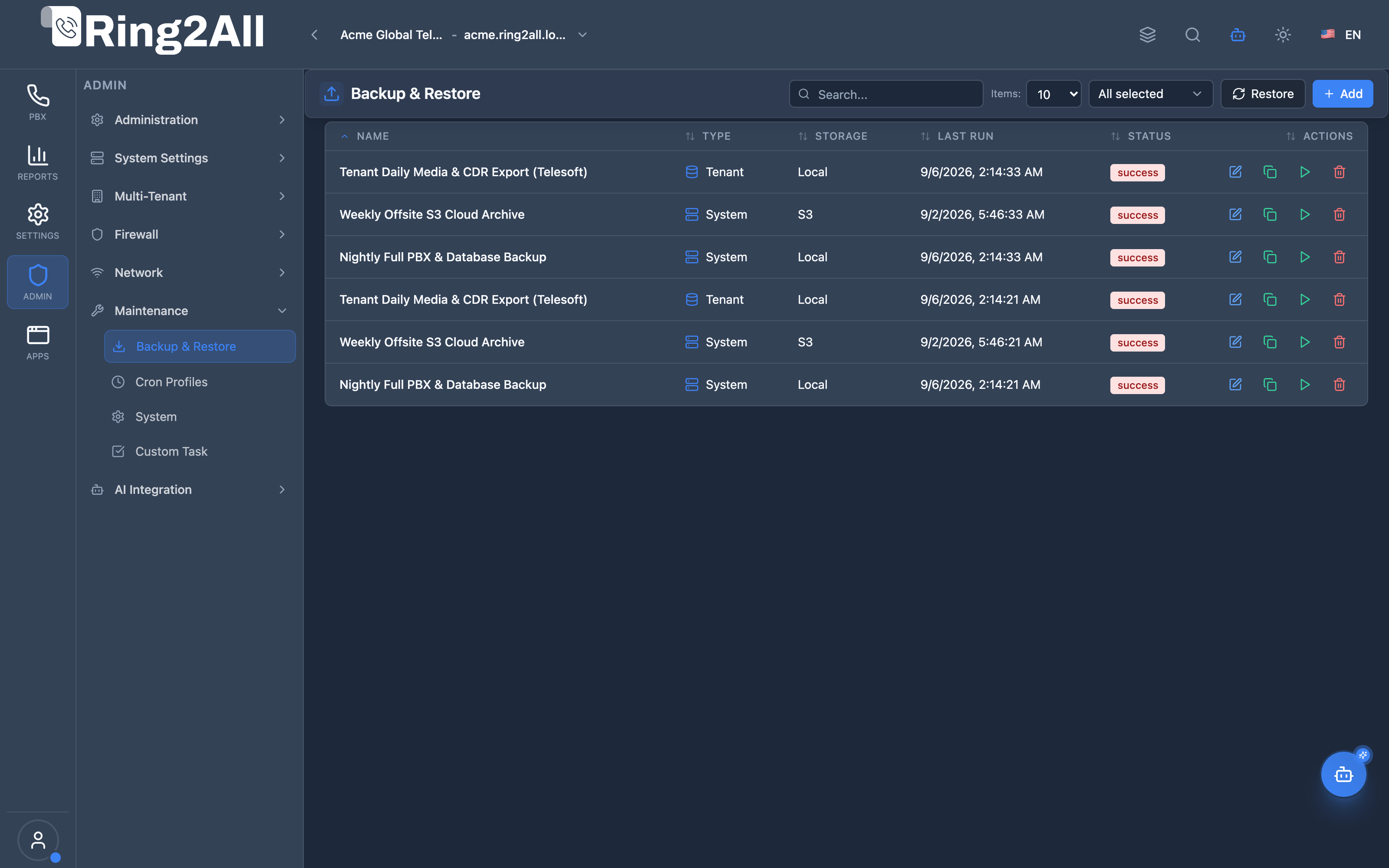
Section titled “Screenshots & Visual Interface”Backup Jobs Management & Schedule Registry
Section titled “Backup Jobs Management & Schedule Registry”Central backup orchestration dashboard listing active backup tasks, target scope (system-wide or tenant-specific), storage backends (Local Filesystem, Amazon S3, SFTP), execution telemetry, and lifecycle action buttons.
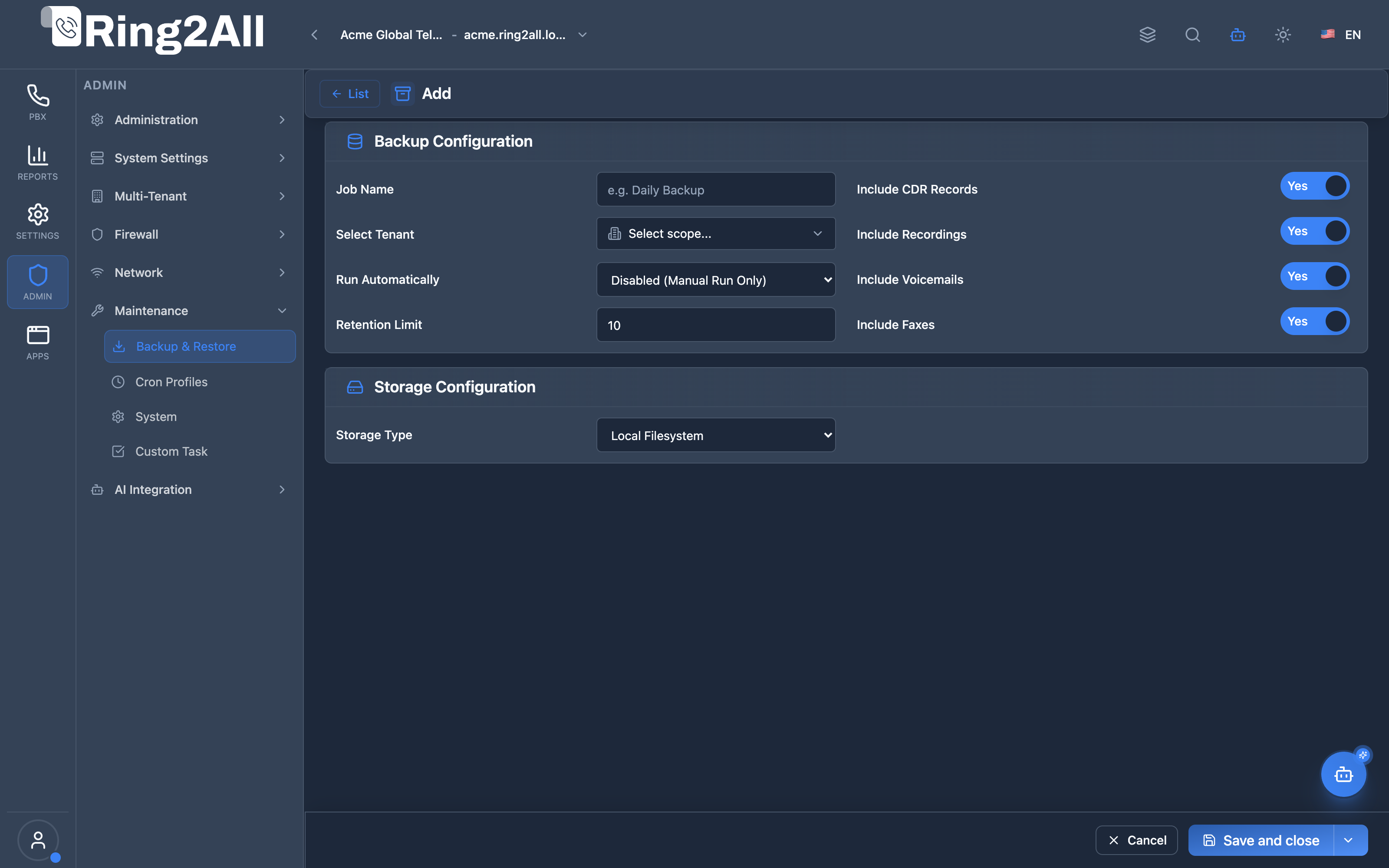
Backup Job Policy & Payload Definition
Section titled “Backup Job Policy & Payload Definition”Configuration editor for provisioning new backup policies, specifying tenant scope, binding automated cron schedules, defining snapshot retention caps, choosing storage repositories, and toggling inclusion of CDRs, audio recordings, voicemails, and faxes.
🎯 User Roles & Key Capabilities
Section titled “🎯 User Roles & Key Capabilities”| Role | Access Level | Responsibilities & Capabilities |
|---|---|---|
| PBX Super Administrator | Full Access (RW) |
Provision global and tenant backup policies, initiate emergency system restore procedures, configure cloud storage (S3/SFTP), and trigger ad-hoc snapshots. |
| Tenant Administrator | Tenant Scoped (RW) |
Schedule automated backups for their own tenant domain, configure local retention limits, and export tenant configuration archives. |
| DevOps & Backup Operator | Execution & Monitoring (RW) |
Monitor backup completion times, verify archive checksum integrity, validate storage disk space, and manage cron profile triggers. |
| AI Platform Copilot / MCP Agent | Automation & Telemetry (RW) |
Execute get_backup_status to audit backup freshness and invoke create_system_backup ahead of high-risk operational maintenance tasks. |
1. Module Overview (Technical)
Section titled “1. Module Overview (Technical)”What Is Backup & Restore?
Section titled “What Is Backup & Restore?”Backup & Restore is a data protection module that creates and manages backup jobs for system configuration and media files. It supports multiple storage destinations and data type selection with automatic retention management.
Architecture
Section titled “Architecture”┌─────────────────────────────────────────────────────────────────┐│ Backup & Restore Architecture │├─────────────────────────────────────────────────────────────────┤│ ││ Backup Jobs ││ ┌──────────────────────────────────────────────────────────┐ ││ │ │ ││ │ Job: Daily Backup │ ││ │ ┌────────────────────────────────────────────────────┐ │ ││ │ │ │ │ ││ │ │ Scope: All Tenants │ │ ││ │ │ │ │ ││ │ │ Data Types: │ │ ││ │ │ ├─ ✓ CDR Records │ │ ││ │ │ ├─ ✓ Recordings │ │ ││ │ │ ├─ ✓ Voicemails │ │ ││ │ │ └─ ✓ Faxes │ │ ││ │ │ │ │ ││ │ │ Schedule: Automatic (Daily) │ │ ││ │ │ Retention: 7 backups │ │ ││ │ │ │ │ ││ │ └────────────────────────────────────────────────────┘ │ ││ │ │ ││ └──────────────────────────────────────────────────────────┘ ││ │ ││ ▼ Stores backups ││ ┌──────────────────────────────────────────────────────────┐ ││ │ Storage Destinations │ ││ │ │ ││ │ ┌─────────────┐ ┌─────────────┐ ┌─────────────┐ │ ││ │ │ Local │ │ S3 Storage │ │ FTP/SFTP │ │ ││ │ │ Filesystem │ │ AWS/MinIO │ │ Server │ │ ││ │ └─────────────┘ └─────────────┘ └─────────────┘ │ ││ │ │ ││ └──────────────────────────────────────────────────────────┘ ││ │ ││ ▼ Available backups ││ ┌──────────────────────────────────────────────────────────┐ ││ │ Backups List │ ││ │ │ ││ │ backup_2024-01-16_daily.tar.gz 512 MB ⬇️ 🗑️ │ ││ │ backup_2024-01-15_daily.tar.gz 498 MB ⬇️ 🗑️ │ ││ │ backup_2024-01-14_daily.tar.gz 505 MB ⬇️ 🗑️ │ ││ │ │ ││ └──────────────────────────────────────────────────────────┘ ││ │└─────────────────────────────────────────────────────────────────┘2. Module Overview (Commercial/Business)
Section titled “2. Module Overview (Commercial/Business)”Business Value
Section titled “Business Value”Backup & Restore provides data protection:
| Without Backups | With Backups |
|---|---|
| Data loss risk | Recoverable |
| Manual exports | Automated jobs |
| Single location | Multiple destinations |
| No retention | Automatic cleanup |
Use Cases
Section titled “Use Cases”-
Disaster Recovery
- System failure recovery
- Configuration restoration
-
Data Compliance
- CDR archival
- Record retention
-
Migration
- Server migration
- Cloud transfer
-
Tenant Backup
- Per-tenant exports
- Selective backup
Feature Highlights
Section titled “Feature Highlights”| Feature | Benefit |
|---|---|
| Multiple Storage | Local, S3, FTP |
| Selective Data | Choose what to backup |
| Tenant Scope | All or specific tenant |
| Retention | Automatic cleanup |
| Run Now | Manual execution |
| Download | Direct file download |
3. Module Overview (End User/Administrator)
Section titled “3. Module Overview (End User/Administrator)”What Can You Do?
Section titled “What Can You Do?”- Create backup jobs
- Configure storage destinations
- Select data types to include
- Set retention limits
- Run backups manually
- Download backup files
- Restore from backup
- Delete old backups
Backup & Restore - Main View
Section titled “Backup & Restore - Main View”┌─────────────────────────────────────────────────────────────────┐│ Backup & Restore │├─────────────────────────────────────────────────────────────────┤│ ││ [General] [Storage] [Backups] ││ ││ [+ New Backup Job] ││ ││ ┌───────────────────────────────────────────────────────────┐ ││ │ Name │ Type │ Storage │ Last Run │ Status │ ││ ├──────────────┼───────────┼───────────┼──────────┼────────┤ ││ │ Daily Backup │ All Tenants│ S3 │ Today │● Success│ ││ │ Weekly Full │ All Tenants│ Local │ Jan 14 │● Success│ ││ │ Tenant A │ Specific │ FTP │ Jan 16 │● Success│ ││ └───────────────────────────────────────────────────────────┘ ││ ││ Actions: [▶ Run Now] [✏️ Edit] [🗑️ Delete] ││ │└─────────────────────────────────────────────────────────────────┘Create/Edit Backup Job
Section titled “Create/Edit Backup Job”┌─────────────────────────────────────────────────────────────────┐│ New Backup Job │├─────────────────────────────────────────────────────────────────┤│ ││ ▼ Backup Configuration ││ Configure the scope and settings for this backup job ││ ││ ┌─────────────────────────────────────────────────────────────┐││ │ │││ │ Job Name: [Daily Backup ] │││ │ Descriptive name for this backup job │││ │ │││ │ Scope: [All Tenants ▼] │││ │ All Tenants | Specific Tenant │││ │ │││ │ Run Automatically: [Disabled (Manual Run Only) ▼] │││ │ Define how and when this backup should run │││ │ │││ │ Retention Limit: [7 ] backups │││ │ Maximum number of backup files to keep │││ │ │││ │ ────────────────────────────────────────────────────────── │││ │ │││ │ Include in Backup: │││ │ ✓ Include CDR Records │││ │ ✓ Include Recordings │││ │ ✓ Include Voicemails │││ │ ✓ Include Faxes │││ │ │││ └─────────────────────────────────────────────────────────────┘││ ││ ▼ Storage Configuration ││ Configure where the backups will be stored ││ ││ ┌─────────────────────────────────────────────────────────────┐││ │ │││ │ Storage Type: [S3 Compatible Object Storage ▼] │││ │ Local Filesystem | S3 Compatible | FTP / SFTP │││ │ │││ │ S3 Bucket: [pbx-backups ] │││ │ Region: [us-east-1 ] │││ │ Access Key: [AKIAXXXXXXXX ] │││ │ Secret Key: [********************************] │││ │ │││ └─────────────────────────────────────────────────────────────┘││ ││ ▼ Console Execution ││ Command to run this backup job from terminal ││ ││ ┌─────────────────────────────────────────────────────────────┐││ │ $ ring2all backup run daily-backup │││ └─────────────────────────────────────────────────────────────┘││ ││ [Save] [Cancel] ││ │└─────────────────────────────────────────────────────────────────┘Backups Tab - Available Files
Section titled “Backups Tab - Available Files”┌─────────────────────────────────────────────────────────────────┐│ Backup & Restore │├─────────────────────────────────────────────────────────────────┤│ ││ [General] [Storage] [Backups] ││ ││ Available Backups ││ ││ ┌───────────────────────────────────────────────────────────┐ ││ │ Filename │ Date │ Size │ ││ ├────────────────────────────────────┼───────────┼─────────┤ ││ │ backup_daily_2024-01-16_0800.tar.gz│ Jan 16 08:00│ 512 MB│ ││ │ backup_daily_2024-01-15_0800.tar.gz│ Jan 15 08:00│ 498 MB│ ││ │ backup_daily_2024-01-14_0800.tar.gz│ Jan 14 08:00│ 505 MB│ ││ │ backup_daily_2024-01-13_0800.tar.gz│ Jan 13 08:00│ 492 MB│ ││ └───────────────────────────────────────────────────────────┘ ││ ││ Actions: [⬇️ Download] [🔄 Restore] [🗑️ Delete] ││ │└─────────────────────────────────────────────────────────────────┘Quick Tips
Section titled “Quick Tips”[!TIP] Retention: Set retention to avoid filling storage.
[!TIP] Recordings: Exclude recordings for smaller backups.
[!WARNING] Restore: Restoring will overwrite current data!
4. Configuration Sections
Section titled “4. Configuration Sections”Backup Configuration
Section titled “Backup Configuration”| Field | Description |
|---|---|
| Job Name | Backup identifier |
| Scope | All Tenants or Specific |
| Run Automatically | Schedule or manual |
| Retention Limit | Max backups to keep |
Data Selection
Section titled “Data Selection”| Option | Description |
|---|---|
| CDR Records | Call history |
| Recordings | Call recordings |
| Voicemails | Voicemail messages |
| Faxes | Fax files |
Storage Configuration
Section titled “Storage Configuration”| Field | Description |
|---|---|
| Storage Type | Destination type |
| S3 Bucket | Bucket name |
| Region | AWS region |
| Access Key | S3 credentials |
| Secret Key | S3 secret |
| Host | FTP hostname |
| Port | FTP port |
| User | FTP username |
| Password | FTP password |
| Path | Directory path |
5. Settings Reference
Section titled “5. Settings Reference”Storage Types
Section titled “Storage Types”| Type | Description | Use Case |
|---|---|---|
| Local | Server filesystem | Quick access |
| S3 | Object storage | Cloud backup |
| FTP/SFTP | Remote server | Off-site storage |
Scope Options
Section titled “Scope Options”| Scope | Description |
|---|---|
| All Tenants | Complete backup |
| Specific Tenant | Single tenant only |
Data Type Impact on Size
Section titled “Data Type Impact on Size”| Data Type | Size Impact | Recommendation |
|---|---|---|
| CDR | Small | Always include |
| Recordings | Large | Exclude if space limited |
| Voicemails | Medium | Include for user recovery |
| Faxes | Medium | Include if used |
Retention Guidelines
Section titled “Retention Guidelines”| Environment | Recommendation |
|---|---|
| Production | 7-30 days |
| Development | 3-7 days |
| Compliance | Per policy (90+ days) |
Model Context Protocol (MCP) AI Integration
Section titled “Model Context Protocol (MCP) AI Integration”The Backup & Restore module interfaces directly with the Model Context Protocol (MCP), providing the Platform Copilot and autonomous operations pipelines with typed tools to audit backup repository health and safely trigger on-demand system snapshots.
Available MCP Tools
Section titled “Available MCP Tools”| Tool Name | Scope | Description |
|---|---|---|
get_backup_status |
Telemetry & Audit (RO) |
Retrieves backup repository status, registered backup jobs, storage targets (local, S3, FTP), and archive retention limits. |
create_system_backup |
Administrative Action (RW) |
Safely creates an on-demand database and configuration backup archive for the platform with multi-database dumps. |
Tool Schemas & Payloads
Section titled “Tool Schemas & Payloads”get_backup_status
Section titled “get_backup_status”{ "name": "get_backup_status", "description": "Retrieves backup repository status, registered backup jobs, storage targets (local, S3, FTP), and archive retention limits.", "parameters": { "type": "object", "properties": { "limit": { "type": "number", "description": "Maximum number of jobs to return (default: 10)." } } }}Realistic Execution Response:
{ "success": true, "data": { "totalJobs": 2, "jobs": [ { "id": 1, "name": "Daily Production Core Snapshot", "type": "system", "tenantScope": "all", "storageType": "local", "limitCount": 7, "schedule": "Nightly Database Backup (0 2 * * *)", "includes": { "cdr": true, "recordings": false, "voicemails": true }, "isActive": true, "createdAt": "2026-09-01T02:00:00Z" }, { "id": 2, "name": "Weekly Offsite Cloud Archive", "type": "tenant", "tenantScope": "specific", "storageType": "s3", "limitCount": 4, "schedule": "Weekly Sunday Archive (0 3 * * 0)", "includes": { "cdr": true, "recordings": true, "voicemails": true }, "isActive": true, "createdAt": "2026-09-07T03:00:00Z" } ] }}create_system_backup
Section titled “create_system_backup”{ "name": "create_system_backup", "description": "Safely creates an on-demand database and configuration backup archive for the platform.", "parameters": { "type": "object", "properties": { "job_id": { "type": "number", "description": "Optional backup job ID to associate with this archive." } } }}Realistic Execution Response:
{ "success": true, "data": { "message": "System backup archive created successfully.", "archivePath": "/var/backups/ring2all/system-backup-job-1-2026-09-08T11-00-00Z.zip", "jobId": 1, "timestamp": "2026-09-08T11:00:00.123Z" }}Bilingual Natural Language Prompt Examples
Section titled “Bilingual Natural Language Prompt Examples”English Prompts
Section titled “English Prompts”- “Copilot, check the status of our backup jobs and when the last archive was created.”
- “Take an immediate system backup before I start upgrading Telephony Server packages.”
- “Verify how many snapshots are currently retained for the daily production backup job.”
Spanish Prompts
Section titled “Spanish Prompts”- “Copilot, consulta el estado de las tareas de respaldo y cuándo fue la última copia generada.”
- “Crea un respaldo completo del sistema antes de comenzar el mantenimiento de la base de datos.”
- “Verifica qué almacenamiento y retención tiene configurada la tarea de backup principal.”
Enterprise Safeguards & Execution Boundaries
Section titled “Enterprise Safeguards & Execution Boundaries”- Multi-Database Atomicity:
create_system_backupsequentially and safely dumpsss_admin,ss_telephony,ss_cdr, andss_billingwithout locking telephony routing tables. - Multi-Tenant Partitioning: Tenant-scoped backups only extract rows matching the target
tenant_id, guaranteeing zero leakage of cross-tenant CDRs or call recordings. - Storage Retention Quotas: The system enforces strict retention thresholds (
limitCount), automatically purging oldest historical snapshots upon new archive creation to prevent disk exhaustion.
6. Common Scenarios & Examples
Section titled “6. Common Scenarios & Examples”Scenario 1: Create Daily Backup Job
Section titled “Scenario 1: Create Daily Backup Job”- Click New Backup Job
- Name = “Daily Backup”
- Scope = All Tenants
- Run Automatically = Daily
- Retention = 7 backups
- Check all data types
- Storage = S3, enter credentials
- Save
Scenario 2: Run Manual Backup
Section titled “Scenario 2: Run Manual Backup”- Find backup job in list
- Click Run Now
- Wait for completion
- Go to Backups tab
- Download the new backup
Scenario 3: Restore from Backup
Section titled “Scenario 3: Restore from Backup”- Go to Backups tab
- Find desired backup file
- Click Restore
- Confirm restoration
- Wait for completion
- Verify restored data
Scenario 4: Tenant-Specific Backup
Section titled “Scenario 4: Tenant-Specific Backup”- Create New Backup Job
- Scope = Specific Tenant
- Select tenant from dropdown
- Configure data and storage
- Save
- Run Now or schedule
7. Limitations & Important Notes
Section titled “7. Limitations & Important Notes”Technical Notes
Section titled “Technical Notes”[!NOTE] Recordings: Large recordings increase backup size significantly.
[!NOTE] Restore Time: Large backups take longer to restore.
[!CAUTION] Restore Overwrites: Restoration replaces current data!
Best Practices
Section titled “Best Practices”- Regular Backups: Schedule daily or weekly
- Multiple Destinations: Use S3 for redundancy
- Test Restores: Periodically verify backups work
- Retention Policy: Balance storage vs. history
- Off-site Storage: Use S3 or FTP for disaster recovery
Backup vs. Data Type
Section titled “Backup vs. Data Type”| Data Type | Database | Files |
|---|---|---|
| Configuration | Yes | - |
| CDR | Yes | - |
| Recordings | - | Yes (large) |
| Voicemails | Yes | Yes |
| Faxes | Yes | Yes |
8. Troubleshooting Tips
Section titled “8. Troubleshooting Tips”Common Issues
Section titled “Common Issues”| Symptom | Possible Cause | Solution |
|---|---|---|
| Backup fails | Storage full | Increase storage |
| S3 error | Bad credentials | Verify access key |
| FTP error | Connection failed | Check host/port |
| Large backup | Recordings included | Exclude or archive |
Check Backup Status
Section titled “Check Backup Status”# View backup job statusring2all backup status daily-backup
# List available backupsring2all backup list
# Run backup manuallyring2all backup run daily-backupVerify Storage
Section titled “Verify Storage”# Check local storagedf -h /var/backups
# Test S3 connectionaws s3 ls s3://pbx-backups/
# Test FTP connectioncurl -u user:pass ftp://ftp.server.com/9. Glossary
Section titled “9. Glossary”| Term | Definition |
|---|---|
| Backup Job | Configured backup task |
| Retention | Number of backups to keep |
| S3 | Object storage protocol |
| Restore | Recovery from backup |
| Scope | Backup coverage |
Documentation last updated: January 2026