

Time Groups Module Documentation
Table of Contents
Section titled “Table of Contents”- Navigation & Access
- Screenshots & Visual Interface
- Module Overview (Technical)
- Module Overview (Commercial/Business)
- Module Overview (End User/Administrator)
- Schedule Types & Modalities
- Configuration Fields Reference
- Holiday Presets & Quick Setup
- Time Conditions Integration
- Common Scenarios & Examples
- Evaluation Engine & Lua Architecture
- Model Context Protocol (MCP) AI Integration
- Troubleshooting & Diagnostics
- Glossary
Navigation & Access
Section titled “Navigation & Access”To access the Time Groups module:
- Log in to the Ring2All Web Portal.
- In the left navigation sidebar, expand PBX Engine.
- Under Incoming Call Tools, click Time Groups (
/pbx/incoming-tools/time-groups).
Screenshots & Visual Interface
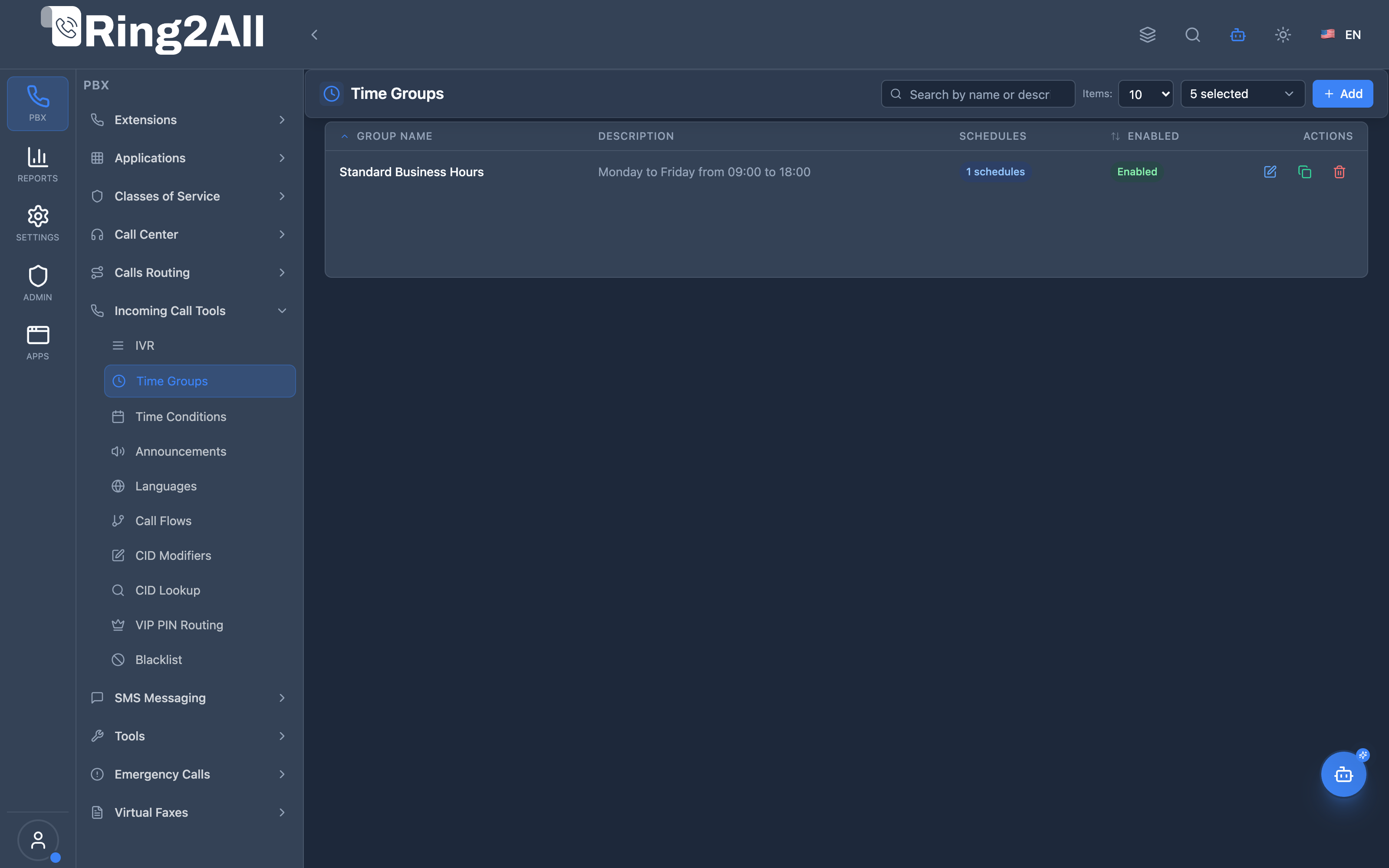
Section titled “Screenshots & Visual Interface”Time Groups Overview
Section titled “Time Groups Overview”Displays all defined schedule groups, schedule rules count, status, and edit shortcuts.
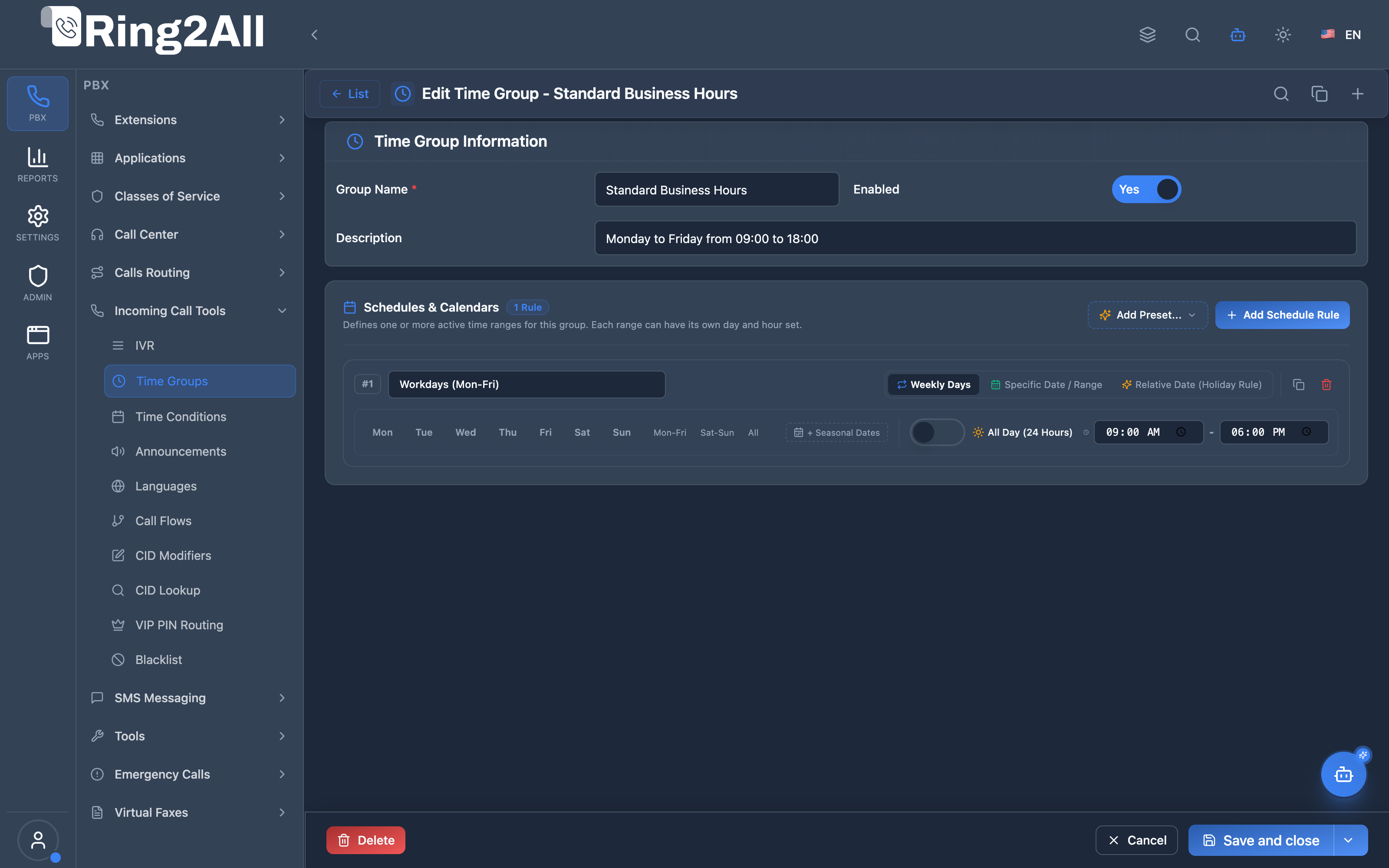
Time Group Configuration Form
Section titled “Time Group Configuration Form”Provides configuration for group name, description, status toggle, and the recurring schedule rules builder (weekly intervals, specific dates, or relative holidays).
1. Module Overview (Technical)
Section titled “1. Module Overview (Technical)”What Are Time Groups?
Section titled “What Are Time Groups?”Time Groups define reusable schedules, calendars, and time intervals used to control time-based call routing. They are referenced by Time Conditions, which evaluate incoming calls in real time and decide whether to route them to a Match Destination (e.g., Main IVR) or a No-Match Destination (e.g., After-Hours Voicemail).
Architecture
Section titled “Architecture”┌─────────────────────────────────────────────────────────────────────────────┐│ Ring2All Time-Based Routing Engine │├─────────────────────────────────────────────────────────────────────────────┤│ ││ Time Group: "Company Holidays & Business Hours" ││ ┌────────────────────────────────────────────────────────────────────────┐ ││ │ Schedule 1 (Weekly): Mon-Fri, 09:00 - 17:00 │ ││ │ Schedule 2 (Specific Date): "Christmas Day", Dec 25 • All Day │ ││ │ Schedule 3 (Relative Date): "Thanksgiving", 4th Thu in Nov • All Day │ ││ │ Schedule 4 (Relative Date): "Memorial Day", Last Mon in May • All Day │ ││ └────────────────────────────────────────────────────────────────────────┘ ││ │ ││ Referenced by: ▼ ││ ┌────────────────────────────────────────────────────────────────────────┐ ││ │ Time Condition: "Main Office Inbound" │ ││ │ │ ││ │ If MATCH (Within configured hours): │ ││ │ → Route to Main IVR / Ring Group │ ││ │ │ ││ │ If NO MATCH (After hours / Holiday closure): │ ││ │ → Route to After-Hours Auto-Attendant / Voicemail │ ││ │ │ ││ │ Manual Override Feature Code: *81 (Toggle via BLF) │ ││ └────────────────────────────────────────────────────────────────────────┘ ││ │ ││ ▼ ││ ┌────────────────────────────────────────────────────────────────────────┐ ││ │ Telephony Server Lua Engine (routing/time_condition.lua) │ ││ │ │ ││ │ 1. Identify tenant and domain_id │ ││ │ 2. Fetch all schedules for assigned time group │ ││ │ 3. Evaluate weekly days, specific dates, or relative holiday rules │ ││ │ 4. Apply override status (override_on / override_off / default) │ ││ │ 5. Route call seamlessly with topology hiding and CDR tagging │ ││ └────────────────────────────────────────────────────────────────────────┘ ││ │└─────────────────────────────────────────────────────────────────────────────┘Key Database Tables
Section titled “Key Database Tables”| Table | Schema | Description |
|---|---|---|
public.time_groups |
ss_telephony |
Time group definitions (domain-scoped) |
public.time_group_schedules |
ss_telephony |
Schedule intervals (Weekly, Specific Dates, Relative Rules) |
public.time_conditions |
ss_telephony |
Routing rules linking Time Groups with Match/No-Match destinations |
Key Source Files
Section titled “Key Source Files”| Component | Path | Description |
|---|---|---|
| Frontend Form View | ring2all/web/src/modules/timeGroups/TimeGroupFormView.tsx |
Time Group creation & editing form |
| Schedules Section UI | ring2all/web/src/modules/timeGroups/components/SchedulesSection.tsx |
Interactive schedule cards, mode switcher & holiday presets |
| Backend Service | ring2all/api/src/modules/telephony/time-groups/services/timeGroupService.ts |
Multi-tenant database service with transactional integrity |
| Routing Handler | telephony/freeswitch/lua/main/xml_handlers/routing/time_condition.lua |
Real-time call routing handler with mathematical relative date evaluation |
| Feature Code Handler | telephony/freeswitch/lua/main/xml_handlers/time_condition/time_condition.lua |
BLF toggle (*81) & audio prompt playback |
2. Module Overview (Commercial/Business)
Section titled “2. Module Overview (Commercial/Business)”Business Value
Section titled “Business Value”Time Groups empower organizations to automate customer interactions around the clock without manual intervention:
| Challenge Without Time Groups | Solution With Ring2All Time Groups |
|---|---|
| Calls ring unattended outside office hours | Automatically routes after-hours calls to specialized greetings or voicemail |
| Need to reprogram floating holidays (like Thanksgiving) every year | Relative Date Rules calculate holidays automatically every year |
| Inability to distinguish individual rules in holiday lists | Named Schedule Labels allow admins to easily track and modify holidays |
| Rigid routing requiring manual switchboard toggles | Full automation with manual BLF feature code override (*81) |
3. Module Overview (End User/Administrator)
Section titled “3. Module Overview (End User/Administrator)”Administrators can configure sophisticated time profiles with zero programming:
- Multiple Schedules per Group: Combine regular weekday hours, weekend hours, and all national holidays inside a single group.
- Named Intervals: Tag each entry with a friendly label (e.g. “Thanksgiving Day”, “Summer Friday Hours”, “Christmas Closure”).
- Natural Language Summary: Every schedule card displays a real-time badge (e.g.,
4th Thursday of November • All Day). - One-Click Holiday Presets: Preload all US or Mexican federal holidays instantly.
- All-Day Mode: 1-click toggle to cover full 24-hour periods without typing times manually.
4. Schedule Types & Modalities
Section titled “4. Schedule Types & Modalities”Each schedule interval inside a Time Group can be configured in one of three powerful modalities:
1. 🗓️ Weekly Days (weekly)
Section titled “1. 🗓️ Weekly Days (weekly)”- Use Case: Regular business hours, shift rotations, or weekend support.
- Controls:
- Multi-select day buttons:
[Mon] [Tue] [Wed] [Thu] [Fri] [Sat] [Sun]. - Start Time & End Time (or All Day toggle).
- Optional Seasonal Range: Set
Valid FromandValid Untildates to apply the weekly pattern only during a specific season (e.g., Summer Hours from June 1 to August 31).
- Multi-select day buttons:
2. 📅 Specific Date / Range (specific_date)
Section titled “2. 📅 Specific Date / Range (specific_date)”- Use Case: Fixed single-day holidays (e.g. Christmas, Independence Day) or multi-day company closures.
- Controls:
Start Date(e.g.2026-12-25).End Date(optional, for multi-day periods like2026-12-24to2026-12-26).- Start/End Time or All Day.
3. 🔄 Relative Date / Floating Holiday Rule (relative_date)
Section titled “3. 🔄 Relative Date / Floating Holiday Rule (relative_date)”- Use Case: Floating national holidays that change numeric day every year (e.g., Thanksgiving, Memorial Day, Labor Day, Martin Luther King Jr. Day).
- Controls:
- Occurrence (Ordinal):
1st (First),2nd (Second),3rd (Third),4th (Fourth),5th (Fifth),Last. - Day of Week:
Monday,Tuesday,Wednesday,Thursday,Friday,Saturday,Sunday. - Month:
JanuarythroughDecember(orEvery Month). - Example:
4thThursdayofNovember• All Day (Thanksgiving). - Advantage: Zero yearly maintenance. The PBX calculates the exact calendar day dynamically year after year.
- Occurrence (Ordinal):
5. Configuration Fields Reference
Section titled “5. Configuration Fields Reference”Time Group Main Settings
Section titled “Time Group Main Settings”| Field | Type | Description | Example |
|---|---|---|---|
| Group Name | String (Required) | Unique identifier for the Time Group | Business Hours & Holidays |
| Description | String (Optional) | Detailed notes about the schedule | Corporate schedule for HQ offices |
| Enabled | Boolean | Toggles active state of the group | true |
Schedule Interval Fields (time_group_schedules)
Section titled “Schedule Interval Fields (time_group_schedules)”| Field | Type | Modality | Description |
|---|---|---|---|
Schedule Label (name) |
String | All | Name of the holiday or interval (e.g. Thanksgiving) |
Schedule Type (schedule_type) |
Enum | All | weekly | specific_date | relative_date |
Days of Week (day_of_week) |
Array | weekly |
['mon', 'tue', 'wed', 'thu', 'fri'] |
Start Date (start_date) |
Date | specific_date / weekly |
Start date boundary (YYYY-MM-DD) |
End Date (end_date) |
Date | specific_date / weekly |
End date boundary (YYYY-MM-DD) |
Occurrence (ordinal_position) |
Enum | relative_date |
first | second | third | fourth | fifth | last |
Relative Weekday (relative_day_of_week) |
Enum | relative_date |
mon | tue | wed | thu | fri | sat | sun |
Month of Year (month_of_year) |
Integer | relative_date |
1 (January) to 12 (December), or 0 for all months |
All Day (is_all_day) |
Boolean | All | Sets active period to 00:00:00 - 23:59:59 |
Start Time (start_time) |
Time | All (if not All Day) | Beginning of active period (HH:MM:SS) |
End Time (end_time) |
Time | All (if not All Day) | End of active period (HH:MM:SS) |
6. Holiday Presets & Quick Setup
Section titled “6. Holiday Presets & Quick Setup”The interface includes a quick-load menu “Add Preset…” to insert preconfigured national holidays with a single click:
🇺🇸 US Federal Holidays Preset
Section titled “🇺🇸 US Federal Holidays Preset”- New Year’s Day: Jan 1 (Specific Date • All Day)
- Martin Luther King Jr. Day: 3rd Monday in January (Relative Date • All Day)
- Presidents’ Day: 3rd Monday in February (Relative Date • All Day)
- Memorial Day: Last Monday in May (Relative Date • All Day)
- Juneteenth: June 19 (Specific Date • All Day)
- Independence Day: July 4 (Specific Date • All Day)
- Labor Day: 1st Monday in September (Relative Date • All Day)
- Columbus Day: 2nd Monday in October (Relative Date • All Day)
- Veterans Day: November 11 (Specific Date • All Day)
- Thanksgiving Day: 4th Thursday in November (Relative Date • All Day)
- Christmas Day: December 25 (Specific Date • All Day)
🇲🇽 Mexican National Holidays Preset
Section titled “🇲🇽 Mexican National Holidays Preset”- Año Nuevo: 1 de Enero (Fecha Específica • Todo el Día)
- Día de la Constitución: 1er Lunes de Febrero (Fecha Relativa • Todo el Día)
- Natalicio de Benito Juárez: 3er Lunes de Marzo (Fecha Relativa • Todo el Día)
- Día del Trabajo: 1 de Mayo (Fecha Específica • Todo el Día)
- Día de la Independencia: 16 de Septiembre (Fecha Específica • Todo el Día)
- Día de la Revolución: 3er Lunes de Noviembre (Fecha Relativa • Todo el Día)
- Navidad: 25 de Diciembre (Fecha Específica • Todo el Día)
7. Time Conditions Integration
Section titled “7. Time Conditions Integration”To activate a Time Group, link it to a Time Condition under Incoming Tools → Time Conditions:
[Inbound Call on DID +1-800-555-0199] │ ▼ [Time Condition: "HQ Main"] │ Is Current Time within Time Group "Business Hours"? ╱ ╲ YES NO (or Holiday) ╱ ╲ ▼ ▼ [Main IVR Menu] [After-Hours Voicemail]Manual Override & Busy Lamp Field (BLF)
Section titled “Manual Override & Busy Lamp Field (BLF)”- Dial the assigned feature code (e.g.
*81) from any phone to toggle between Normal Mode, Override ON (force match), and Override OFF (force no-match). - The BLF LED on the physical desk phone illuminates accordingly (Green = Normal, Red = Override Active).
8. Common Scenarios & Examples
Section titled “8. Common Scenarios & Examples”Scenario 1: Standard Corporate Office with Floating Holidays
Section titled “Scenario 1: Standard Corporate Office with Floating Holidays”Time Group: “HQ Schedule & Holidays”
- Interval 1:
Weekly• Mon-Fri 09:00 - 17:00 - Interval 2:
Relative Date• “Thanksgiving” • 4th Thursday in November • All Day - Interval 3:
Relative Date• “Memorial Day” • Last Monday in May • All Day - Interval 4:
Specific Date• “Christmas” • 2026-12-25 • All Day
Scenario 2: Weekend Technical Support On-Call
Section titled “Scenario 2: Weekend Technical Support On-Call”Time Group: “Weekend Emergency Support”
- Interval 1:
Weekly• Saturday & Sunday • 08:00 - 20:00 - Time Condition Match: Route directly to Mobile Ring Group.
- Time Condition No-Match: Route to Emergency Ticket Dispatcher IVR.
9. Evaluation Engine & Lua Architecture
Section titled “9. Evaluation Engine & Lua Architecture”The Telephony Server Lua handler (telephony/freeswitch/lua/main/xml_handlers/routing/time_condition.lua) executes an optimized, sub-millisecond evaluation algorithm:
Relative Date Mathematical Logic
Section titled “Relative Date Mathematical Logic”-- For N-th Occurrence (1st, 2nd, 3rd, 4th, 5th):-- In any month, the N-th occurrence of a weekday falls in strict 7-day windows:if ordinal == "first" then date_matched = (mday >= 1 and mday <= 7) endif ordinal == "second" then date_matched = (mday >= 8 and mday <= 14) endif ordinal == "third" then date_matched = (mday >= 15 and mday <= 21) endif ordinal == "fourth" then date_matched = (mday >= 22 and mday <= 28) end -- e.g. 4th Thursdayif ordinal == "fifth" then date_matched = (mday >= 29 and mday <= 31) end
-- For Last Occurrence (e.g. Last Monday in May):if ordinal == "last" then local days_in_month = get_days_in_month(current_month, current_year) date_matched = ((mday + 7) > days_in_month)end10. Model Context Protocol (MCP) AI Integration
Section titled “10. Model Context Protocol (MCP) AI Integration”Ring2All exposes native Model Context Protocol (MCP) tools for Time Groups, enabling AI agents, Copilots, and scheduling systems to inspect business hours, query active holiday calendars, manage schedule rules (weekly intervals, fixed calendar dates, and relative floating holiday rules), and import national holiday presets programmatically with domain isolation and dependency protection.
Available MCP Tools
Section titled “Available MCP Tools”| Tool Name | Description | Key Parameters |
|---|---|---|
list_time_groups |
Lists all Time Groups in the domain, displaying schedule intervals summary, rule counts, and enabled state. | search (optional string) |
get_time_group_status |
Retrieves full configuration and structured schedule intervals (weekly hours, specific dates, floating relative holiday rules like 4th Thursday in November) of a Time Group. | name (required string) |
create_time_group |
Provisions a new Time Group with schedule intervals. Strictly validates name uniqueness per domain and interval structure. | name, schedules (array of schedule objects), description |
update_time_group |
Updates Time Group metadata, enabled status, or replaces its schedule intervals. | name, newName, description, enabled, schedules |
list_holiday_presets |
Lists available country codes and country names for automated national holiday calendar imports. | None |
import_country_holidays_to_time_group |
Fetches verified national public holidays for a specified country and year, and appends or imports them directly as schedule intervals into the Time Group. | timeGroupName, countryCode (e.g. “US”, “MX”, “CR”, “ES”), year (number) |
delete_time_group |
Safely removes a Time Group after verifying via assertCanDeleteTimeGroup that no active Time Conditions or ARS Route Selections reference it. |
name (required string) |
Protection Guards & Integrity
Section titled “Protection Guards & Integrity”- Name Uniqueness: Time group names must be unique within each tenant domain.
- Relational Integrity Guard (
assertCanDeleteTimeGroup): If a Time Group is referenced by any Time Condition or Class of Service ARS route selection, deletion is blocked and a detailed error identifies the referencing telephony rules. - Dialplan Hot Reload: Changes trigger Telephony Server XML reload (
reloadxml) so modified schedules evaluate immediately on subsequent calls.
AI Agent Operational Examples
Section titled “AI Agent Operational Examples”Auditing Time Group Schedules and Rules
Section titled “Auditing Time Group Schedules and Rules”{ "tool": "get_time_group_status", "arguments": { "name": "Standard Business Hours" }}Importing National Holidays into a Holiday Calendar
Section titled “Importing National Holidays into a Holiday Calendar”{ "tool": "import_country_holidays_to_time_group", "arguments": { "timeGroupName": "Company Holidays 2026", "countryCode": "US", "year": 2026 }}Recommended Natural Language Prompts
Section titled “Recommended Natural Language Prompts”- “List all Time Groups and show their configured schedule intervals.”
- “Import the 2026 national public holidays for the United States into the ‘US Holidays’ Time Group.”
- “Check if any Time Conditions are using the ‘Weekend Support’ Time Group before I delete it.”
- “Add a weekly schedule from Monday to Friday, 08:00 to 17:00, to the ‘Sales Office Hours’ Time Group.”
11. Troubleshooting & Diagnostics
Section titled “11. Troubleshooting & Diagnostics”Diagnostic SQL Queries
Section titled “Diagnostic SQL Queries”Inspect all schedules configured for a domain:
SELECT tg.name AS group_name, tgs.name AS schedule_label, tgs.schedule_type, tgs.day_of_week, tgs.start_time, tgs.end_time, tgs.start_date, tgs.end_date, tgs.ordinal_position, tgs.relative_day_of_week, tgs.month_of_year, tgs.is_all_dayFROM public.time_groups tgJOIN public.time_group_schedules tgs ON tgs.group_id = tg.idWHERE tg.domain_id = [YOUR_DOMAIN_ID]ORDER BY tg.name, tgs.id ASC;Check active Time Condition status:
SELECT id, name, status, destination_match_value, destination_nomatch_valueFROM public.time_conditionsWHERE domain_id = [YOUR_DOMAIN_ID];Telephony Server Live Logs
Section titled “Telephony Server Live Logs”# Filter time condition decisions in real time:tail -f /var/log/freeswitch/freeswitch.log | grep -E "Time condition|time_condition.lua|Evaluating schedule"12. Glossary
Section titled “12. Glossary”| Term | Definition |
|---|---|
| Time Group | Named collection of one or more active time intervals and calendar rules. |
| Schedule Modality | The rule type for an interval: Weekly Days, Specific Date, or Relative Date. |
| Floating Holiday | A holiday that falls on a variable date each year based on a rule (e.g., 4th Thursday of November). |
| Time Condition | Inbound call routing policy that branches based on Time Group evaluation. |
| BLF Override | Dialable feature code (*81) to manually override scheduled routing from a phone button. |
| All Day Mode | Flag that evaluates an interval as active for the complete 24-hour cycle (00:00:00 - 23:59:59). |
Documentation updated: August 2026 • Ring2All Platform Documentation Subsystem