

Geo Firewall Module Documentation
Table of Contents
Section titled “Table of Contents”- Module Overview (Technical)
- Module Overview (Commercial & Business Value)
- 🎯 User Roles & Key Capabilities
- Visual Interface & Form Structure
- Architectural Flow & Security Governance
- Common Scenarios & Operational Playbooks
- Troubleshooting & Diagnostic Commands
- Model Context Protocol (MCP) AI Integration
- Glossary
1. Module Overview (Technical)
Section titled “1. Module Overview (Technical)”The Geo Firewall module (public.geo_firewall_rules, public.geo_ip_ranges) provides country-level geographical IP filtering for Ring2All Billing. In telecommunications and billing operations, malicious connection attempts, credential attacks, and toll fraud schemes frequently originate from specific geographic regions where the operating company maintains no legitimate business presence, carrier interconnects, or customer accounts.
By leveraging an integrated MaxMind GeoLite2 / DB-IP database and high-performance Linux kernel sets (nftables sets / ipset), the Geo Firewall evaluates the geographic origin of every inbound packet at wire speed. Countries can be marked as Allowed (emerald green) or Blocked (crimson red). Blocked countries are dropped at the kernel PREROUTING stage before consuming application server memory or Fastify event-loop cycles.
Data Model & Architecture Diagram
Section titled “Data Model & Architecture Diagram” ┌────────────────────────────────────────────────────────────────────────┐ │ Geo Firewall Entity (public.geo_firewall_rules) │ │ • id: bigint (Primary Key) │ │ • country_code: CHAR(2) (ISO 3166-1 Alpha-2, e.g. 'RU', 'CN', 'US') │ │ • country_name: VARCHAR(100) │ │ • action: 'allow' | 'block' │ │ • notes: text │ │ • enabled: boolean │ │ • updated_at: timestamptz │ └───────────────────────────────────┬────────────────────────────────────┘ │ ┌─────────────────────────┴─────────────────────────┐ ▼ ▼ ┌───────────────────────────────────┐ ┌───────────────────────────────────┐ │ MaxMind GeoIP Database │ │ Linux Kernel nftables Set │ │ • Binary lookup / CIDR blocks │ │ • nft add set inet filter geo_drop│ │ • Updated weekly via cron │ │ • O(1) hash lookup per packet │ └───────────────────────────────────┘ └───────────────────────────────────┘PostgreSQL Schema Architecture
Section titled “PostgreSQL Schema Architecture”public.geo_firewall_rules:id: Numeric primary key (bigserial).country_code: Standard ISO 3166-1 Alpha-2 two-character country code.country_name: Full formal geographic name.action: Enforcement directive ('allow'or'block').enabled: Active state flag.updated_at: Timestamp recording when the regional policy was modified.
2. Module Overview (Commercial & Business Value)
Section titled “2. Module Overview (Commercial & Business Value)”- 95%+ Attack Surface Reduction: Blocking countries outside the carrier’s operating footprint immediately eliminates the vast majority of automated botnet scans, unauthorized SIP registrations, and SSH brute-force campaigns.
- Toll Fraud & IRSF Mitigation: Prevents rogue actors in offshore jurisdictions from scanning billing self-care portals or intercepting online rating mechanisms.
- Server Resource Preservation: Dropping unwanted geographical traffic in the kernel eliminates up to 90% of useless socket allocations, ensuring the Fastify API and OCS balance deduction engines run with minimal latency.
3. 🎯 User Roles & Key Capabilities
Section titled “3. 🎯 User Roles & Key Capabilities”| User Role | Key Permissions | Core Responsibilities & Workflows |
|---|---|---|
| Super Administrator | Full Control (RW on Geo-Firewall) |
Configures national allow/block lists, toggles regional access policies, and saves changes to kernel netfilter tables. |
| Security Officer / SecOps | Geographic Threat Analysis | Analyzes attack origins on the AI Perimeter Guard dashboard, identifies malicious clusters, and updates Geo-Firewall rules accordingly. |
| Billing Operations Lead | Read-Only (Territorial Coverage) | Verifies that countries where new enterprise customers or carrier interconnects are located are properly marked as Allowed. |
4. Visual Interface & Form Structure
Section titled “4. Visual Interface & Form Structure”Level 1 — Geo Firewall Interactive World Map
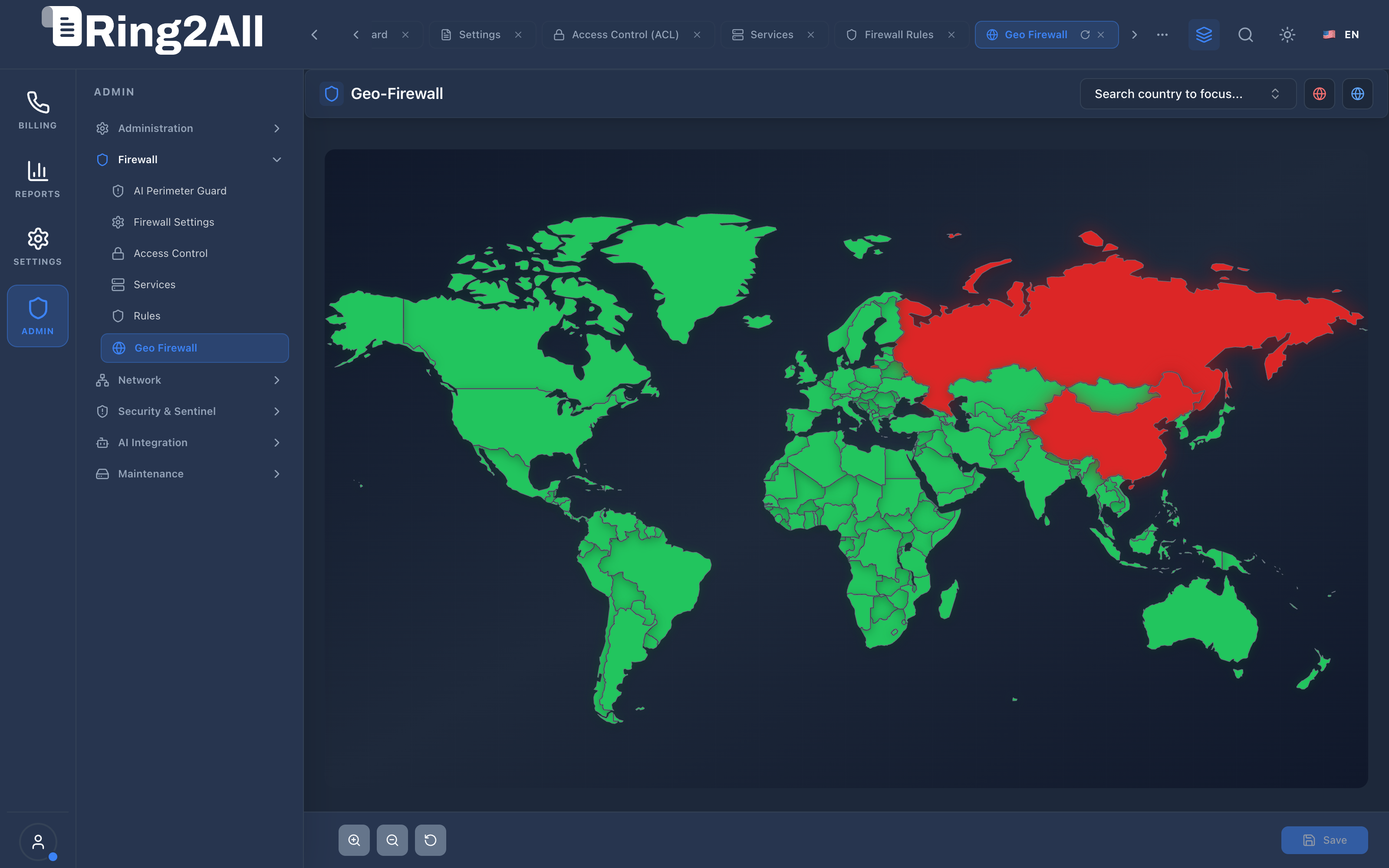
Section titled “Level 1 — Geo Firewall Interactive World Map”The interface presents an interactive vector world map (WorldMap.tsx / jsvectormap) rendering global geographical boundaries. Allowed countries are rendered in emerald green, while blocked regions illuminate in vivid crimson red.
Controls & Parameters Reference
Section titled “Controls & Parameters Reference”- Interactive World Map: Click any nation to toggle its filtering status between Allowed and Blocked. Hovering displays the country name, two-letter code, and current state.
- Search Country Selector: Dropdown search box in the header toolbar allowing rapid lookup and centering of any nation.
- Map Zoom Controls: Bottom-left floating controls providing Zoom In (+), Zoom Out (-), and Reset View.
- Sticky Action Bar: Floating bottom toolbar featuring the Save button to persist modified country lists and recompile kernel sets.
5. Architectural Flow & Security Governance
Section titled “5. Architectural Flow & Security Governance” ┌──────────────┐ 1. Inbound Network Packet ┌────────────────────────┐ │ Foreign Host ├───────────────────────────────────────────────►│ Linux Kernel Netfilter │ └──────────────┘ └───────────┬────────────┘ │ 2. O(1) Set Lookup Against GeoIP Subnets (nftables) ▼ ┌───────────────────────────────────────────┐ │ Match in Blocked Regional CIDR Set? │ └─────┬───────────────────────────────┬─────┘ │ Yes │ No ▼ ▼ ┌─────────────────────┐ ┌─────────────────────┐ │ Silent Kernel DROP │ │ Fastify 5 API / Web │ │ (0 CPU overhead) │ │ Session Evaluation │ └─────────────────────┘ └─────────────────────┘- Ingress Arrival: A packet arrives from an external IP address.
- Kernel Set Inspection: The Linux
nftablesnetfilter chain references the compiledgeo_dropset. - Instant Mitigation: If the IP belongs to a blocked country’s CIDR ranges, the packet is silently dropped at
PREROUTINGbefore any application code executes. - Allowed Path: Packets from permitted countries proceed to standard port filtering and authentication.
6. Common Scenarios & Operational Playbooks
Section titled “6. Common Scenarios & Operational Playbooks”Playbook 1: Blocking High-Risk Jurisdictions Following a Brute-Force Surge
Section titled “Playbook 1: Blocking High-Risk Jurisdictions Following a Brute-Force Surge”- Review the AI Perimeter Guard telemetry to identify the top attack origins (e.g., Russian Federation, Eastern Asia).
- Navigate to ADMIN > Firewall > Geo Firewall.
- Use the search selector in the top toolbar to locate the offending country (e.g.,
Russian Federation). - Click on the country on the world map to toggle its state from Allowed (Green) to Blocked (Red).
- Repeat for any other target regions (e.g.,
China). - Click Save in the bottom-right action bar.
- The system regenerates the kernel IP set and applies the block immediately.
Playbook 2: Unblocking a Country for International Expansion
Section titled “Playbook 2: Unblocking a Country for International Expansion”- When onboarding a new customer or carrier interconnect in a previously blocked country (e.g., Germany or Brazil):
- Navigate to ADMIN > Firewall > Geo Firewall.
- Locate the country on the map or type its name in the search bar.
- Click the territory so it changes to Allowed (Green).
- Click Save to commit the changes and remove the country’s IP subnets from the kernel drop set.
7. Troubleshooting & Diagnostic Commands
Section titled “7. Troubleshooting & Diagnostic Commands”Inspecting Configured Geo Rules in Database
Section titled “Inspecting Configured Geo Rules in Database”sudo -u postgres psql -d ss_billing -c \ "SELECT country_code, country_name, action, enabled, updated_at \ FROM geo_firewall_rules WHERE action = 'block' ORDER BY country_name ASC;"Checking Linux nftables Geo Drop Sets
Section titled “Checking Linux nftables Geo Drop Sets”# Count total CIDR elements loaded into the geo drop setnft list set inet filter geo_drop | grep -c "elements"
# Verify if a specific IP belongs to a blocked geo setnft "get element inet filter geo_drop { 198.51.100.1 }"8. Model Context Protocol (MCP) AI Integration
Section titled “8. Model Context Protocol (MCP) AI Integration”The Geo Firewall module connects directly to the Ring2All BSS MCP Server, providing security copilots and network automation tools with instant visibility into geographic filtering policies and blocked territory counts.
Available MCP Tools
Section titled “Available MCP Tools”| Tool Name | Access Role | Description & Primary Function | Example Arguments |
|---|---|---|---|
get_geo_firewall_status |
Super Administrator |
Retrieves geographical IP blocking status, blocked country count, and database version. | {} |
Sample MCP Tool Execution: get_geo_firewall_status
Section titled “Sample MCP Tool Execution: get_geo_firewall_status”Request Payload
Section titled “Request Payload”{ "name": "get_geo_firewall_status", "arguments": {}}Response Payload
Section titled “Response Payload”{ "geoFirewallEnabled": true, "blockedCountriesCount": 18, "allowedCountriesCount": 231, "geoDbVersion": "GeoLite2-Country-2026.09", "kernelSetLoaded": true, "topBlockedCountries": ["RU", "CN", "IR", "KP", "NG"]}Conversational AI Prompts for Copilot
Section titled “Conversational AI Prompts for Copilot”- “What is the status of the Geo Firewall and how many countries are blocked?”
- “List the top blocked country codes enforced at the kernel level.”
- “Verify if the GeoIP database is current and loaded into nftables.”
9. Glossary
Section titled “9. Glossary”- ISO 3166-1 Alpha-2: Two-letter country codes representing countries and dependent territories (e.g.,
US,DE,MX). - GeoIP Database: A structured mapping table connecting public IPv4 and IPv6 address ranges to geographic countries, cities, and autonomous system numbers (ASNs).
- PREROUTING: The earliest stage in the Linux network stack where incoming packets can be evaluated before routing decisions are made.
- O(1) Set Lookup: Constant-time algorithmic lookup provided by kernel hash tables (
nftablessets /ipset), ensuring zero latency impact regardless of table size. - Model Context Protocol (MCP): Open protocol standard that enables secure, controlled integration between Large Language Models and external tools, databases, and telecom rating engines.