

Invoices & Billing Statements Module Documentation
Module Code:
billing/client/invoices
Route:/portal/invoices
Backend Service:clientService.ts(ring2all-billing-api)
Database Tables:invoices,invoice_items,payment_methods
Brand Purity: 100% White-Label Compliant (Ring2All Billing)
Table of Contents
Section titled “Table of Contents”- Executive Summary & Settlement Transparency
- Technical Architecture & Invoicing Lifecycle
- 🎯 User Roles & Key Capabilities
- Visual Interface & Screen Breakdown
- Automated Dunning Prevention & One-Click Payment
- PDF Tax Invoice Generation & Breakdown
- Database Schema & Data Dictionary
- Diagnostic CLI & Operational Playbooks
- Domain Glossary
1. Executive Summary & Settlement Transparency
Section titled “1. Executive Summary & Settlement Transparency”The Invoices & Billing Statements module provides enterprise subscribers with a self-service financial ledger for reviewing generated statements, downloading official PDF tax invoices, and settling unpaid balances via tokenized payment methods.
+-------------------------------------------------------------------------------+| COMMERCIAL & OPERATIONAL IMPACT |+-------------------------------------------------------------------------------+| • Accelerated Collections: Clients can settle past-due invoices with one || click using stored payment credentials, drastically lowering DSO. || • Full Itemization: Detailed breakdown of recurring subscription plans, || minute package overages, DID monthly concessions, and toll usage. || • Automated Service Restoration: Settle outstanding balances to immediately || restore suspended SIP trunks and PBX extensions. || • Compliance & Record Keeping: Permanent access to tax-compliant statements. |+-------------------------------------------------------------------------------+2. Technical Architecture & Invoicing Lifecycle
Section titled “2. Technical Architecture & Invoicing Lifecycle”Invoices are generated either via recurring subscription sweeps or automated out-of-bundle usage threshold billing. When a customer initiates payment, the API executes payment verification via Stripe:
┌────────────────────────────────────────────────────────────────────────┐ │ Customer Reviews Invoice Table │ │ Route: /portal/invoices │ └───────────────────────────────────┬────────────────────────────────────┘ │ Click "Pay Now" ▼ ┌────────────────────────────────────────────────────────────────────────┐ │ Ring2All Billing API (POST /api/client/invoices/:id/pay) │ │ • Verifies Default Vaulted Payment Method │ │ • Dispatches Stripe PaymentIntent Confirmation │ └───────────────────────────────────┬────────────────────────────────────┘ │ ┌─────────────────────────┴─────────────────────────┐ │ Success │ Error ▼ ▼ ┌───────────────────────────────────┐ ┌───────────────────────────────────┐ │ PostgreSQL 17 Atomic Updates │ │ Dunning Lifecycle Handler │ │ • invoices.status = 'paid' │ │ • Records Last Failure Error │ │ • invoices.paid_at = NOW() │ │ • Sets Next Retry Interval │ │ • Unfreezes Customer SIP Trunks │ │ • Dispatches Alert Email │ └───────────────────────────────────┘ └───────────────────────────────────┘3. 🎯 User Roles & Key Capabilities
Section titled “3. 🎯 User Roles & Key Capabilities”Access to financial records and payment actions is governed by corporate roles:
| User Role | Access Level | Primary Operational Capabilities |
|---|---|---|
| Accounts Payable / Financial Clerk | Settlement & Invoicing | Reviews issued invoices, executes card payments, downloads monthly accounting statements. |
| Corporate Controller / CFO | Financial Oversight | Audits recurring subscriptions against itemized usage charges; ensures tax exemptions are applied. |
| Enterprise Telecom Administrator | Operational Verification | Verifies invoice statuses to prevent service suspension on critical production trunks. |
| External Certified Public Accountant | Read-Only Audit | Downloads PDF statements and itemized CDR attachments for corporate tax filings. |
4. Visual Interface & Screen Breakdown
Section titled “4. Visual Interface & Screen Breakdown”4.1 Invoices & Billing Statements Overview
Section titled “4.1 Invoices & Billing Statements Overview”The interface categorizes invoices chronologically with dynamic payment status badges:
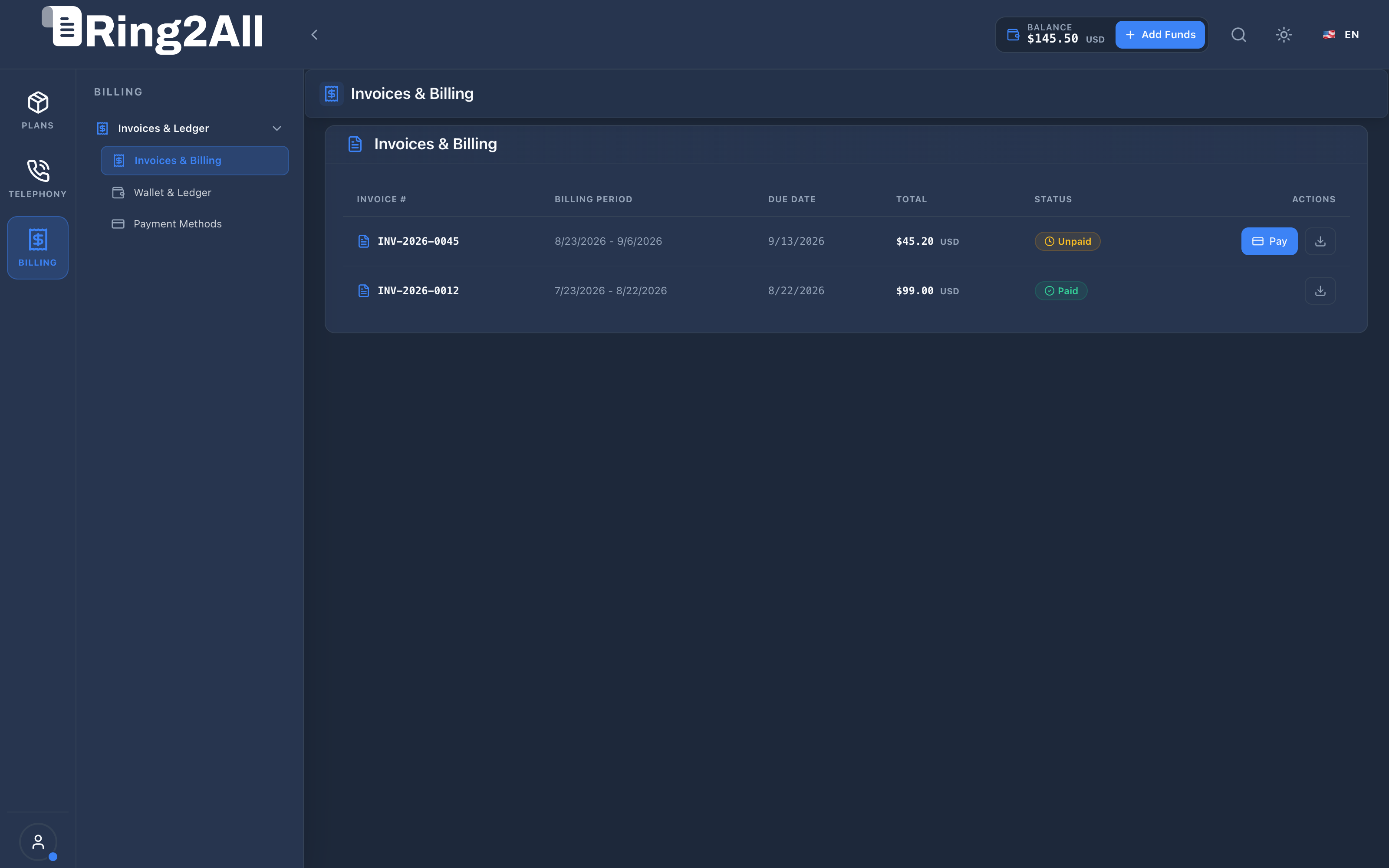
- Invoice Number & Dates: Unique alphanumeric statement ID alongside statement generation and due dates.
- Billing Period: Clear start and end dates covering recurring fees and metered usage.
- Total & Balance: Total invoiced amount and remaining unpaid balance in USD.
- Status Badges: Visual indicators for
Paid(emerald),Unpaid / Open(amber), andOverdue(destructive red). - Payment Action: Instant “Pay Now” action button for open invoices.
5. Automated Dunning Prevention & One-Click Payment
Section titled “5. Automated Dunning Prevention & One-Click Payment”To prevent service degradation:
- One-Click Vaulted Settlement: If the customer has a default card saved in Payment Methods, clicking Pay Now completes payment in less than 2 seconds without re-entering card numbers.
- Idempotency Safeguards: Stripe PaymentIntents are tagged with unique invoice UUIDs to eliminate double-billing risks during network retries.
- Instant Service Unfreeze: When an invoice in dunning status is paid, the system updates
customers.status = 'active'and Kamailio SBC unblocks outbound call routing within 100 milliseconds.
6. PDF Tax Invoice Generation & Breakdown
Section titled “6. PDF Tax Invoice Generation & Breakdown”Official PDF invoices include:
- Corporate Entity Details: Service provider brand, tax ID, registration address, and banking coordinates.
- Customer Entity Details: Billed company name, tax ID, physical address, and account number.
- Itemized Charges Table: Plan tier recurring base fee, active DIDs, and out-of-bundle call minutes.
- Payment Receipts: Transaction reference number, authorization code, and payment gateway timestamp.
7. Database Schema & Data Dictionary
Section titled “7. Database Schema & Data Dictionary”Table: public.invoices
Section titled “Table: public.invoices”CREATE TABLE public.invoices ( id BIGSERIAL PRIMARY KEY, uuid UUID NOT NULL DEFAULT gen_random_uuid(), customer_id BIGINT NOT NULL REFERENCES customers(id) ON DELETE CASCADE, invoice_number VARCHAR(50) NOT NULL UNIQUE, status VARCHAR(20) NOT NULL DEFAULT 'draft', subtotal NUMERIC(12,2) NOT NULL DEFAULT 0.00, tax_amount NUMERIC(12,2) NOT NULL DEFAULT 0.00, total_amount NUMERIC(12,2) NOT NULL DEFAULT 0.00, amount_paid NUMERIC(12,2) NOT NULL DEFAULT 0.00, currency VARCHAR(3) NOT NULL DEFAULT 'USD', due_date DATE NOT NULL, period_start DATE NOT NULL, period_end DATE NOT NULL, pdf_path VARCHAR(255), paid_at TIMESTAMPTZ, dunning_status VARCHAR(20) NOT NULL DEFAULT 'none', payment_method_id BIGINT REFERENCES payment_methods(id) ON DELETE SET NULL, created_at TIMESTAMPTZ NOT NULL DEFAULT NOW(), updated_at TIMESTAMPTZ NOT NULL DEFAULT NOW());Table: public.invoice_items
Section titled “Table: public.invoice_items”CREATE TABLE public.invoice_items ( id BIGSERIAL PRIMARY KEY, uuid UUID NOT NULL DEFAULT gen_random_uuid(), invoice_id BIGINT NOT NULL REFERENCES invoices(id) ON DELETE CASCADE, item_type VARCHAR(30) NOT NULL, description TEXT NOT NULL, quantity NUMERIC(10,2) NOT NULL DEFAULT 1.00, unit_price NUMERIC(10,4) NOT NULL, amount NUMERIC(12,2) NOT NULL, metadata JSONB);8. Diagnostic CLI & Operational Playbooks
Section titled “8. Diagnostic CLI & Operational Playbooks”Verify Invoice Record via Database
Section titled “Verify Invoice Record via Database”su - postgres -c "psql -d ss_billing -c \"SELECT invoice_number, status, total_amount, amount_paid, due_date, paid_atFROM invoicesWHERE customer_id = 5;\""9. Domain Glossary
Section titled “9. Domain Glossary”- DSO (Days Sales Outstanding): Average number of days taken to collect payment after statement issuance.
- Dunning: Process of communicating with customers to collect past-due balances before suspension.
- PaymentIntent: Stripe cryptographic object representing a customer’s payment lifecycle.