

Voicemail Broadcast Groups Module Documentation
Table of Contents
Section titled “Table of Contents”- Module Overview (Technical)
- Module Overview (Commercial/Business)
- Module Overview (End User/Administrator)
- Configuration Fields Reference
- Call Flow / Logic Explanation
- Common Scenarios & Examples
- Model Context Protocol (MCP) AI Integration
- Limitations & Important Notes
- Troubleshooting Tips
- Glossary
1. Module Overview (Technical)
Section titled “1. Module Overview (Technical)”What Are Voicemail Broadcast Groups?
Section titled “What Are Voicemail Broadcast Groups?”Voicemail Broadcast Groups allow users to record a message once and have it delivered to multiple voicemail boxes simultaneously. This is ideal for company announcements, emergency notifications, or team updates.
Architecture
Section titled “Architecture”┌─────────────────────────────────────────────────────────────────┐│ Voicemail Broadcast System │├─────────────────────────────────────────────────────────────────┤│ ││ User dials: 8060 (broadcast group code) ││ │ ││ ▼ ││ ┌──────────────────────────────────────────────────────────┐ ││ │ Broadcast Group Lookup │ ││ │ SELECT * FROM public.voicemail_broadcast_groups │ ││ │ WHERE code = '8060' AND enabled = true │ ││ └──────────────────────────────────────────────────────────┘ ││ │ ││ ▼ ││ ┌──────────────────────────────────────────────────────────┐ ││ │ Access Control │ ││ │ │ ││ │ 1. Check allowed_origins (if caller permitted) │ ││ │ 2. Prompt for PIN (if password set) │ ││ │ │ ││ └──────────────────────────────────────────────────────────┘ ││ │ ││ ▼ ││ ┌──────────────────────────────────────────────────────────┐ ││ │ Record Message │ ││ │ │ ││ │ - Play instructions (unless skip_instructions) │ ││ │ - Record up to max_record_time seconds │ ││ │ - Store in voicemail_broadcast storage │ ││ │ │ ││ └──────────────────────────────────────────────────────────┘ ││ │ ││ ▼ ││ ┌──────────────────────────────────────────────────────────┐ ││ │ Distribute to Members │ ││ │ │ ││ │ For each member extension: │ ││ │ ├─ Copy message to member's voicemail folder │ ││ │ └─ Mark as new message │ ││ │ │ ││ │ Distribution modes: │ ││ │ ├─ Parallel: Send to all immediately │ ││ │ ├─ Sequential: One by one │ ││ │ └─ Active Only: Only registered extensions │ ││ │ │ ││ └──────────────────────────────────────────────────────────┘ ││ │ ││ ▼ ││ Send notification (email/API/event) if configured ││ │└─────────────────────────────────────────────────────────────────┘Storage Paths
Section titled “Storage Paths”| Location | Purpose |
|---|---|
/var/lib/freeswitch/storage/voicemail_broadcast/ |
Broadcast recordings |
/var/lib/freeswitch/storage/voicemail/default/{ext}/ |
Destination folders |
2. Module Overview (Commercial/Business)
Section titled “2. Module Overview (Commercial/Business)”Business Value
Section titled “Business Value”Voicemail Broadcast enables efficient mass communication:
| Without Broadcast | With Broadcast |
|---|---|
| Leave individual voicemails | Record once, deliver to many |
| Call each person | One dial, all receive |
| Time-consuming | Instant distribution |
Use Cases
Section titled “Use Cases”-
Company Announcements
- Office closures, policy changes
- HR updates, benefits information
-
Emergency Notifications
- Building evacuations
- Weather-related closures
-
Team Updates
- Daily standup summaries
- Project status updates
-
Sales Teams
- New product information
- Pricing changes
Feature Highlights
Section titled “Feature Highlights”| Feature | Benefit |
|---|---|
| PIN Protection | Control who can broadcast |
| Skip Instructions | Faster recording for experienced users |
| Distribution Modes | Parallel, sequential, or active-only |
| Notifications | Email/API confirmation after broadcast |
| Allowed Origins | Restrict who can initiate broadcasts |
3. Module Overview (End User/Administrator)
Section titled “3. Module Overview (End User/Administrator)”What Can You Do?
Section titled “What Can You Do?”- Create broadcast groups with designated member extensions.
- Protect broadcast initiation with security PIN codes.
- Restrict broadcast transmission to authorized origin extensions.
- Configure recording options (audio formats, duration limits, prompt skipping).
- Set up real-time delivery notifications via Email, Webhook API, or System Event.
Navigation
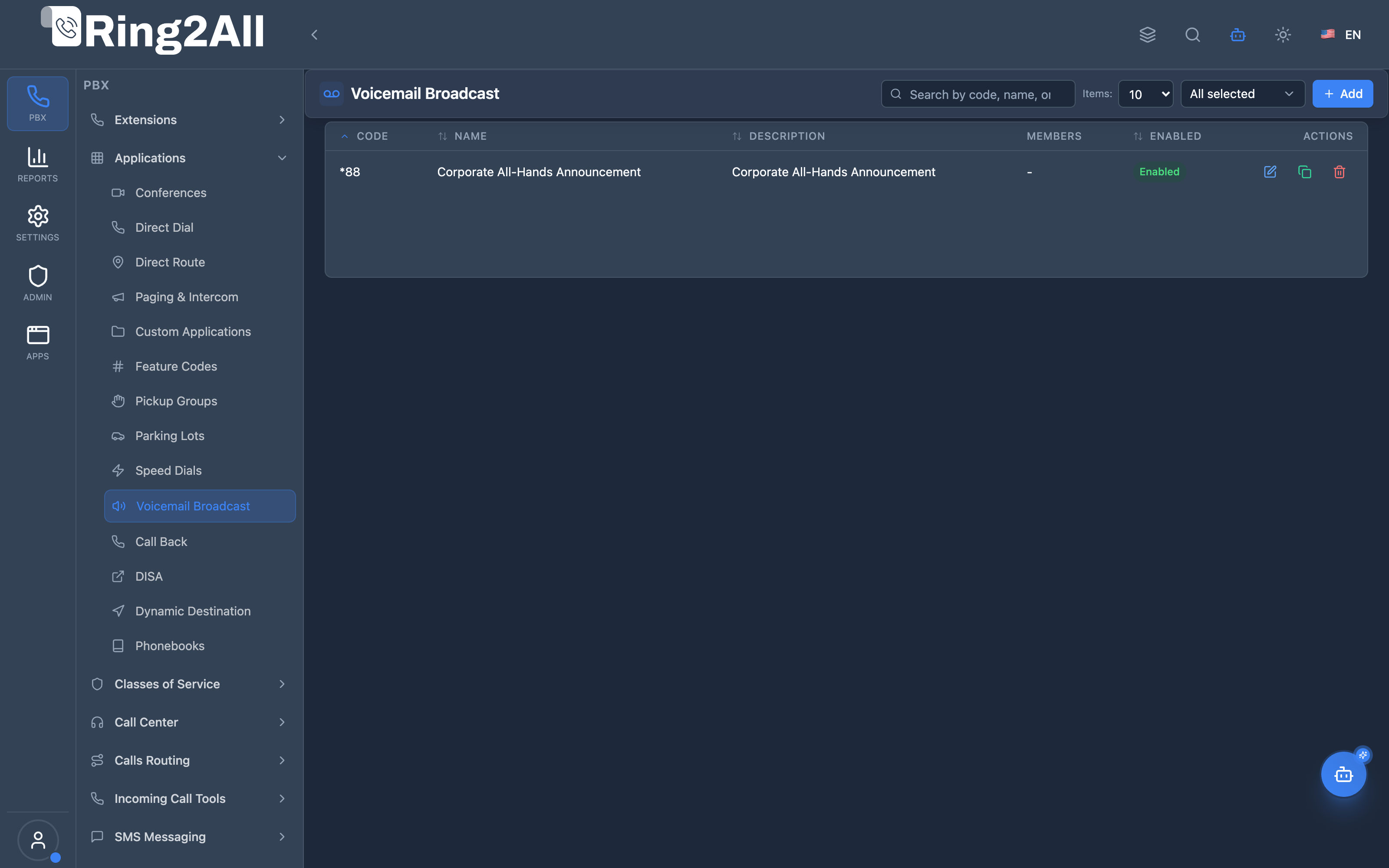
Section titled “Navigation”- In the main navigation bar, select PBX Engine → Applications → Voicemail Broadcast (or navigate directly to
/pbx/applications/voicemail-broadcast). - The list view displays all configured voicemail broadcast groups, highlighting the dialable Code, Group Name, Context, Member Count, and active Status (Enabled/Disabled).
- Click the + Add button in the upper action toolbar to create a new broadcast group.
- Click any existing record row or edit icon to open the configuration form.
Administrator Workflow
Section titled “Administrator Workflow”┌─────────────────────────────────────────────────────────────────┐│ Creating a Voicemail Broadcast Group │├─────────────────────────────────────────────────────────────────┤│ ││ Step 1: General Information ││ ├─ Code: *88 (dial code) ││ ├─ Name: "Corporate All-Hands Announcement" ││ ├─ Password: **** (PIN protection) ││ └─ Skip Instructions: Enabled (fast recording mode) ││ ││ Step 2: Delivery & Distribution Settings ││ ├─ Distribution Mode: Parallel (simultaneous distribution) ││ ├─ Max Record Time: 300 seconds ││ ├─ Record Format: WAV (uncompressed audio quality) ││ └─ Playback Volume: 5 (balanced amplification) ││ ││ Step 3: Group Members & Authorized Origins ││ ├─ Select member extensions via multi-select modal ││ └─ Configure notification alert (Email / API / Event) ││ ││ Step 4: Enable and Save Form ││ │└─────────────────────────────────────────────────────────────────┘User Workflow (Recording a Broadcast)
Section titled “User Workflow (Recording a Broadcast)”1. Dial the assigned broadcast group code (e.g. *88) from an authorized extension.2. If a password is configured, enter the PIN followed by '#' when prompted.3. Listen to instructions (or immediately hear the recording beep if "Skip Instructions" is active).4. Speak the message clearly into the handset and press '#' when finished.5. The PBX automatically processes and places the message into all member voicemail boxes simultaneously.Quick Tips
Section titled “Quick Tips”[!TIP] Allowed Origins: When configured, only callers originating from the specified extensions can dial the broadcast code. This prevents unauthorized callers from triggering announcements.
[!TIP] Skip Instructions: Enable this toggle for experienced department heads so they can start dictating immediately after the tone.
[!CAUTION] Max Record Time: Set an appropriate limit (e.g., 180–300 seconds) to prevent accidental continuous recording that consumes server storage.
4. Configuration Fields Reference
Section titled “4. Configuration Fields Reference”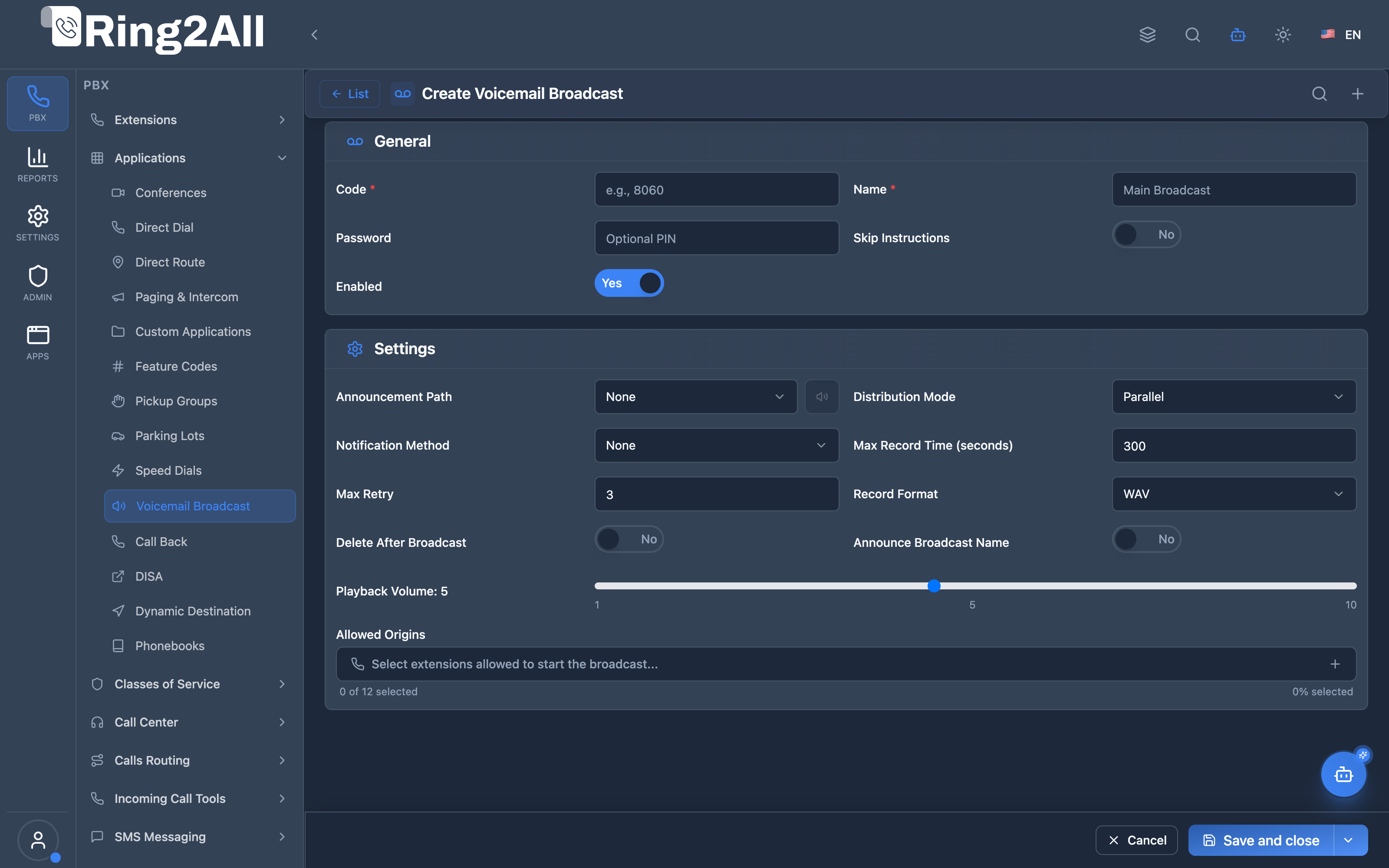
General Information Box
Section titled “General Information Box”| Field | Description | UI Tooltip | Example | Notes |
|---|---|---|---|---|
| Code * | Dialable shortcode for this broadcast group | Dialable shortcode used by callers to record and trigger the broadcast | *88, 8060 |
Must be unique across PBX dialables. Required. |
| Name * | Administrative display label | Friendly name identifying this broadcast group | Corporate All-Hands Announcement |
Required. |
| Password | Security PIN code required to authenticate before recording | Optional PIN code required by callers before recording a broadcast message | 1234, 8899 |
Numeric PIN. Optional. |
| Skip Instructions | Bypass pre-recording audio guidance | Bypass voice instructions and prompt directly with a beep for recording | Enabled / Disabled |
Toggle. Default: Disabled. |
| Enabled | Master operational status | Master toggle to activate or deactivate this broadcast group | Enabled / Disabled |
Toggle. Default: Enabled. |
Settings & Distribution Box
Section titled “Settings & Distribution Box”| Field | Description | UI Tooltip | Default | Options / Range |
|---|---|---|---|---|
| Announcement Path | Introductory prompt played before recording or to recipients | Custom voice announcement played prior to recording or playback | None (Default beep) | Dropdown selection from system Audio Recordings library. |
| Distribution Mode | Delivery strategy for placing voicemails | How audio payloads are distributed to member mailboxes | Parallel |
Parallel (Simultaneous delivery to all mailboxes), Sequential (Delivered one mailbox at a time), Active Only (Delivered only to registered/online devices). |
| Notification Method | Alert mechanism sent when distribution completes | Delivery mechanism for broadcast completion notifications | None |
None, Email, API (HTTP Webhook POST), Event (Internal PBX event bus). |
| Notification Target | Destination address for completion alerts | Target recipient email address or HTTP webhook URL | None | Required when Notification Method is not None. Example: admin@ring2all.com or https://crm.company.com/webhooks/vm. |
| Max Record Time | Maximum recording duration in seconds | Maximum allowable length for the recorded announcement in seconds | 300 |
Integer: 10 to 3600 seconds. |
| Max Retry | Retry delivery attempts upon temporary lock | Maximum retry attempts if a target mailbox is locked or busy | 3 |
Integer: 0 to 10. |
| Record Format | Audio codec container for the stored message | Audio file encoding format for the broadcast recording | WAV |
WAV (PCM uncompressed, 8kHz/16kHz), MP3 (MPEG audio), OGG (Vorbis compressed). |
| Delete After Broadcast | Purge master spool file after distribution | Automatically delete master recording from temporary broadcast spool once distributed | Disabled |
Toggle. Keeps individual mailbox copies intact while freeing master spool storage. |
| Announce Group Name | Speak group name prefix before message audio | Play the broadcast group’s recorded title before playing the broadcast payload | Disabled |
Toggle. Useful when users belong to multiple broadcast groups. |
| Playback Volume | Audio gain amplification for recipients | Volume amplification level for recipients when listening to the message | 5 |
Interactive slider: 1 (Quiet) to 10 (Maximum amplification). |
| Group Members / Allowed Origins | Extensions authorized to trigger and receive broadcasts | Select member extensions that receive the voicemail broadcast and are permitted to initiate recordings | All Extensions | Interactive multi-select button opening search modal with extension name and numbering. |
5. Call Flow / Logic Explanation
Section titled “5. Call Flow / Logic Explanation”Broadcast Flow
Section titled “Broadcast Flow”┌─────────────────────────────────────────────────────────────────┐│ Broadcast Recording Flow │├─────────────────────────────────────────────────────────────────┤│ ││ 1. User dials 8060 (broadcast group code) ││ │ ││ ▼ ││ 2. Look up broadcast group ││ ├─ Found & enabled → Continue ││ └─ Not found → "Feature not available" ││ │ ││ ▼ ││ 3. Check allowed_origins (if configured) ││ ├─ Caller in list → Continue ││ ├─ List empty → Anyone can broadcast ││ └─ Caller NOT in list → "Not authorized" ││ │ ││ ▼ ││ 4. Prompt for PIN (if password set) ││ ├─ Correct PIN → Continue ││ └─ Wrong PIN → "Not authorized" ││ │ ││ ▼ ││ 5. Play recording instructions (unless skip_instructions) ││ │ ││ ▼ ││ 6. Record message (up to max_record_time, # to stop) ││ │ ││ ▼ ││ 7. Save recording to broadcast storage ││ │ ││ ▼ ││ 8. Distribute to members based on distribution_mode ││ ├─ Copy to each member's voicemail folder ││ └─ Mark as new message with MWI update ││ │ ││ ▼ ││ 9. Send notification (if configured) ││ │ ││ ▼ ││ 10. Delete original (if delete_after_broadcast = true) ││ │ ││ ▼ ││ 11. Play "Message saved" confirmation ││ │└─────────────────────────────────────────────────────────────────┘6. Common Scenarios & Examples
Section titled “6. Common Scenarios & Examples”Scenario 1: Company-Wide Announcements
Section titled “Scenario 1: Company-Wide Announcements”Setup:
| Setting | Value |
|---|---|
| Code | 8060 |
| Name | All Staff |
| Password | 1234 |
| Allowed Origins | 1001 (CEO), 1002 (HR) |
| Members | All employee extensions |
| Distribution | Parallel |
| Notification | Email to hr@company.com |
Scenario 2: Emergency Broadcast
Section titled “Scenario 2: Emergency Broadcast”Setup:
| Setting | Value |
|---|---|
| Code | *911 |
| Name | Emergency Alert |
| Password | (none - quick access) |
| Allowed Origins | Security team only |
| Skip Instructions | ✓ |
| Announce Group Name | ✓ |
Scenario 3: Sales Team Updates
Section titled “Scenario 3: Sales Team Updates”Setup:
| Setting | Value |
|---|---|
| Code | 8070 |
| Name | Sales Team |
| Password | (none) |
| Allowed Origins | Sales manager only |
| Members | Sales team extensions |
| Delete After Broadcast | ✓ (temporary updates) |
7. Model Context Protocol (MCP) AI Integration
Section titled “7. Model Context Protocol (MCP) AI Integration”Ring2All exposes comprehensive Model Context Protocol (MCP) tools for Voicemail Broadcast Groups, empowering AI voice agents and Copilots to query broadcast distribution groups, inspect subscribed member extensions, and provision or adjust announcement groups while enforcing domain-level numbering isolation.
Available MCP Tools
Section titled “Available MCP Tools”| Tool Name | Description | Key Parameters |
|---|---|---|
list_voicemail_broadcast_groups |
Lists all voicemail broadcast groups in the domain, including dial codes, group names, descriptions, and member counts. | search (optional string) |
get_voicemail_broadcast_group_status |
Retrieves full group configuration and the list of destination extension mailboxes for a specific broadcast code. | code (required) |
create_voicemail_broadcast_group |
Creates a new broadcast group with a dial code, group name, description, and an initial array of recipient extensions. | code, name, description, members (array of extension numbers) |
update_voicemail_broadcast_group |
Modifies broadcast group parameters such as name, description, membership list, or enabled status. | currentCode, newCode, name, description, members, enabled |
delete_voicemail_broadcast_group |
Deletes a voicemail broadcast group and de-registers its dial code from the PBX dialplan. | code (required) |
Strict Domain Numbering Safeguards
Section titled “Strict Domain Numbering Safeguards”When an AI agent executes create_voicemail_broadcast_group or update_voicemail_broadcast_group, Ring2All runs validateNumberUniqueness(code, domain.id, 'voicemail_broadcast'). The code is checked against sip_extensions, public.dialplan_registry, and public.direct_routes. A broadcast dial code (e.g. *85 or 8060) can never collide with an existing extension, paging group, speed dial, or conference room in the same domain.
AI Agent Operational Examples
Section titled “AI Agent Operational Examples”Inspecting Voicemail Broadcast Group Details
Section titled “Inspecting Voicemail Broadcast Group Details”{ "tool": "get_voicemail_broadcast_group_status", "arguments": { "code": "8060" }}Provisioning an Emergency Department Voicemail Broadcast Group
Section titled “Provisioning an Emergency Department Voicemail Broadcast Group”{ "tool": "create_voicemail_broadcast_group", "arguments": { "code": "8070", "name": "Warehouse Leads Broadcast", "description": "Mass announcement drop for logistics leads", "members": ["1001", "1002", "1005"] }}Recommended Natural Language Prompts
Section titled “Recommended Natural Language Prompts”- “List all voicemail broadcast groups and tell me how many recipient extensions each one has.”
- “Create a voicemail broadcast group with code 8080 named ‘Emergency Response’ sending to extensions 101, 102, and 103.”
- “Show me which extensions receive broadcasts when dialing code 8060.”
8. Limitations & Important Notes
Section titled “8. Limitations & Important Notes”Technical Limitations
Section titled “Technical Limitations”[!WARNING] Voicemail Required: Members must have voicemail enabled on their extensions.
[!WARNING] Storage Space: Long broadcasts to large groups consume significant disk space.
[!IMPORTANT] MWI Updates: Message Waiting Indicator may have slight delay after broadcast.
Best Practices
Section titled “Best Practices”- Limit Allowed Origins: Prevent unauthorized broadcasts
- Use PINs: Add layer of security for sensitive groups
- Keep Messages Short: Respectful of recipient time
- Regular Cleanup: Enable delete_after_broadcast for temporary messages
- Test First: Create a small test group before company-wide rollout
9. Troubleshooting Tips
Section titled “9. Troubleshooting Tips”Common Issues
Section titled “Common Issues”| Symptom | Possible Cause | Solution |
|---|---|---|
| “Not authorized” | Not in allowed_origins | Add caller to list |
| No message in VM | Member has no voicemail | Enable voicemail for extension |
| Recording too short | max_record_time too low | Increase limit |
| No MWI light | MWI not configured | Check extension voicemail settings |
Diagnostic SQL
Section titled “Diagnostic SQL”List broadcast groups:
SELECT code, name, enabled, (SELECT COUNT(*) FROM public.voicemail_broadcast_group_members WHERE voicemail_broadcast_group_id = g.id) as member_countFROM public.voicemail_broadcast_groups gWHERE domain_id = [domain_id];Check group members:
SELECT e.extension, e.descriptionFROM public.voicemail_broadcast_group_members mJOIN public.sip_extensions e ON m.sip_extension_id = e.idWHERE m.voicemail_broadcast_group_id = [group_id];10. Glossary
Section titled “10. Glossary”| Term | Definition |
|---|---|
| Broadcast Group | Collection of extensions to receive broadcast messages |
| Broadcast | One message delivered to multiple voicemail boxes |
| Allowed Origins | Extensions permitted to initiate broadcasts |
| Distribution Mode | How messages are delivered (parallel/sequential) |
| MWI | Message Waiting Indicator (voicemail light on phone) |
| Skip Instructions | Skip the “record your message” prompt |
Documentation last updated: January 2026