

Telephony Domains Module Documentation
Table of Contents
Section titled “Table of Contents”- Navigation & Access
- Screenshots & Visual Interface
- Module Overview (Technical)
- Module Overview (Commercial & Business Value)
- Module Overview (End User & Administrator Experience)
- User Roles & Key Capabilities
- Form Structure & Tabs Reference
- Call Recording Quota & Atomic Tracking Engine
- Automated Quota Email Alert System
- Automated Retention Cleanup Engine
- Common Scenarios & Best Practices
- Model Context Protocol (MCP) AI Integration
- Troubleshooting & Verification
- Glossary
Navigation & Access
Section titled “Navigation & Access”To access the Telephony Domains module:
- Log in to the Ring2All Web Portal (
https://<domain-or-ip>/login). - In the left navigation sidebar, expand Admin.
- Under Multi-Tenant, click Domains (
/admin/multi-tenant/domains). - To create a new SIP domain realm, click the + Add Domain button (
/admin/multi-tenant/domains/new). - To view or edit an existing telephony domain, click on the domain name or action icons in the table row (
/admin/multi-tenant/domains/:id).
Screenshots & Visual Interface
Section titled “Screenshots & Visual Interface”Telephony Domains List View
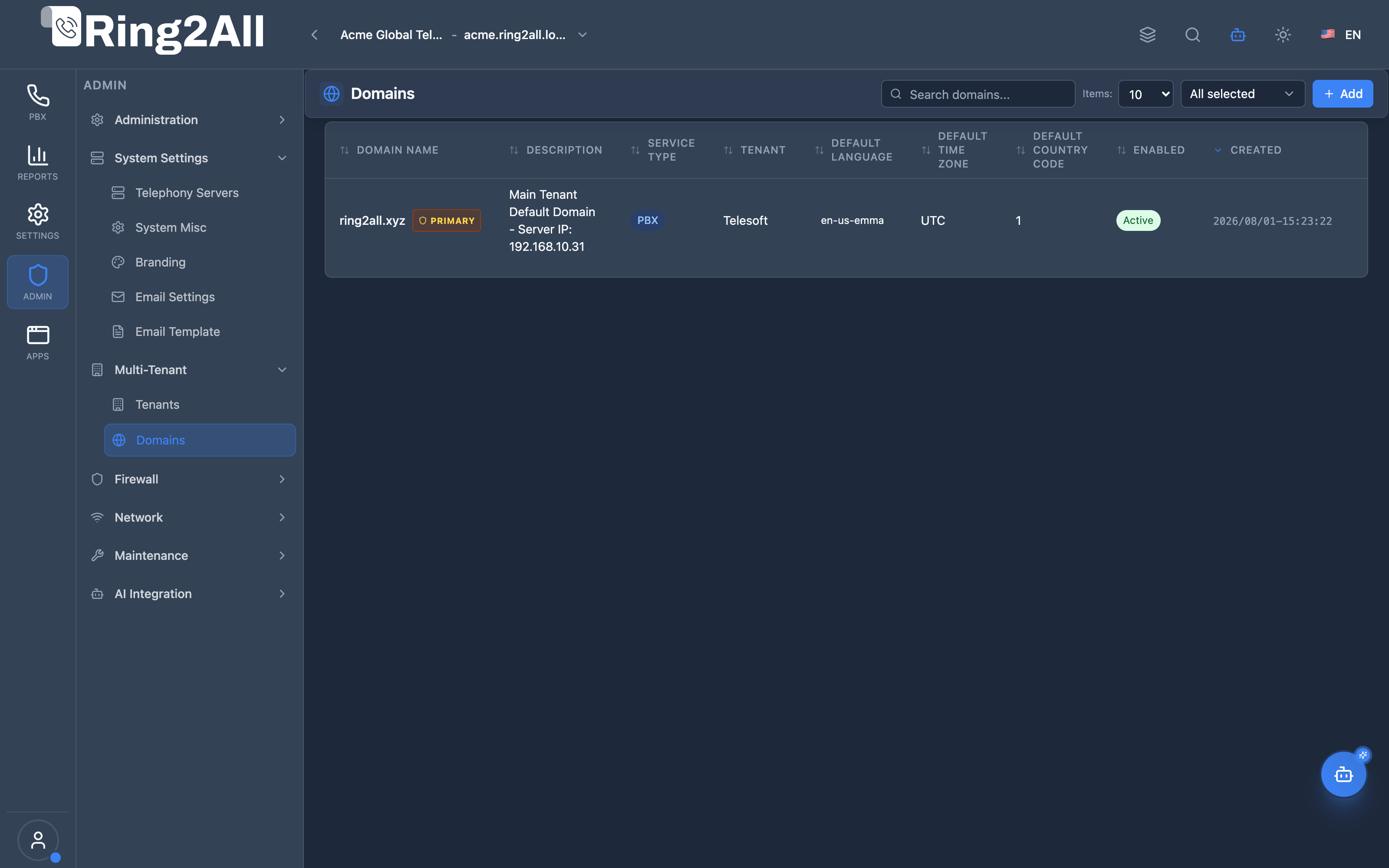
Section titled “Telephony Domains List View”The Telephony Domains directory lists all configured SIP authentication realms, displaying domain FQDNs, descriptive notes, tenant assignments, primary domain indicators, enabled statuses, and quick action controls.
Telephony Domain Configuration Form & Tabs
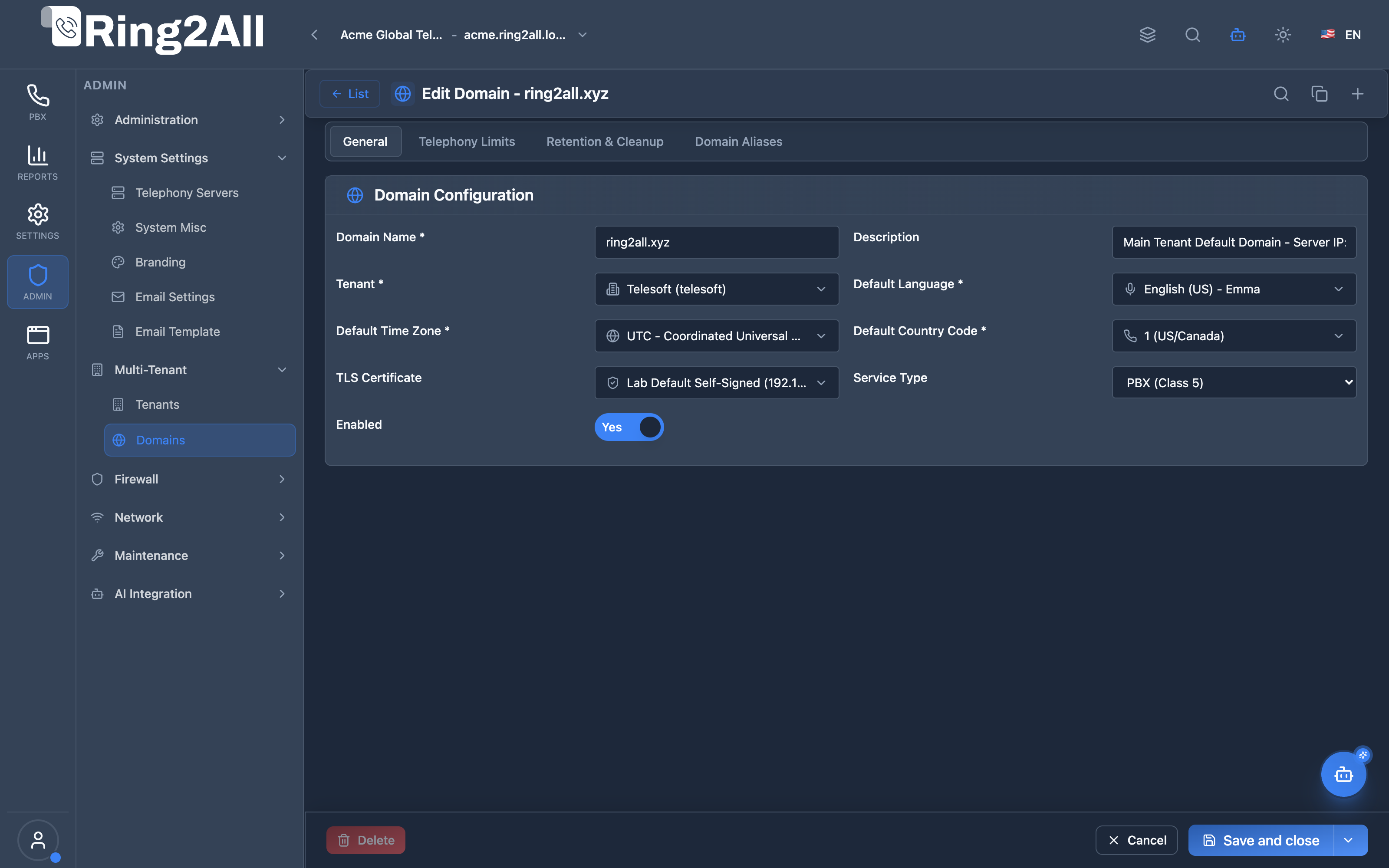
Section titled “Telephony Domain Configuration Form & Tabs”The domain configuration interface is organized into four standardized tabs: General Information, Telephony Limits & Recording Quotas, Retention & Automated Cleanup, and Domain Aliases.
1. Module Overview (Technical)
Section titled “1. Module Overview (Technical)”What Are Telephony Domains?
Section titled “What Are Telephony Domains?”In the SoftSwitch Platform, Telephony Domains constitute the fundamental multi-tenant SIP realm and namespace isolation boundary. Each domain configures a distinct Telephony Server realm context (public.domains in ss_telephony), defining:
- Namespace & Authentication Scope: SIP user registration (
user@domain.com) and dialplan routing context. - Resource Allocations & Capacity Limits: Explicit quotas for extensions, queues, IVRs, conferences, ring groups, parking lots, and concurrent SIP channels.
- Call Recording Storage Management: Global domain recording switch, GB disk storage quotas, real-time byte tracking, and automatic threshold policies (
fifo_purge,stop_recording,notify_only). - Quota Alerting: Automated administrator email alerts with rate-limited anti-spam protection (24-hour cooldown).
- Data Lifecycle & Retention: Scheduled background cleanup for call recordings, voicemails, CDR logs, and short recordings.
- Multi-Server Clustering & Aliases: Canonical mapping of multiple IP addresses, hostnames, and SBC interfaces to a single domain context.
Architectural Diagram
Section titled “Architectural Diagram”┌────────────────────────────────────────────────────────────────────────────────────────┐│ SoftSwitch Telephony Domain Architecture │├────────────────────────────────────────────────────────────────────────────────────────┤│ ││ Domain Entity (ss_telephony.domains) ││ ┌──────────────────────────────────────────────────────────────────────────────────┐ ││ │ Domain Name: pbx.enterprise.com Tenant ID: 104 (Acme Corp) │ ││ │ Service Type: PBX (Class 5) Certificate: Wildcard SSL │ ││ │ Language: en | Timezone: America/New_York | Country Code: +1 │ ││ │ │ ││ │ Resource Limits: │ ││ │ ├─ Max Extensions: 100 ├─ Max Channels: 30 │ ││ │ ├─ Max Queues: 5 ├─ Max Ring Groups: 10 │ ││ │ └─ Max Conferences: 4 └─ Max IVRs: 6 │ ││ │ │ ││ │ Recording & Storage Quota: │ ││ │ ├─ Allow Recording: TRUE │ ││ │ ├─ Max Storage: 25 GB ├─ Used: 18.42 GB (73%) │ ││ │ ├─ Quota Action: FIFO Purge ├─ Alert Email: pbx-admin@enterprise.com │ ││ │ │ ││ │ Retention & Automated Cleanup: │ ││ │ ├─ Cleanup: TRUE (Daily 02:00) ├─ Voicemail Retention: 60 days │ ││ │ ├─ Recording Retention: 90 days ├─ CDR Retention: 180 days │ ││ │ └─ Delete Short Calls: < 3 sec │ ││ └──────────────────────────────────────────────────────────────────────────────────┘ ││ │ │ ││ ▼ Telephony Engine Binding ▼ Periodic Lifecycle ││ ┌──────────────────────────────┐ ┌──────────────────────────────────┐ ││ │ Telephony Dialplan Context │ │ System Cleanup Service │ ││ │ ├─ SIP Directory & Auth │ │ ├─ Nightly cron execution │ ││ │ ├─ Channel Limit Guard │ │ ├─ Purge expired recordings/CDRs │ ││ │ ├─ Lua Recording Hook │ │ ├─ FIFO capacity purge on quota │ ││ │ └─ Atomic Storage Tracking │ │ └─ Auto-reset quota alert status │ ││ └──────────────────────────────┘ └──────────────────────────────────┘ ││ │└────────────────────────────────────────────────────────────────────────────────────────┘Key Database Tables
Section titled “Key Database Tables”| Table | Database | Purpose |
|---|---|---|
public.domains |
ss_telephony |
Master domain record, limits, recording quotas, retention config, and alert timestamps. |
public.domain_aliases |
ss_telephony |
Cluster/IP aliases mapping secondary endpoints and server IPs to the canonical domain. |
public.cdr |
ss_cdr |
Call detail records with exact per-call recording_size_bytes and index idx_cdr_recording_size. |
public.cdr_fields |
ss_telephony |
Schema registry for dynamic CDR fields (order 34: recording_size_bytes). |
2. Module Overview (Commercial & Business Value)
Section titled “2. Module Overview (Commercial & Business Value)”For telecom operators, hosted PBX providers, and managed service providers (MSPs), Telephony Domains serve as the commercial service-tier enforcement engine:
- Monetizable Resource Tiers: Sell tiered subscriptions (e.g. Starter 10 Ext / 4 Channels vs Enterprise 100 Ext / 30 Channels) with hard limits enforced in real-time by the platform.
- Storage Monetization: Bill for call recording storage by assigning explicit GB quotas (
max_recording_storage_gb). Ring2All BSS billing integration dynamically sizes and charges per GB or step blocks (e.g. 5 GB increments). - Zero Runaway Storage Overhead: Prevent unmanaged call recordings from exhausting host storage using automated FIFO auto-purging or hard blocks.
- Compliance & Data Privacy (GDPR/HIPAA): Built-in automated retention policies guarantee that sensitive voice recordings and voicemail files are pruned after legally required retention windows.
- Proactive Customer Alerting: Domain administrators receive branded automated email alerts when approaching or reaching storage capacity, driving plan upgrades.
3. Module Overview (End User & Administrator Experience)
Section titled “3. Module Overview (End User & Administrator Experience)”Standardized Navigation & Layout (Level 1 vs Level 2)
Section titled “Standardized Navigation & Layout (Level 1 vs Level 2)”Following the platform UI standards:
- Level 1 (Domains List): Root data grid view with
DataGridToolbar, search bar, tenant filter, and action toolbar (+ Create Domain,Apply SSL Configuration). No< Backbutton. - Level 2 (Domain Form): Fixed 56px header (
ModuleFormHeader) with standard< Listreturn button, domain title, and quick-action icons. - Bottom Fixed Action Bar: Contains
Save/UpdateandCancel. In accordance with standard UX rules, clicking Cancel reverts uncommitted changes to preserve original values without leaving the form view. To return to the list, the user clicks< Listin the header.
🎯 User Roles & Key Capabilities
Section titled “🎯 User Roles & Key Capabilities”The Telephony Domains module allocates administrative and engineering privileges across standard platform roles:
| User Role | Key Permissions & Responsibilities | Common Tasks & Workflows |
|---|---|---|
| System Super Administrator | Global authority over all SIP domain realms across every tenant organization. | Provision new telephony realms, set tenant ownership, establish max storage quotas, allocate concurrency channels, bind system SSL certificates. |
| Tenant Administrator | Scoped management over domains assigned to their own organization ID (tenant_id). |
Configure default timezones, select audio prompt languages, monitor storage quota consumption, update alert notification email addresses, inspect active extensions. |
| PBX & VoIP Engineer | Technical configuration of SIP protocol layers and dialplan contexts in Telephony Server. | Configure service types (pbx, trunking, hybrid), define domain network aliases for multi-homed interfaces, audit channel utilization, verify dialplan routing. |
| Storage & Systems Administrator | Disk infrastructure management, backup planning, and automated retention oversight. | Monitor byte-level storage tracking, configure FIFO automatic purge thresholds, execute scheduled nightly retention cleanup, verify short recording purge rules. |
4. Form Structure & Tabs Reference
Section titled “4. Form Structure & Tabs Reference”The Telephony Domains form is structured into 4 clean, text-only tabs:
┌────────────────────────────────────────────────────────────────────────────────────────┐│ [General] [Telephony Limits] [Retention & Cleanup] [Domain Aliases] │└────────────────────────────────────────────────────────────────────────────────────────┘Tab 1: General Information
Section titled “Tab 1: General Information”Configures the domain identification, tenant ownership, and baseline localization.
| Field | Type | Description |
|---|---|---|
| Domain Name | Text (Required) | Unique FQDN SIP realm (e.g., sip.enterprise.com). Must be lowercase alphanumeric with hyphens or dots. |
| Description | Text | Human-readable notes or corporate identity. |
| Tenant | Select (Required) | Tenant that owns this domain. |
| Service Type | Select | Service architecture: pbx (Class 5 Hosted PBX), trunking (Class 4 SIP Trunking), or hybrid. |
| Enabled | Toggle | Master operational switch. When disabled, SIP registration and inbound/outbound calls are halted. |
| Default Language | Select | Voice prompt language for system announcements, IVR menus, and voicemail prompts. |
| Default Time Zone | Select | Timezone applied to call timestamps, voicemail delivery, and time-condition routing. |
| Default Country Code | Select | Country dial code used for E.164 normalization and international dialing format. |
| TLS Certificate | Select | TLS/SSL certificate bound to this domain for HTTPS portal access and SIP TLS (SIPS). |
Tab 2: Telephony Limits & Recording Quotas
Section titled “Tab 2: Telephony Limits & Recording Quotas”Provides resource capping and call recording storage governance.
Resource Limits Grid
Section titled “Resource Limits Grid”| Field | Default | Description |
|---|---|---|
| Max Extensions | 0 |
Maximum SIP extensions allowed in this domain. 0 = Unlimited. |
| Max Concurrent Channels | 0 |
Maximum simultaneous active calls allowed. 0 = Unlimited. Emergency services (e.g., 911, 112) are never blocked by this limit. |
| Max Queues | 0 |
Maximum call center queues allowed. 0 = Unlimited. |
| Max Ring Groups | 0 |
Maximum ring groups allowed. 0 = Unlimited. |
| Max Conferences | 0 |
Maximum conference rooms allowed. 0 = Unlimited. |
| Max IVR Menus | 0 |
Maximum auto-attendant interactive menus allowed. 0 = Unlimited. |
| Max Parking Lots | 0 |
Maximum call parking lots allowed. 0 = Unlimited. |
Call Recording Master Switch & Conditional Rendering
Section titled “Call Recording Master Switch & Conditional Rendering”To maintain an intuitive interface, the Enable Call Recording master toggle is placed first among all recording options.
[!NOTE] Conditional Rendering Rule: If Enable Call Recording is toggled Off, all dependent recording fields (Storage In Use, Max Storage Quota, Quota Action, and Alert Email) are hidden from view, and an informational banner confirms that domain-wide call recording is disabled. When toggled On, all recording quota and alert configuration fields are immediately displayed.
| Field | Type | Description |
|---|---|---|
| Enable Call Recording | Toggle | Master switch controlling call recording capability across all extensions, queues, and features in this domain. |
| Storage In Use | Display Indicator | Displays real-time disk storage consumed by domain recordings (formatted dynamically in GB or MB) along with percentage of allocated quota. |
| Max Recording Storage (GB) | Integer | Maximum disk storage in Gigabytes allocated for recordings. 0 = Unlimited. |
| Quota Reached Action | Select | Policy enforced when storage consumption reaches 100% of the assigned GB limit: • fifo_purge: (Recommended) Automatically purges the oldest recordings to make room for new calls.• stop_recording: Blocks new recording sessions while allowing calls to proceed.• notify_only: Continues recording uninterrupted while sending quota alerts. |
| Quota Alert Email | Email Input | Destination email address to receive immediate capacity warning notifications. If left empty, alerts automatically default to the primary Tenant Administrator email. |
Tab 3: Retention & Automated Cleanup
Section titled “Tab 3: Retention & Automated Cleanup”Automates lifecycle data purging to prevent disk saturation and maintain regulatory compliance.
| Field | Type | Description |
|---|---|---|
| Enable Retention Cleanup | Toggle | Activates scheduled automated purging of historical records and audio files. |
| Cleanup Schedule | Select | Frequency of the automated task: daily (recommended, runs during off-peak night hours), weekly, or monthly. |
| Recordings Retention (Days) | Integer | Number of days to keep call recording audio files before deletion. 0 or blank = keep forever. |
| Voicemails Retention (Days) | Integer | Number of days to retain voicemail audio messages. 0 or blank = keep forever. |
| CDR Retention (Days) | Integer | Number of days to retain Call Detail Records in ss_cdr. 0 or blank = keep forever. |
| Delete Short Recordings (Sec) | Integer | Automatically deletes recording files for calls shorter than this threshold (e.g. 1-3 seconds), eliminating accidental or silent recordings. 0 = disabled. |
| Run Retention Cleanup Now | Button | Triggers an immediate, synchronous retention pass for this domain, executing file removals and returning a summary report. |
Tab 4: Domain Aliases
Section titled “Tab 4: Domain Aliases”Available in Edit Mode, this tab manages multi-server and multi-IP domain aliases stored in public.domain_aliases.
Why Domain Aliases Are Essential
Section titled “Why Domain Aliases Are Essential”In multi-server Telephony Server topologies and local network deployments:
- IP-Based Phone Registration: Hardware desk phones or ATA devices often register directly against the server IP (e.g.
192.168.10.31) or secondary interface rather than an FQDN. - Kamailio SBC Dispatching: The SBC forwards traffic using internal IP addresses.
- Canonical Resolution: When Telephony Server receives a SIP request addressed to an alias, the directory handler transparently maps it to the primary domain without requiring duplicate user accounts or dialplans.
5. Call Recording Quota & Atomic Tracking Engine
Section titled “5. Call Recording Quota & Atomic Tracking Engine”Call recording byte tracking operates at the telephony media layer:
- Recording Flush & Close: When a call recording ends, Telephony Server closes and flushes the WAV/MP3 file to disk.
- Post-Process Lua Hook: Telephony Server executes the post-processing hook:
Terminal window lua resources/functions/update_recording_storage.lua <domain_id> <filepath> - Exact Disk Size Query: The script opens the file, reads its exact length via
f:seek("end"), and obtains the size in bytes. - Atomic Counter Increment: An atomic SQL update updates
public.domains:UPDATE public.domainsSET recording_storage_bytes = recording_storage_bytes + :bytesWHERE id = :domain_idRETURNING id, domain_name, max_recording_storage_gb, recording_storage_bytes,recording_quota_action, recording_quota_alert_sent_at; - CDR Size Association: The script updates
public.cdrinss_cdr:The indexed columnUPDATE public.cdr SET recording_size_bytes = :bytes WHERE recording_file = :filepath;recording_size_bytesensures that any future single-call deletion instantly discounts the exact bytes from the domain’s storage total.
6. Automated Quota Email Alert System
Section titled “6. Automated Quota Email Alert System”When recording storage reaches 100% of the assigned GB quota:
┌─────────────────────────────────────────────────────────────┐ │ Quota Threshold Evaluation (Lua) │ │ cur_bytes >= (max_recording_storage_gb * 1024^3) │ └──────────────────────────────┬──────────────────────────────┘ │ Exceeded & Cooldown Elapsed? │ ▼ ┌─────────────────────────────────────────────────────────────┐ │ Async Dispatch to SoftSwitch API │ │ POST /api/telephony/domains/:id/quota-alert │ └──────────────────────────────┬──────────────────────────────┘ │ ▼ ┌─────────────────────────────────────────────────────────────┐ │ Recipient Priority Resolution │ │ 1. domain.admin_email │ │ 2. tenant.admin_email │ │ 3. Primary Tenant Admin User │ └──────────────────────────────┬──────────────────────────────┘ │ ▼ ┌─────────────────────────────────────────────────────────────┐ │ Branded HTML & Text Email Sent │ │ Detailed consumption, assigned limit & policy applied │ └─────────────────────────────────────────────────────────────┘Anti-Spam Rate Limiting (24-Hour Cooldown)
Section titled “Anti-Spam Rate Limiting (24-Hour Cooldown)”To prevent mail flooding during high-volume call traffic:
- Telephony Server records
recording_quota_alert_sent_at = NOW(). - If subsequent recordings finish while the domain is still at capacity, new alerts are suppressed until at least 24 hours (86,400 seconds) have elapsed.
- As soon as storage drops below the quota (via retention cleanup or manual file deletion),
recording_quota_alert_sent_atis automatically reset toNULL.
7. Automated Retention Cleanup Engine
Section titled “7. Automated Retention Cleanup Engine”The retention service runs as a scheduled background job or on-demand:
- Calculates Cutoff Dates: Derives timestamps based on
retention_recordings_days,retention_voicemails_days, andretention_cdr_days. - Short Call File Purge: Identifies recordings where
billsec < delete_short_recordings_secondsand removes them from disk. - Expired Recording Removal: Unlinks audio files on disk, sets
recording_file = NULLon the CDR, and decrementsrecording_storage_bytesonpublic.domains. - FIFO Auto-Purge Policy: If a domain with
recording_quota_action = 'fifo_purge'reaches 100% quota, the cleaner deletes the oldest recordings until storage returns below the limit.
8. Common Scenarios & Best Practices
Section titled “8. Common Scenarios & Best Practices”Scenario A: Provisioning a Standard Small Business Domain
Section titled “Scenario A: Provisioning a Standard Small Business Domain”- Limits: Max Extensions =
15, Max Channels =6. - Recording: Enable Call Recording =
true, Max Storage =5 GB, Action =fifo_purge. - Email: Leave
admin_emailempty to inherit the Tenant Administrator email. - Retention: Enable Retention =
true, Recordings =90 days, Voicemails =30 days, CDR =365 days, Short Recordings =2 sec.
Scenario B: Medical / Legal Compliant Domain
Section titled “Scenario B: Medical / Legal Compliant Domain”- Limits: Max Extensions =
50, Max Channels =20. - Recording: Enable Call Recording =
true, Max Storage =50 GB, Action =notify_only. - Email: Set
admin_email = compliance@firm.law. - Retention: Recordings =
0(keep forever, do not purge), Voicemails =180 days, CDR =2555 days(7 years).
Model Context Protocol (MCP) AI Integration
Section titled “Model Context Protocol (MCP) AI Integration”The Telephony Domains module interfaces with the Ring2All Platform Copilot MCP Server, enabling automated SIP domain provisioning, quota inspection, and storage diagnostics:
🛠️ Available MCP Tools
Section titled “🛠️ Available MCP Tools”| Tool Name | Operation | Access Level | Description | Key Parameters |
|---|---|---|---|---|
list_domains |
Read | SuperAdmin / Tenant Admin | Lists all SIP virtual domains accessible to the active user context, displaying domain FQDNs, tenant assignments, primary status, and active state. | search (string, optional), tenantId (number, optional) |
get_domain_status |
Read | SuperAdmin / Tenant Admin | Retrieves detailed domain parameters, including active extension counts, concurrent channel limits, recording disk quota, and storage bytes in use. | domainId (number, required) |
create_domain |
Write | SuperAdmin Only | Provisions a new SIP realm and Telephony Server context partition bound to a specific tenant with storage and channel limits. | tenantId (number), domainName (string), description (string), maxExtensions (number), maxChannels (number), allowRecording (boolean), maxStorageGb (number) |
update_domain |
Write | SuperAdmin / Tenant Admin | Modifies domain settings, limits, recording quota policies (fifo_purge, stop_recording, notify_only), or alert email targets. |
domainId (number), description (string), isEnabled (boolean), maxExtensions (number), maxStorageGb (number), quotaAction (string) |
delete_domain |
Delete (Guarded) | SuperAdmin Only | Deletes an unassigned domain from Telephony Server and database partitions (primary domain deletion strictly prohibited). | domainId (number, required) |
📋 JSON Tool Schemas & Sample Executions
Section titled “📋 JSON Tool Schemas & Sample Executions”list_domains
Section titled “list_domains”{ "name": "list_domains", "arguments": { "tenantId": 104 }}Sample Successful Response:
{ "success": true, "data": { "total": 1, "domains": [ { "id": 28, "domainName": "acme.pbx.company.com", "description": "Acme Primary PBX Realm", "tenantId": 104, "isPrimary": true, "isEnabled": true, "maxExtensions": 100, "maxChannels": 30, "allowRecording": true, "maxStorageGb": 25, "usedStorageGb": 18.42, "storageUsagePercent": 73.68 } ] }}get_domain_status
Section titled “get_domain_status”{ "name": "get_domain_status", "arguments": { "domainId": 28 }}Sample Successful Response:
{ "success": true, "data": { "domain": { "id": 28, "domainName": "acme.pbx.company.com", "tenantId": 104, "isEnabled": true, "serviceType": "pbx", "voiceLanguage": "en", "timezone": "America/New_York", "resourceUsage": { "extensions": { "current": 42, "limit": 100 }, "channels": { "active": 8, "limit": 30 }, "queues": { "current": 3, "limit": 5 }, "conferences": { "current": 2, "limit": 4 } }, "recordingStorage": { "allowed": true, "limitGb": 25, "usedBytes": 19778437120, "usedGb": 18.42, "quotaAction": "fifo_purge", "alertEmail": "pbx-admin@enterprise.com", "alertSentAt": null }, "retention": { "enabled": true, "recordingsDays": 90, "voicemailsDays": 60, "cdrDays": 180, "shortRecordingThresholdSec": 3 } } }}💬 Natural Language Prompt Examples
Section titled “💬 Natural Language Prompt Examples”English Prompts
Section titled “English Prompts”- “List all telephony domains assigned to tenant ID 104.”
- “Check the call recording storage usage and quota status for domain ‘acme.pbx.company.com’.”
- “Create a new SIP domain ‘sales.company.com’ for tenant 104 with 50 extensions, 15 channels, and 10 GB recording storage.”
- “Change the recording quota action on domain ID 28 to ‘fifo_purge’ and set alert email to ‘ops@company.com’.”
- “Inspect whether any domain has reached 80% or more of its allocated recording disk space.”
Ejemplos en Español (Spanish Prompts)
Section titled “Ejemplos en Español (Spanish Prompts)”- “Lista todos los dominios de telefonía asignados al tenant ID 104.”
- “Revisa el uso de almacenamiento de grabaciones y estado del cupo para el dominio ‘acme.pbx.company.com’.”
- “Crea un nuevo dominio SIP ‘ventas.empresa.com’ para el tenant 104 con 50 extensiones, 15 canales y 10 GB de grabaciones.”
- “Cambia la acción de cuota de grabaciones en el dominio con ID 28 a ‘fifo_purge’ y define el correo de alertas en ‘ops@empresa.com’.”
- “Inspecciona si algún dominio ha superado el 80% o más de su cuota de espacio en disco asignada.”
🛡️ Enterprise Safeguards & Best Practices
Section titled “🛡️ Enterprise Safeguards & Best Practices”- Primary Domain Immobility: The primary SIP realm of a tenant cannot be deleted, preserving core registration and inbound routing channels.
- Atomic Quota Accounting: Disk usage calculations are atomically executed in PostgreSQL (
recording_storage_bytes = recording_storage_bytes + size), preventing concurrent call termination race conditions. - Alert Anti-Spam Throttling: Quota notification emails are rate-limited to a maximum of 1 alert every 24 hours per domain, preventing mailbox inundation during call surges.
- Tenant Access Scoping: Non-SuperAdmin requests are strictly filtered to the user’s authorized
tenant_id, prohibiting visibility into other organizations’ SIP realms.
9. Troubleshooting & Verification
Section titled “9. Troubleshooting & Verification”Verify Domain Storage Usage via CLI
Section titled “Verify Domain Storage Usage via CLI”Connect to PostgreSQL on the telephony server:
sudo -u postgres psql -d ss_telephony -c " SELECT id, domain_name, max_recording_storage_gb, pg_size_pretty(recording_storage_bytes) as storage_in_use, recording_quota_action, admin_email, recording_quota_alert_sent_at FROM public.domains;"Trigger Manual Quota Alert Test
Section titled “Trigger Manual Quota Alert Test”You can test the notification pipeline directly via curl:
curl -X POST http://127.0.0.1:3001/api/telephony/domains/<DOMAIN_ID>/quota-alert \ -H "Content-Type: application/json"Verify Telephony Server Log Tracking
Section titled “Verify Telephony Server Log Tracking”In fs_cli, verify that storage updates execute upon call hangup:
fs_cli> /log 7[INFO] update_recording_storage.lua: 🎙️ [Storage] Updated domain 1 recording usage: +148290 bytes (0.14 MB) -> /var/lib/freeswitch/recordings/domain/archive.wav10. Glossary
Section titled “10. Glossary”| Term | Definition |
|---|---|
| SIP Realm | Authentication domain scope presented in SIP Digest realm="domain.com". |
| FIFO Purge | First-In, First-Out automatic deletion of the oldest recordings when disk quota is exhausted. |
| E.164 | International public telecommunication numbering plan (e.g., +13055550199). |
| Atomic Tracking | Direct database increments in SQL (recording_storage_bytes = recording_storage_bytes + size) preventing race conditions during concurrent call terminations. |
| Domain Alias | Alternative IP address or hostname mapped to a canonical domain context for multi-interface SIP routing. |
Documentation updated: September 2026