

AI Translator Profiles Module Documentation
Table of Contents
Section titled “Table of Contents”- Navigation & Access
- Screenshots & Visual Interface
- 🎯 User Roles & Key Capabilities
- Module Overview (Technical)
- Module Overview (Commercial/Business)
- Module Overview (End User/Administrator)
- Configuration Sections
- Settings Reference
- Common Scenarios & Examples
- Model Context Protocol (MCP) AI Integration
- Limitations & Important Notes
- Troubleshooting Tips
Navigation & Access
Section titled “Navigation & Access”To access the AI Translator Profiles module:
- Log in to the Ring2All Web Portal (
https://<domain-or-ip>/login). - In the left navigation sidebar, expand Administration.
- Under AI Integration, click AI Translator Profiles (
/admin/ai-integration/translator-profiles). - Review active live translation profiles, native languages, translation modes (subtitles vs audio interpreter), and assigned synthetic voices.
- Click + Add to register a new translation pipeline (
/admin/ai-integration/translator-profiles/new), or edit existing profile models.
Screenshots & Visual Interface
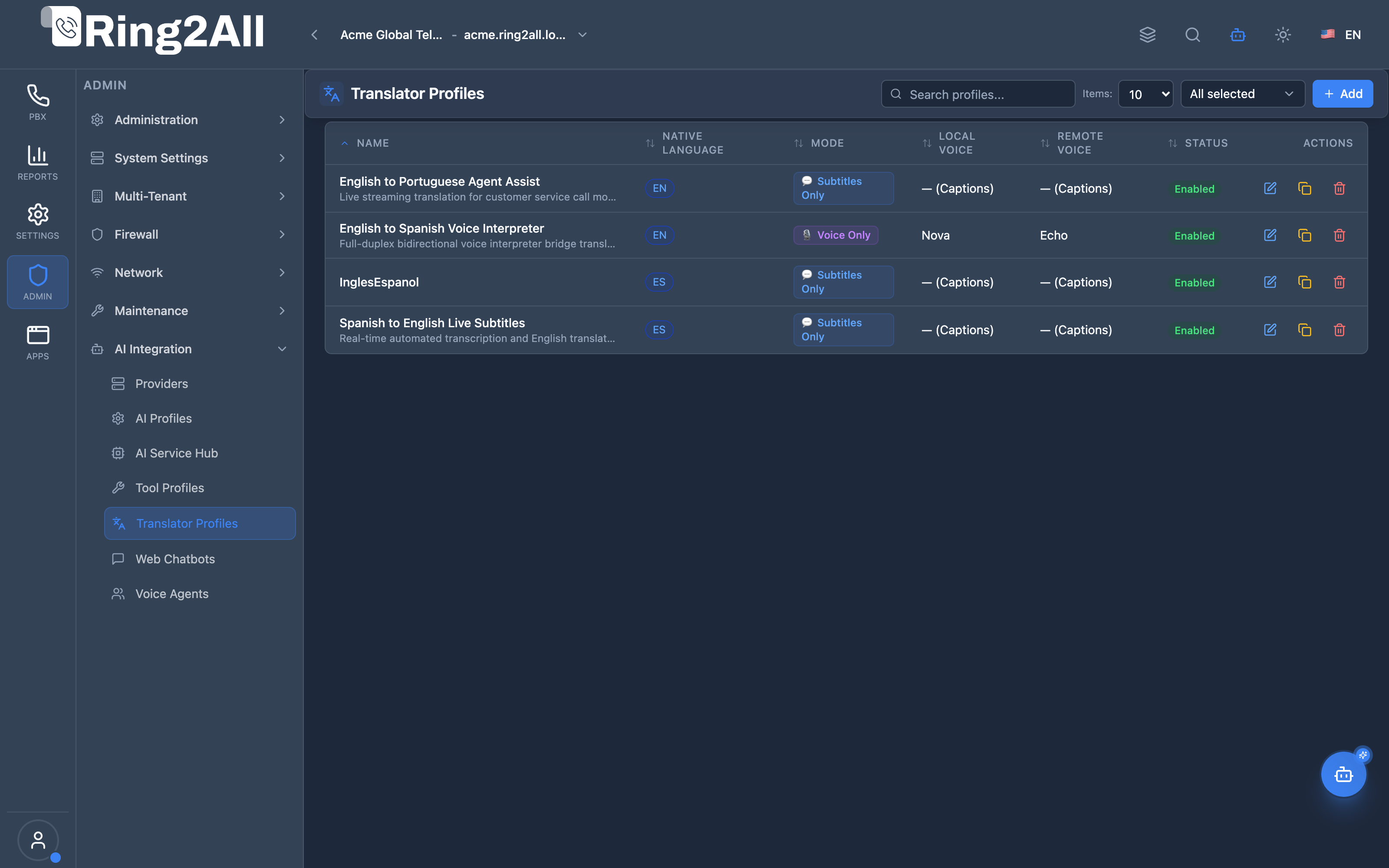
Section titled “Screenshots & Visual Interface”AI Translator Profiles Directory
Section titled “AI Translator Profiles Directory”Registry displaying configured simultaneous translation profiles, source and target languages, translation modes (subtitles vs full-duplex voice), and status switches.
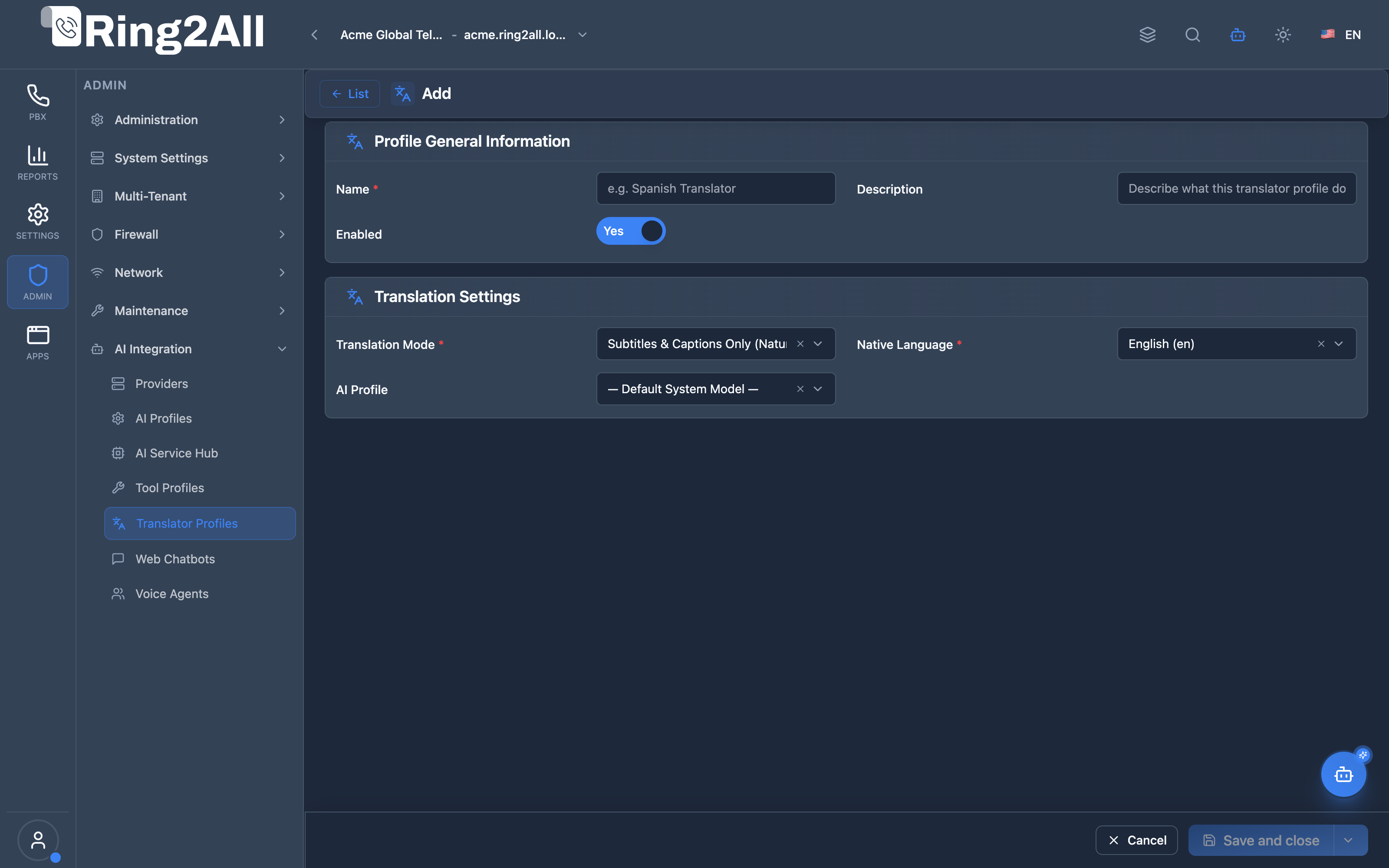
Create / Edit AI Translator Profile Form
Section titled “Create / Edit AI Translator Profile Form”Configuration editor for naming the translation profile, specifying the native speaker’s language, choosing synthetic voice outputs (local and remote), selecting the underlying Realtime LLM profile, and defining the translation mode.
🎯 User Roles & Key Capabilities
Section titled “🎯 User Roles & Key Capabilities”| Role | Access Level | Responsibilities & Capabilities |
|---|---|---|
| PBX Super Administrator | Full Access (RW) |
Create, update, and delete simultaneous translation profiles, configure Azure Neural Resonance voice mappings, and assign default translation rules across organizations. |
| Multinational Operations Director | Department Oversight (RW) |
Design bilingual interpreter policies for global customer support desks, review call latency logs, and manage translation accuracy settings. |
| Call Center Supervisor | Operational Monitoring (RO) |
Monitor active call translation quality, review translation mode allocations (subtitles vs streaming voice), and report latency anomalies. |
| AI Platform Copilot / MCP Agent | Programmatic Inspection (RO) |
Execute list_ai_translator_profiles to inspect available translation pipelines, target languages, and assigned neural voice synthesis engines. |
1. Module Overview (Technical)
Section titled “1. Module Overview (Technical)”What Are AI Translator Profiles?
Section titled “What Are AI Translator Profiles?”AI Translator Profiles replace legacy static language fields with a dynamic, relational, UUID-based architecture. Instead of hardcoding a “Native Language” directly on an extension, administrators assign an AI Translator Profile to the extension. This profile governs exactly how real-time simultaneous translation behaves for that user, including the source/target language, AI provider, TTS (Text-to-Speech) neural voice settings, and translation strictness.
Architecture
Section titled “Architecture”┌─────────────────────────────────────────────────────────────────┐│ AI Translator Architecture │├─────────────────────────────────────────────────────────────────┤│ ││ AI Translator Profile: "Executive Spanish Translation" ││ ┌──────────────────────────────────────────────────────────┐ ││ │ Profile ID: [UUID] │ ││ │ │ ││ │ Translation Settings: │ ││ │ ├─ User's Native Language: Spanish │ ││ │ ├─ Target Business Language: English │ ││ │ └─ Translation Mode: Simultaneous (Streaming) │ ││ │ │ ││ │ TTS Voice Engine (Azure Neural Resonance): │ ││ │ ├─ Voice: es-MX-JorgeNeural │ ││ │ ├─ Style: Professional │ ││ │ └─ Speed: 1.1x │ ││ │ │ ││ │ AI Model: │ ││ │ ├─ Provider: OpenAI │ ││ │ └─ Model: GPT-4o Realtime │ ││ └──────────────────────────────────────────────────────────┘ ││ ▲ ││ │ Linked via aiTranslatorProfileId ││ ┌────┴─────────────────────────────────────────────────────┐ ││ │ Extension 1001 (CEO) │ ││ │ - simultaneousTranslationEnabled: true │ ││ │ - aiTranslatorProfileId: [UUID] │ ││ └──────────────────────────────────────────────────────────┘ ││ │└─────────────────────────────────────────────────────────────────┘2. Module Overview (Commercial/Business)
Section titled “2. Module Overview (Commercial/Business)”Business Value
Section titled “Business Value”The AI Translator Profiles module breaks down language barriers in enterprise environments. It enables real-time, simultaneous translation during live phone calls.
| Legacy System | New AI Translator Architecture |
|---|---|
| Basic translation requiring human interpreters | Real-time AI interpretation with ultra-low latency |
| Hardcoded per user | Centralized profiles that can be updated in bulk |
| Monotone robotic voices | Azure Neural Resonance for human-like inflection |
Use Cases
Section titled “Use Cases”-
Multinational Internal Communications
- An engineer in Japan calls a manager in the US. Both speak in their native languages; the PBX translates the audio in real-time.
-
Global Customer Support
- Support agents can assist callers in any language without needing to learn the language. The profile ensures the customer hears a highly professional, native-sounding TTS voice.
3. Module Overview (End User/Administrator)
Section titled “3. Module Overview (End User/Administrator)”What Can You Do?
Section titled “What Can You Do?”- Create centralized translation profiles instead of configuring languages one-by-one per user.
- Configure exact Voice profiles (TTS) that represent the translated speech.
- Easily manage configurations via a standardized 4-column DataGrid.
Navigation
Section titled “Navigation”- Go to Admin → AI → Translator Profiles.
- Click + Add to create a new profile.
- Configure the source/target languages and select the AI model.
- Go to PBX → Extensions, edit an extension, and in the Advanced tab, assign the profile.
4. Configuration Sections
Section titled “4. Configuration Sections”General Information
Section titled “General Information”| Field | Description | Example |
|---|---|---|
| Profile Name | A descriptive name for the configuration. | Sales - English to Spanish |
| Description | Internal notes. | Used for LATAM sales reps |
Language & Translation Settings
Section titled “Language & Translation Settings”| Field | Description | Example |
|---|---|---|
| Native Language | The language spoken by the extension owner. | Spanish (es-MX) |
| Target Language | The default language the AI should translate into. | English (en-US) |
| Translation Engine | The LLM provider performing the translation. | OpenAI |
| Model | Specific model (e.g., GPT-4o) optimized for speed. | GPT-4o |
Voice Settings (TTS)
Section titled “Voice Settings (TTS)”| Field | Description | Example |
|---|---|---|
| Voice Provider | The engine used to synthesize the translated text back into audio. | Azure Neural Resonance |
| Voice Selection | The specific voice persona. | en-US-JennyNeural |
5. Settings Reference
Section titled “5. Settings Reference”[!TIP] Voice Selection: For simultaneous translation, it is highly recommended to use Azure Neural Resonance voices, as they provide the lowest latency and highest natural inflection for real-time streaming.
[!WARNING]
Latency Expectations: Simultaneous translation requires processing time. Expect a 1.5 to 2.5-second delay between speech and translation depending on the chosen model’s context-window processing.
6. Common Scenarios & Examples
Section titled “6. Common Scenarios & Examples”Scenario: Creating a Profile for a French Executive
Section titled “Scenario: Creating a Profile for a French Executive”- Navigate to AI Translator Profiles and click + Add.
- Name:
French Exec Translation - Native Language:
French - Translation Engine:
OpenAI(Model:GPT-4o) - Voice Provider:
Azure Neural - Voice Selection:
fr-FR-HenriNeural - Save the profile.
- Navigate to Extensions, edit the executive’s extension, go to the Advanced tab.
- Toggle Simultaneous Translation to
Enabled. - Select
French Exec Translationfrom the dropdown.
Model Context Protocol (MCP) AI Integration
Section titled “Model Context Protocol (MCP) AI Integration”The AI Translator Profiles module integrates with the SoftSwitch Model Context Protocol (MCP) server, allowing AI Copilots, automated orchestrators, and diagnostic agents to query real-time translation pipelines, speech synthesis voices, and model assignments.
MCP Tools Catalog
Section titled “MCP Tools Catalog”| Tool Name | Type | Access | Description |
|---|---|---|---|
list_ai_translator_profiles |
Query | ai_system_admin / Read |
Lists all real-time AI simultaneous speech translation profiles, target languages, TTS synthesis voices, and assigned model engines. |
Tool Schemas & Execution Responses
Section titled “Tool Schemas & Execution Responses”list_ai_translator_profiles
Section titled “list_ai_translator_profiles”{ "name": "list_ai_translator_profiles", "description": "Lists all real-time AI simultaneous speech translation profiles, target languages, TTS synthesis voices, and assigned model engines.", "parameters": { "type": "object", "properties": { "search": { "type": "string", "description": "Filter by profile name or target language." } } }}Realistic Execution Response:
{ "success": true, "data": { "total": 3, "translators": [ { "id": "b3e944fb-2782-411a-a1ad-467923793df1", "name": "Executive Spanish to English Interpreter", "description": "Real-time bidirectional translation for executive conferences", "nativeLanguage": "es-MX", "translationMode": "simultaneous_streaming", "voice": "en-US-JennyNeural", "remoteVoice": "es-MX-JorgeNeural", "enabled": true, "aiProfileId": 4 }, { "id": "e421a8cd-2f11-482d-82d2-5b9247c43310", "name": "Global Support French Interpreter", "description": "Customer care simultaneous translation from French to English", "nativeLanguage": "fr-FR", "translationMode": "simultaneous_streaming", "voice": "en-US-GuyNeural", "remoteVoice": "fr-FR-HenriNeural", "enabled": true, "aiProfileId": 4 }, { "id": "78c2e92a-8991-48f1-8cb2-2ef97e5989d2", "name": "Japanese Tech Support Subtitles", "description": "Text streaming and subtitle feed for tier-3 engineering calls", "nativeLanguage": "ja-JP", "translationMode": "subtitles_only", "voice": null, "remoteVoice": null, "enabled": true, "aiProfileId": 2 } ] }}Bilingual Natural Language Prompt Examples
Section titled “Bilingual Natural Language Prompt Examples”English Prompts
Section titled “English Prompts”- “Copilot, list all configured AI simultaneous translation profiles.”
- “Which translation profile is assigned to Spanish-speaking executives?”
- “Check which Azure Neural TTS voice is configured for French speech translation.”
Spanish Prompts
Section titled “Spanish Prompts”- “Copilot, lista todos los perfiles de traducción simultánea con IA configurados.”
- “¿Qué perfil de traducción está configurado para ejecutivos de habla hispana?”
- “Verifica qué voz neuronal de Azure está asignada al perfil de traducción al francés.”
Enterprise Safeguards & Execution Boundaries
Section titled “Enterprise Safeguards & Execution Boundaries”- Immutable UUID Architecture: All translator profiles use globally unique UUIDs to maintain referential integrity when bound to extensions.
- Multi-Tenant Isolation: Queries strictly isolate profiles by immutable numeric
tenant_id, ensuring organizations cannot view or borrow each other’s custom voice models or translation keys. - Bandwidth & Latency Protection: Simultaneous audio streaming enforces strict session timeouts and maximum speech buffers to prevent excessive OpenAI / Azure API consumption.
7. Limitations & Important Notes
Section titled “7. Limitations & Important Notes”- UUID Architecture: Translator profiles use UUIDs, meaning they are globally unique and immune to ID collisions during database merges or migrations.
- Action Bar Parity: The module supports standard DataGrid actions including Edit, Duplicate, and Delete directly from the fixed Action Bar.
8. Troubleshooting Tips
Section titled “8. Troubleshooting Tips”| Symptom | Possible Cause | Solution |
|---|---|---|
| Translation is heavily delayed | Wrong model selected | Ensure you are using GPT-4o or models specifically tagged for low-latency streaming. |
| Robotic voice | Using legacy TTS | Switch Voice Provider to Azure Neural Resonance. |
| Profile doesn’t apply to calls | Not assigned to extension | Verify the profile is selected in the Extension’s Advanced tab and the feature is toggled On. |
Glossary
Section titled “Glossary”| Term | Definition |
|---|---|
| Translator Profile | Settings mapping source/target languages and voices for translation |
| Simultaneous Translation | Real-time audio translation during a call |
Documentation last updated: May 2026