

Firewall Rules Module Documentation
Table of Contents
Section titled “Table of Contents”- Module Overview (Technical)
- Module Overview (Commercial & Business Value)
- 🎯 User Roles & Key Capabilities
- Visual Interface & Form Structure
- Architectural Flow & Security Governance
- Common Scenarios & Operational Playbooks
- Troubleshooting & Diagnostic Commands
- Model Context Protocol (MCP) AI Integration
- Glossary
1. Module Overview (Technical)
Section titled “1. Module Overview (Technical)”The Firewall Rules module (public.firewall_rules) provides the policy orchestration engine for Ring2All Billing, enabling system operators to construct complex, multi-variable packet filtering statements. While the Services module defines ports and protocols, and Access Control manages quick IP whitelists and blacklists, Firewall Rules connects services, source subnets, destination interfaces, and evaluation actions into an ordered rule hierarchy.
Each firewall rule defines an explicit Action (Accept, Drop, or Reject), directionality (Input, Output, or Forward), an associated named Service, a numeric evaluation Priority, source and destination CIDR boundaries, and optional interface binding. When committed via Apply Rules, the platform synchronizes the state directly with the underlying Linux netfilter engine (nftables/iptables).
Data Model & System Linkage
Section titled “Data Model & System Linkage” ┌────────────────────────────────────────────────────────────────────────┐ │ Firewall Rule Entity (public.firewall_rules) │ │ • id: bigint (Primary Key) │ │ • name: VARCHAR(100) (Rule Name, e.g. 'Allow Fastify API from VPN') │ │ • action: 'accept' | 'drop' | 'reject' │ │ • direction: 'input' | 'output' | 'forward' │ │ • service_id: bigint (FK to public.firewall_services) │ │ • priority: integer (Execution Evaluation Order, e.g. 10, 20, 30) │ │ • source_address: VARCHAR(100) (e.g. '10.8.0.0/24', '192.168.10.0/24')│ │ • destination_address: VARCHAR(100) (Optional Local VIP or Interface) │ │ • interface: VARCHAR(50) (e.g. 'eth0', 'tun0', 'wg0') │ │ • enabled: boolean (Active State Toggle) │ └───────────────────────────────────┬────────────────────────────────────┘ │ ┌─────────────────────────┴─────────────────────────┐ ▼ ▼ ┌───────────────────────────────────┐ ┌───────────────────────────────────┐ │ Service Definition Lookup │ │ Linux Netfilter Pipeline │ │ • Extracts TCP/UDP protocol │ │ • Rules sorted by priority ASC │ │ • Extracts single port or range │ │ • Injected into nftables chain │ └───────────────────────────────────┘ └───────────────────────────────────┘PostgreSQL Schema Architecture
Section titled “PostgreSQL Schema Architecture”public.firewall_rules:id: Numeric primary key (bigserial).name: Concise, meaningful label identifying the policy purpose.action:accept: Allows packet traversal immediately.drop: Discards packet silently without ICMP notification.reject: Discards packet and issues an explicit ICMP unreachable response.
direction: Traffic vector (input,output,forward).service_id: Foreign key pointing topublic.firewall_services.id.priority: Numeric weight controlling evaluation sequence. Rules are sorted in ascending order (ORDER BY priority ASC).source_address: CIDR notation or specific IP restricting where traffic originates.destination_address: Optional target IP constraint.interface: Restricts policy application to a specific network interface.enabled: Master switch controlling whether the rule is compiled into the running kernel firewall.
2. Module Overview (Commercial & Business Value)
Section titled “2. Module Overview (Commercial & Business Value)”- Zero-Trust Network Architecture: Restricts sensitive billing administration and database replication exclusively to authorized corporate subnets, VPN tunnels, and trusted interconnects.
- Carrier SLA Assurance: Protects carrier rating engines from distributed denial-of-service (DDoS) exhaustion, ensuring high-volume Call Detail Record (CDR) ingestion remains uninterrupted.
- Granular Policy Auditability: Clean separation of concerns allows compliance auditors to verify that administrative interfaces (SSH, database, API) are never exposed directly to public ingress interfaces.
3. 🎯 User Roles & Key Capabilities
Section titled “3. 🎯 User Roles & Key Capabilities”| User Role | Key Permissions | Core Responsibilities & Workflows |
|---|---|---|
| Super Administrator | Full Control (CRUD on Firewall Rules) |
Authors enterprise security policies, designs network segregation rules, reorders priority evaluation chains, and applies rules to the kernel. |
| Security Officer / SecOps | Policy Audit & Optimization | Reviews rule ordering to eliminate shadowing and redundancy, validates source subnet restrictions, and verifies compliance with ISO 27001. |
| Network Engineer | Read & Test (Routing & Interfaces) | Verifies interface bindings (e.g., ensuring internal telecom nodes communicate across tun0/wg0 while customer portals bind to eth0). |
4. Visual Interface & Form Structure
Section titled “4. Visual Interface & Form Structure”Level 1 — Firewall Rules List View
Section titled “Level 1 — Firewall Rules List View”The policy catalog displays all active rules ordered by priority, displaying rule names, target services, actions, direction, interface bindings, active statuses, and execution controls.
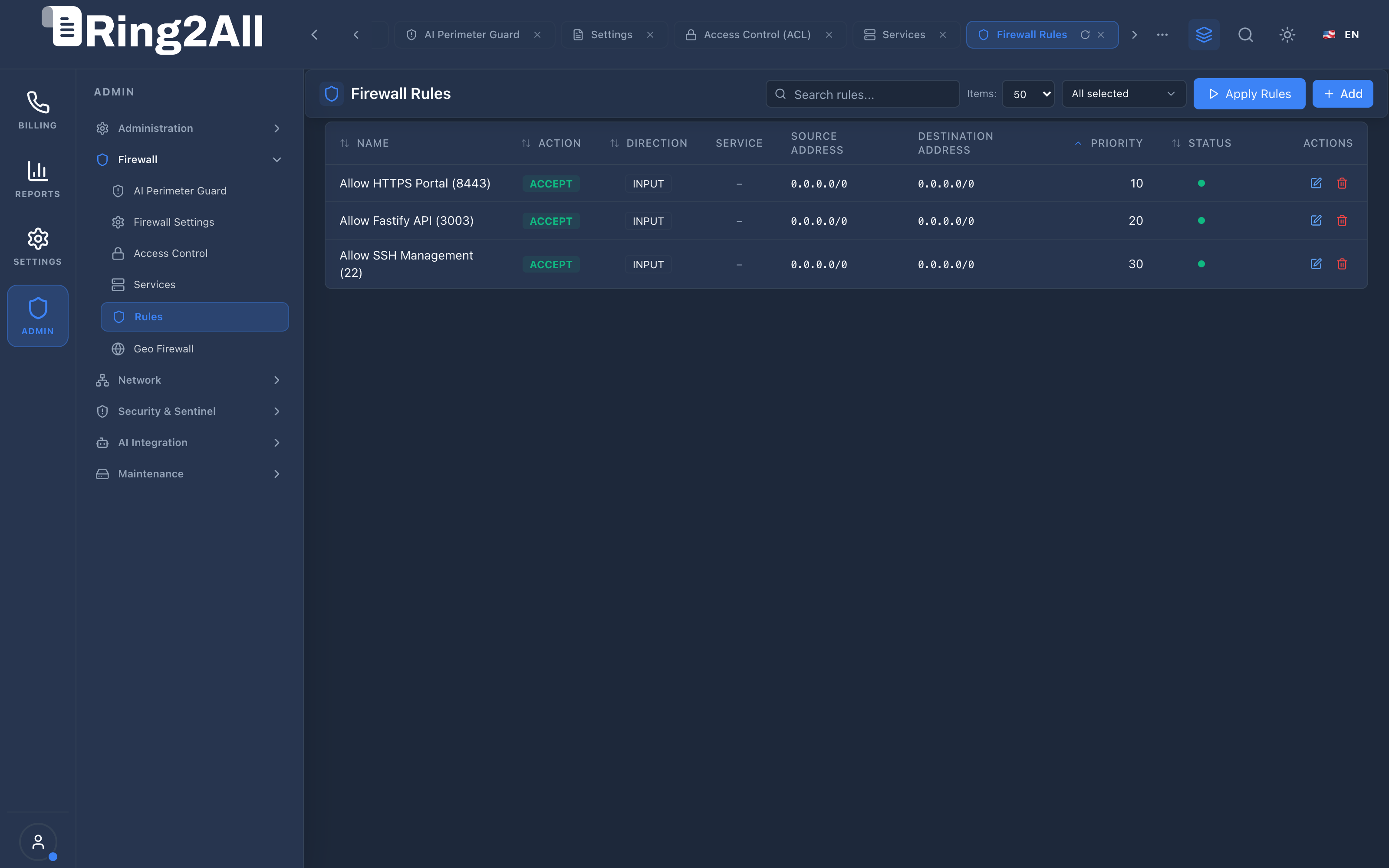
Level 2 — Add Firewall Rule Modal
Section titled “Level 2 — Add Firewall Rule Modal”The policy creation modal provides structured input fields to configure actions, services, priorities, and source/destination addresses.
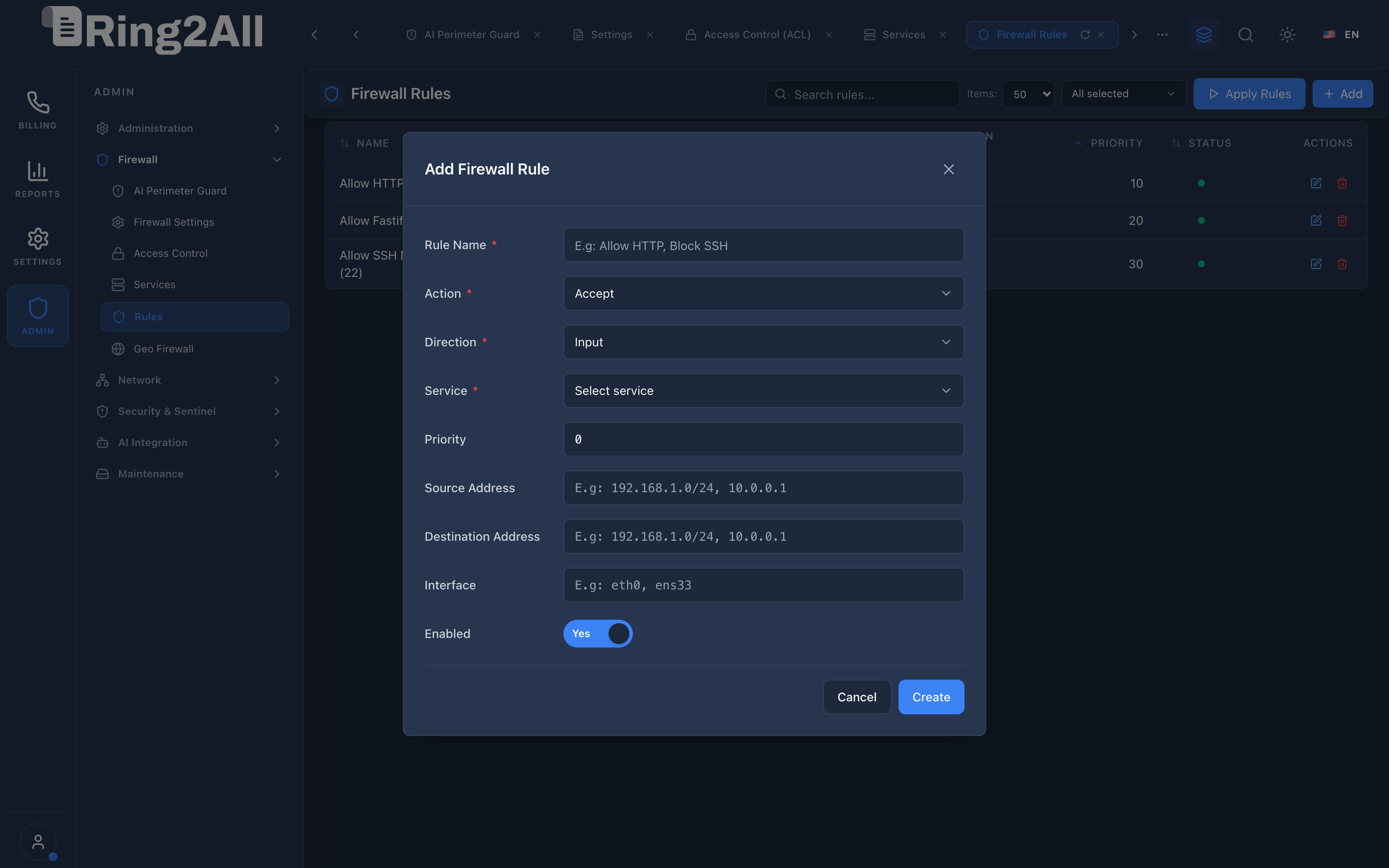
Fields & Parameters Reference
Section titled “Fields & Parameters Reference”- Rule Name: Descriptive title (e.g.,
Allow HTTPS Portal Web,Restrict SSH to Management VPN). - Action: Filtering decision (
Accept,Drop,Reject). - Direction: Flow perspective (
Input,Output,Forward). - Service: Dropdown selecting a preconfigured definition from the Services module.
- Priority: Numeric execution order (e.g.,
10,20,30). Lowest numbers evaluate first. - Source Address: Origin CIDR subnet or IP address (e.g.,
10.8.0.0/24or192.168.10.0/24). Leave blank for any source (0.0.0.0/0). - Destination Address: Target CIDR subnet or local host IP. Leave blank for any local address.
- Interface: Hardware or virtual interface binding (e.g.,
eth0,ens33,tun0,wg0). - Enabled: Operational toggle. Set to
Yesto include the rule in kernel compilation.
5. Architectural Flow & Security Governance
Section titled “5. Architectural Flow & Security Governance” ┌──────────────┐ 1. POST /api/firewall/rules ┌────────────────────────┐ │ System Admin ├───────────────────────────────────────────────►│ Fastify 5 API Route │ └──────────────┘ └───────────┬────────────┘ │ 2. Insert Rule Record into ss_billing ▼ ┌──────────────┐ 4. Atomic Rule Translation ┌────────────────────────┐ │ Linux Kernel ◄────────────────────────────────────────────────┤ nftables Synchronizer │ │ netfilter │ └────────────────────────┘ └──────────────┘ ▲ │ 3. User Clicks 'Apply Rules'- Rule Configuration: The administrator defines the policy parameters in the modal dialog.
- Database Persistence: The Fastify API performs boundary validation and records the rule in
public.firewall_rules. - Compilation Trigger: The administrator clicks Apply Rules in the top-right toolbar.
- Kernel Synthesis: The synchronizer queries all enabled rules ordered by priority, resolves associated service port definitions, generates an atomic
nftablestransaction, and loads it directly into the kernel without interrupting active sessions.
6. Common Scenarios & Operational Playbooks
Section titled “6. Common Scenarios & Operational Playbooks”Playbook 1: Restricting SSH Access to Management VPN Only
Section titled “Playbook 1: Restricting SSH Access to Management VPN Only”- Navigate to ADMIN > Firewall > Rules.
- Click + Add in the top-right toolbar.
- Enter Rule Name:
Restrict SSH to OpenVPN Subnet. - Set Action:
Accept. - Set Direction:
Input. - Select Service:
SSH Management(Port 22). - Set Priority:
15. - In Source Address, enter the VPN pool CIDR:
10.8.0.0/24. - In Interface, enter:
tun0. - Toggle Enabled to
Yesand click Create. - Click Apply Rules to commit changes to the kernel.
Playbook 2: Allowing Public Customer Access to Billing Web Portal
Section titled “Playbook 2: Allowing Public Customer Access to Billing Web Portal”- Navigate to ADMIN > Firewall > Rules.
- Click + Add.
- Enter Rule Name:
Allow Public HTTPS Web Portal. - Set Action:
Accept. - Set Direction:
Input. - Select Service:
HTTPS Portal Web(Port 8443). - Set Priority:
20. - Leave Source Address blank (
0.0.0.0/0) to allow all public traffic. - Toggle Enabled to
Yesand click Create. - Click Apply Rules.
7. Troubleshooting & Diagnostic Commands
Section titled “7. Troubleshooting & Diagnostic Commands”Querying Rules in Database
Section titled “Querying Rules in Database”# Display all rules sorted by prioritysudo -u postgres psql -d ss_billing -c \ "SELECT r.priority, r.name, r.action, r.direction, s.name AS service, s.port, r.source_address, r.enabled \ FROM firewall_rules r \ JOIN firewall_services s ON r.service_id = s.id \ ORDER BY r.priority ASC;"Inspecting Running Kernel Rules
Section titled “Inspecting Running Kernel Rules”# View active nftables ruleset in human-readable formatnft -a list ruleset | grep -A 5 "chain input"
# View rule packet and byte countersnft list table inet filter8. Model Context Protocol (MCP) AI Integration
Section titled “8. Model Context Protocol (MCP) AI Integration”The Firewall Rules module connects directly to the Ring2All BSS MCP Server, empowering security copilots and network automation tools to audit ordered rule sets and packet actions safely.
Available MCP Tools
Section titled “Available MCP Tools”| Tool Name | Access Role | Description & Primary Function | Example Arguments |
|---|---|---|---|
list_firewall_rules |
Super Administrator |
Lists granular packet filtering firewall rules with evaluation priority, action (ACCEPT/DROP), and service associations. | {} |
Sample MCP Tool Execution: list_firewall_rules
Section titled “Sample MCP Tool Execution: list_firewall_rules”Request Payload
Section titled “Request Payload”{ "name": "list_firewall_rules", "arguments": {}}Response Payload
Section titled “Response Payload”[ { "id": 1, "name": "Allow HTTPS Public Web", "action": "accept", "direction": "in", "priority": 10, "serviceName": "Billing HTTP/HTTPS", "sourceAddress": "any", "enabled": true }, { "id": 2, "name": "Drop Unauthenticated Management", "action": "drop", "direction": "in", "priority": 90, "serviceName": "SSH Management", "sourceAddress": "!192.168.10.0/24", "enabled": true }]Conversational AI Prompts for Copilot
Section titled “Conversational AI Prompts for Copilot”- “List all active firewall rules sorted by evaluation priority.”
- “Show all DROP rules configured in the input chain.”
- “Verify if public access to port 443 is permitted.”
9. Glossary
Section titled “9. Glossary”- Evaluation Priority: The chronological order in which the firewall tests incoming packets against rule definitions; first-match semantics terminate evaluation.
- Shadowing: A configuration error where an overly broad high-priority rule prevents a more specific lower-priority rule from ever being evaluated.
- Interface Binding: Limiting a firewall policy strictly to traffic flowing through a specific network interface (e.g.,
tun0for OpenVPN). - ICMP Unreachable: A reject response informing the client that the destination port or host is administratively filtered.
- Model Context Protocol (MCP): Open protocol standard that enables secure, controlled integration between Large Language Models and external tools, databases, and telecom rating engines.