

GeoFirewall Module Documentation
Table of Contents
Section titled “Table of Contents”- Navigation & Access
- Screenshots & Visual Interface
- Module Overview (Technical)
- Module Overview (Commercial/Business)
- Module Overview (End User/Administrator)
- User Roles & Key Capabilities
- Configuration Sections
- Settings Reference
- Common Scenarios & Examples
- Model Context Protocol (MCP) AI Integration
- Limitations & Important Notes
- Troubleshooting Tips
- Glossary
Navigation & Access
Section titled “Navigation & Access”To access the Geo Firewall module:
- Log in to the Ring2All Web Portal (
https://<domain-or-ip>/login) with administrative credentials. - In the left navigation sidebar, locate and expand Admin.
- Under the Firewall section, click Geo Firewall (
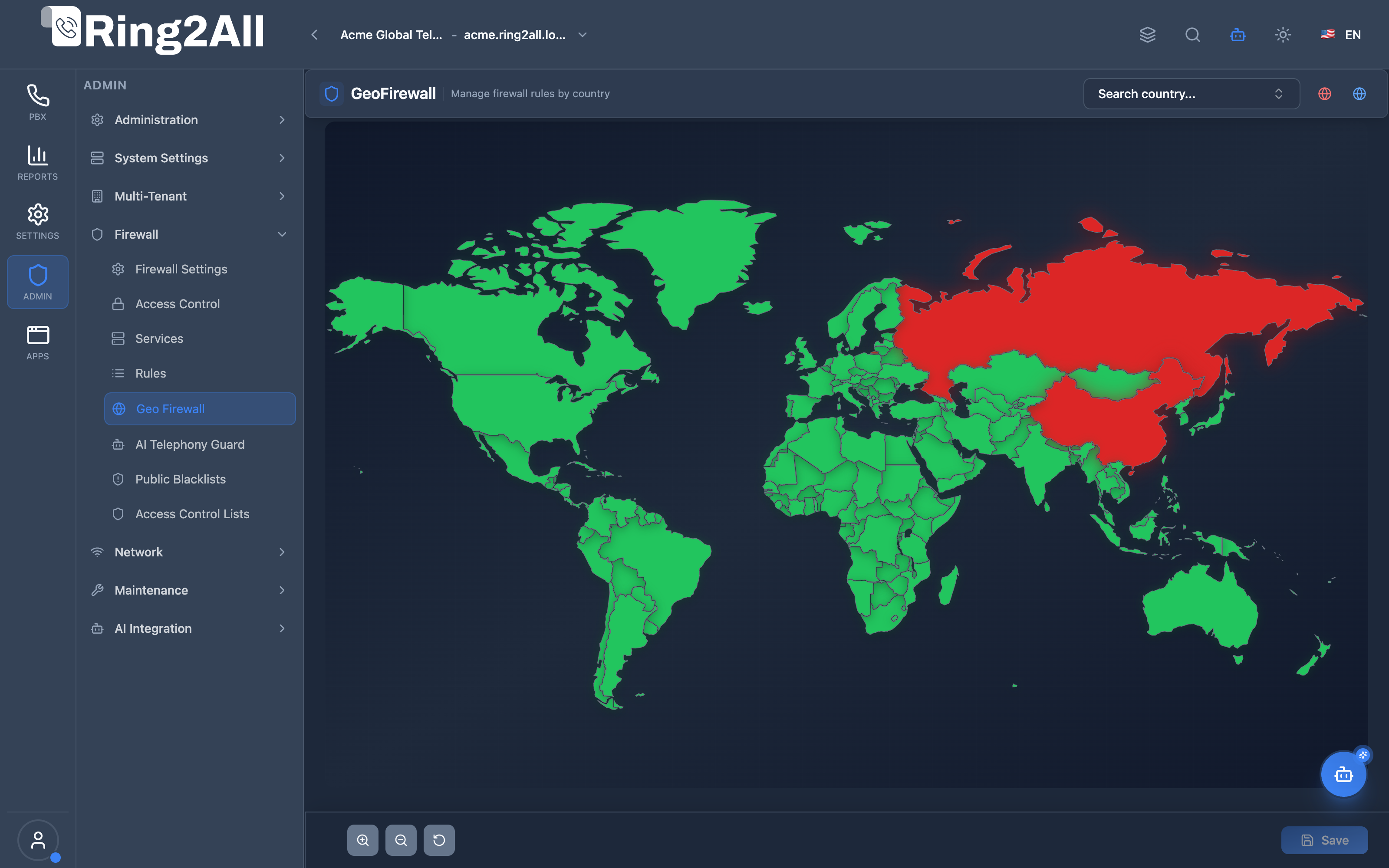
/admin/firewall/geo). - Interact directly with the SVG world map by clicking countries to toggle between Allowed (green) and Blocked (red), or use the country search selector at the top right.
- Use the map zoom (
+/-) and reset controls at the bottom left to navigate regions. - Click Save in the bottom action bar to apply geographic IP filtering rules into the system firewall.
Screenshots & Visual Interface
Section titled “Screenshots & Visual Interface”Geo Firewall Interactive World Map
Section titled “Geo Firewall Interactive World Map”The Geo Firewall module renders a high-performance interactive vector world map where countries are color-coded in real time according to their traffic admission status. Blocked high-risk jurisdictions are highlighted in red, allowed traffic origins in green, and changes can be inspected and committed dynamically.
1. Module Overview (Technical)
Section titled “1. Module Overview (Technical)”What Is GeoFirewall?
Section titled “What Is GeoFirewall?”GeoFirewall is a country-based firewall module that creates rules based on geographic IP ranges. It provides an interactive world map for country selection and supports both blocking and allowing traffic by country.
Architecture
Section titled “Architecture”┌─────────────────────────────────────────────────────────────────┐│ GeoFirewall Architecture │├─────────────────────────────────────────────────────────────────┤│ ││ Interactive World Map ││ ┌──────────────────────────────────────────────────────────┐ ││ │ │ ││ │ ┌─────┐ ┌─────┐ ┌─────┐ ┌─────┐ ┌─────┐ │ ││ │ │ 🟢 │ │ 🔴 │ │ 🔴 │ │ ⚪ │ │ 🟢 │ │ ││ │ │ USA │ │ CN │ │ RU │ │ BR │ │ UK │ │ ││ │ └─────┘ └─────┘ └─────┘ └─────┘ └─────┘ │ ││ │ │ ││ │ 🟢 Allowed 🔴 Blocked ⚪ Unselected │ ││ │ │ ││ └──────────────────────────────────────────────────────────┘ ││ │ ││ ▼ Generates rules ││ ┌──────────────────────────────────────────────────────────┐ ││ │ GeoFirewall Rules │ ││ │ │ ││ │ ┌────────────────┐ ┌────────────────┐ │ ││ │ │ Block China │ │ Block Russia │ │ ││ │ │ Country: CN │ │ Country: RU │ │ ││ │ │ Action: Block │ │ Action: Block │ │ ││ │ │ Priority: 100 │ │ Priority: 110 │ │ ││ │ └────────────────┘ └────────────────┘ │ ││ │ │ ││ └──────────────────────────────────────────────────────────┘ ││ │ ││ ▼ Applied to nftables with GeoIP ││ ┌──────────────────────────────────────────────────────────┐ ││ │ Linux Firewall (nftables + GeoIP) │ ││ │ │ ││ │ table inet geo_filter { │ ││ │ chain input { │ ││ │ # Block China │ ││ │ ip saddr @geoip_cn drop │ ││ │ # Block Russia │ ││ │ ip saddr @geoip_ru drop │ ││ │ } │ ││ │ } │ ││ │ │ ││ └──────────────────────────────────────────────────────────┘ ││ │└─────────────────────────────────────────────────────────────────┘2. Module Overview (Commercial/Business)
Section titled “2. Module Overview (Commercial/Business)”Business Value
Section titled “Business Value”GeoFirewall provides geographic access control:
| Without GeoFirewall | With GeoFirewall |
|---|---|
| No geo blocking | Block by country |
| IP range research | Visual map selection |
| Manual ranges | Auto GeoIP updates |
| Complex setup | Click to block |
Use Cases
Section titled “Use Cases”-
Block Attack Origins
- Block high-risk countries
- Reduce SIP scanning
-
Regional Service
- Allow only service region
- Restrict global access
-
Compliance
- Geographic restrictions
- Data sovereignty
-
Cost Control
- Block toll fraud countries
- Limit international access
Feature Highlights
Section titled “Feature Highlights”| Feature | Benefit |
|---|---|
| Interactive Map | Visual selection |
| Block/Allow | Flexible actions |
| Bulk Operations | Select/deselect all |
| Enable/Disable | Quick toggle |
| Priority Order | Controlled evaluation |
| GeoIP Database | Accurate IP mapping |
3. Module Overview (End User/Administrator)
Section titled “3. Module Overview (End User/Administrator)”What Can You Do?
Section titled “What Can You Do?”- Block countries by clicking on map
- Allow only specific countries
- Search for countries
- Select/deselect all countries
- Enable/disable all rules
- Set rule priority
- Apply rules to firewall
GeoFirewall Interface - Map View
Section titled “GeoFirewall Interface - Map View”┌─────────────────────────────────────────────────────────────────┐│ GeoFirewall │├─────────────────────────────────────────────────────────────────┤│ ││ Manage firewall rules by country ││ ││ [🔍 Search country...] [GeoFirewall: ● Enabled] ││ ││ [Map] [Form] ││ ││ ┌───────────────────────────────────────────────────────────┐ ││ │ │ ││ │ WORLD MAP │ ││ │ │ ││ │ ┌─────────────────────────────────────────────────────┐ │ ││ │ │ │ │ ││ │ │ 🟢 USA 🔴 CN ⚪ IN │ │ ││ │ │ │ │ ││ │ │ 🟢 UK 🔴 RU ⚪ BR │ │ ││ │ │ │ │ ││ │ │ 🟢 CA 🔴 KP ⚪ AU │ │ ││ │ │ │ │ ││ │ └─────────────────────────────────────────────────────┘ │ ││ │ │ ││ │ [+ Zoom] [- Zoom] [Reset] [Select All] [Unselect All] │ ││ │ │ ││ └───────────────────────────────────────────────────────────┘ ││ ││ Legend: 🟢 Allowed 🔴 Blocked ⚪ Unselected ││ ││ Selected: 6 countries (3 blocked, 3 allowed) ││ │└─────────────────────────────────────────────────────────────────┘GeoFirewall Interface - Form/List View
Section titled “GeoFirewall Interface - Form/List View”┌─────────────────────────────────────────────────────────────────┐│ GeoFirewall │├─────────────────────────────────────────────────────────────────┤│ ││ [Map] [Form] ││ ││ [+ Add Rule] [Enable All] [Disable All] [Apply Rules] ││ ││ [🔍 Search rules...] ││ ││ ┌───────────────────────────────────────────────────────────┐ ││ │ Name │ Country │ Action│ Direction│ Pri │ St │ ││ ├──────────────┼────────────┼───────┼──────────┼─────┼────┤ ││ │ Block China │ 🇨🇳 China │ Block │ Input │ 100 │ ● │ ││ │ Block Russia │ 🇷🇺 Russia │ Block │ Input │ 110 │ ● │ ││ │ Block N.Korea│ 🇰🇵 N. Korea│ Block │ Input │ 120 │ ● │ ││ │ Allow USA │ 🇺🇸 USA │ Allow │ Input │ 200 │ ● │ ││ │ Allow UK │ 🇬🇧 UK │ Allow │ Input │ 210 │ ● │ ││ │ Allow Canada │ 🇨🇦 Canada │ Allow │ Input │ 220 │ ● │ ││ └───────────────────────────────────────────────────────────┘ ││ │└─────────────────────────────────────────────────────────────────┘Add/Edit Rule
Section titled “Add/Edit Rule”┌─────────────────────────────────────────────────────────────────┐│ Add GeoFirewall Rule │├─────────────────────────────────────────────────────────────────┤│ ││ Rule Name: [Block China ] ││ Descriptive name (e.g., Block China, Allow USA) ││ ││ Country: [🇨🇳 China (CN) ▼] ││ Selected from map or dropdown ││ Rule applies to all traffic from/to this country ││ ││ Action: [Block ▼] ││ Block (discard traffic) | Allow (permit traffic) ││ ││ Direction: [Input ▼] ││ Input (to server) | Output (from server) | Forward ││ ││ Priority: [100 ] ││ Rule priority (0-9999). Lower numbers evaluated first ││ ││ Enabled: ✓ ││ ││ [Save] [Cancel] ││ │└─────────────────────────────────────────────────────────────────┘Quick Tips
Section titled “Quick Tips”[!TIP] Map Click: Click any country on the map to block/allow.
[!TIP] Search: Use search to quickly find countries.
[!WARNING] Don’t Block Your Country: Ensure your access isn’t blocked!
🎯 User Roles & Key Capabilities
Section titled “🎯 User Roles & Key Capabilities”The GeoFirewall module allocates country-level filtering controls across platform operational roles:
| User Role | Key Permissions & Responsibilities | Common Tasks & Workflows |
|---|---|---|
| System Super Administrator / Security Officer | Full authority to manage global country block/allow lists, interactive map toggles, and kernel ipset bindings. | Block entire high-risk geographical zones (e.g. regions with zero legitimate business), commit rules to nftables, safeguard host country access. |
| Tenant Administrator | Scoped review of allowed countries to ensure international branches and teleworkers are reachable. | Verify country access status for employees traveling abroad, request targeted country exemptions from the security operations team. |
| Fraud Prevention Analyst / NOC | Rapid response to international toll fraud campaigns and distributed brute-force attacks. | Identify spike origins in real time, toggle targeted nations to BLOCK during live volumetric SIP sweeps, analyze geographic traffic telemetry. |
| Regulatory & Compliance Auditor | Auditing geographic network boundaries to satisfy cross-border telecommunication mandates. | Verify that sanctioned jurisdictions are systematically blocked at layer 3/4, inspect changes to geographic access permissions. |
4. Configuration Sections
Section titled “4. Configuration Sections”Rule Fields
Section titled “Rule Fields”| Field | Description |
|---|---|
| Rule Name | Unique identifier |
| Country | Selected country |
| Action | Block or Allow |
| Direction | Input, Output, Forward |
| Priority | Order (0-9999) |
| Enabled | Active/Inactive |
Map Controls
Section titled “Map Controls”| Control | Description |
|---|---|
| Zoom In | Enlarge map |
| Zoom Out | Shrink map |
| Reset | Default view |
| Select All | Block/allow all |
| Unselect All | Remove all rules |
5. Settings Reference
Section titled “5. Settings Reference”Actions
Section titled “Actions”| Action | Behavior | Use Case |
|---|---|---|
| Block | Drop all traffic | High-risk countries |
| Allow | Permit traffic | Service regions |
Common Blocked Countries (High SIP Attacks)
Section titled “Common Blocked Countries (High SIP Attacks)”| Country | Code | Risk Level |
|---|---|---|
| China | CN | High |
| Russia | RU | High |
| North Korea | KP | High |
| Iran | IR | Medium |
| Vietnam | VN | Medium |
| Indonesia | ID | Medium |
Regional Allow Lists
Section titled “Regional Allow Lists”| Region | Countries |
|---|---|
| North America | US, CA, MX |
| Western Europe | UK, DE, FR, ES, IT |
| APAC Business | JP, AU, SG, KR |
6. Common Scenarios & Examples
Section titled “6. Common Scenarios & Examples”Scenario 1: Block High-Risk Countries
Section titled “Scenario 1: Block High-Risk Countries”- Open GeoFirewall
- Click on China → Block
- Click on Russia → Block
- Click on North Korea → Block
- Apply Rules
Scenario 2: Allow Only USA
Section titled “Scenario 2: Allow Only USA”- Click “Select All” → Block All
- Click on USA → Allow
- Set priority (Allow lower than Block)
- Apply Rules
Scenario 3: Block Toll Fraud Origins
Section titled “Scenario 3: Block Toll Fraud Origins”- Identify high-risk countries for toll fraud
- Block: Cuba, Somalia, Guinea-Bissau
- Block: Mauritania, Sierra Leone
- Apply Rules
- Monitor CDR for anomalies
Scenario 4: Regional Service
Section titled “Scenario 4: Regional Service”Allow Rules (Priority 10-100):├─ USA (10)├─ Canada (20)├─ UK (30)├─ Germany (40)└─ France (50)
Block Rule (Priority 9999):└─ All others (catch-all)7. Limitations & Important Notes
Section titled “7. Limitations & Important Notes”Technical Notes
Section titled “Technical Notes”[!NOTE] GeoIP Database: Accuracy depends on database updates.
[!NOTE] VPN/Proxy: Users can bypass with VPNs.
[!WARNING] Self-Block: Don’t block your own country!
Best Practices
Section titled “Best Practices”- Know Your Users: Don’t block legitimate users
- Allow First: Create allow rules with lower priority
- Test Access: Verify after applying rules
- Update Database: Keep GeoIP current
- Monitor Logs: Watch for blocked traffic
GeoIP Limitations
Section titled “GeoIP Limitations”| Limitation | Impact |
|---|---|
| VPN bypass | Users appear from VPN country |
| CDN/Cloud | IP may show as different country |
| Accuracy | ~95-99% for countries |
| Updates | Need periodic database refresh |
Model Context Protocol (MCP) AI Integration
Section titled “Model Context Protocol (MCP) AI Integration”The GeoFirewall module connects directly to the Ring2All Platform Copilot MCP Server, enabling natural language geographic IP policy inspection and management:
🛠️ Available MCP Tools
Section titled “🛠️ Available MCP Tools”| Tool Name | Operation | Access Level | Description | Key Parameters |
|---|---|---|---|---|
list_geofirewall_rules |
Read | SuperAdmin / Auditor | Lists country-level GeoFirewall rules, displaying country code, country name, action (block or allow), direction, and enabled state. |
search (string), action (accept, drop, allow, block), direction (input, output), countryCode (string), enabled (boolean) |
list_firewall_rules |
Read | SuperAdmin / Auditor | Inspects general packet filtering rules that interact with geographic sets. | search (string, optional) |
get_voipbl_status |
Read | SuperAdmin / Auditor | Returns status of threat intelligence blocklists working alongside GeoIP filtering. | None |
📋 JSON Tool Schemas & Sample Executions
Section titled “📋 JSON Tool Schemas & Sample Executions”list_geofirewall_rules
Section titled “list_geofirewall_rules”{ "name": "list_geofirewall_rules", "arguments": { "action": "block" }}Sample Successful Response:
{ "success": true, "data": { "total": 2, "rules": [ { "id": 1, "name": "Block High-Risk Eastern Europe", "countryCode": "RU", "countryName": "Russian Federation", "action": "block", "direction": "input", "priority": 50, "enabled": true }, { "id": 2, "name": "Block High-Risk Asia Scanners", "countryCode": "CN", "countryName": "China", "action": "block", "direction": "input", "priority": 50, "enabled": true } ] }}💬 Natural Language Prompt Examples
Section titled “💬 Natural Language Prompt Examples”English Prompts
Section titled “English Prompts”- “List all countries currently blocked by the PBX GeoFirewall.”
- “Check if traffic from Mexico (country code MX) is allowed or blocked.”
- “Show all active GeoFirewall rules with high priority (priority <= 50).”
- “Verify whether any inbound GeoFirewall rule blocks the United States (US).”
Ejemplos en Español (Spanish Prompts)
Section titled “Ejemplos en Español (Spanish Prompts)”- “Lista todos los países actualmente bloqueados por el GeoFirewall de la centralita.”
- “Verifica si el tráfico procedente de México (código MX) está permitido o bloqueado.”
- “Muestra todas las reglas de GeoFirewall activas con prioridad alta (prioridad <= 50).”
- “Comprueba si alguna regla entrante de GeoFirewall bloquea a Estados Unidos (US).”
🛡️ Enterprise Safeguards & Best Practices
Section titled “🛡️ Enterprise Safeguards & Best Practices”- Home Country Lockout Safeguard: System initialization verifies that the host server’s local country and primary operating jurisdiction are not set to
block, preventing accidental administrative lockout. - Kernel ipset Efficiency: Country IP blocks are aggregated into high-performance kernel sets (
nftables set), allowing millions of IPv4/IPv6 subnets to be evaluated in O(1) CPU lookup time. - Database Freshness: GeoIP subnet mappings are continuously updated against verified MaxMind GeoLite2 databases to prevent stale ISP classification errors.
8. Troubleshooting Tips
Section titled “8. Troubleshooting Tips”Common Issues
Section titled “Common Issues”| Symptom | Possible Cause | Solution |
|---|---|---|
| Blocked unexpectedly | Wrong country blocked | Check rules |
| Can’t connect | Own country blocked | Console access |
| Still getting attacks | VPN/proxy | Add IP blacklist |
| Map not loading | Library missing | Check npm install |
Check Rules
Section titled “Check Rules”SELECT name, country_code, action, direction, priority, is_enabledFROM public.geo_firewall_rulesORDER BY priority;GeoIP Lookup
Section titled “GeoIP Lookup”# Check IP countrygeoiplookup 8.8.8.8
# View GeoIP database infogeoiplookup -vEmergency Recovery
Section titled “Emergency Recovery”# If blocked yourself:# 1. Access server console# 2. Disable GeoFirewallsystemctl stop nftables
# 3. Fix rules via admin panel# 4. Re-enablesystemctl start nftables9. Glossary
Section titled “9. Glossary”| Term | Definition |
|---|---|
| GeoIP | IP to country mapping |
| GeoFirewall | Country-based firewall |
| Block | Deny traffic |
| Allow | Permit traffic |
| Country Code | ISO 3166-1 alpha-2 |
Documentation last updated: January 2026