

Feature Codes Module Documentation
Table of Contents
Section titled “Table of Contents”- Module Overview (Technical)
- Module Overview (Commercial/Business)
- Module Overview (End User/Administrator)
- Configuration Fields Reference
- Feature Categories Reference
- Common Scenarios & Examples
- Model Context Protocol (MCP) AI Integration
- Limitations & Important Notes
- Troubleshooting Tips
- Glossary
1. Module Overview (Technical)
Section titled “1. Module Overview (Technical)”What Are Feature Codes?
Section titled “What Are Feature Codes?”Feature Codes are dial-activated shortcuts that trigger specific telephony features. When a user dials a code like *67 (anonymous calling) or *72 (call forward), the PBX executes the corresponding feature logic.
Architecture
Section titled “Architecture”┌─────────────────────────────────────────────────────────────────┐│ Feature Codes System │├─────────────────────────────────────────────────────────────────┤│ ││ User dials: *72 (Call Forward All) ││ │ ││ ▼ ││ ┌──────────────────────────────────────────────────────────┐ ││ │ Dialplan Feature Code Lookup │ ││ │ SELECT * FROM feature_codes │ ││ │ WHERE (custom_number = '*72' OR default_number = '*72') │ ││ │ AND enabled = true │ ││ └──────────────────────────────────────────────────────────┘ ││ │ ││ ▼ ││ ┌──────────────────────────────────────────────────────────┐ ││ │ Execute Feature Handler │ ││ │ │ ││ │ ├─ call_forward_all → prompt for destination │ ││ │ ├─ dnd_toggle → toggle DND status in database │ ││ │ ├─ agent_login → log agent into queue │ ││ │ ├─ voicemail_access → transfer to voicemail │ ││ │ └─ etc. │ ││ │ │ ││ └──────────────────────────────────────────────────────────┘ ││ │ ││ ▼ ││ Play confirmation tone or prompt → Hangup ││ │└─────────────────────────────────────────────────────────────────┘🎯 User Roles & Key Capabilities
Section titled “🎯 User Roles & Key Capabilities”| User Role | Key Capabilities & Permissions |
|---|---|
| PBX Super Admin | Full access to view, search, enable/disable, and modify default or custom keypad digits across all domains and feature categories. |
| Domain Administrator | Manage and customize feature codes for their specific telephony domain, resolving extension dialing conflicts and applying corporate dialplan patterns. |
| Call Center Supervisor | Review active feature codes for agent queue login/logout, eavesdropping, whisper, barge, and pause states. |
| Standard Extension User | Dial configured feature codes directly from SIP desk phones or WebRTC softphones according to assigned Class of Service (CoS). |
2. Module Overview (Commercial/Business)
Section titled “2. Module Overview (Commercial/Business)”Business Value
Section titled “Business Value”Feature Codes provide standardized telephony shortcuts:
| Benefit | Description |
|---|---|
| Industry Standard | Uses familiar codes (*67, *72, etc.) |
| User Empowerment | Users control their own settings |
| No Training Needed | Many codes are universal |
| Customizable | Override default codes per organization |
Key Categories
Section titled “Key Categories”| Category | Example Features |
|---|---|
| Call Forwarding | Forward all, forward busy, DND |
| Call Center | Agent login/logout, queue toggle |
| Spy Modes | Listen, whisper, barge |
| Business Services | Wakeup call, hotdesking, paging |
| Recordings | Voicemail access, custom recording |
| Test Services | Echo test, time announcement |
3. Module Overview (End User/Administrator)
Section titled “3. Module Overview (End User/Administrator)”What Can You Do?
Section titled “What Can You Do?”- Enable/disable feature codes globally
- Customize dial codes (change *67 to *777 if needed)
- View all available features by category
- Search for specific features
Navigation
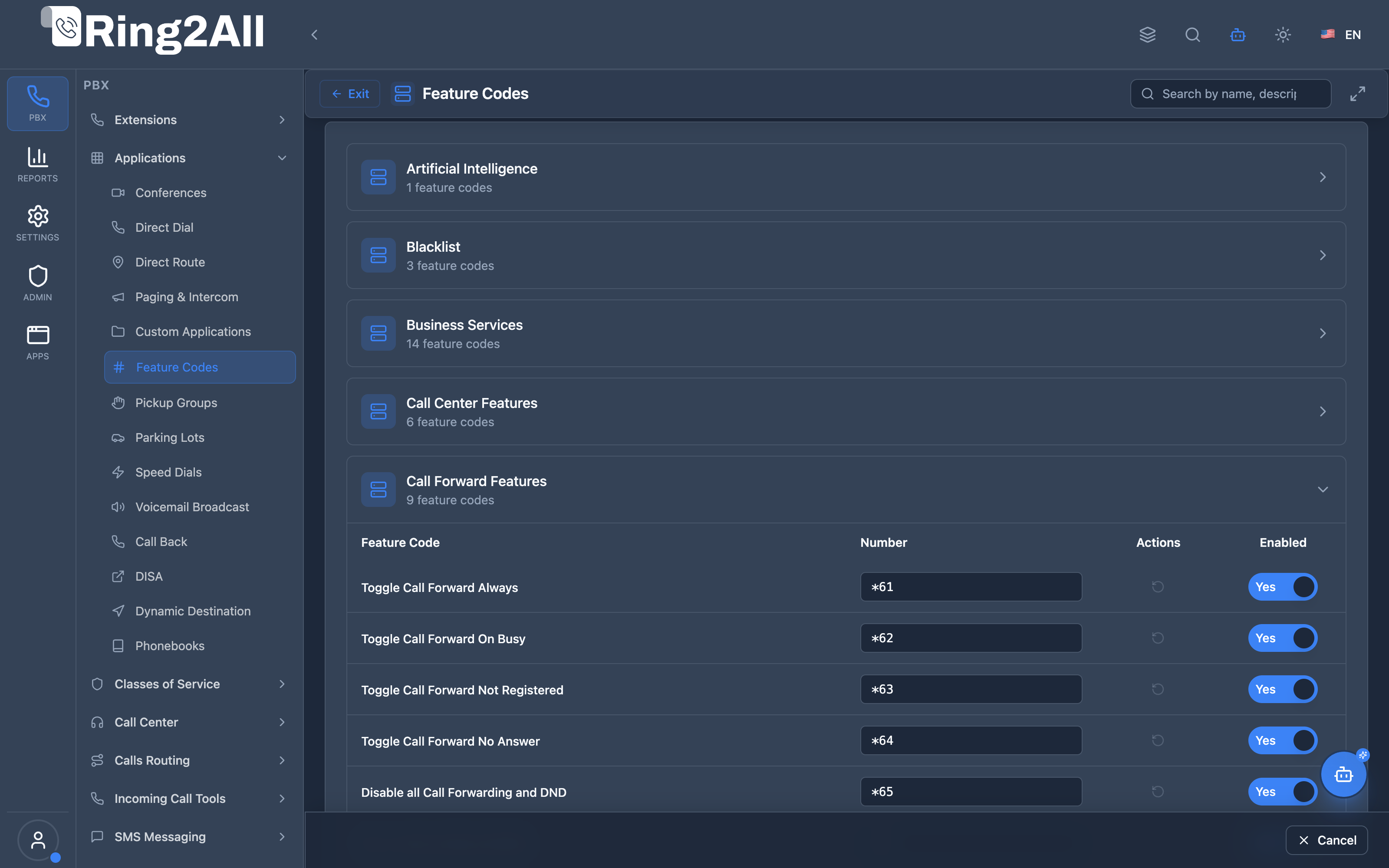
Section titled “Navigation”- Navigate to PBX → Applications → Feature Codes in the main sidebar.
- The central matrix view groups all system telephony codes into expandable categories (e.g., Artificial Intelligence, Blacklist, Business Services, Call Center Features, Call Forward Features, Call Park, Recordings, and Test Services).
- Click any category row to expand or collapse its available dial codes.
- Click the Expand All button in the upper toolbar to view the complete catalog at once, or use the real-time search input (
Search by name, description...) to instantly filter codes. - Customize any dialable number directly in its input field, toggle activation (Yes / No), or click the reset icon to return to system default.
- Use the bottom action bar (Save / Cancel) to commit or discard changes across the domain.
Administrator Workflow
Section titled “Administrator Workflow”┌─────────────────────────────────────────────────────────────────┐│ Managing Feature Codes │├─────────────────────────────────────────────────────────────────┤│ ││ 1. Select Category ││ └─ Call Forwarding ││ ││ 2. View Feature Codes in Category ││ ├─ Toggle No Answer Forwarding (*92) [✓ Enabled] ││ ├─ Toggle DND (*76) [✓ Enabled] ││ ├─ Toggle Follow Me (*21) [✗ Disabled] ││ └─ Clear All Settings (*73) [✓ Enabled] ││ ││ 3. Customize a Code ││ ├─ Feature: Toggle DND ││ ├─ Default: *76 ││ └─ Custom: *77 (override to use *77 instead) ││ ││ 4. Save Changes ││ └─ Users can now dial *77 to toggle DND ││ │└─────────────────────────────────────────────────────────────────┘Quick Tips
Section titled “Quick Tips”[!TIP] Leave Custom Blank: If you want the default code, leave the custom number field empty.
[!TIP] Disable Unused Features: Disable codes you don’t want users to access.
[!CAUTION] Code Conflicts: Custom codes must not conflict with extensions or other feature codes.
4. Configuration Fields Reference
Section titled “4. Configuration Fields Reference”
Feature Code Table Columns
Section titled “Feature Code Table Columns”| Column / Control | Description | User-Friendly Tooltip | Example |
|---|---|---|---|
| Feature Code | Human-readable name of the telephony function | Identifies the feature behavior | Toggle Call Forward Always, Toggle DND |
| Number | Dialable string from phone keypads (starting with *) |
The exact keypad sequence dialed by extensions to activate/deactivate the feature | *61, *62, *76 |
| Actions | Quick action controls for the individual code | Revert to default feature code | Reset icon (RotateCcw) |
| Enabled | Master switch to enable or disable the feature code | Activates or suppresses this feature code for users in the domain | Yes / No (toggle) |
Category Overview
Section titled “Category Overview”| Category | Description |
|---|---|
| Blacklist | Block/unblock callers |
| Business Services | Wakeup, reminders, hotdesking |
| Call Center Features | Agent login, queue management |
| Call Forwarding | Forward calls, DND |
| Call Forward Features | Set/cancel forwarding destinations |
| On Call Features | Transfer, pickup, recording |
| Call Park Features | Park and retrieve calls |
| Do Not Disturb | DND toggle and cancel |
| Directory | Dial-by-name directory |
| Recordings & Announcements | Voicemail access, custom recordings |
| Spy Modes | Listen, whisper, barge |
| Test Services | Echo, time, volume tests |
5. Feature Categories Reference
Section titled “5. Feature Categories Reference”Blacklist
Section titled “Blacklist”| Feature | Default Code | Description |
|---|---|---|
| Add to Blacklist | *30 | Add a number to blocked callers list |
| Remove from Blacklist | *31 | Remove a number from blocked list |
| Blacklist Last Caller | *32 | Block the last person who called you |
Business Services
Section titled “Business Services”| Feature | Default Code | Description |
|---|---|---|
| Wakeup Call (Self) | *68 | Schedule a wakeup call to your extension |
| Remote Wakeup | *69 | Schedule wakeup call to another extension |
| Lock/Unlock Phone | *55 | Secure your extension with PIN |
| Hotdesking Login/Logout | *80 | Login to a shared phone |
| Anonymous Calling | *67 | Hide your caller ID |
| Paging | *8 | Page a group of extensions |
Call Center Features
Section titled “Call Center Features”| Feature | Default Code | Description |
|---|---|---|
| Queue Toggle | *50 | Join/leave a specific queue |
| Queue Pause Toggle | *51 | Pause/resume in a queue |
| Global Queue Toggle | *52 | Join/leave all queues |
| Global Pause Toggle | *53 | Pause/resume in all queues |
| Agent Login | *54 | Log into the call center |
| Agent Logout | *55 | Log out of the call center |
| Agent Status | *59 | Hear your current status |
Call Forwarding
Section titled “Call Forwarding”| Feature | Default Code | Description |
|---|---|---|
| Toggle No Answer | *92 | Enable/disable forward on no answer |
| Set No Answer Dest | *93 | Set destination for no answer |
| Toggle DND | *76 | Enable/disable Do Not Disturb |
| Toggle Follow Me | *21 | Enable/disable Follow Me |
| Clear All Settings | *73 | Reset all forwarding settings |
| Time Condition Toggle | *99 | Override time-based routing |
Call Forward Set/Cancel
Section titled “Call Forward Set/Cancel”| Feature | Default Code | Description |
|---|---|---|
| Call Forward All | *72 | Forward all calls to a number |
| Call Forward All Cancel | *73 | Cancel forward all |
| Call Forward Busy | *90 | Forward when busy |
| Call Forward Busy Cancel | *91 | Cancel forward busy |
| Call Forward No Answer | *92 | Forward on no answer |
| Call Forward No Answer Cancel | *93 | Cancel forward no answer |
On Call Features
Section titled “On Call Features”| Feature | Default Code | Description |
|---|---|---|
| Attended Transfer | *2 | Transfer with consultation |
| Blind Transfer | ## | Transfer without consultation |
| Direct Pickup | ** | Answer a specific ringing phone |
| Group Pickup | *8 | Answer any ringing phone in your group |
| One-Touch Recording | *1 | Start/stop recording current call |
| Pause Outbound Recording | *0 | Pause recording on outbound call |
| Park Call | *70 | Park the current call |
Call Park Features
Section titled “Call Park Features”| Feature | Default Code | Description |
|---|---|---|
| Call Park | *70 | Park call in a parking lot |
| Call Park Retrieve | *71 | Retrieve a parked call |
Do Not Disturb
Section titled “Do Not Disturb”| Feature | Default Code | Description |
|---|---|---|
| DND Toggle | *78 | Enable Do Not Disturb |
| DND Cancel | *79 | Disable Do Not Disturb |
Directory
Section titled “Directory”| Feature | Default Code | Description |
|---|---|---|
| Dial by Name | *411 | Search and dial by name |
| Directory Search | *411 | Same as dial by name |
Recordings & Announcements
Section titled “Recordings & Announcements”| Feature | Default Code | Description |
|---|---|---|
| Custom Recording | *732 | Record a custom announcement |
| Direct Voicemail | *97 | Access your voicemail |
| Remote Voicemail | *98 | Access voicemail from external phone |
Spy Modes
Section titled “Spy Modes”| Feature | Default Code | Description |
|---|---|---|
| Spy (Normal) | *33 | Listen to a call silently |
| Spy (Whisper) | *34 | Listen and speak to one party |
| Spy (Barge) | *35 | Join the call as third party |
| Spy (Random) | *36 | Listen to a random active call |
Test Services
Section titled “Test Services”| Feature | Default Code | Description |
|---|---|---|
| Speak Date/Time | *60 | Hear current date and time |
| Speak Extension | *65 | Hear your extension number |
| Echo Test | *9196 | Test audio (echo back your voice) |
| Simulate Incoming Call | *9197 | Test your phone ringing |
| Test Music on Hold | *9664 | Hear MOH audio |
| Volume Test | *9198 | Test speaker volume |
6. Common Scenarios & Examples
Section titled “6. Common Scenarios & Examples”Scenario 1: Disable Spy Features
Section titled “Scenario 1: Disable Spy Features”Problem: Don’t want supervisors to spy on calls.
Solution:
- Go to Feature Codes → Spy Modes
- Disable all spy mode codes
- Save
Result: Spy codes no longer work.
Scenario 2: Change DND Code
Section titled “Scenario 2: Change DND Code”Problem: Company standard uses *77 for DND, not *76.
Solution:
- Go to Feature Codes → Do Not Disturb
- Find “DND Toggle”
- Enter *77 in Custom Number field
- Save
Result: Users dial *77 to toggle DND.
Scenario 3: Restrict Forwarding
Section titled “Scenario 3: Restrict Forwarding”Problem: Prevent users from forwarding calls externally.
Solution:
- Go to Feature Codes → Call Forwarding
- Disable “Call Forward All” (*72)
- Keep “Toggle No Answer” enabled (internal only)
- Save
Result: Users can’t forward all calls but can set no-answer forwarding.
7. Model Context Protocol (MCP) AI Integration
Section titled “7. Model Context Protocol (MCP) AI Integration”Feature Codes across all telephony categories can be audited, modified, and managed via the Model Context Protocol (MCP). AI copilots can explain star codes to end users, audit enabled feature flags, or customize dialing prefixes while ensuring non-conflicting dialplans.
Available MCP Tools
Section titled “Available MCP Tools”| Tool Name | Operation | Description | Access Level |
|---|---|---|---|
list_feature_categories |
Query | List all 9 feature code categories (Call Forwarding, Voicemail, DND, Call Parking, etc.) with feature counts. | Read-Only |
list_feature_codes |
Query | List all seeded and custom feature codes with default number, custom override, and active state. | Read-Only |
get_feature_code_status |
Query | Inspect configuration and active routing for a specific feature code. | Read-Only |
update_feature_code |
Management | Enable/disable a feature code or assign a custom star number override (e.g. changing *72 to *720). |
Admin / Superadmin |
Tool Definitions & Parameter Reference
Section titled “Tool Definitions & Parameter Reference”update_feature_code
Section titled “update_feature_code”Customizes or enables/disables a feature code.
{ "name": "update_feature_code", "description": "Update an existing telephony feature code, toggling enabled state or assigning a custom star code number.", "inputSchema": { "type": "object", "properties": { "id": { "type": "string", "description": "Numeric ID or code string identifying the feature code." }, "customNumber": { "type": "string", "description": "Custom dial string override (e.g. '*720' or '*988'). Set null to restore default." }, "enabled": { "type": "boolean", "description": "Whether this feature code is enabled." }, "description": { "type": "string", "description": "Optional notes or reason for modification." } }, "required": ["id"] }}Safety Safeguards & Number Uniqueness
Section titled “Safety Safeguards & Number Uniqueness”- Domain Number Collision Prevention: When updating
custom_number, the service invokesvalidateNumberUniqueness(customNumber, domainId, 'feature_code', id)againstpublic.dialplan_registry. Custom star codes cannot collide with Extensions, Conferences, Paging Groups, Parking Lots, or other Feature Codes in the same domain. - Atomic Trigger Synchronization: All feature codes are synchronized to
public.dialplan_registrythrough thesync_feature_code_to_dialplan_registry()database trigger, ensuring immediate consistency without requiring server reboots.
Example AI Assistant Prompts & Workflow
Section titled “Example AI Assistant Prompts & Workflow”Example 1: Auditing Call Forwarding Codes for a User
Section titled “Example 1: Auditing Call Forwarding Codes for a User”User Prompt:
“What feature codes are available on this system to activate call forwarding?”
AI Tool Execution:
{ "tool": "list_feature_codes", "arguments": { "search": "Call Forward" }}MCP Response:
{ "success": true, "data": [ { "id": 1, "name": "Call Forward All Prompt", "default_number": "*72", "custom_number": null, "enabled": true, "category_name": "Call Forwarding" }, { "id": 2, "name": "Call Forward All Deactivate", "default_number": "*73", "custom_number": null, "enabled": true, "category_name": "Call Forwarding" }, { "id": 3, "name": "Call Forward Busy Prompt", "default_number": "*90", "custom_number": null, "enabled": true, "category_name": "Call Forwarding" }, { "id": 4, "name": "Call Forward Busy Deactivate", "default_number": "*91", "custom_number": null, "enabled": true, "category_name": "Call Forwarding" } ]}8. Limitations & Important Notes
Section titled “8. Limitations & Important Notes”Technical Limitations
Section titled “Technical Limitations”[!WARNING] Custom Number Conflicts: Custom codes must not conflict with extensions, other feature codes, or emergency numbers.
[!WARNING] Domain Specific: Feature codes can be configured per domain—changes only affect selected domain.
Best Practices
Section titled “Best Practices”- Document Changes: Note why you changed default codes
- Train Users: Inform users of any custom codes
- Disable Unused: Reduce confusion by disabling features not in use
- Test After Changes: Verify codes work as expected
Reserved Code Ranges
Section titled “Reserved Code Ranges”Some codes are standard across telephony systems:
| Code Range | Typical Use |
|---|---|
| *67 | Anonymous calling (industry standard) |
| *69 | Call return |
| *72/*73 | Call forwarding (industry standard) |
| *78/*79 | DND (industry standard) |
| 911 | Emergency (never override) |
9. Troubleshooting Tips
Section titled “9. Troubleshooting Tips”Common Issues
Section titled “Common Issues”| Symptom | Possible Cause | Solution |
|---|---|---|
| Code not working | Feature disabled | Enable the feature code |
| Wrong feature triggers | Custom code conflict | Check for duplicate codes |
| Feature not available | Category disabled | Enable the category |
| “Number not found” | Code not in dialplan | Check domain selection |
Diagnostic SQL
Section titled “Diagnostic SQL”List all feature codes:
SELECT fc.name, fc.default_number, fc.custom_number, fc.enabled, cat.name as categoryFROM public.feature_codes fcJOIN public.feature_categories cat ON fc.category_id = cat.idWHERE fc.domain_id = [domain_id]ORDER BY cat.name, fc.name;Find code conflicts:
SELECT COALESCE(fc.custom_number, fc.default_number) as active_code, fc.name, COUNT(*) as countFROM public.feature_codes fcWHERE fc.domain_id = [domain_id] AND fc.enabled = trueGROUP BY active_code, fc.nameHAVING COUNT(*) > 1;10. Glossary
Section titled “10. Glossary”| Term | Definition |
|---|---|
| Feature Code | A dial code that activates a specific telephony feature |
| Default Number | The standard code assigned to a feature |
| Custom Number | An override code for a specific organization |
| DND | Do Not Disturb—sends all calls to voicemail |
| Follow Me | Rings multiple numbers sequentially |
| Call Forward All | Redirects all calls to another number |
| Call Park | Places call on hold in a “parking lot” for retrieval |
| Spy Mode | Supervisor feature to listen to active calls |
| Whisper | Spy mode where supervisor can speak to agent only |
| Barge | Spy mode where supervisor joins as third party |
| Agent Login | Call center agent becomes available for calls |
| Queue Toggle | Join or leave a specific call queue |
Documentation last updated: January 2026