

PBX Endpoints & Core Clusters
Table of Contents
Section titled “Table of Contents”- Overview & Architecture
- Business & Operational Significance
- 🎯 User Roles & Key Capabilities
- Visual Interface & Form Layout
- Field & Configuration Reference
- Kamailio Dispatcher Core Mechanics
- Load Balancing Algorithms & Failover Strategies
- Security Best Practices & Operational Hardening
- Model Context Protocol (MCP) AI Integration
- Troubleshooting & Verification
- Glossary
1. Overview & Architecture
Section titled “1. Overview & Architecture”In Ring2All SBC, the Endpoints module (public.dispatcher) configures and manages high-availability clusters of backend telephony media engines—specifically Ring2All Telephony Server nodes, Asterisk PBX servers, and media gateways.
Rather than exposing core PBX infrastructure directly to the public Internet, Ring2All SBC acts as an intelligent stateful perimeter proxy. Incoming calls destined for extensions, IVRs, or call center queues are distributed across active backend nodes according to sophisticated load-balancing algorithms, automatic health-check probes, and real-time latency metrics.
┌────────────────────────────────────┐ │ Public Internet / Carriers │ │ Inbound SIP Sessions │ └─────────────────┬──────────────────┘ │ ▼ ┌────────────────────────────────────┐ │ Ring2All SBC Perimeter │ │ Kamailio Dispatcher Core │ └─────────────────┬──────────────────┘ │ Algorithm: Weight / Failover / Round-Robin / Hash │ ┌────────────────────────────────────────────┼────────────────────────────────────────────┐ │ (Active Heartbeat: OPTIONS 5060) │ (Active Heartbeat: OPTIONS 5060) │ (Active Heartbeat: OPTIONS 5060) ▼ ▼ ▼┌───────────────────────────────┐ ┌───────────────────────────────┐ ┌───────────────────────────────┐│ Ring2All PBX Node 01 │ │ Ring2All PBX Node 02 │ │ Ring2All PBX Node 03 ││ • Telephony Server Media Engine │ │ • Telephony Server Media Engine │ │ • Telephony Server Media Engine ││ • 192.168.10.31 (Weight 100) │ │ • 192.168.10.33 (Weight 100) │ │ • 192.168.10.34 (Standby) ││ • Port 5060 (Core Sofia) │ │ • Port 5060 (Core Sofia) │ │ • Port 5060 (Core Sofia) │└───────────────────────────────┘ └───────────────────────────────┘ └───────────────────────────────┘2. Business & Operational Significance
Section titled “2. Business & Operational Significance”- Zero Downtime Maintenance: Telephony engineers can gracefully drain traffic from any individual Telephony node for software updates or kernel patches without dropping active customer calls or interrupting new call arrivals.
- Elastic Horizontal Scalability: As corporate call concurrency grows, additional Ring2All PBX media servers can be added to an Endpoint cluster in seconds without modifying external DNS records or carrier peering IPs.
- Intelligent Disaster Failover: If a physical server or virtualization hypervisor fails, Kamailio detects the absence of SIP
OPTIONSresponses within 2000 milliseconds and instantly shifts inbound call traffic to surviving secondary nodes. - Sticky Session Preservation (Call-ID Hash): Ensures related signaling transactions, transfers, and mid-dialog re-INVITEs remain anchored to the exact PBX node hosting the active media session.
3. 🎯 User Roles & Key Capabilities
Section titled “3. 🎯 User Roles & Key Capabilities”| Role | Primary Use Case | Key Capabilities |
|---|---|---|
| SBC Administrator | Media Farm Architecture | Create and manage Endpoint dispatch clusters; configure load-balancing algorithms; define port profiles; set weight and priority matrices. |
| VoIP Systems Engineer | Capacity Planning | Monitor server health states (Active, Inactive, Probing); adjust node weights during high-traffic marketing campaigns; drain nodes for maintenance. |
| NOC Operator | Real-Time Health Inspection | Inspect dispatcher gateway states; verify automated SIP ping latency; trigger manual re-checks via Kamailio RPC commands. |
| AI Platform Copilot / NOC Diagnostic Agent | Autonomous Health Audit & Node Draining | Execute get_dispatcher_status, list_sbc_endpoints, reload_dispatchers, and set_dispatcher_state to diagnose cluster availability, adjust weights, and drain nodes gracefully. |
4. Visual Interface & Form Layout
Section titled “4. Visual Interface & Form Layout”Endpoints List View
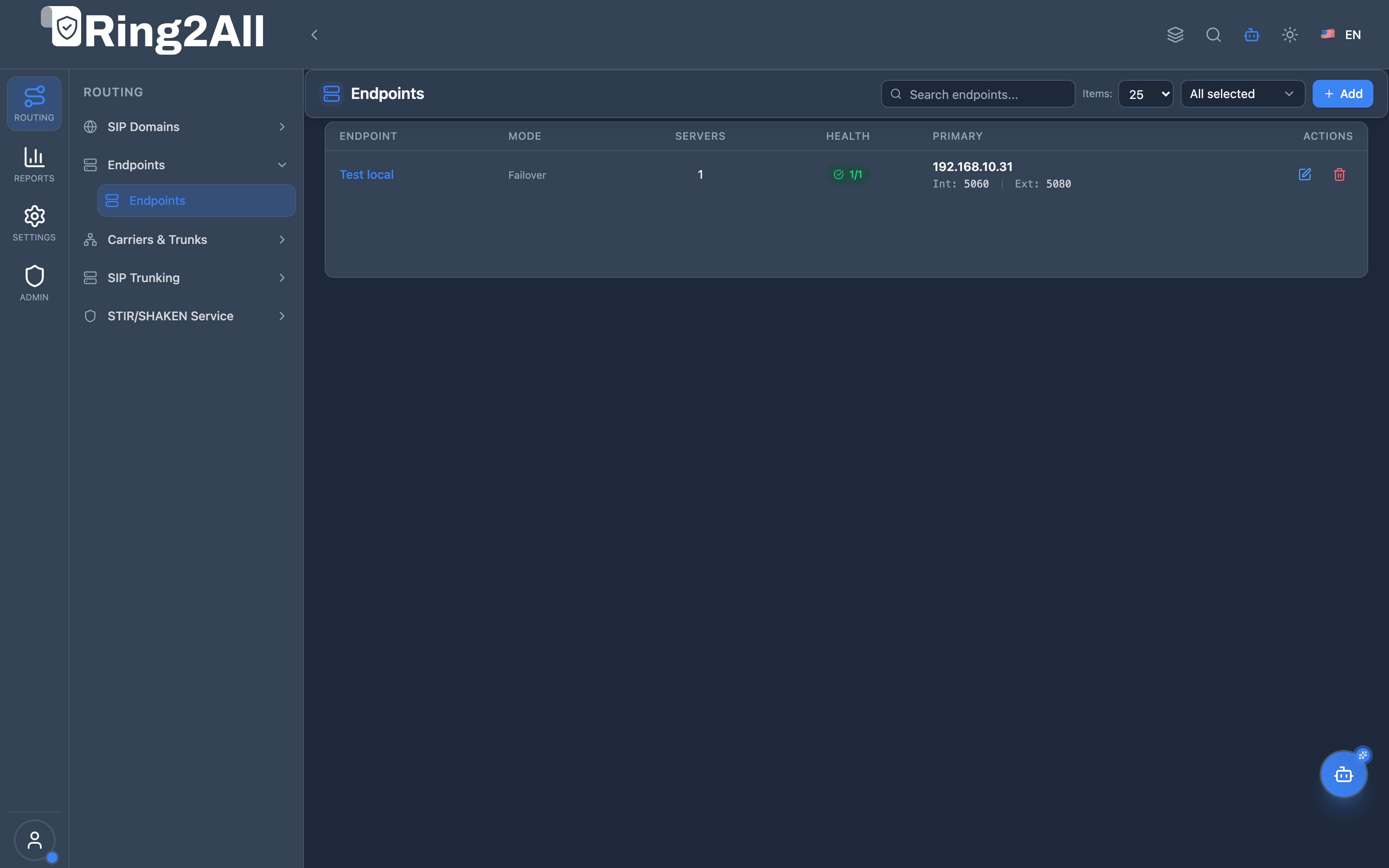
Section titled “Endpoints List View”The list view displays all configured PBX Endpoint clusters, their assigned dispatcher set ID, algorithm, member node count, and health status.
Endpoint Configuration Form
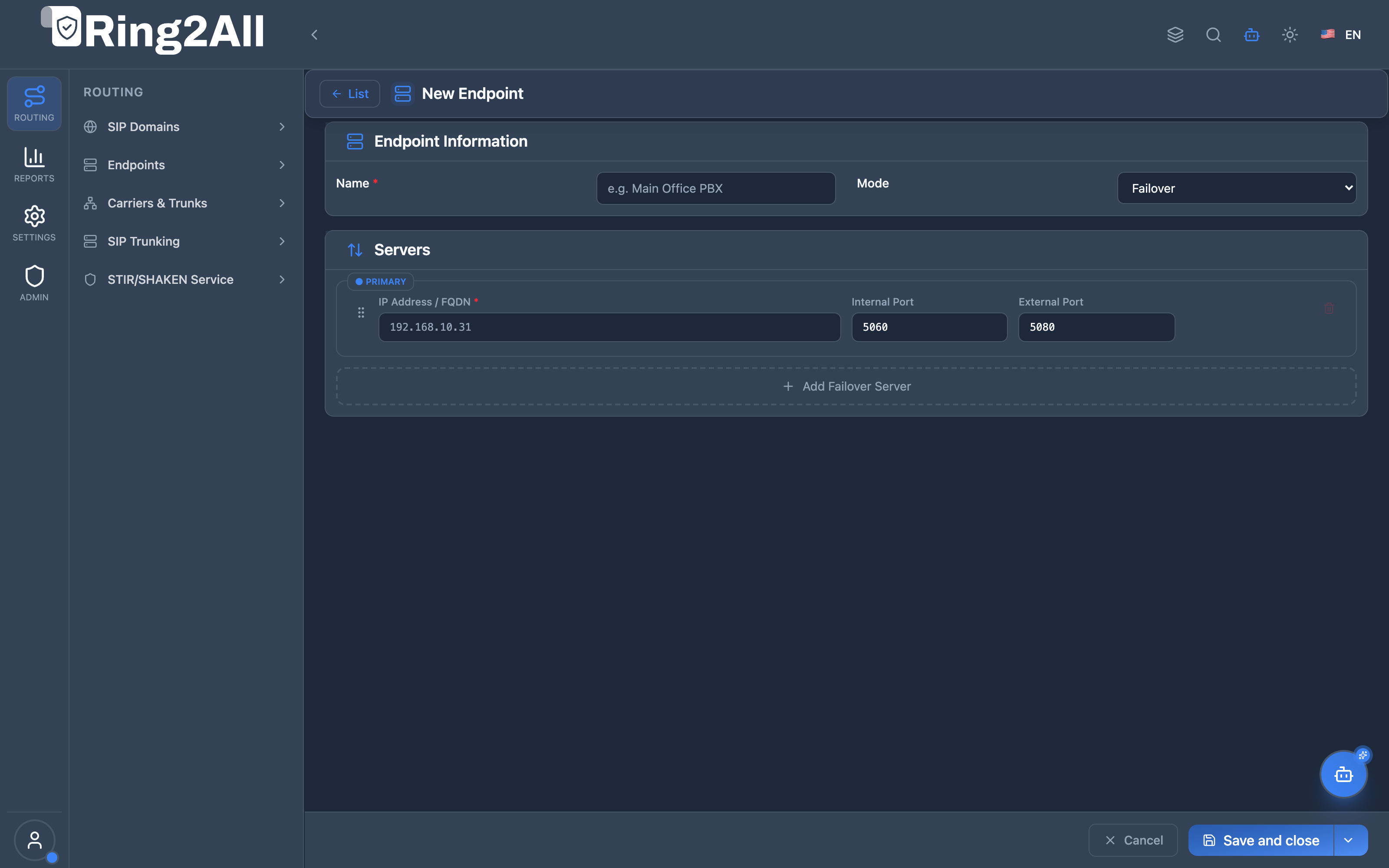
Section titled “Endpoint Configuration Form”The configuration view features interactive drag-and-drop ordering, algorithm selection, and dynamic node parameters.
5. Field & Configuration Reference
Section titled “5. Field & Configuration Reference”Section 1: Cluster Identity & Balancing Algorithm
Section titled “Section 1: Cluster Identity & Balancing Algorithm”| Field | Type | Options / Constraints | Description |
|---|---|---|---|
| Endpoint Name * | Text | Unique identifier | Descriptive name for the server cluster (e.g., Core Telephony Cluster, EU PBX Nodes). |
| Balancing Algorithm * | Dropdown | 8 (Failover), 4 (Round Robin), 9 (Weight), 6 (Random), 0 (Call-ID Hash) |
The mathematical policy governing how new inbound calls are dispatched across member nodes. |
Section 2: Member Server Nodes
Section titled “Section 2: Member Server Nodes”| Field | Type | Format / Range | Description |
|---|---|---|---|
| IP Address / Host * | Text | Valid IPv4 or FQDN | The internal or private network IP address of the backend PBX node (e.g., 192.168.10.31). |
| Internal Port * | Number | Default 5060 |
SIP listening port on the PBX for internal extension traffic and core dialplans. |
| External Port | Number | Default 5080 |
SIP listening port on the PBX used for carrier trunking or direct inbound gateway profiles. |
| Weight | Number | 1 to 100 (Default 100) |
Relative capacity ratio. A node with weight 100 receives twice as many calls as a node with weight 50. |
| Priority | Number | 1 to 100 (Default 10) |
Failover ranking. Lower numbers denote higher priority. Standby nodes receive higher priority values. |
| Description | Text | Max 100 characters | Free-form operational notes (e.g., Node 1 - Primary Hypervisor Host A). |
6. Kamailio Dispatcher Core Mechanics
Section titled “6. Kamailio Dispatcher Core Mechanics”Under the hood, Ring2All SBC synchronizes Endpoint configurations with the Kamailio dispatcher module (kamailio.dispatcher table):
- Destination URI Formatting:
Each server entry compiles into a canonical Kamailio destination string:
sip:<ip_address>:<internal_port>;transport=udp
- Automated OPTIONS Probing:
Kamailio sends periodic keep-alive pings:
modparam("dispatcher", "ds_ping_interval", 10)modparam("dispatcher", "ds_ping_latency_stats", 1)modparam("dispatcher", "ds_probing_threshold", 2)modparam("dispatcher", "ds_inactive_threshold", 3)
- Active State (
flags=0): Server responds toOPTIONSwith200 OK. Receives call traffic normally. - Probing State (
flags=1): Server failed 3 consecutive pings. Kamailio stops routing calls to it and sends probe packets until recovery is verified.
- Active State (
- Dispatch Routing Execution (
route[DISPATCH_TO_PBX]):# Select destination using configured set ID and algorithmif (!ds_select_dst("$var(set_id)", "$var(algorithm)")) {sl_send_reply("503", "No Backend PBX Nodes Available");exit;}t_on_failure("PBX_FAILOVER");t_relay();
7. Load Balancing Algorithms & Failover Strategies
Section titled “7. Load Balancing Algorithms & Failover Strategies”| Algorithm Code | Name | Behavioral Logic | Recommended Telecom Use Case |
|---|---|---|---|
| 8 | Failover (Serial) | All calls route to the highest-priority active node. If that node fails, traffic immediately cascades to the next active server. | Active/Passive high-availability setups with cold or warm standby nodes. |
| 4 | Round Robin | Calls distribute sequentially across all active nodes in an even circular distribution. | Homogeneous server clusters with identical CPU and memory specifications. |
| 9 | Weight-Based | Distributes traffic proportionally based on assigned node weights. | Heterogeneous environments where newer servers have larger call capacity than legacy nodes. |
| 0 | Hash (Call-ID) | MD5 hashes the SIP Call-ID to determine destination. The same Call-ID always routes to the same node. |
Stateful environments, call transfers, attended conferences, and WebRTC gateways. |
| 6 | Random | Selects a server randomly from the active set. | High-volume microservice routing where statistical distribution suffices. |
8. Security Best Practices & Operational Hardening
Section titled “8. Security Best Practices & Operational Hardening”- Isolate on Private VLANs: PBX endpoints must reside on private RFC 1918 subnets (e.g.,
10.0.0.0/8or192.168.0.0/16) or dedicated WireGuard VPN tunnels accessible exclusively by the SBC. - Drop Public Ingress to Port 5060: Block all direct public Internet access to Telephony Server SIP ports using the SBC firewall or Linux
nftables. All signaling must pass through the SBC perimeter. - Calibrate Failure Cooldowns: Set ping thresholds to require at least 2 consecutive successful
200 OKresponses before marking a recovered node active, avoiding route flapping during server restarts.
Model Context Protocol (MCP) AI Integration
Section titled “Model Context Protocol (MCP) AI Integration”The PBX Endpoints & Core Clusters module integrates with the Ring2All SBC Model Context Protocol (MCP) server, allowing AI Copilots and NOC automation agents to query real-time load balancer states, inspect node latency, drain nodes for maintenance, and trigger zero-downtime memory reloads.
MCP Tools Catalog
Section titled “MCP Tools Catalog”| Tool Name | Type | Access | Description |
|---|---|---|---|
get_dispatcher_status |
Query | dispatcher / Read |
Get real-time load balancer dispatcher sets and health status (Active/UP, Inactive/DOWN, Probing) of Telephony Server/PBX nodes. |
list_sbc_endpoints |
Query | dids_endpoints / Read |
List PBX core clusters and Customer SIP endpoints registered as internal routing destinations. |
set_dispatcher_state |
Mutation | dispatcher / Write |
Change the operational state of a dispatcher node (Active/UP, Inactive/Maintenance, Probing) for graceful traffic draining. |
reload_dispatchers |
Operational | dispatcher / Exec |
Reload Kamailio dispatcher routing tables from database into RAM memory across all cluster nodes. |
Tool Schemas & Execution Responses
Section titled “Tool Schemas & Execution Responses”get_dispatcher_status
Section titled “get_dispatcher_status”{ "name": "get_dispatcher_status", "description": "Get real-time load balancer dispatcher sets and health status (Active/UP, Inactive/DOWN, Probing) of Telephony Server/PBX nodes.", "parameters": { "type": "object", "properties": { "setId": { "type": "number", "description": "Optional Dispatcher Set ID to filter (e.g. 1 for Telephony Server pool)." } } }}Realistic Execution Response:
{ "success": true, "data": { "setId": 1, "totalNodes": 3, "activeNodes": 2, "probingNodes": 1, "nodes": [ { "id": 1, "destination": "sip:192.168.10.31:5060", "flags": "ACTIVE", "priority": 10, "weight": 100, "latencyMs": 1.2, "description": "Telephony Core Node 1" }, { "id": 2, "destination": "sip:192.168.10.33:5060", "flags": "ACTIVE", "priority": 10, "weight": 100, "latencyMs": 1.4, "description": "Telephony Core Node 2" }, { "id": 3, "destination": "sip:192.168.10.34:5060", "flags": "PROBING", "priority": 20, "weight": 50, "latencyMs": 0, "description": "Telephony Server Standby Node 3" } ] }}list_sbc_endpoints
Section titled “list_sbc_endpoints”{ "name": "list_sbc_endpoints", "description": "List PBX core clusters and Customer SIP endpoints registered as internal routing destinations.", "parameters": { "type": "object", "properties": {} }}Realistic Execution Response:
{ "success": true, "data": { "totalEndpoints": 2, "endpoints": [ { "endpointId": "pbx-cluster-primary", "address": "sip:192.168.10.31:5060", "description": "Ring2All Telephony Server Primary Media Farm" }, { "endpointId": "cust-trunk-apex", "address": "sip:198.51.100.40:5060", "description": "Apex Enterprise Downstream PBX" } ] }}set_dispatcher_state
Section titled “set_dispatcher_state”{ "name": "set_dispatcher_state", "description": "Change the operational state of a dispatcher node (Active/UP, Inactive/Maintenance, Probing).", "parameters": { "type": "object", "properties": { "state": { "type": "string", "enum": ["active", "inactive", "probing"], "description": "Desired operational state." }, "setId": { "type": "number", "description": "Dispatcher Set ID (e.g. 1)." }, "destination": { "type": "string", "description": "SIP URI of the destination node." } }, "required": ["state", "setId", "destination"] }}Realistic Execution Response:
{ "success": true, "data": { "message": "Node sip:192.168.10.31:5060 in Set 1 state set to inactive (Maintenance Mode).", "setId": 1, "destination": "sip:192.168.10.31:5060", "newState": "inactive" }}reload_dispatchers
Section titled “reload_dispatchers”{ "name": "reload_dispatchers", "description": "Reload Kamailio dispatcher routing tables from database into RAM memory.", "parameters": { "type": "object", "properties": {} }}Realistic Execution Response:
{ "success": true, "data": { "message": "Kamailio dispatcher table reloaded into shared memory.", "status": "synchronized" }}Bilingual Natural Language Prompt Examples
Section titled “Bilingual Natural Language Prompt Examples”English Prompts
Section titled “English Prompts”- “NOC Copilot, what is the current health status of Telephony nodes in dispatcher set 1?”
- “Are there any media server nodes currently in Probing or Inactive state?”
- “Set node ‘sip:192.168.10.31:5060’ in Set 1 to inactive so we can perform scheduled kernel maintenance.”
- “Reload Kamailio dispatcher memory to sync newly provisioned PBX endpoints.”
Spanish Prompts
Section titled “Spanish Prompts”- “Copilot NOC, ¿cuál es el estado de salud de los nodos de Telephony Server en el dispatcher set 1?”
- “¿Hay algún servidor de medios en estado Probing o Inactivo en este momento?”
- “Pasa el nodo ‘sip:192.168.10.31:5060’ del Set 1 a estado inactivo para realizar mantenimiento programado.”
- “Recarga la memoria del dispatcher en Kamailio para sincronizar los nuevos endpoints PBX.”
Enterprise Safeguards & Execution Boundaries
Section titled “Enterprise Safeguards & Execution Boundaries”- Last Active Node Safeguard: MCP tools reject any attempt to put all nodes of a dispatcher set into maintenance mode simultaneously, ensuring at least one healthy engine remains available to accept calls.
- Graceful Drain vs Immediate Drop: Setting a node to
inactiveprevents newINVITEarrivals while existing active dialogs anchored to that node complete naturally. - Automated Health Recovery Verification: Nodes returning from maintenance must successfully respond to multiple consecutive
OPTIONSprobes before Kamailio re-admits them into the active balancing pool.
9. Troubleshooting & Verification
Section titled “9. Troubleshooting & Verification”| Symptom / Issue | Potential Root Cause | Recommended Verification & Resolution |
|---|---|---|
Calls fail with 503 No Backend PBX Nodes Available |
All nodes in the dispatcher set are in Probing or Inactive state. | Check node status via CLI: kamcmd dispatcher.list. Verify network reachability from SBC to Telephony Server: sipsak -s sip:192.168.10.31:5060. |
| Server marked Inactive despite being operational | Telephony Server Sofia profile rejecting OPTIONS pings with 403 or timeout. |
Verify log-auth-failures and ensure Telephony Server allows unauthenticated OPTIONS pings from the SBC’s private IP. |
| Uneven call distribution in Round Robin | Call-ID hash or lingering dialog state skewing dispatch counters. | Confirm algorithm is set to 4 (Round Robin) and review Kamailio routing logs in Reports > Audit Logs. |
10. Glossary
Section titled “10. Glossary”- Dispatcher Set: A numeric grouping of destination SIP proxies managed collectively by Kamailio’s
dispatchermodule. - Probing State: A health monitoring mode where Kamailio actively pings an unresponsive node while withholding production call traffic.
- Sofia SIP Profile: The endpoint SIP stack configuration in Telephony Server responsible for binding to network interfaces and processing sessions.
- Failover Cascade: Automated re-routing mechanism that sequentially attempts alternate gateways when an initial SIP attempt returns
408 Request Timeoutor503 Service Unavailable.