

Gateway SIP Profiles Module Documentation
Table of Contents
Section titled “Table of Contents”- Navigation & Access
- Screenshots & Visual Interface
- Module Overview (Technical)
- Module Overview (Commercial/Business)
- Module Overview (End User/Administrator)
- User Roles & Key Capabilities
- Configuration Sections
- Settings Reference
- Common Scenarios & Examples
- Limitations & Important Notes
- Troubleshooting Tips
- Glossary
- Model Context Protocol (MCP) AI Integration
Navigation & Access
Section titled “Navigation & Access”To access the Gateway Profiles configuration module:
- Log in to the Ring2All Web Portal (
https://<domain-or-ip>/login). - In the left navigation sidebar, expand Settings.
- Under Technology, click Gateway Profiles (
/settings/technology/gateway-profile). - To create a new carrier trunking profile template, click + Add Profile (
/settings/technology/gateway-profile/new). To edit an existing profile, click on the profile row or the Edit action button (/settings/technology/gateway-profile/:id).
Screenshots & Visual Interface
Section titled “Screenshots & Visual Interface”Gateway Profiles Directory
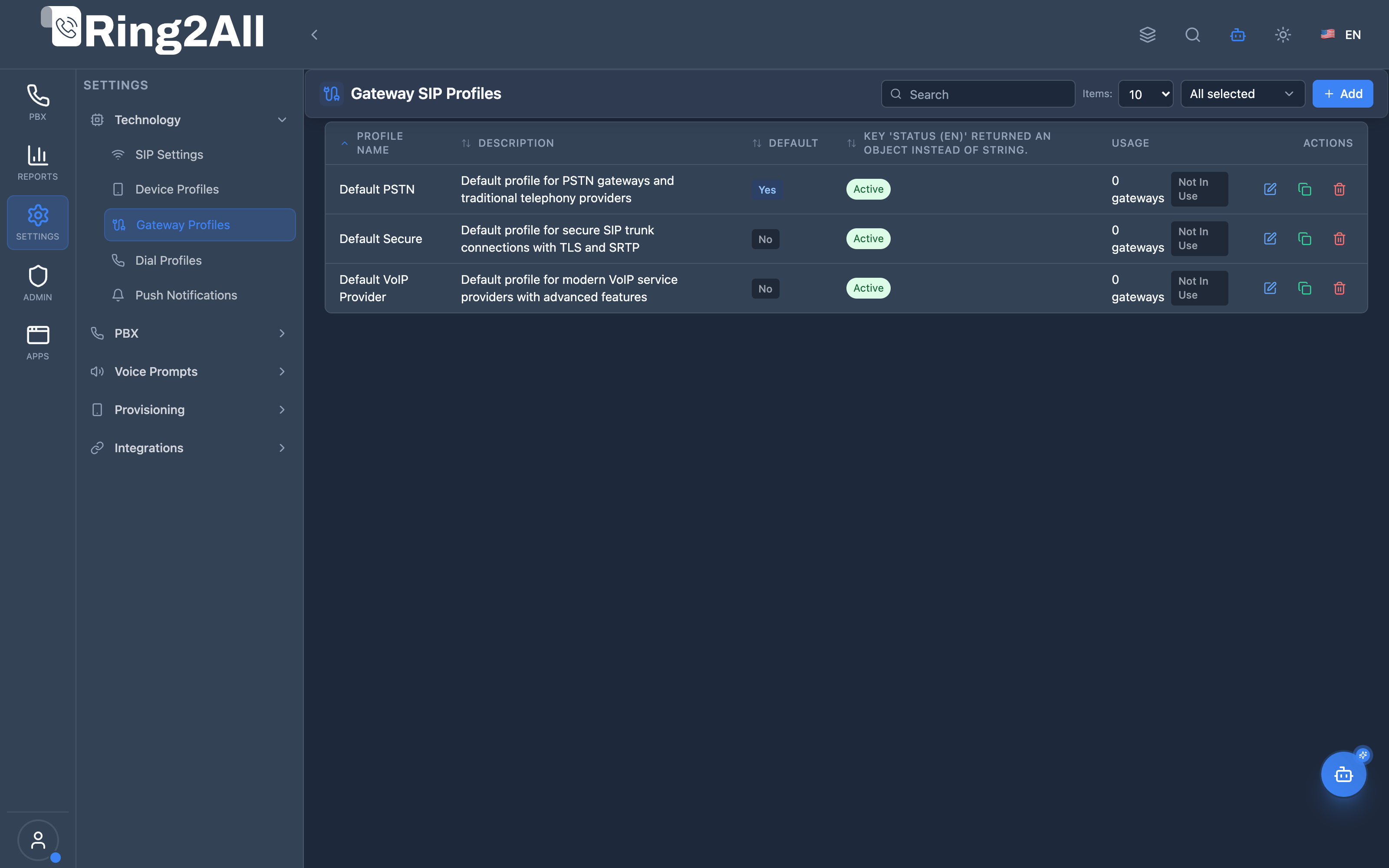
Section titled “Gateway Profiles Directory”Overview of trunking gateway profiles configured across the platform, displaying profile names, descriptions, associated carrier categories, and last modified timestamps.
Gateway Profile Configuration Form
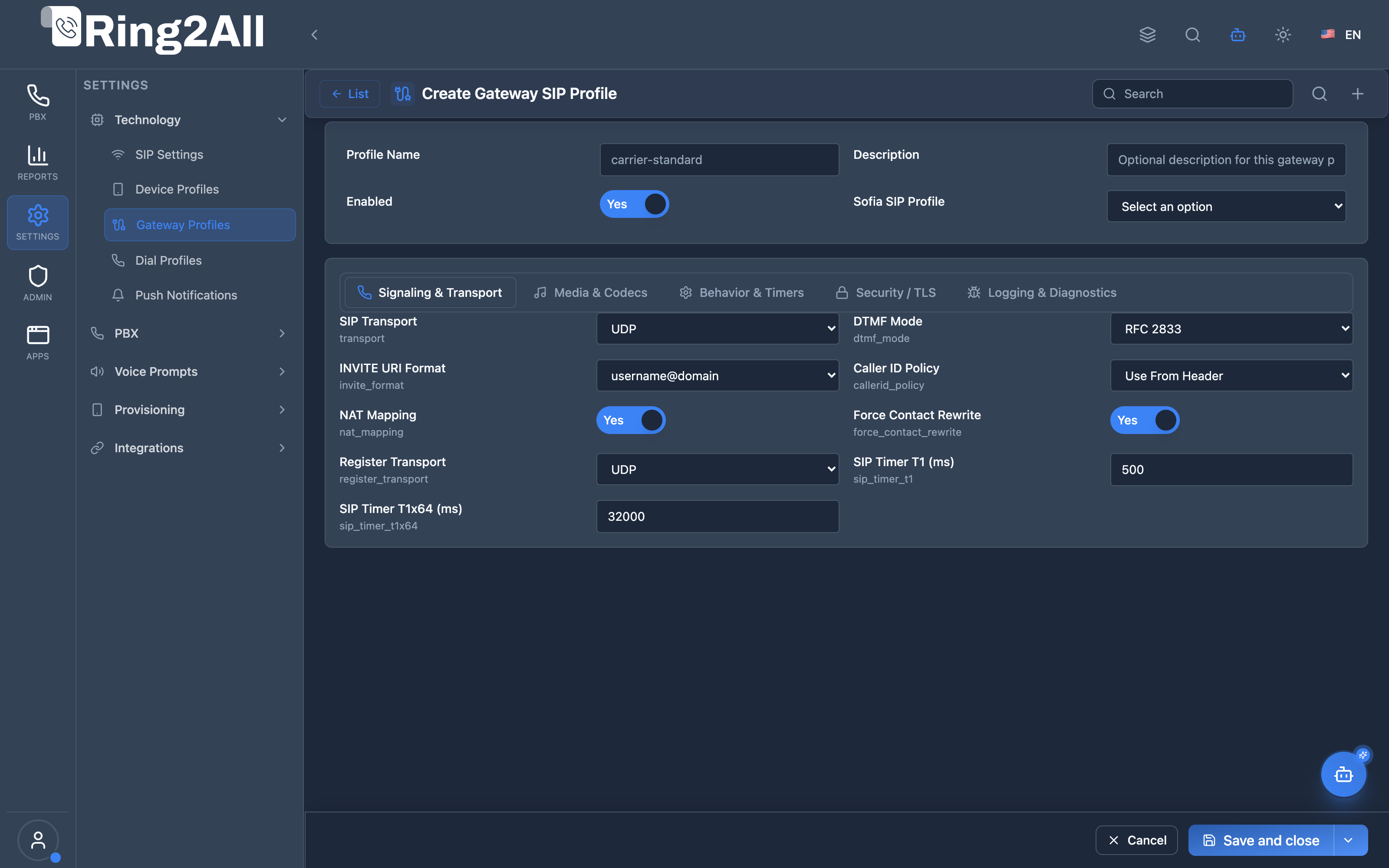
Section titled “Gateway Profile Configuration Form”Detailed template management form allowing administrators to establish default carrier parameters such as registration intervals, SIP auth realm settings, caller ID formatting, outbound proxy configurations, and codec lists.
1. Module Overview (Technical)
Section titled “1. Module Overview (Technical)”What Are Gateway SIP Profiles?
Section titled “What Are Gateway SIP Profiles?”Gateway SIP Profiles are configuration templates for SIP trunks and carriers. They define transport, codec, NAT, security, and behavior settings that are applied to gateways. This allows standardized configuration across multiple carriers with similar requirements.
Architecture
Section titled “Architecture”┌─────────────────────────────────────────────────────────────────┐│ Gateway SIP Profiles Architecture │├─────────────────────────────────────────────────────────────────┤│ ││ Admin Panel ││ ┌──────────────────────────────────────────────────────────┐ ││ │ Gateway SIP Profiles │ ││ │ │ ││ │ Templates: │ ││ │ ├─ Standard Carrier (UDP, no NAT) │ ││ │ ├─ NAT-Safe Carrier (TCP, NAT rewrite) │ ││ │ └─ Secure Carrier (TLS, SRTP) │ ││ │ │ ││ └──────────────────────────────────────────────────────────┘ ││ │ ││ ▼ Assigned to gateways ││ ┌──────────────────────────────────────────────────────────┐ ││ │ Gateways Module │ ││ │ │ ││ │ Twilio Gateway → NAT-Safe Carrier profile │ ││ │ AT&T SIP Trunk → Standard Carrier profile │ ││ │ Internal PBX → Secure Carrier profile │ ││ │ │ ││ └──────────────────────────────────────────────────────────┘ ││ │ ││ ▼ Applied to gateway XML ││ ┌──────────────────────────────────────────────────────────┐ ││ │ Telephony Server │ ││ │ │ ││ │ <gateway name="twilio"> │ ││ │ <!-- Profile settings applied --> │ ││ │ <param name="proxy" value="..."/> │ ││ │ <param name="register-transport" value="tcp"/> │ ││ │ <param name="NDLB-force-rport" value="true"/> │ ││ │ </gateway> │ ││ │ │ ││ └──────────────────────────────────────────────────────────┘ ││ │└─────────────────────────────────────────────────────────────────┘2. Module Overview (Commercial/Business)
Section titled “2. Module Overview (Commercial/Business)”Business Value
Section titled “Business Value”Gateway SIP Profiles provides standardized trunk configuration:
| Without Gateway Profiles | With Gateway Profiles |
|---|---|
| Configure each gateway | Template once, apply many |
| Inconsistent settings | Standardized config |
| Repetitive work | Reusable templates |
| Hard to maintain | Easy updates |
Use Cases
Section titled “Use Cases”-
Multi-Carrier Deployment
- Standard templates for each carrier type
- Quick gateway setup
-
NAT Handling
- Pre-configured NAT templates
- Reliable remote carriers
-
Security Standards
- TLS/SRTP templates
- Enforce security policies
-
Video Calling
- Video codec profiles
- Carrier-specific video
Feature Highlights
Section titled “Feature Highlights”| Feature | Benefit |
|---|---|
| Templates | Reusable configurations |
| Transport Options | UDP, TCP, TLS |
| Codec Control | Audio + Video |
| NAT Settings | Contact rewrite |
| T.38 Fax | Carrier fax support |
| Security | TLS, SRTP options |
| Debugging | SIP trace, logging |
3. Module Overview (End User/Administrator)
Section titled “3. Module Overview (End User/Administrator)”What Can You Do?
Section titled “What Can You Do?”- Create gateway profile templates
- Configure transport protocols
- Set codec preferences (audio + video)
- Configure NAT handling
- Enable security (TLS, SRTP)
- Set timers and session limits
- Enable debugging/tracing
Gateway SIP Profiles Interface
Section titled “Gateway SIP Profiles Interface”┌─────────────────────────────────────────────────────────────────┐│ Gateway SIP Profiles │├─────────────────────────────────────────────────────────────────┤│ ││ [+ Create Gateway Profile] ││ ││ ┌───────────────────────────────────────────────────────────┐ ││ │ Profile Name │ Description │ Usage │ Status│ ││ ├────────────────────┼─────────────────────┼───────┼───────┤ ││ │ Standard Carrier │ Basic UDP trunks │ 5 gw │ ✓ On │ ││ │ NAT-Safe Carrier │ Cloud/NAT carriers │ 3 gw │ ✓ On │ ││ │ Secure Carrier │ TLS + SRTP trunks │ 2 gw │ ✓ On │ ││ │ Video Enabled │ Video SIP trunks │ 1 gw │ ✓ On │ ││ │ Fax Optimized │ T.38 fax carriers │ 1 gw │ ✓ On │ ││ └───────────────────────────────────────────────────────────┘ ││ │└─────────────────────────────────────────────────────────────────┘Profile Edit View
Section titled “Profile Edit View”┌─────────────────────────────────────────────────────────────────┐│ Edit Gateway Profile: NAT-Safe Carrier │├─────────────────────────────────────────────────────────────────┤│ ││ Profile Name: [NAT-Safe Carrier ] ││ Description: [For cloud and NAT carriers ] ││ Sofia Profile: [external ▼] ││ Enabled: ✓ ││ ││ ▼ Signaling & Transport ││ ├─ SIP Transport: [TCP ▼] ││ ├─ DTMF Mode: [RFC 2833 ▼] ││ ├─ INVITE URI Format: [username@domain ▼] ││ ├─ Caller ID Policy: [Use From Header ▼] ││ ├─ NAT Mapping: ✓ ││ ├─ Force Contact Rewrite: ✓ ││ └─ Register Transport: [TCP ▼] ││ ││ ▼ Media & Codecs ││ ├─ Audio Codecs: [PCMU, PCMA, G729, G722 📝] ││ ├─ Video Codecs: [None ] ││ ├─ Allow Video: ☐ ││ ├─ RTP Proxy: ✓ ││ ├─ T.38 Fax Support: ✓ ││ └─ Packetization Time: [20 ▼] ││ ││ ▼ Behavior & Timers ││ ├─ Session Timer: [1800 ] ││ ├─ Session Refresher: [Auto ▼] ││ ├─ Codec Negotiation: [Generous ▼] ││ ├─ Media Timeout: [300 ] ││ └─ Max Concurrent Sessions: [100 ] ││ ││ ▶ Security / TLS ││ ▶ Logging & Diagnostics ││ ││ [Save] [Cancel] ││ │└─────────────────────────────────────────────────────────────────┘Quick Tips
Section titled “Quick Tips”[!TIP] Codec Order: Drag codecs to set priority order.
[!TIP] NAT Issues: Enable NAT Mapping and Contact Rewrite for cloud carriers.
[!NOTE] Usage Count: Shows how many gateways use this profile.
🎯 User Roles & Key Capabilities
Section titled “🎯 User Roles & Key Capabilities”| Role | Permissions | Key Capabilities |
|---|---|---|
| Super Administrator | Full Access (read, write, delete) |
Configure carrier SIP trunk profiles, manage TLS/SRTP cipher suites, and define global PSTN interconnect defaults. |
| VoIP / Trunking Engineer | Trunk Management (read, write) |
Set registration retry intervals, configure T.38 fax relay parameters, adjust session timers, and bind SIP gateways to profiles. |
| Support Specialist | Read & Diagnostic (read) |
Verify carrier gateway associations, inspect NAT traversal policies, and check codec negotiation order. |
| Tenant Administrator | Restricted Read | View tenant-assigned gateway profile templates in partitioned environments. |
4. Configuration Sections
Section titled “4. Configuration Sections”Signaling & Transport
Section titled “Signaling & Transport”| Setting | Description |
|---|---|
| SIP Transport | UDP, TCP, or TLS |
| DTMF Mode | RFC2833, INFO, In-band, Auto |
| INVITE URI Format | username@domain, E.164, user-only |
| Caller ID Policy | From, PAI, RPID |
| NAT Mapping | Enable NAT contact rewrite |
| Force Contact Rewrite | Always rewrite Contact |
| Register Transport | Registration protocol |
| SIP Timer T1 | Base retransmit timer |
| SIP Timer T1x64 | Max retransmit timeout |
Media & Codecs
Section titled “Media & Codecs”| Setting | Description |
|---|---|
| Audio Codecs | PCMU, PCMA, G729, G722, OPUS, etc. |
| Video Codecs | VP8, H264, H263, AV1 |
| Allow Video | Enable video negotiation |
| RTP Proxy | Force media through FS |
| Force RTP Proxy | Always proxy RTP |
| RTP IP | RTP bind address |
| External RTP IP | Public IP for NAT |
| RTCP Interval | RTCP report interval |
| Packetization Time | Audio packet size (ms) |
| T.38 Support | Enable T.38 fax |
| Media Timeout | RTP timeout (seconds) |
Behavior & Timers
Section titled “Behavior & Timers”| Setting | Description |
|---|---|
| Session Timer | Max session duration |
| Session Refresher | UAC, UAS, or Auto |
| Codec Negotiation | Greedy or Generous |
| Media Timeout Mode | Drop or Ignore |
| Max Sessions | Concurrent call limit |
| Hold Music | MOH source |
Security / TLS
Section titled “Security / TLS”| Setting | Description |
|---|---|
| Enable TLS | TLS signaling |
| TLS Verify Policy | None, Peer, Self-signed, Optional |
| TLS Version | 1.0, 1.1, 1.2, 1.3 |
| Certificate Directory | Path to certs |
| TLS Passphrase | Key passphrase |
| Secure RTP Mode | Always, Optional, Never |
| Require Secure Media | Enforce SRTP |
Logging & Diagnostics
Section titled “Logging & Diagnostics”| Setting | Description |
|---|---|
| Debug Level | 0-9 verbosity |
| Log Auth Failures | Track auth errors |
| SIP Trace | Packet tracing |
5. Settings Reference
Section titled “5. Settings Reference”Common Profile Types
Section titled “Common Profile Types”| Profile Type | Key Settings |
|---|---|
| Standard Carrier | UDP, no NAT, basic codecs |
| NAT-Safe Carrier | TCP, NAT mapping, contact rewrite |
| Secure Carrier | TLS, SRTP required |
| Video Enabled | Video codecs, allow video |
| Fax Optimized | T.38 enabled, PCMU/PCMA only |
Transport Selection
Section titled “Transport Selection”| Transport | Use Case |
|---|---|
| UDP | Standard carriers, low latency |
| TCP | Large packets, NAT traversal |
| TLS | Security required |
Codec Negotiation
Section titled “Codec Negotiation”| Mode | Behavior |
|---|---|
| Greedy | Use your preferred order |
| Generous | Accept peer’s preference |
6. Common Scenarios & Examples
Section titled “6. Common Scenarios & Examples”Scenario 1: Cloud Carrier (Twilio/Vonage)
Section titled “Scenario 1: Cloud Carrier (Twilio/Vonage)”- Create new profile
- Set Transport = TCP
- Enable NAT Mapping
- Enable Force Contact Rewrite
- Set codecs = PCMU, PCMA, G722
- Save and assign to gateway
Scenario 2: Secure Enterprise Trunk
Section titled “Scenario 2: Secure Enterprise Trunk”- Create new profile
- Set Transport = TLS
- Enable TLS, set version = 1.2+
- Enable SRTP = Always
- Require Secure Media = Yes
- Save and assign
Scenario 3: Video SIP Trunk
Section titled “Scenario 3: Video SIP Trunk”- Create new profile
- Set audio codecs
- Add video codecs = VP8, H264
- Enable Allow Video
- RTP Proxy = True (if NAT)
- Save and assign
Scenario 4: Fax-Optimized Carrier
Section titled “Scenario 4: Fax-Optimized Carrier”- Create new profile
- Set codecs = PCMU, PCMA only
- Enable T.38 Support = True
- Disable video
- Session timer = 300 (short for fax)
- Save and assign
7. Limitations & Important Notes
Section titled “7. Limitations & Important Notes”Technical Notes
Section titled “Technical Notes”[!NOTE] Profile Assignment: Profiles are assigned in Gateways module.
[!NOTE] Sofia Profile: Must select base profile (internal/external).
[!WARNING] Cannot Delete In-Use: Profiles with assigned gateways cannot be deleted.
Best Practices
Section titled “Best Practices”- Create Per Carrier Type: Different profiles for different carriers
- Test Thoroughly: Verify settings before production
- Use NAT Settings: Enable for cloud/SBC carriers
- Optimize Codecs: Match carrier requirements
- Enable Debugging: Use SIP trace for troubleshooting
- Document Profiles: Note what each profile is for
8. Troubleshooting Tips
Section titled “8. Troubleshooting Tips”Common Issues
Section titled “Common Issues”| Symptom | Possible Cause | Solution |
|---|---|---|
| Registration fails | Wrong transport | Check carrier requirements |
| One-way audio | NAT/RTP issues | Enable RTP Proxy, NAT Mapping |
| Audio quality | Wrong codec | Match carrier codecs |
| Fax fails | No T.38 | Enable T.38 Support |
| TLS fails | Cert issues | Check TLS settings |
| DTMF not working | Wrong mode | Try RFC2833 vs INFO |
Carrier Compatibility Checklist
Section titled “Carrier Compatibility Checklist”| Setting | Check |
|---|---|
| Transport | Match carrier (UDP/TCP/TLS) |
| Codecs | Support carrier’s codecs |
| DTMF | Match carrier’s method |
| NAT | Enable if behind firewall |
| T.38 | Enable if carrier supports |
Debug Workflow
Section titled “Debug Workflow”- Enable SIP Trace for profile
- Reproduce issue
- Check Telephony Server logs
- Look for SIP errors
- Adjust settings
- Disable trace when done
9. Glossary
Section titled “9. Glossary”| Term | Definition |
|---|---|
| Gateway Profile | SIP settings template for trunks |
| SIP Trunk | Connection to carrier/PSTN |
| T.38 | Fax over IP protocol |
| SRTP | Secure Real-time Transport Protocol |
| NAT Mapping | Rewrite addresses for NAT |
| Codec Negotiation | How codecs are chosen |
| Session Timer | Call duration refresh |
| RTP Proxy | Media through Telephony Server |
Model Context Protocol (MCP) AI Integration
Section titled “Model Context Protocol (MCP) AI Integration”The Ring2All PBX platform integrates deep AI assistance via the Model Context Protocol (MCP). The Gateway SIP Profiles module allows the PBX AI Copilot to safely inspect trunking templates, analyze carrier interoperability parameters, and diagnose codec negotiation or NAT traversal configuration issues across SIP trunks.
Available MCP Tools
Section titled “Available MCP Tools”| Tool Name | Operation Type | RBAC Risk Level | Description |
|---|---|---|---|
list_gateway_sip_profiles |
Read / Query | low |
Lists Gateway SIP Profiles (SIP trunk configuration templates for inbound/outbound carriers) with tenant/domain isolation. |
Tool Input Schemas & Parameters
Section titled “Tool Input Schemas & Parameters”1. list_gateway_sip_profiles
Section titled “1. list_gateway_sip_profiles”{ "name": "list_gateway_sip_profiles", "description": "List Gateway SIP Profiles (SIP trunk configuration templates for inbound/outbound carriers).", "inputSchema": { "type": "object", "properties": { "search": { "type": "string", "description": "Filter by gateway profile name or description (e.g. 'Twilio', 'Bandwidth', 'Telnyx')." } } }}Natural Language Prompts
Section titled “Natural Language Prompts”| User Request | Invoked MCP Tool | Expected AI Response |
|---|---|---|
| “Show me all configured gateway SIP profiles.” | list_gateway_sip_profiles |
Lists profiles with associated gateways count, base Sofia profile, and enabled status. |
| “Which gateway profile is configured for our primary carrier?” | list_gateway_sip_profiles({ search: "Carrier" }) |
Retrieves matching carrier profile with codec, NAT, and session timer details. |
| “Are any gateways currently assigned to the default trunk profile?” | list_gateway_sip_profiles |
Reports the _count.gateways metric for each profile to avoid deleting profiles in active use. |
Multi-Tenant & Security Safeguards
Section titled “Multi-Tenant & Security Safeguards”- Strict Domain Isolation: Gateway profiles are partitioned by domain (
domain_id) or global system level (domain_id IS NULL), preventing cross-tenant leakage. - Reference Integrity Enforcement: Profiles in active use by SIP trunks cannot be deleted until all assigned gateways are reassigned.
- Credential Protection: Gateway profile templates define transport and media policies; carrier passwords and SIP auth secrets remain secured in the
gatewaystable. - Audit Logging: All gateway profile queries and updates are logged in the central security audit log.
Documentation last updated: January 2026