

Firewall Packet Filtering Rules & Chain Governance
Table of Contents
Section titled “Table of Contents”- Overview & Chain Architecture
- Business & Operational Significance
- 🎯 User Roles & Key Capabilities
- Visual Interface & Layout
- Field Reference & Rule Parameters
- Pre-Configured Rule Baseline & Priority Hierarchy
- nftables Compilation & Atomic Deployment
- Operational Hardening & Rule Ordering Principles
- Verification & Diagnostics
- Model Context Protocol (MCP) AI Integration
- Glossary
1. Overview & Chain Architecture
Section titled “1. Overview & Chain Architecture”In Ring2All SBC, the Firewall Rules module provides granular, priority-ordered packet filtering governance directly integrated with the Linux kernel’s nftables subsystem. Operating at OSI Layers 3 and 4, the rules engine enforces a strict Default-Deny security posture: all ingress traffic is evaluated sequentially against prioritized acceptance criteria, with non-matching packets dropped at the final catch-all rule.
┌─────────────────────────────────────────────────┐ │ INCOMING NETWORK PACKET (NIC) │ └────────────────────────┬────────────────────────┘ │ ┌───────────────────────────────────▼───────────────────────────────────┐ │ NFTABLES INPUT CHAIN EVALUATION │ ├──────────┬──────────────────────────────────────────┬─────────────────┤ │ Priority │ Rule Description │ Action │ ├──────────┼──────────────────────────────────────────┼─────────────────┤ │ 1 │ Allow Loopback (127.0.0.0/8) │ ACCEPT (Exit) │ │ 2 │ Allow Established & Related Connections │ ACCEPT (Exit) │ │ 10 │ Allow SSH (Port 22) │ ACCEPT (Exit) │ │ 15 │ Allow ICMP Ping │ ACCEPT (Exit) │ │ 16 │ Allow WireGuard VPN (Port 51820) │ ACCEPT (Exit) │ │ 20 │ Allow HTTPS Web UI (Port 443) │ ACCEPT (Exit) │ │ 25 │ Allow SBC Admin API (10.0.0.0/8) │ ACCEPT (Exit) │ │ 40 │ Allow SIP Signaling (Ports 5060/5080) │ ACCEPT (Exit) │ │ 50 │ Allow RTP Media (Ports 10000-20000) │ ACCEPT (Exit) │ │ 71 │ Allow PostgreSQL (10.0.0.0/8) │ ACCEPT (Exit) │ │ 100 │ Drop All Other Input Traffic │ DROP (Term) │ └──────────┴──────────────────────────────────────────┴─────────────────┘The graphical user interface abstracts complex nftables tables, sets, and verdict statements into an intuitive, prioritized DataGrid that validates CIDR boundaries, service objects, and rule ordering prior to atomic kernel application.
2. Business & Operational Significance
Section titled “2. Business & Operational Significance”- Carrier-Grade Defense-in-Depth: Safeguards telecommunications infrastructure by ensuring internal administration services (PostgreSQL, SBC Admin API) are completely shielded from public Internet interfaces.
- Deterministic Priority Processing: Enforces sequential numeric evaluation (Priority 1 through 100), ensuring that stateful connection tracking and loopback exemptions take precedence before compute-heavy inspection rules.
- Atomic Zero-Downtime Reconfiguration: Compiles and injects rule changes into the Linux kernel atomically via
nft -f, eliminating packet leakage or temporary network blackouts during rule updates. - Strict Source Subnet Whitelisting: Allows administrators to restrict sensitive ports exclusively to authorized NOC subnets, preventing lateral exploit propagation across hybrid cloud topologies.
3. 🎯 User Roles & Key Capabilities
Section titled “3. 🎯 User Roles & Key Capabilities”| Role | Primary Use Case | Key Capabilities |
|---|---|---|
| SBC Security Administrator | Perimeter Rule Authoring | Define ingress/egress filtering rules, associate named services, specify source CIDR constraints, and order rule priorities. |
| Network Infrastructure Engineer | Trunk & Media Port Routing | Provision rules permitting RTP media stream ranges, allocate SIP external ports, and verify WireGuard tunnel access. |
| SecOps Compliance Officer | Access Control Audit | Audit firewall rule tables, verify the presence of the default-drop terminus, and validate private-subnet restrictions. |
| DevOps Engineer | Automated Deployment | Re-apply rule configurations across secondary cluster nodes following software provisioning. |
| AI Firewall Policy Engineer / NOC Copilot | Packet Filter Auditing & State Toggle | Inspect active firewall rules in priority order, verify default-deny terminus integrity, and safely toggle rule enablement states via MCP. |
4. Visual Interface & Layout
Section titled “4. Visual Interface & Layout”The Firewall Rules console provides a comprehensive DataGrid view featuring numeric priority ordering, service badges, directional tags, source/destination constraints, and rule deployment triggers.
4.1 Firewall Rules List View
Section titled “4.1 Firewall Rules List View”Displays all active firewall rules in strict priority execution order, along with immediate status toggles and deployment controls.
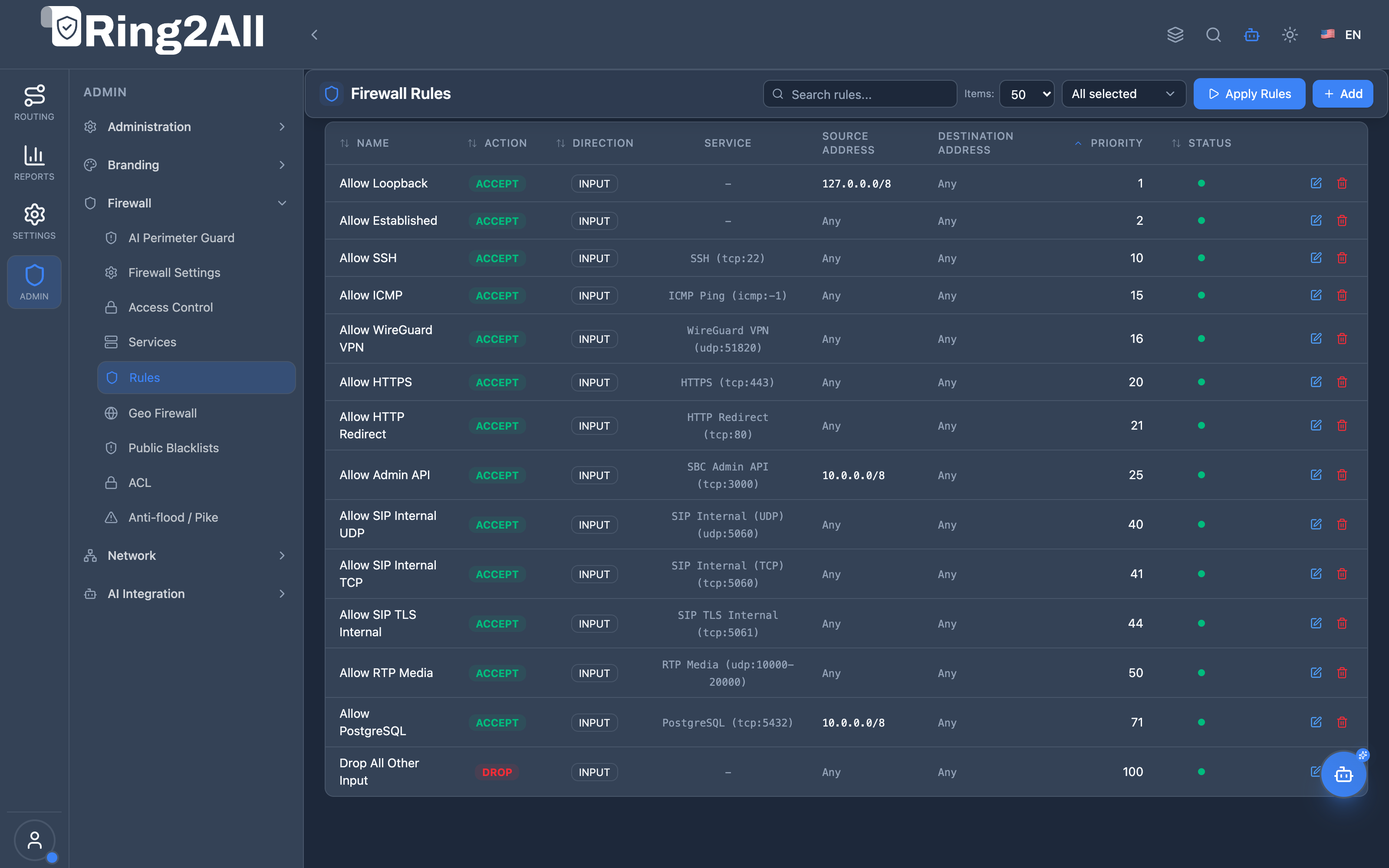
5. Field Reference & Rule Parameters
Section titled “5. Field Reference & Rule Parameters”| Field | Type | Options | Description |
|---|---|---|---|
| Name | String | Text | Descriptive identifier summarizing the rule’s operational intent (e.g., Allow SIP Internal UDP). |
| Action | Badge | ACCEPT, DROP, REJECT |
The packet verdict: ACCEPT permits passage, DROP silently discards, and REJECT returns an ICMP unreachable packet. |
| Direction | Badge | INPUT, OUTPUT, FORWARD |
The packet chain: INPUT for inbound traffic, OUTPUT for local outbound, and FORWARD for routed transit packets. |
| Service | Dropdown | Defined Services | Named service object referencing transport protocols and port ranges (e.g., SSH (tcp:22), RTP Media). |
| Source Address | String | CIDR or Any |
Originating IP address or network range (e.g., 10.0.0.0/8, 192.168.10.0/24, Any). |
| Destination Address | String | CIDR or Any |
Destination IP address or network interface range (typically Any for local host filtering). |
| Priority | Number | 1 to 100 |
Evaluation precedence. Rules with lower numeric values execute first; evaluation terminates upon first matching verdict. |
| Status | Status Dot | Active / Inactive | Indicates whether the rule is compiled and enforced in the active kernel packet filter. |
6. Pre-Configured Rule Baseline & Priority Hierarchy
Section titled “6. Pre-Configured Rule Baseline & Priority Hierarchy”Ring2All SBC includes an enterprise-hardened default rule baseline:
| Priority | Name | Action | Service | Source Address | Operational Purpose |
|---|---|---|---|---|---|
| 1 | Allow Loopback | ACCEPT |
— |
127.0.0.0/8 |
Permissive inter-process communication on the local loopback interface. |
| 2 | Allow Established | ACCEPT |
— |
Any |
Stateful tracking: permits packets belonging to already-negotiated sessions. |
| 10 | Allow SSH | ACCEPT |
SSH (tcp:22) |
Any |
Remote host administration access (protected by Fail2Ban). |
| 15 | Allow ICMP | ACCEPT |
ICMP Ping (icmp:-1) |
Any |
Diagnostic reachability checks and MTU path discovery. |
| 16 | Allow WireGuard VPN | ACCEPT |
WireGuard (udp:51820) |
Any |
Secure encrypted tunnels with remote core PBX and carrier nodes. |
| 20 | Allow HTTPS | ACCEPT |
HTTPS (tcp:443) |
Any |
Web administration dashboard and REST API TLS endpoint. |
| 21 | Allow HTTP Redirect | ACCEPT |
HTTP (tcp:80) |
Any |
Automatic port 80 redirect to HTTPS. |
| 25 | Allow Admin API | ACCEPT |
SBC Admin API (tcp:3000) |
10.0.0.0/8 |
Fastify backend API (strictly restricted to private management networks). |
| 40 | Allow SIP Internal UDP | ACCEPT |
SIP Internal (udp:5060) |
Any |
Core PBX and local extension SIP signaling over UDP. |
| 41 | Allow SIP Internal TCP | ACCEPT |
SIP Internal (tcp:5060) |
Any |
Core PBX and local extension SIP signaling over TCP. |
| 44 | Allow SIP TLS Internal | ACCEPT |
SIP TLS (tcp:5061) |
Any |
Encrypted internal PBX signaling via TLS. |
| 50 | Allow RTP Media | ACCEPT |
RTP Media (udp:10000-20000) |
Any |
Audio and video media streams relayed by RTPEngine. |
| 71 | Allow PostgreSQL | ACCEPT |
PostgreSQL (tcp:5432) |
10.0.0.0/8 |
Database access (strictly restricted to internal network nodes). |
| 100 | Drop All Other Input | DROP |
— |
Any |
Default-Deny Terminus: Drops all unmatched ingress traffic. |
7. nftables Compilation & Atomic Deployment
Section titled “7. nftables Compilation & Atomic Deployment”When an administrator clicks Apply Rules in the toolbar, the backend orchestrator generates a declarative nftables ruleset and applies it atomically:
# Generated nftables input chain snippettable inet filter {    chain input {        type filter hook input priority 0; policy drop;
        # Priority 1: Loopback        iif "lo" accept
        # Priority 2: Established/Related        ct state established,related accept
        # Priority 10: SSH        tcp dport 22 accept
        # Priority 25: Admin API (Restricted)        ip saddr 10.0.0.0/8 tcp dport 3000 accept
        # Priority 40: SIP Internal UDP        udp dport 5060 accept
        # Priority 50: RTP Media        udp dport 10000-20000 accept
        # Priority 100: Final catch-all drop        drop    }}
The file is applied via nft -f /tmp/ruleset.nft. If syntax validation succeeds, the active kernel filter is replaced instantly without dropping existing voice calls.
8. Operational Hardening & Rule Ordering Principles
Section titled “8. Operational Hardening & Rule Ordering Principles”- Keep Established Tracking at Priority 2: Placing
ct state established,related acceptimmediately after loopback ensures that high-volume RTP and active TCP streams bypass subsequent rule evaluations, dramatically lowering CPU utilization. - Strict Whitelisting for Administrative Services: Always enforce private CIDR source constraints (e.g.,
10.0.0.0/8or specific jump host IPs) on PostgreSQL (5432) and SBC Admin API (3000). - Never Delete the Catch-All Drop Rule: Priority 100 (
Drop All Other Input) must always remain active to ensure the perimeter operates in a true Default-Deny posture. - Audit Rule Priorities Before Applying: Ensure new acceptance rules are assigned priorities lower than 100 (e.g., 10–90). Any rule placed after Priority 100 will never be evaluated.
9. Verification & Diagnostics
Section titled “9. Verification & Diagnostics”9.1 Live Kernel Ruleset Dump
Section titled “9.1 Live Kernel Ruleset Dump”Verify the active compiled ruleset currently enforced in Linux kernel memory:
sudo nft list table inet filter9.2 Packet Counter Verification
Section titled “9.2 Packet Counter Verification”Inspect packet and byte counters across active rules to verify traffic matching:
sudo nft -a list chain inet filter input9.3 Database Rules Inspection
Section titled “9.3 Database Rules Inspection”Query all rules and their assigned priorities in PostgreSQL:
sudo -u postgres psql -d sbc_admin -c "SELECT priority, name, action, direction, source_address, is_activeFROM firewall_rulesORDER BY priority ASC;"10. Model Context Protocol (MCP) AI Integration
Section titled “10. Model Context Protocol (MCP) AI Integration”The Ring2All SBC MCP Server exposes dedicated packet filtering and rule orchestration tools under the firewall_rules tool category. Autonomous SecOps agents and the Ring2All SBC NOC Copilot can audit rule hierarchies, verify priority order, and safely toggle rule statuses without raw terminal access.
10.1 Available MCP Tools
Section titled “10.1 Available MCP Tools”| Tool Name | Operation Type | Risk Level | Description |
|---|---|---|---|
list_sbc_firewall_rules |
Read-only | read_only |
Lists all host-level packet filtering rules in priority sequence, detailing action, direction, protocol, and CIDR constraints. |
toggle_sbc_firewall_rule |
Mutating / Operational | operational |
Enables or disables an individual firewall rule by numerical ID with automatic validation. |
10.2 Tool Schemas & Parameter Definitions
Section titled “10.2 Tool Schemas & Parameter Definitions”list_sbc_firewall_rules
Section titled “list_sbc_firewall_rules”- Description: List all defined packet filtering firewall rules in Ring2All SBC ordered by execution priority.
- Input Schema:
{ "type": "object", "properties": {}}toggle_sbc_firewall_rule
Section titled “toggle_sbc_firewall_rule”- Description: Enable or disable a specific firewall rule by numerical ID.
- Input Schema:
{ "type": "object", "properties": { "id": { "type": "number", "description": "Numerical primary key ID of the firewall rule to toggle" }, "enabled": { "type": "boolean", "description": "True to activate the rule; false to disable it" } }, "required": ["id", "enabled"]}10.3 Sample Tool Execution Payloads
Section titled “10.3 Sample Tool Execution Payloads”Example 1: Listing Active Firewall Rules
Section titled “Example 1: Listing Active Firewall Rules”Request Payload:
{ "tool": "list_sbc_firewall_rules", "parameters": {}}Response Payload:
{ "success": true, "data": { "total": 13, "rules": [ { "id": 1, "priority": 1, "name": "Allow Loopback", "action": "ACCEPT", "direction": "INPUT", "sourceAddress": "127.0.0.0/8", "destinationAddress": "Any", "enabled": true }, { "id": 8, "priority": 25, "name": "Allow Admin API", "action": "ACCEPT", "direction": "INPUT", "sourceAddress": "10.0.0.0/8", "destinationAddress": "Any", "protocol": "TCP", "destinationPort": "3000", "enabled": true }, { "id": 13, "priority": 100, "name": "Drop All Other Input", "action": "DROP", "direction": "INPUT", "sourceAddress": "Any", "destinationAddress": "Any", "enabled": true } ] }}Example 2: Toggling a Maintenance Firewall Rule
Section titled “Example 2: Toggling a Maintenance Firewall Rule”Request Payload:
{ "tool": "toggle_sbc_firewall_rule", "parameters": { "id": 4, "enabled": false }}Response Payload:
{ "success": true, "data": { "message": "Firewall rule 'Allow ICMP Ping' updated to disabled", "ruleId": 4, "enabled": false }}10.4 Bilingual Natural Language Copilot Prompts
Section titled “10.4 Bilingual Natural Language Copilot Prompts”English Prompts
Section titled “English Prompts”- “List all active firewall rules in priority order and confirm the final drop rule is enabled.”
→ Agent calls
list_sbc_firewall_rules(). - “Disable firewall rule ID 4 temporarily to block ICMP echo requests on the WAN interface.”
→ Agent calls
toggle_sbc_firewall_rule({"id": 4, "enabled": false}).
Spanish Prompts (Español)
Section titled “Spanish Prompts (Español)”- “Lista todas las reglas del firewall en orden de prioridad y confirma que la regla final de descarte esté activa.”
→ Agente invoca
list_sbc_firewall_rules(). - “Deshabilita temporalmente la regla de firewall con ID 4 para bloquear solicitudes ICMP.”
→ Agente invoca
toggle_sbc_firewall_rule({"id": 4, "enabled": false}).
10.5 Enterprise Security & Execution Safeguards
Section titled “10.5 Enterprise Security & Execution Safeguards”- Catch-All Rule Invariance: Disabling Priority 100 (
Drop All Other Input) is strictly prohibited through automated tools to prevent accidentally converting the SBC into an open, insecure network gateway. - Priority Monotonicity: Rule execution strictly respects the
prioritynumeric column. Toggling a rule immediately updates its state in PostgreSQL. - Audit Recording: Toggling rules records the operator identity, rule name, previous state, and timestamp in administrative activity logs.
11. Glossary
Section titled “11. Glossary”- Default-Deny: A foundational cybersecurity posture where all traffic is blocked by default unless explicitly permitted by an authorized rule.
- Conntrack (
ct state): Kernel subsystem that tracks the state of network connections (e.g.,NEW,ESTABLISHED,RELATED). - Verdict: The outcome determined by a firewall rule when a packet matches its criteria (
accept,drop, orreject). - Atomic Deployment: The process of applying a complete set of configuration changes instantaneously, ensuring no intermediate inconsistent states occur.
- Model Context Protocol (MCP): An open standard enabling autonomous AI assistants and NOC copilots to securely discover and invoke SBC operational tools.