

Inbound Routes Module Documentation
Table of Contents
Section titled “Table of Contents”- Navigation & Access
- Screenshots & Visual Interface
- Module Overview (Technical)
- Module Overview (Commercial/Business)
- Module Overview (End User/Administrator)
- Configuration Fields Reference
- Destination Modules
- Pattern Matching
- Common Scenarios & Examples
- Model Context Protocol (MCP) AI Integration
- Limitations & Important Notes
- Troubleshooting Tips
- Glossary
Navigation & Access
Section titled “Navigation & Access”To access the Inbound Routes module:
- Log in to the Ring2All Web Portal.
- In the left navigation sidebar, expand PBX Engine.
- Under Call Routing, click Inbound Routes (
/pbx/calls-routing/inbound).
Screenshots & Visual Interface
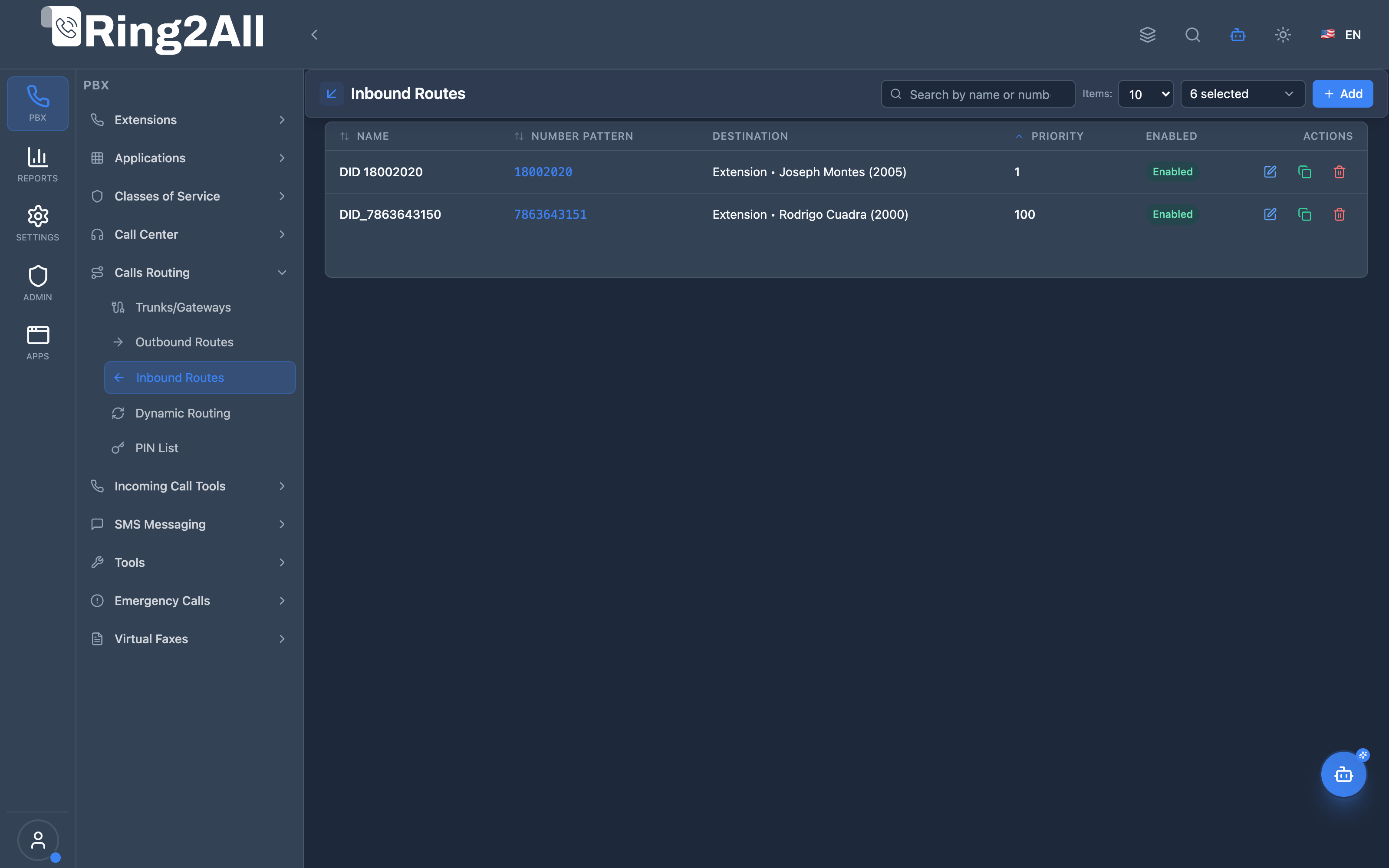
Section titled “Screenshots & Visual Interface”Inbound Routes List View
Section titled “Inbound Routes List View”Displays all inbound DID routing rules, pattern numbers, assigned destination module and target, priority, and enabled status.
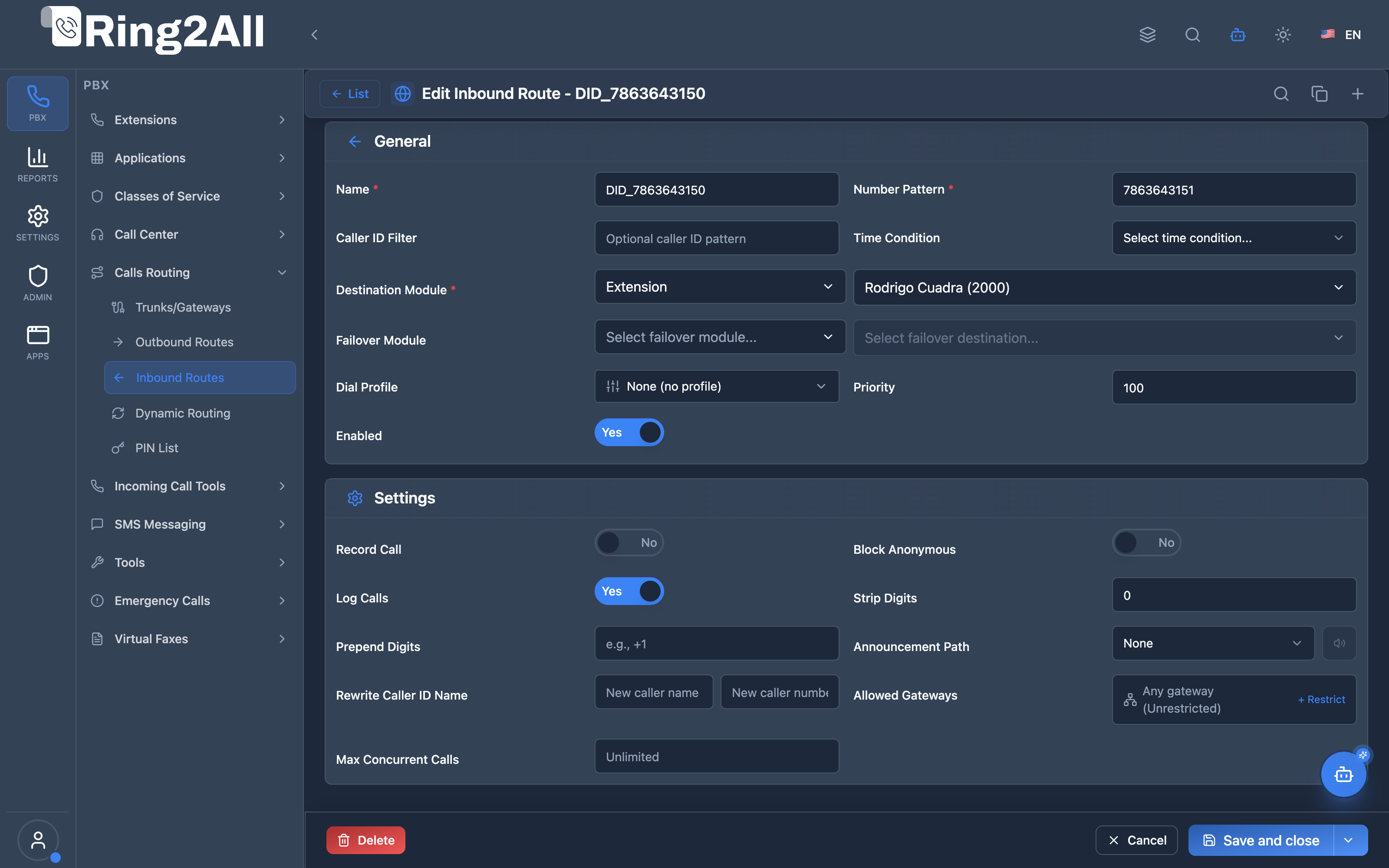
Inbound Route Configuration Form
Section titled “Inbound Route Configuration Form”Provides configuration for DID matching patterns, destination endpoints, dial profiles, and advanced settings (failover, recording, caller ID rewrite, screening).
1. Module Overview (Technical)
Section titled “1. Module Overview (Technical)”What Are Inbound Routes?
Section titled “What Are Inbound Routes?”Inbound Routes define how incoming calls are routed from SIP gateways/carriers to internal destinations (extensions, queues, IVRs, etc.). They match DIDs (phone numbers) to destinations based on regex patterns.
Architecture
Section titled “Architecture”┌─────────────────────────────────────────────────────────────────┐│ Inbound Routes System │├─────────────────────────────────────────────────────────────────┤│ ││ Incoming Call: +15055551234 from Carrier ││ │ ││ ▼ ││ ┌──────────────────────────────────────────────────────────┐ ││ │ route_with_fallback.lua │ ││ │ │ ││ │ 1. Detect call_direction = "inbound" │ ││ │ 2. Query public.inbound_routes │ ││ │ 3. Match: number_pattern = ^5055551234$ │ ││ │ 4. Optional: caller_id_filter check │ ││ │ 5. Route to destination_module + destination_data │ ││ │ │ ││ └──────────────────────────────────────────────────────────┘ ││ │ ││ ▼ ││ ┌──────────────────────────────────────────────────────────┐ ││ │ Destination Handler │ ││ │ │ ││ │ extension → routing/extension.lua │ ││ │ ivr → routing/ivr.lua │ ││ │ queue → routing/queue.lua │ ││ │ ring_group → routing/ring_group.lua │ ││ │ conference → routing/conference.lua │ ││ │ ... │ ││ │ │ ││ └──────────────────────────────────────────────────────────┘ ││ │└─────────────────────────────────────────────────────────────────┘2. Module Overview (Commercial/Business)
Section titled “2. Module Overview (Commercial/Business)”Business Value
Section titled “Business Value”Inbound Routes enable DID-to-destination mapping:
| Without Inbound Routes | With Inbound Routes |
|---|---|
| All calls to default | Route by DID number |
| No caller filtering | Filter by caller ID |
| No time routing | Time-based destinations |
| No call screening | Anonymous call blocking |
Use Cases
Section titled “Use Cases”-
DID Routing
- Route +15051234567 → Sales Queue
- Route +15057654321 → Support IVR
-
Department Lines
- Main number → Auto-Attendant
- Support number → Support Queue
- Fax number → Fax Server
-
Geographic Routing
- Local calls → Local agents
- International → Language IVR
-
Time-Based Routing
- Business hours → Main IVR
- After hours → Voicemail
Feature Highlights
Section titled “Feature Highlights”| Feature | Benefit |
|---|---|
| Pattern Matching | Regex for DIDs |
| Caller ID Filter | Route by caller |
| Time Conditions | Time-based routing |
| Multiple Destinations | Extension, Queue, IVR, etc. |
| Call Recording | Auto-record inbound calls |
| Anonymous Blocking | Reject hidden or anonymous callers |
| Caller ID Rewriting | Customize presented caller ID name and number |
| Gateway Restriction | Restrict routes to allowed trunk gateways |
| Max Concurrent | Capacity limits with failover rerouting |
3. Module Overview (End User/Administrator)
Section titled “3. Module Overview (End User/Administrator)”What Can You Do?
Section titled “What Can You Do?”- Create inbound routes for DIDs
- Define number patterns (regex)
- Filter by caller ID
- Set destination (extension, queue, IVR, etc.)
- Configure time conditions
- Block anonymous callers
- Set concurrent call limits
Administrator Workflow
Section titled “Administrator Workflow”┌─────────────────────────────────────────────────────────────────┐│ Creating an Inbound Route │├─────────────────────────────────────────────────────────────────┤│ ││ Section: General ││ ├─ Name: "Main Line" ││ ├─ Number Pattern: ^5055551234$ ││ ├─ Caller ID Filter: (optional) ││ ├─ Priority: 100 ││ └─ Enabled: ✓ ││ ││ Section: Settings ││ ├─ Destination Module: IVR ││ ├─ Destination: Main Auto-Attendant ││ ├─ Time Condition: Business Hours (optional) ││ ├─ Failover Module: Voicemail ││ ├─ Failover Destination: General Mailbox ││ ├─ Record Call: ✓ ││ ├─ Block Anonymous: ✓ ││ └─ Max Concurrent: 20 ││ │└─────────────────────────────────────────────────────────────────┘Quick Tips
Section titled “Quick Tips”[!TIP] Use Anchors:
^5055551234$matches exactly that number.
[!TIP] Wildcard DIDs:
^505555.*matches all 505555xxxx numbers.
[!CAUTION] Priority Order: Lower number = higher priority (checked first).
4. Configuration Fields Reference
Section titled “4. Configuration Fields Reference”General Fields
Section titled “General Fields”| Field | Description | Example |
|---|---|---|
| Name | Route identifier | Main Line |
| Number Pattern | Regex for DID | ^5055551234$ |
| Caller ID Filter | Optional caller pattern | ^1800.* |
| Priority | Evaluation order (lower = first) | 100 |
| Enabled | Route active | On/Off |
Destination Fields
Section titled “Destination Fields”| Field | Description |
|---|---|
| Destination Module | Target type (extension, ivr, queue, etc.) |
| Destination | Specific destination |
| Time Condition | Optional time-based routing |
| Dial Profile | Optional Dial Profile template to control call variables (transfers, ringbacks) for incoming calls |
| Failover Module | Backup destination type |
| Failover Destination | Backup target |
Advanced Fields
Section titled “Advanced Fields”| Field | Description | Default |
|---|---|---|
| Record Call | Auto-record incoming calls with domain quota checks | Off |
| Announcement | Audio recording played before transfer to destination | None |
| Strip Digits | Number of leading digits to strip from destination number | 0 |
| Add Prefix | Digits or prefix prepended to destination number | None |
| Rewrite Caller ID Name | Overrides SIP effective_caller_id_name presented to destination |
None |
| Rewrite Caller ID Number | Overrides SIP effective_caller_id_number presented to destination |
None |
| Block Anonymous | Reject calls with anonymous/private caller ID (SIP 433) | Off |
| Allowed Gateways | Restrict route to specific SIP gateways | All (Unrestricted) |
| Max Concurrent | Maximum simultaneous calls (exceeded calls redirect to failover) | Unlimited |
| Log Calls | Log all calls routed through this rule | On |
5. Destination Modules
Section titled “5. Destination Modules”Available Destinations
Section titled “Available Destinations”| Module | Description | Handler |
|---|---|---|
| Extension | Route to extension | routing/extension.lua |
| IVR | Route to IVR menu | routing/ivr.lua |
| Queue | Route to call center queue | routing/queue.lua |
| Ring Group | Route to ring group | routing/ring_group.lua |
| Conference | Route to conference room | routing/conference.lua |
| Announcement | Play announcement | routing/announcement.lua |
| Call Flow | Route to call flow | routing/call_flow.lua |
| Time Condition | Time-based routing | routing/time_condition.lua |
| Direct Route | Direct external route | routing/direct_route.lua |
| Direct Dial | Speed dial destination | routing/direct_dial.lua |
| Language | Language selection | routing/language.lua |
| Fax | Fax server | routing/fax.lua |
| Emergency | Emergency routing | routing/emergency.lua |
Destination Selection Flow
Section titled “Destination Selection Flow”Destination Module: Queue │ ▼Destination Dropdown loads:├─ Sales Queue├─ Support Queue├─ Billing Queue└─ ... │ ▼Select: "Support Queue"6. Pattern Matching
Section titled “6. Pattern Matching”Number Pattern Syntax
Section titled “Number Pattern Syntax”| Pattern | Matches | Example DID |
|---|---|---|
^5055551234$ |
Exact number | 5055551234 |
^505555.* |
505555 + any digits | 5055551234, 5055559999 |
^1800\d{7}$ |
1800 + 7 digits | 18001234567 |
.* |
Any number | All DIDs |
Caller ID Filter
Section titled “Caller ID Filter”| Pattern | Filters |
|---|---|
^1800.* |
Toll-free callers |
^505.* |
Local callers |
^011.* |
International callers |
| `^(PRIVATE | ANONYMOUS)$` |
Pattern Examples
Section titled “Pattern Examples”| Purpose | Number Pattern | Caller Filter |
|---|---|---|
| Specific DID | ^5055551234$ |
- |
| Range of DIDs | ^505555\d{4}$ |
- |
| VIP Callers | ^5055551234$ |
^18001234567$ |
| Block Toll-Free | ^5055551234$ |
^(?!1800).* |
7. Common Scenarios & Examples
Section titled “7. Common Scenarios & Examples”Scenario 1: Main Business Line
Section titled “Scenario 1: Main Business Line”Route: “Main Line”
| Setting | Value |
|---|---|
| Number Pattern | ^5055551234$ |
| Destination Module | IVR |
| Destination | Main Auto-Attendant |
| Priority | 100 |
| Record Call | ✓ |
| Block Anonymous | ✓ |
Scenario 2: Support Queue with Time Routing
Section titled “Scenario 2: Support Queue with Time Routing”Route: “Support Line”
| Setting | Value |
|---|---|
| Number Pattern | ^5055559999$ |
| Time Condition | Business Hours |
| Destination Module | Queue |
| Destination | Support Queue |
| Failover Module | Voicemail |
| Failover Destination | Support Mailbox |
Scenario 3: VIP Caller Direct to Extension
Section titled “Scenario 3: VIP Caller Direct to Extension”Route: “VIP Direct Line”
| Setting | Value |
|---|---|
| Number Pattern | ^5055551234$ |
| Caller ID Filter | ^15055559999$ |
| Priority | 50 (higher than main) |
| Destination Module | Extension |
| Destination | 1001 (CEO) |
Scenario 4: Fax Line
Section titled “Scenario 4: Fax Line”Route: “Fax Line”
| Setting | Value |
|---|---|
| Number Pattern | ^5055550000$ |
| Destination Module | Fax |
| Destination | Fax Server |
8. Model Context Protocol (MCP) AI Integration
Section titled “8. Model Context Protocol (MCP) AI Integration”Ring2All exposes native Model Context Protocol (MCP) tools for Inbound Routes (DID Routing), enabling autonomous AI agents, Copilots, and telecom automation engines to inspect incoming phone number mappings, link DIDs to call handling destinations (IVRs, Ring Groups, Queues, Extensions, Voicemail), enforce strict DID numbering collision prevention within the domain, and maintain synchronized Telephony dialplans (reloadxml).
Available MCP Tools
Section titled “Available MCP Tools”| Tool Name | Description | Key Parameters |
|---|---|---|
list_inbound_routes |
Lists all inbound routes configured in the domain, displaying DID number patterns, destination modules, target data, priority, and enabled status. | search (optional string) |
get_inbound_route_status |
Retrieves complete configuration of an inbound route by name or DID number pattern, including caller ID filters, priority, and destination target. | identifier (required string - route name or DID) |
create_inbound_route |
Provisions a new inbound DID routing rule. Validates pattern syntax and strictly prevents DID numbering collisions against existing routes in the same domain. | name, numberPattern, destinationModule (ivr, ring-group, queue, extension, voicemail, time-condition, hangup), destinationData, priority, callerIdFilter |
update_inbound_route |
Updates an existing inbound route’s destination target, priority, caller ID filter, or DID pattern with atomic collision verification. | identifier, newName, numberPattern, destinationModule, destinationData, priority, enabled |
diagnose_inbound_route |
Performs deep operational diagnostic on an Inbound DID Route: validates pattern/regex syntax, checks enabled status and priority ordering, verifies destination target existence and health (detecting orphaned routes), and scans Telephony engine logs for recent incoming SIP INVITE matching issues. | identifier (required string - route name or incoming DID) |
delete_inbound_route |
Removes an inbound DID route and immediately syncs Telephony Server XML cache. | identifier (required string) |
Anti-Collision & Numbering Integrity Protection
Section titled “Anti-Collision & Numbering Integrity Protection”- DID Collision Prevention: It is strictly forbidden for two inbound routes to claim the identical incoming DID pattern and caller ID filter within the same tenant domain. Both
create_inbound_routeandupdate_inbound_routeperform atomic pre-flight checks:If a duplicate is detected, the operation is immediately rejected with a descriptive conflict error.SELECT id FROM public.inbound_routesWHERE domain_id = [domain_id]AND number_pattern = [numberPattern]AND coalesce(caller_id_filter, '') = coalesce([callerIdFilter], ''); - Dialplan Hot Reload: Creation, modification, or removal of inbound routes automatically invokes Telephony Server
reloadxml, ensuring carrier traffic routes without manual daemon restarts.
AI Agent Operational Examples
Section titled “AI Agent Operational Examples”Querying Inbound Routes Matching a Specific DID
Section titled “Querying Inbound Routes Matching a Specific DID”{ "tool": "get_inbound_route_status", "arguments": { "identifier": "+18005550199" }}Provisioning an Inbound DID to an IVR Menu
Section titled “Provisioning an Inbound DID to an IVR Menu”{ "tool": "create_inbound_route", "arguments": { "name": "Main Office Toll-Free", "numberPattern": "^(\\+?18005550199)$", "destinationModule": "ivr", "destinationData": "7001", "priority": 10 }}Re-routing an Inbound Route to a Call Center Queue
Section titled “Re-routing an Inbound Route to a Call Center Queue”{ "tool": "update_inbound_route", "arguments": { "identifier": "Main Office Toll-Free", "destinationModule": "queue", "destinationData": "800", "priority": 5 }}Diagnosing Inbound Route & Destination Integrity
Section titled “Diagnosing Inbound Route & Destination Integrity”{ "tool": "diagnose_inbound_route", "arguments": { "identifier": "+18005550199" }}Recommended Natural Language Prompts
Section titled “Recommended Natural Language Prompts”- “Show me all inbound DIDs and where they are currently routing.”
- “Route incoming calls for DID +15055551234 to Ring Group 600.”
- “Check if DID +18005550199 is already configured or if there is a number collision.”
- “Update the after-hours inbound route to send callers directly to Voicemail 1001.”
9. Limitations & Important Notes
Section titled “9. Limitations & Important Notes”Technical Notes
Section titled “Technical Notes”[!NOTE] Priority Order: Inbound routes are checked by priority (lowest first). First match wins.
[!WARNING] Pattern Overlap: If patterns overlap, use priority to control which route wins.
[!WARNING] Regex Escaping: Use
\.for literal dots,\dfor digits.
Best Practices
Section titled “Best Practices”- Use Exact Patterns:
^5055551234$is safer than505555.* - Set Priorities: Lower priority for specific routes (50), higher for catch-all (999)
- Test Patterns: Verify patterns match intended DIDs
- Configure Failover: Always have a backup destination
- Use Time Conditions: Route differently for business/after hours
10. Troubleshooting Tips
Section titled “10. Troubleshooting Tips”Common Issues
Section titled “Common Issues”| Symptom | Possible Cause | Solution |
|---|---|---|
| Wrong destination | Pattern overlap | Adjust priorities |
| No route found | Pattern doesn’t match | Test regex pattern |
| Call rejected | Anonymous blocking | Disable or adjust |
| Failover not working | Failover not configured | Set failover module |
| Time routing wrong | Time condition incorrect | Check time condition |
Diagnostic SQL
Section titled “Diagnostic SQL”List inbound routes:
SELECT id, name, number_pattern, destination_module, destination_data, priority, enabledFROM public.inbound_routesWHERE domain_id = [domain_id]ORDER BY priority;Test pattern matching:
SELECT name, number_pattern, destination_module, destination_dataFROM public.inbound_routesWHERE domain_id = [domain_id] AND enabled = TRUE AND '5055551234' ~ number_patternORDER BY priorityLIMIT 1;Telephony Server Logs
Section titled “Telephony Server Logs”# Check inbound routinggrep "inbound_routes" /var/log/freeswitch/freeswitch.loggrep "route_with_fallback" /var/log/freeswitch/freeswitch.log11. Glossary
Section titled “11. Glossary”| Term | Definition |
|---|---|
| Inbound Route | Rule for routing incoming calls |
| DID | Direct Inward Dialing number |
| Number Pattern | Regex to match dialed number |
| Caller ID Filter | Regex to match caller number |
| Destination Module | Type of destination (extension, ivr, etc.) |
| Time Condition | Time-based routing rule |
| Failover | Backup destination if primary fails |
Documentation last updated: January 2026