

Outbound Routes Module Documentation
Table of Contents
Section titled “Table of Contents”- Navigation & Access
- Screenshots & Visual Interface
- Module Overview (Technical)
- Module Overview (Commercial/Business)
- Module Overview (End User/Administrator)
- Configuration Fields Reference
- Dial Patterns
- Routing Strategies
- Common Scenarios & Examples
- Model Context Protocol (MCP) AI Integration
- Limitations & Important Notes
- Troubleshooting Tips
- Glossary
Navigation & Access
Section titled “Navigation & Access”To access the Outbound Routes module:
- Log in to the Ring2All Web Portal.
- In the left navigation sidebar, expand PBX Engine.
- Under Call Routing, click Outbound Routes (
/pbx/calls-routing/outbound).
Screenshots & Visual Interface
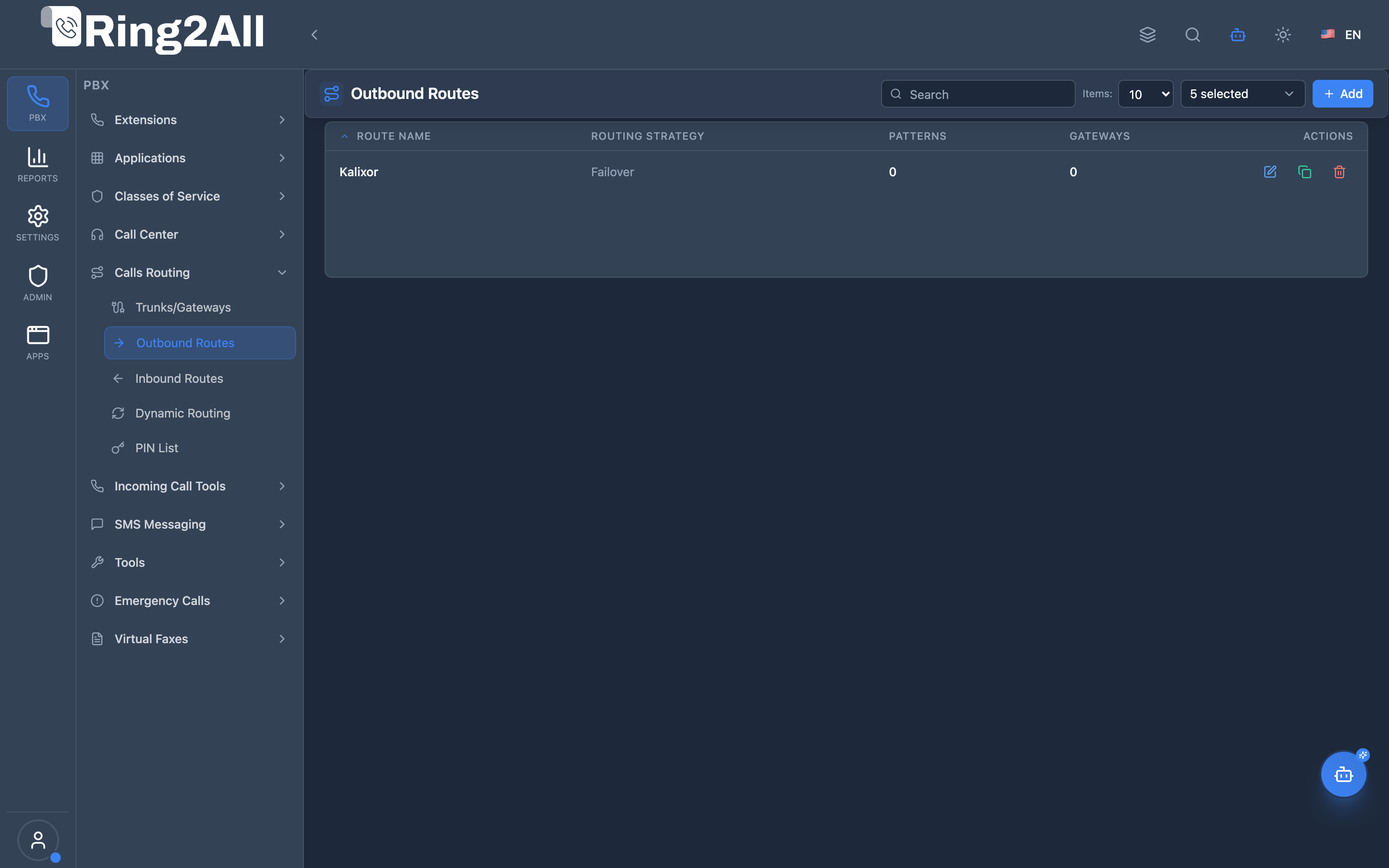
Section titled “Screenshots & Visual Interface”Outbound Routes List View
Section titled “Outbound Routes List View”Displays all configured outbound routes with their priority, routing strategy, assigned gateways, pattern count, and status.
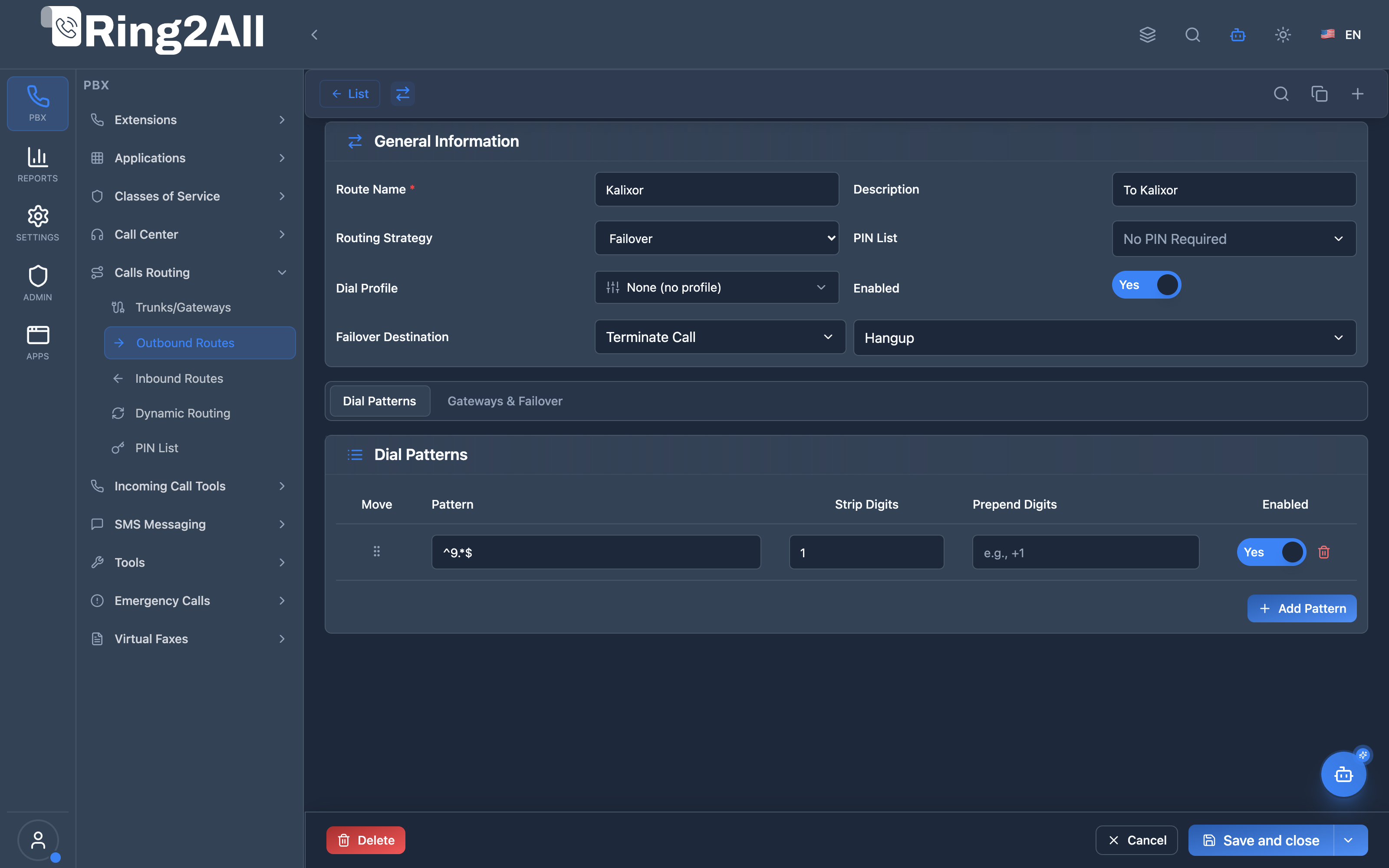
Outbound Route Configuration Form
Section titled “Outbound Route Configuration Form”Provides configuration for general settings, drag-and-drop dial patterns (with strip/prepend rules), and ordered gateway failover cascades.
1. Module Overview (Technical)
Section titled “1. Module Overview (Technical)”What Are Outbound Routes?
Section titled “What Are Outbound Routes?”Outbound Routes define how external calls are routed from the PBX to SIP gateways. They match dialed numbers against patterns and select gateways based on priority, weight, and routing strategy.
Architecture
Section titled “Architecture”┌─────────────────────────────────────────────────────────────────┐│ Outbound Routes System │├─────────────────────────────────────────────────────────────────┤│ ││ User dials: 918005551212 ││ │ ││ ▼ ││ ┌──────────────────────────────────────────────────────────┐ ││ │ route_with_fallback.lua │ ││ │ │ ││ │ 1. Check dialplan_registry (extensions, features) │ ││ │ 2. No match → Check outbound_route_patterns │ ││ │ 3. Match pattern: ^9\d{10}$ → "National Calls" │ ││ │ 4. Strip 1 digit (9) → 18005551212 │ ││ │ 5. Prepend: +1 → +118005551212 │ ││ │ 6. Select gateway based on strategy │ ││ │ │ ││ └──────────────────────────────────────────────────────────┘ ││ │ ││ ▼ ││ ┌──────────────────────────────────────────────────────────┐ ││ │ Gateway Selection (Failover Strategy) │ ││ │ │ ││ │ Priority 1: carrier_primary ──→ Try first │ ││ │ Priority 2: carrier_backup ──→ If primary fails │ ││ │ Priority 3: carrier_tertiary ──→ Last resort │ ││ │ │ ││ └──────────────────────────────────────────────────────────┘ ││ │ ││ ▼ ││ sofia/gateway/carrier_primary/+118005551212 ││ │└─────────────────────────────────────────────────────────────────┘2. Module Overview (Commercial/Business)
Section titled “2. Module Overview (Commercial/Business)”Business Value
Section titled “Business Value”Outbound Routes enable intelligent external call routing:
| Without Outbound Routes | With Outbound Routes |
|---|---|
| Single gateway | Multiple carrier support |
| No cost optimization | Least-cost routing |
| No redundancy | Automatic failover |
| No access control | PIN-protected routes |
Use Cases
Section titled “Use Cases”-
Least-Cost Routing
- Route by destination prefix
- Different carriers for local/long-distance/international
-
Carrier Failover
- Primary carrier unreachable → automatic switch
- No manual intervention
-
Access Control
- PIN-protect expensive routes
- Restrict international dialing
-
Number Manipulation
- Strip access codes (9)
- Prepend country codes (+1)
Feature Highlights
Section titled “Feature Highlights”| Feature | Benefit |
|---|---|
| Pattern Matching | Regex or simplified (9XXX) |
| Strip/Prepend | Number manipulation |
| 3 Strategies | Failover, Round Robin, Load Balance |
| Priority-based | Route evaluation order |
| PIN Protection | Access control |
| Gateway Failover | Automatic redundancy |
3. Module Overview (End User/Administrator)
Section titled “3. Module Overview (End User/Administrator)”What Can You Do?
Section titled “What Can You Do?”- Create outbound routes with names
- Define dial patterns (prefix or regex)
- Configure number manipulation (strip/prepend)
- Assign multiple gateways with priorities
- Choose routing strategy
- Add PIN protection
Administrator Workflow
Section titled “Administrator Workflow”┌─────────────────────────────────────────────────────────────────┐│ Creating an Outbound Route │├─────────────────────────────────────────────────────────────────┤│ ││ Tab 1: General Settings ││ ├─ Route Name: "National Calls" ││ ├─ Description: "US domestic calls via primary carrier" ││ ├─ Priority: 100 ││ ├─ Routing Strategy: Failover ││ └─ Enabled: ✓ ││ ││ Tab 2: Dial Patterns ││ ┌───────────────────────────────────────────────────────────┐ ││ │ Pattern: 9NXXNXXXXXX | Strip: 1 | Prepend: +1 | ✓ │ ││ │ Pattern: 91NXXNXXXXXX | Strip: 1 | Prepend: + | ✓ │ ││ └───────────────────────────────────────────────────────────┘ ││ [+ Add Pattern] ││ ││ Tab 3: Gateways & Failover ││ ┌───────────────────────────────────────────────────────────┐ ││ │ ≡ carrier_primary | Priority: 1 | Weight: 100 | ✓ │ ││ │ ≡ carrier_backup | Priority: 2 | Weight: 100 | ✓ │ ││ └───────────────────────────────────────────────────────────┘ ││ [+ Add Gateway] ││ ││ Tab 4: Advanced Options ││ ├─ PIN List: (optional) ││ ├─ Failover Module: Terminate ││ └─ Failover Destination: Hangup ││ │└─────────────────────────────────────────────────────────────────┘Quick Tips
Section titled “Quick Tips”[!TIP] Use Simplified Patterns:
9XXXis easier than^9\d{3}$.
[!TIP] Lower Priority = Higher Precedence: Route with priority 50 is checked before 100.
[!CAUTION] Strip Count: Make sure strip count doesn’t remove too many digits.
4. Configuration Fields Reference
Section titled “4. Configuration Fields Reference”Route Fields
Section titled “Route Fields”| Field | Description | Example |
|---|---|---|
| Route Name | Unique identifier | National Calls |
| Description | Optional description | US domestic calls |
| Priority | Evaluation order (lower = first) | 100 |
| Routing Strategy | Gateway selection method | Failover |
| Enabled | Route active status | On/Off |
| Dial Profile | Optional Dial Profile template to execute dialplan variables before bridging | (select list) |
| PIN List | Optional PIN protection | (select list) |
| Failover Module | Action when all fail | Terminate |
| Failover Destination | Specific action | Hangup |
Pattern Fields
Section titled “Pattern Fields”| Field | Description | Example |
|---|---|---|
| Pattern | Dial pattern to match | 9NXXNXXXXXX |
| Strip Digits | Digits to remove from start | 1 |
| Prepend | Digits to add after strip | +1 |
| Description | Pattern description | Local calls |
| Priority | Order within route | 1 |
| Enabled | Pattern active | On/Off |
Gateway Fields
Section titled “Gateway Fields”| Field | Description |
|---|---|
| Gateway | Selected gateway |
| Priority | Order for failover (1=first) |
| Weight | Load balance weighting |
| Description | Optional note |
| Enabled | Gateway in use |
5. Dial Patterns
Section titled “5. Dial Patterns”Pattern Syntax
Section titled “Pattern Syntax”Simplified Patterns:
| Symbol | Meaning | Example |
|---|---|---|
X |
Any digit (0-9) | 9XXX = 9000-9999 |
Z |
Digit 1-9 | 9ZXXX = 91000-99999 |
N |
Digit 2-9 | 9NXXX = 92000-99999 |
Regex Patterns:
| Pattern | Matches |
|---|---|
^9\d{10}$ |
9 + 10 digits |
^011.* |
International (011…) |
^1[2-9]\d{9}$ |
1 + 10 digit US |
Pattern Examples
Section titled “Pattern Examples”| Purpose | Pattern | Strip | Prepend | Result |
|---|---|---|---|---|
| Local (7-digit) | 9NXXXXXX |
1 | +1305 |
Dial 95551234 → +13055551234 |
| National (10-digit) | 9NXXNXXXXXX |
1 | +1 |
Dial 93055551234 → +13055551234 |
| Toll-Free | 91800NXXXXXX |
1 | + |
Dial 918005551234 → +18005551234 |
| International | 9011. |
1 | + |
Dial 901152… → +52… |
6. Routing Strategies
Section titled “6. Routing Strategies”Strategy Comparison
Section titled “Strategy Comparison”| Strategy | Description | Best For |
|---|---|---|
| Failover | Try gateways in priority order | Reliability |
| Round Robin | Rotate through gateways | Load distribution |
| Load Balance | Weighted distribution | Proportional traffic |
Failover Strategy
Section titled “Failover Strategy”Call comes in │ ▼Try Gateway 1 (Priority 1) │ ├── Success → Call connected │ └── Fail → Try Gateway 2 (Priority 2) │ ├── Success → Call connected │ └── Fail → Failover destinationRound Robin Strategy
Section titled “Round Robin Strategy”Call 1 → Gateway ACall 2 → Gateway BCall 3 → Gateway CCall 4 → Gateway A (restart)Load Balance Strategy
Section titled “Load Balance Strategy”Weights: Gateway A = 70, Gateway B = 30
~70% of calls → Gateway A~30% of calls → Gateway B7. Common Scenarios & Examples
Section titled “7. Common Scenarios & Examples”Scenario 1: US National Calling
Section titled “Scenario 1: US National Calling”Route: “National Calls”
| Setting | Value |
|---|---|
| Priority | 100 |
| Strategy | Failover |
Patterns:
| Pattern | Strip | Prepend | Description |
|---|---|---|---|
9NXXNXXXXXX |
1 | +1 |
10-digit national |
91NXXNXXXXXX |
1 | + |
11-digit with 1 |
Gateways:
| Gateway | Priority |
|---|---|
| primary_carrier | 1 |
| backup_carrier | 2 |
Scenario 2: International with PIN
Section titled “Scenario 2: International with PIN”Route: “International”
| Setting | Value |
|---|---|
| Priority | 200 |
| Strategy | Failover |
| PIN List | International PIN |
Patterns:
| Pattern | Strip | Prepend | Description |
|---|---|---|---|
9011. |
1 | + |
International |
Scenario 3: Load-Balanced Multi-Carrier
Section titled “Scenario 3: Load-Balanced Multi-Carrier”Route: “Multi-Carrier”
| Setting | Value |
|---|---|
| Priority | 100 |
| Strategy | Load Balance |
Gateways:
| Gateway | Weight |
|---|---|
| carrier_a | 50 |
| carrier_b | 30 |
| carrier_c | 20 |
8. Model Context Protocol (MCP) AI Integration
Section titled “8. Model Context Protocol (MCP) AI Integration”Ring2All exposes native Model Context Protocol (MCP) tools for Outbound Routes, allowing AI agents and PBX automation engines to inspect egress dial patterns, examine multi-gateway failover cascades, adjust routing strategies (failover, round-robin, load-balance, lcr), and provision or remove outbound dialing rules programmatically with strict domain isolation and automatic Telephony dialplan synchronization (reloadxml).
Available MCP Tools
Section titled “Available MCP Tools”| Tool Name | Description | Key Parameters |
|---|---|---|
list_outbound_routes |
Lists all outbound routes in the domain, including match patterns, assigned gateway trunks, routing strategy, priority, and enabled state. | search (optional string) |
get_outbound_route_status |
Retrieves full configuration of a specific outbound route, detailing ordered regex patterns, digit manipulation (strip/prepend), and prioritized gateway failover lists. | name (required string) |
create_outbound_route |
Provisions a new outbound route matching dial patterns to ordered carrier gateways with a specified strategy and priority. Strictly enforces route name uniqueness within the domain. | name, patterns (array of regex/prefix strings), gatewayNames (ordered array of gateways), routingStrategy (failover, round-robin, load-balance, lcr), priority, description |
update_outbound_route |
Updates outbound route parameters, including routing strategy, priority, enabled status, or name. | name, newName, routingStrategy, priority, enabled |
diagnose_outbound_route |
Performs deep operational diagnostic on an Outbound Route: tests dial patterns against an optional test dialed number, validates route priority and enabled status, checks live Sofia trunk gateway registration and ping reachability, evaluates trunk failover cascades, and scans Telephony engine logs for recent egress call errors (SIP 503, 486, 404). | name (required string), testNumber (optional string) |
simulate_dialplan_route |
Dry-run end-to-end call routing emulator reproducing the exact FreeSWITCH Lua dialplan engine. Tests extension DND, call forwardings, Ring Groups, Queues, IVR, Voicemail, Blacklists, Class of Service dial rule restrictions, Outbound Route priority/patterns, prepend/strip digit transformation, Gateway Sofia readiness, and effective CID resolution. | dialedNumber (required string), callerExt (optional string) |
delete_outbound_route |
Safely removes an outbound route and its associated pattern and gateway junction rows, automatically triggering dialplan XML reload. | name (required string) |
Protection Guards & Integrity
Section titled “Protection Guards & Integrity”- Name Uniqueness: Route names must be strictly unique within each tenant domain. Attempts to create or rename a route to an existing name trigger a validation rejection.
- Gateway Existence Validation: When creating an outbound route via MCP, every gateway named in
gatewayNamesis verified against active domain gateways before provisioning the junction table (outbound_route_gateways). - Atomic Telephony Server Synchronization: Successful creation, modification, or deletion invokes Telephony Server XML cache invalidation (
reloadxml) so outbound routing takes effect instantly without orphaned dialplans.
AI Agent Operational Examples
Section titled “AI Agent Operational Examples”Auditing Outbound Routes & Gateways
Section titled “Auditing Outbound Routes & Gateways”{ "tool": "list_outbound_routes", "arguments": { "search": "International" }}Provisioning an Emergency 911 Outbound Route
Section titled “Provisioning an Emergency 911 Outbound Route”{ "tool": "create_outbound_route", "arguments": { "name": "Emergency_E911", "patterns": ["^911$", "^933$"], "gatewayNames": ["Telnyx_Primary", "Twilio_Backup"], "routingStrategy": "failover", "priority": 0, "description": "Highest priority emergency egress route" }}Updating Strategy to Least Cost Routing (LCR)
Section titled “Updating Strategy to Least Cost Routing (LCR)”{ "tool": "update_outbound_route", "arguments": { "name": "Domestic_Standard", "routingStrategy": "lcr", "priority": 10 }}Diagnosing Outbound Routing & Gateway Readiness
Section titled “Diagnosing Outbound Routing & Gateway Readiness”{ "tool": "diagnose_outbound_route", "arguments": { "name": "Domestic_Standard", "testNumber": "13055551234" }}Simulating End-to-End Dialplan Routing (simulate_dialplan_route)
Section titled “Simulating End-to-End Dialplan Routing (simulate_dialplan_route)”{ "tool": "simulate_dialplan_route", "arguments": { "callerExt": "2002", "dialedNumber": "13055551234" }}Recommended Natural Language Prompts
Section titled “Recommended Natural Language Prompts”- “List all outbound routes and the carrier gateways assigned to each.”
- “Simulate an outbound call from extension 2002 to 13055551234 to verify which route and gateway will be selected.”
- “Create an outbound route for North American 10-digit dialing through Telnyx with Twilio as failover.”
- “Check the dial pattern configuration for the International route.”
- “Disable the legacy carrier outbound route without deleting it.”
9. Limitations & Important Notes
Section titled “9. Limitations & Important Notes”Technical Notes
Section titled “Technical Notes”[!NOTE] Route Priority: Lower number = higher priority (checked first).
[!WARNING] Pattern Overlap: If patterns overlap, the first matching route wins.
[!WARNING] Strip Count: Stripping too many digits will break the dialed number.
Best Practices
Section titled “Best Practices”- Order Routes Carefully: Most specific patterns first
- Test Patterns: Verify patterns match intended numbers
- Set Failover: Always have a backup gateway
- Use PIN for Expensive Routes: Protect international calling
- Document Routes: Use descriptions for future reference
10. Troubleshooting Tips
Section titled “10. Troubleshooting Tips”Common Issues
Section titled “Common Issues”| Symptom | Possible Cause | Solution |
|---|---|---|
| Call not routing | Pattern doesn’t match | Test pattern regex |
| Wrong carrier used | Route priority wrong | Adjust route priority |
| Number format wrong | Strip/prepend incorrect | Review manipulation |
| No failover | All gateways disabled | Enable backup gateway |
| PIN always required | PINless not enabled | Check extension settings |
Diagnostic SQL
Section titled “Diagnostic SQL”List outbound routes:
SELECT id, name, priority, routing_strategy, enabledFROM public.outbound_routesWHERE domain_id = [domain_id]ORDER BY priority;Check route patterns:
SELECT r.name as route, p.pattern, p.strip_digits, p.prepend, p.enabledFROM public.outbound_route_patterns pJOIN public.outbound_routes r ON p.route_id = r.idWHERE r.domain_id = [domain_id]ORDER BY r.priority, p.priority;Check route gateways:
SELECT r.name as route, g.name as gateway, org.priority, org.weightFROM public.outbound_route_gateways orgJOIN public.outbound_routes r ON org.route_id = r.idJOIN public.gateways g ON org.gateway_id = g.idWHERE r.domain_id = [domain_id]ORDER BY r.name, org.priority;Telephony Server Logs
Section titled “Telephony Server Logs”# Enable debug loggingfs_cli -x "sofia loglevel all 9"
# Check outbound call routinggrep "route_with_fallback" /var/log/freeswitch/freeswitch.log11. Glossary
Section titled “11. Glossary”| Term | Definition |
|---|---|
| Outbound Route | Rule for routing external calls |
| Dial Pattern | Regex or simplified pattern to match |
| Strip Digits | Remove N digits from start of number |
| Prepend | Add digits before the number |
| Failover | Try next gateway on failure |
| Round Robin | Rotate through gateways |
| Load Balance | Distribute calls by weight |
| PIN List | Access control via numeric codes |
Documentation last updated: January 2026