

Branding & White-Label Customization
📖 Introduction
Section titled “📖 Introduction”The Branding module provides end-to-end white-label personalization for telecom operators, Managed Service Providers (MSPs), and enterprise organizations. It allows administrators to replace Ring2All platform marks with custom corporate identities, ensuring a unified customer brand experience across the web application, navigation headers, and login splash screens.
All branding assets and variables are injected dynamically via CSS custom properties and client-side theme contexts without requiring application recompilation or service restarts.
🎯 User Roles & Key Capabilities
Section titled “🎯 User Roles & Key Capabilities”| Role | Primary Use Case | Key Capabilities |
|---|---|---|
| System Administrator | Enterprise White-Labeling | Upload corporate logos, set application titles, and define corporate brand colors for the Switchboard console. |
| Call Center Supervisor | Console Visual Audit | Verify corporate identity compliance and brand asset consistency across operator cockpits. |
| Switchboard Operator | Ergonomic Workspace | Inherit corporate branding tokens while retaining personal choice over dark mode variants and visual contrast. |
🏢 Application Information
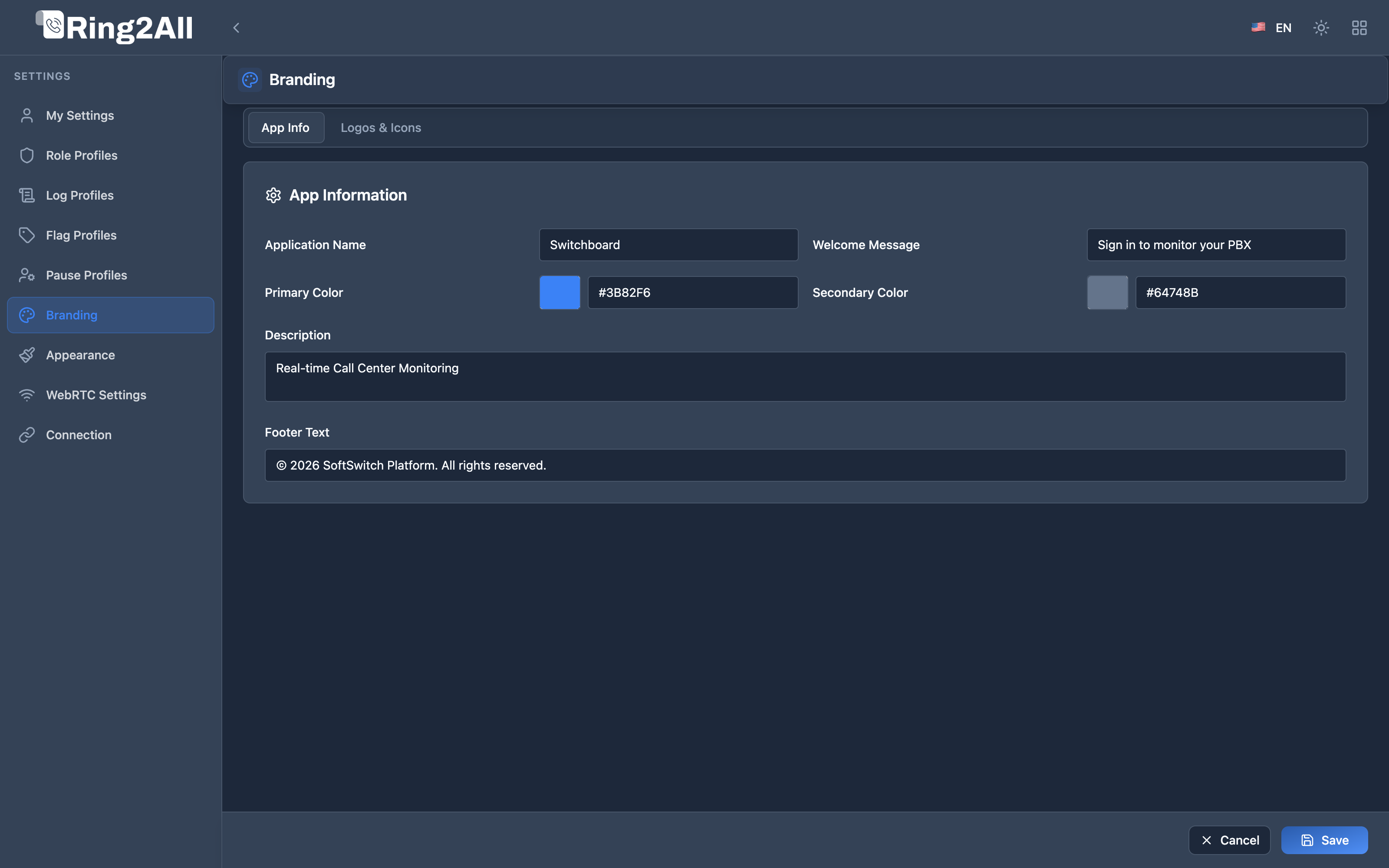
Section titled “🏢 Application Information”The App Information tab sets the foundational corporate identity strings and brand colors displayed across browser title bars, email notifications, and footer metadata:
| Field Name | Example Value | Where Rendered |
|---|---|---|
| Application Name | Switchboard Console |
Browser <title> tag, header logo alternate text, and tab headers. |
| Company Name | Apex Global Telecom |
Organization watermark and system identity disclosures. |
| Primary Color | #3B82F6 |
Main brand accent color for active call buttons, focus outlines, and primary status indicators. |
| Secondary Color | #64748B |
Supporting brand color for badges, subtle borders, and auxiliary buttons. |
| Tagline / Slogan | Enterprise Voice Operator |
Ambient subtitle displayed beneath the login card. |
| Support URL | https://support.apextelecom.com |
“Need Help?” direct hyperlink in user dropdowns. |
| Documentation Link | https://docs.apextelecom.com |
Direct anchor in help tooltips and operator guidance docs. |
| Copyright Notice | © 2026 Apex Global. All rights reserved. |
Displayed in console footer and legal disclosures. |
Corporate Brand Synchronization & Operator Cockpit Hierarchy
Section titled “Corporate Brand Synchronization & Operator Cockpit Hierarchy”- Automatic Inheritance (
useCorporateColors: true): All operator profiles inherit the corporate brand colors configured here by default. - The “Corporate Brand” Preset Slot: These corporate colors automatically populate Slot 1 (“Corporate Brand / Marca Corporativa”) in the operator’s Appearance > Colors tab.
- Operator Autonomy: Operators handling intense call queues can switch to alternative ergonomic presets or custom hues without permanently disconnecting from the company theme, and can return to corporate branding at any time with a single click.
- Brand Protection: Corporate logos, favicons, login designs, and copyright statements remain immutable and exclusively managed within this module.
🖼️ Logos & Asset Management
Section titled “🖼️ Logos & Asset Management”The Logos tab manages graphical brand assets with automatic dark/light mode switching:
| Asset Type | Recommended Dimensions | Format | Operational Usage |
|---|---|---|---|
| Light Mode Logo | 240 x 60 px (Horizontal) |
SVG, Transparent PNG | Rendered in the top navigation header when the console is operating in Light Mode. |
| Dark Mode Logo | 240 x 60 px (Horizontal) |
SVG, Transparent PNG | High-contrast logo rendered against slate/navy backgrounds in Dark Mode. |
| Collapsed / Mobile Icon | 64 x 64 px (Square 1:1) |
SVG, PNG | Rendered when the left sidebar is collapsed into mini-icon mode and on mobile screens. |
| Browser Favicon | 32 x 32 px or 64 x 64 px |
.ico, .svg, .png |
Injected into the browser <link rel="icon"> for browser tabs and bookmarks. |
[ Browser Theme: Dark ] ──> Automatically loads: logo-dark.svg[ Browser Theme: Light ] ──> Automatically loads: logo-light.svg[ Sidebar: Collapsed ] ──> Automatically loads: icon-square.svg[!TIP] Always upload SVG (Scalable Vector Graphics) assets whenever possible. Vector graphics ensure crisp, razor-sharp rendering on high-DPI Apple Retina and 4K workstations without visual blur.
🎨 Login Screen Design
Section titled “🎨 Login Screen Design”Customize the operator login portal to present a polished, corporate gateway for employees:
- Welcome Title: Custom headline greeting (e.g.,
Welcome to Apex Operator Cockpit). - Welcome Description: Informational subtext (e.g.,
Log in with your enterprise credentials or Single Sign-On). - Card Styling: Choice of clean minimalist solid background or modern glassmorphism blur backdrop.
- Login Wallpapers: Select between curated subtle telecom abstract gradients or upload a custom high-resolution corporate banner.