

User Portal Overview
📖 Introduction
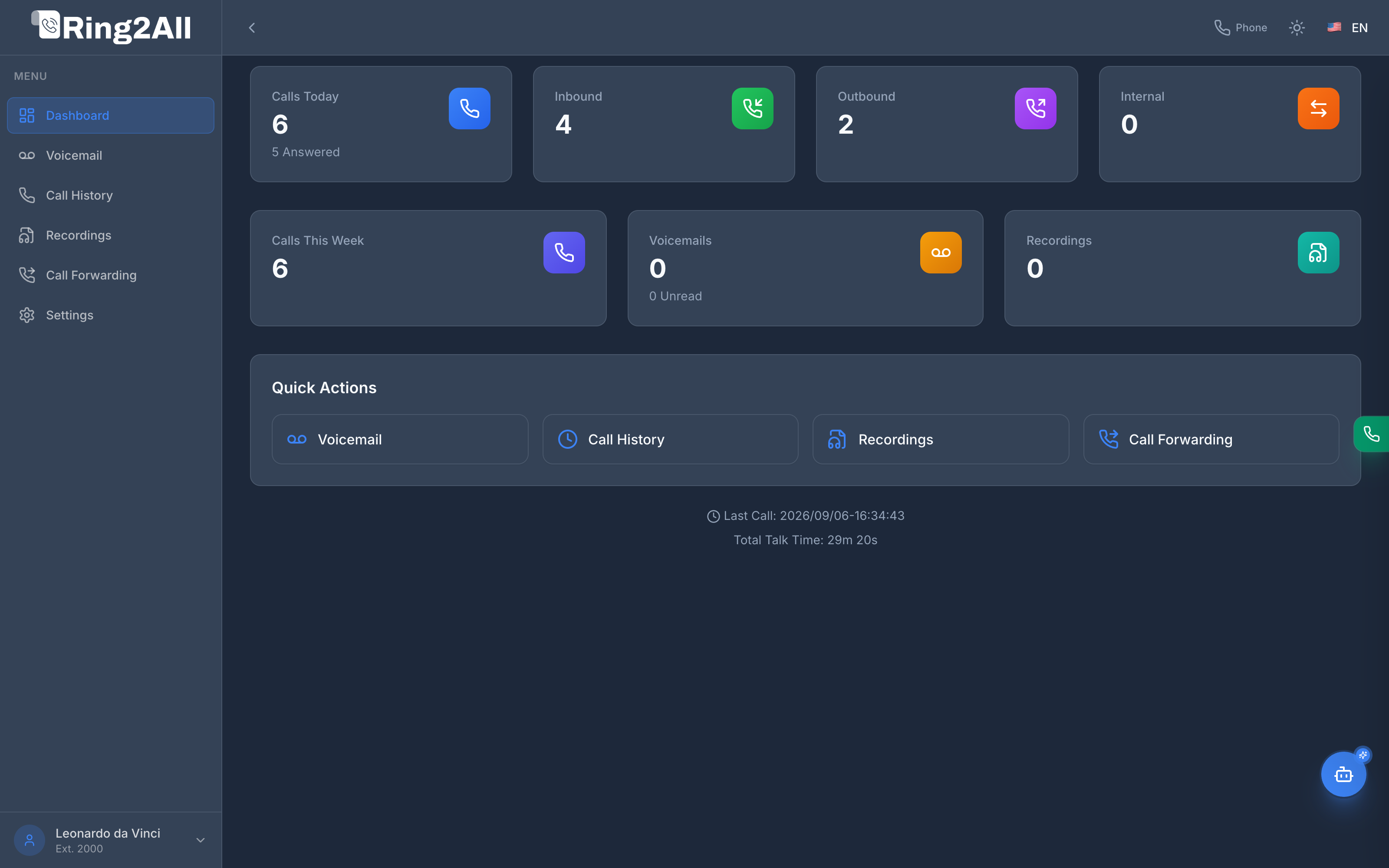
Section titled “📖 Introduction”The User Portal is an individual self-service web application designed specifically for PBX extension subscribers. Each team member accesses an isolated, modern cockpit tailored to their individual telephone extension, allowing them to manage incoming calls, review smart voicemail summaries, inspect recordings, control call forwarding, and operate an integrated WebRTC softphone without administrative intervention.
⚙️ Linkage with PBX Extension Configuration (Advanced Tab)
Section titled “⚙️ Linkage with PBX Extension Configuration (Advanced Tab)”Access permissions and capabilities within the User Portal are strictly governed by the PBX administrator from the primary management interface under PBX > Extensions > Edit Extension > Advanced Tab.

Key Extension Attributes
Section titled “Key Extension Attributes”| Setting | Field Name | Description & Portal Impact |
|---|---|---|
| Portal Access | portal_enabled |
Master boolean switch. When enabled (true), the subscriber is authorized to authenticate into the User Portal using their extension and password/PIN or SSO. |
| WebRTC Softphone | softphone_enabled |
Controls whether the built-in WebRTC dialer and floating green status indicator are rendered in the portal. When disabled, the phone tab and dialer are completely hidden. |
| AI Assistant / Copilot | chatbot_enabled |
Toggles the floating conversational AI Copilot widget on the lower right (bottom-20). Enables natural language PBX queries, extension diagnostics, and voicemail analysis. |
| Assigned Chatbot Agent | chatbot_agent_id |
Designates the specific AI Agent and Persona configured in ADMIN > AI Integration > Web Chatbots to serve this extension. |
| Live Call Translator | ai_translator_profile_id |
Binds a real-time bidirectional translation engine to the subscriber’s active WebRTC calls. |
| Voicemail PIN | vm_password |
Default authentication credential used by subscribers for portal access and telephony voicemail IVR retrieval (*97 / *98). |
[!IMPORTANT] Zero Clutter Enforcement: If an extension does not have
softphone_enabledorchatbot_enabledtoggled on in PBX Admin, the corresponding UI controls (such as the WebRTC phone panel and AI Assistant FAB) are completely omitted from the DOM for that user.
🎯 Module Catalog
Section titled “🎯 Module Catalog”The User Portal provides 8 specialized modules structured for rapid productivity:
graph LR
    Portal["User Portal App"] --> Dash["Dashboard"]
    Portal --> VM["Smart Voicemail"]
    Portal --> History["Call History"]
    Portal --> Rec["Recordings"]
    Portal --> Forward["Call Forwarding"]
    Portal --> App["Appearance"]
    Portal --> Set["Settings"]
    Portal --> Phone["WebRTC Phone"]
| Module | Route | Key Capabilities |
|---|---|---|
| Dashboard | /portal/dashboard |
Real-time daily metrics, inbound/outbound distribution, quick actions, and last call telemetry. |
| Voicemail | /portal/voicemail |
Smart Voicemail AI with Whisper transcription, intent detection, urgency indicators (🔥 URGENT), and one-click callback copy. |
| Call History | /portal/call-history |
Searchable CDR records filtered specifically for the logged-in extension, including billable duration and disposition. |
| Recordings | /portal/recordings |
In-browser audio player, waveform scrub, and MP3/WAV download for calls recorded on this extension. |
| Call Forwarding | /portal/forwarding |
Immediate Forward, On Busy, No Answer, Not Registered redirection rules, and Follow-Me scheduling. |
| Appearance | /portal/appearance |
Comprehensive UI customization: Light, Dark, System theme modes, dark styles (Navy, Mirage, Mint, Cinder, Black), and accent colors. |
| Settings | /portal/settings |
Profile details, password updates, WebRTC audio feedback, ringtone previews, and directory URL. |
| WebRTC Phone | Overlay Panel | SIP over WebSocket browser phone, DTMF dial pad, auto-answer, mute/hold/transfer, and contacts directory. |
🔐 Access and Authentication
Section titled “🔐 Access and Authentication”Subscribers can authenticate through two standardized pathways:
- Direct Portal Login:
- URL:
https://<pbx-domain>/portal - Username: Extension number (e.g.,
2000) or primary extension email. - Password: Voicemail PIN or custom user portal password.
- URL:
- Administrative SSO (Single Sign-On):
- Administrators navigating extensions in PBX Admin can seamlessly launch a session via authenticated token exchange (
POST /api/apps/portal/sso-token), ensuring instant diagnostic verification.
- Administrators navigating extensions in PBX Admin can seamlessly launch a session via authenticated token exchange (
💡 Best Practices for Organizations
Section titled “💡 Best Practices for Organizations”[!TIP] Enforce Strong Credentials: Encourage employees to update their initial voicemail PIN into a secure web password immediately after first login via Settings > Change Password.
[!TIP] Leverage WebRTC Softphone: Users working remotely do not need desktop SIP clients or hardware phones. Toggling
softphone_enabledenables instant voice calling over secure WebRTC without VPN requirements.