

Add Funds & Prepaid Wallet Module Documentation
Table of Contents
Section titled “Table of Contents”- Module Overview (Technical)
- Module Overview (Commercial & Business Value)
- 🎯 User Roles & Key Capabilities
- Prepaid Digital Wallet & Credit Limits
- Instant Stripe Top-Up Modal, Presets & Payment Processing
- Financial Ledger & Transaction Audit Trail
- Troubleshooting & Verification
- Glossary
1. Module Overview (Technical)
Section titled “1. Module Overview (Technical)”The Add Funds & Prepaid Wallet module (WalletPage.tsx, TopupModal.tsx, and clientService.ts) manages balance top-ups, credit reserves, automated replenishment triggers, and double-entry transaction ledgers in the Ring2All Billing Client Portal. It safeguards carrier margins by maintaining strict prepaid debit controls and preventing unauthorized PSTN traffic when account balances are exhausted.
sequenceDiagram
    autonumber
    actor Client as Customer Portal
    participant API as Ring2All Billing API
    participant Stripe as Stripe Payment Gateway
    participant DB as PostgreSQL (ss_billing)
    participant OCS as Online Charging System (OCS)

    Client->>API: POST /api/client/wallet/topup { amount: 50.00, currency: 'usd' }
    API->>Stripe: Create & Confirm PaymentIntent (Saved Card / Vault)
    Stripe-->>API: 200 OK (PaymentIntent pi_3N9... Succeeded)

    critical Atomic Wallet Balance Update
        API->>DB: UPDATE wallets SET balance = balance + 50.00 WHERE customer_id = :id
        API->>DB: INSERT INTO transactions (customer_id, wallet_id, amount, balance_after, type='topup')
        API->>OCS: Update In-Memory Balance Cache (Redis / OCS Worker)
    end

    API-->>Client: 201 Created (Wallet Credited Instantly)
    Client->>Client: Refresh Wallet KPI & Ledger Table ($145.50 -> $195.50)
Key Technical Capabilities
Section titled “Key Technical Capabilities”- Atomic Balance Mutations: Utilizes PostgreSQL ACID transactions to ensure balance increments and ledger entries commit simultaneously without rounding discrepancies.
- Low-Latency OCS Cache Synchronization: Instantly updates real-time rating workers, immediately lifting call barring or low-balance routing restrictions upon payment receipt.
- PCI-DSS Compliant Tokenization: Integrates with Stripe payment elements and customer vault IDs, ensuring credit card numbers never touch Ring2All servers.
2. Module Overview (Commercial & Business Value)
Section titled “2. Module Overview (Commercial & Business Value)”- Zero Credit Risk for Carriers: Enforcing prepaid wallet top-ups eliminates the risk of uncollectible invoices, non-payment, and telecommunications fraud.
- Frictionless Customer Cash Inflows: Instant card charging via preset buttons ($25, $50, $100, $250) encourages frequent, friction-free wallet top-ups.
- Continuous Service Continuity: Auto-refill rules and low-balance warning alerts protect clients against dropped calls and unexpected outbound service interruptions.
- Immutable Accounting Transparency: Comprehensive transaction ledger details every top-up, monthly recurring plan deduction, and per-minute call charge.
3. 🎯 User Roles & Key Capabilities
Section titled “3. 🎯 User Roles & Key Capabilities”| User Role | Primary Objectives | Key Capabilities in Add Funds & Wallet |
|---|---|---|
| Enterprise Account Owner | Maintains active communications funding for company operations. | Adds funds via card, reviews current balance, verifies credit limits, and checks account status. |
| Accounts Payable & Finance | Reconciles credit card statements with telecom expenses. | Audits transaction histories, cross-references Stripe receipt identifiers, and reviews deduction amounts. |
| Call Center Supervisor | Monitors trunk availability for high-volume outbound campaigns. | Ensures prepaid balances stay above minimum operating thresholds to prevent agent call disconnections. |
| Billing & Risk Administrator | Protects telephony platform from abusive traffic and fraud. | Configures customer billing types (prepaid vs postpaid), adjusts emergency credit limits, and audits ledger events. |
4. Prepaid Digital Wallet & Credit Limits
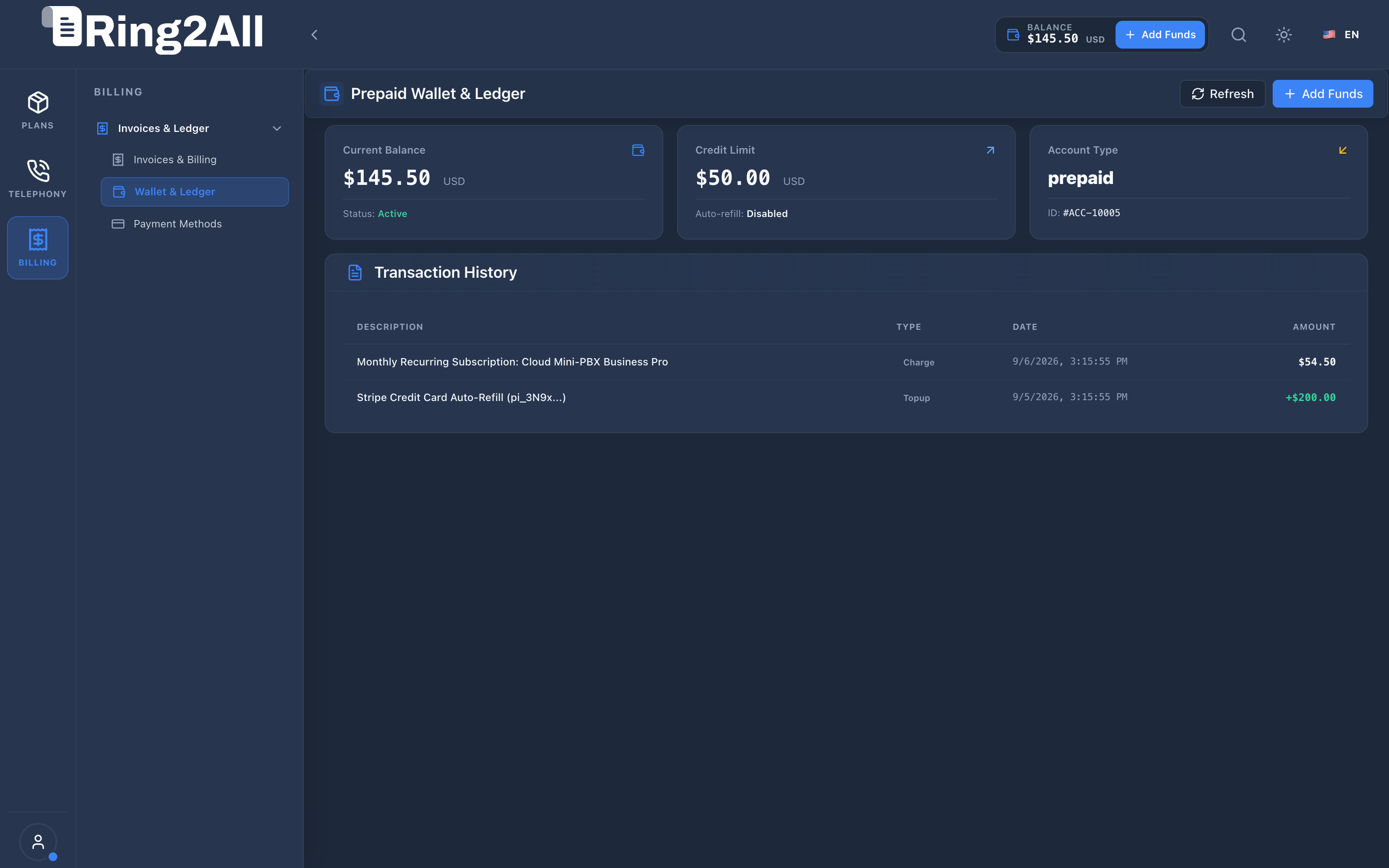
Section titled “4. Prepaid Digital Wallet & Credit Limits”The Wallet overview screen presents an immediate executive summary of the customer’s financial standing and operational status.
Core Wallet KPI Cards
Section titled “Core Wallet KPI Cards”- Current Balance Card:
- Displays live usable funding available for telephony usage, plan renewals, and DID rentals (e.g.,
$145.50 USD). - Shows account operational status badge:
Active(green) orSuspended(red).
- Displays live usable funding available for telephony usage, plan renewals, and DID rentals (e.g.,
- Credit Limit Card:
- Indicates authorized overdraft or emergency cushion allowed before calls are barred (e.g.,
$50.00 USD). - Displays auto-refill configuration status (
DisabledorEnabled at $10.00).
- Indicates authorized overdraft or emergency cushion allowed before calls are barred (e.g.,
- Account Type Card:
- Identifies the billing archetype (
prepaidorpostpaid). - Displays the permanent, immutable account number (
#ACC-10005).
- Identifies the billing archetype (
5. Instant Stripe Top-Up Modal, Presets & Payment Processing
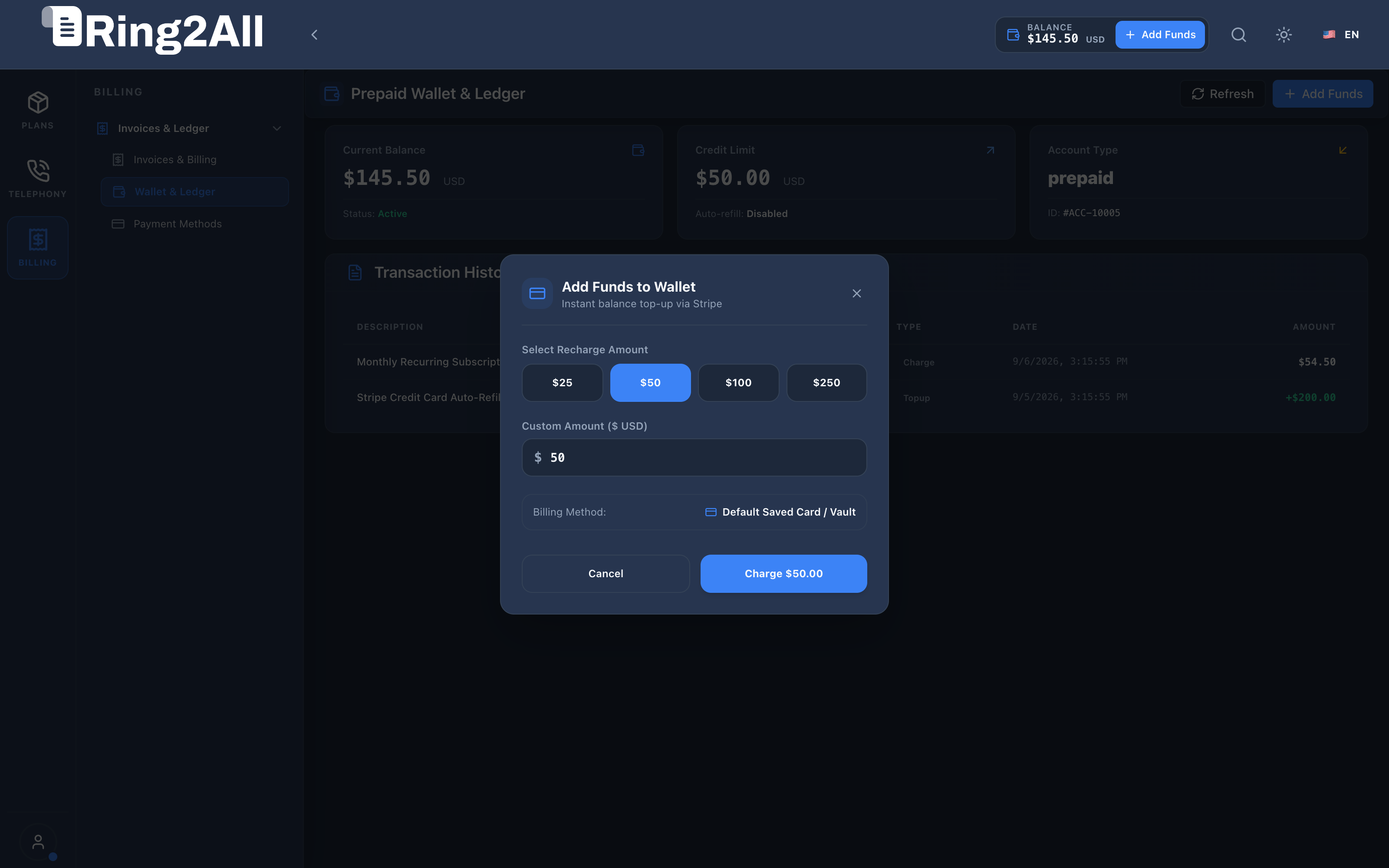
Section titled “5. Instant Stripe Top-Up Modal, Presets & Payment Processing”Clicking the + Add Funds button in the header or top action bar opens the Add Funds to Wallet modal.
Recharge Controls & Fields
Section titled “Recharge Controls & Fields”| Field / Control | Type | Description |
|---|---|---|
| Recharge Presets | Button Grid | Quick-select buttons for standard denominations: $25, $50, $100, and $250. |
| Custom Amount | Numeric Input | Allows entering any custom dollar amount meeting the platform minimum (e.g., $50). |
| Billing Method | Selection | Displays the default saved payment method (e.g., Default Saved Card / Vault). |
| Charge Button | Action Button | Submits the payment intent to Stripe; displays animated progress spinner during authorization. |
| Success Banner | Confirmation | Displays a green checkmark and confirmation message upon successful wallet credit before auto-closing. |
6. Financial Ledger & Transaction Audit Trail
Section titled “6. Financial Ledger & Transaction Audit Trail”All balance modifications are permanently recorded in the immutable transactions table and displayed in the Transaction History table on the Wallet view.
Ledger Entry Breakdown
Section titled “Ledger Entry Breakdown”| Transaction Type | Description | Impact on Balance | Example Ledger Description |
|---|---|---|---|
topup |
Customer payment via credit card, wire transfer, or PayPal. | Positive (+) | Stripe Credit Card Auto-Refill (pi_3N9x...) |
charge |
Monthly recurring plan fee or hardware rental deduction. | Negative (-) | Monthly Recurring Subscription: Cloud Mini-PBX Business Pro |
usage |
Aggregated call traffic or out-of-bundle minute debits. | Negative (-) | PSTN Outbound Minutes Settlement (Cycle #104) |
refund |
Administrative credit adjustment or disputed fee reversal. | Positive (+) | Service Level Credit - Maintenance Window Overrun |
7. Troubleshooting & Verification
Section titled “7. Troubleshooting & Verification”Auditing Customer Balance & Wallet in Database
Section titled “Auditing Customer Balance & Wallet in Database”SELECT w.id AS wallet_id, c.id AS customer_id, c.name AS customer_name, c.account_number, w.balance, w.credit_limit, w.currency, w.auto_refill_enabled, w.auto_refill_threshold, w.auto_refill_amountFROM wallets wJOIN customers c ON c.id = w.customer_idWHERE c.id = 5;Inspecting Recent Ledger Transactions
Section titled “Inspecting Recent Ledger Transactions”SELECT id, type, amount, balance_after, description, reference_id, created_atFROM transactionsWHERE customer_id = 5ORDER BY created_at DESCLIMIT 10;8. Glossary
Section titled “8. Glossary”- Digital Wallet: An in-app electronic ledger storing client monetary credit used to settle recurring and pay-as-you-go telephony services.
- Prepaid Billing: A billing paradigm where services are consumed exclusively against pre-deposited funds, preventing debt accumulation.
- Credit Limit: An emergency financial threshold below $0.00 allowing critical voice calls to proceed even if the prepaid balance reaches zero.
- PaymentIntent: A Stripe API object representing a customer payment lifecycle from creation to authorization and settlement.
- Double-Entry Ledger: An accounting method where financial transactions require balanced debits and credits, ensuring financial auditability.