

VIP PIN Routing Module Documentation
Table of Contents
Section titled “Table of Contents”- Navigation & Access
- Screenshots & Visual Interface
- Module Overview (Technical)
- Module Overview (Commercial & Business Value)
- Module Overview (End User & Administrator Experience)
- Configuration Fields Reference
- VIP PIN Code Management & CSV Import
- Telephony Routing & Telephony Server Lua Execution
- MCP (Model Context Protocol) AI Integration
- Common Scenarios & Examples
- Limitations & Important Notes
- Troubleshooting Tips
- Glossary
Navigation & Access
Section titled “Navigation & Access”To access the VIP PIN Routing module:
- Log in to the Ring2All Web Portal.
- In the left navigation sidebar, expand PBX Engine.
- Under Incoming Call Tools, click VIP PIN Routing (
/pbx/incoming-tools/vip-pin-routing).
Screenshots & Visual Interface
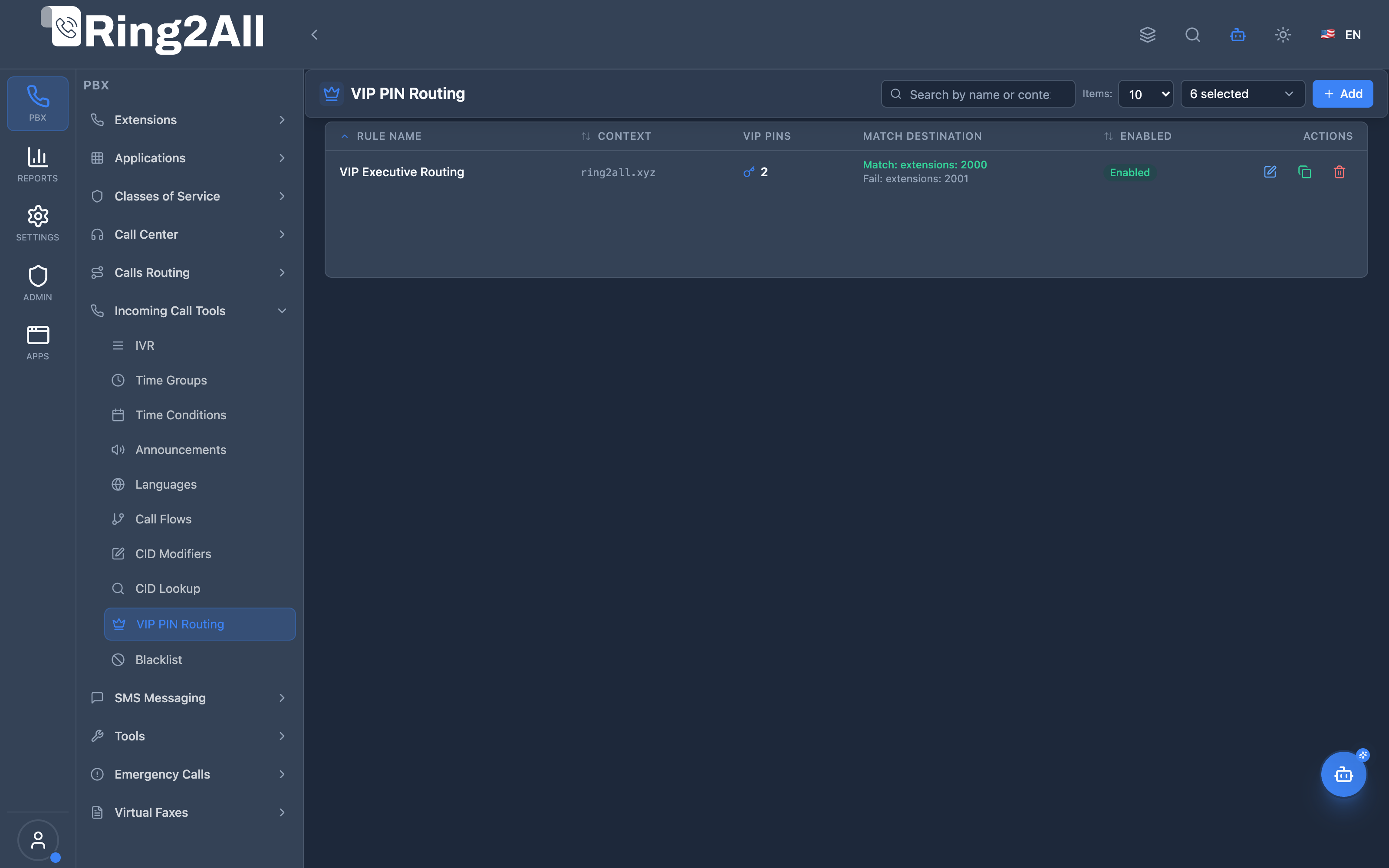
Section titled “Screenshots & Visual Interface”VIP PIN Routing Overview
Section titled “VIP PIN Routing Overview”Displays all gatekeeper routing rules, target priority destinations, fallback paths, and status toggles.
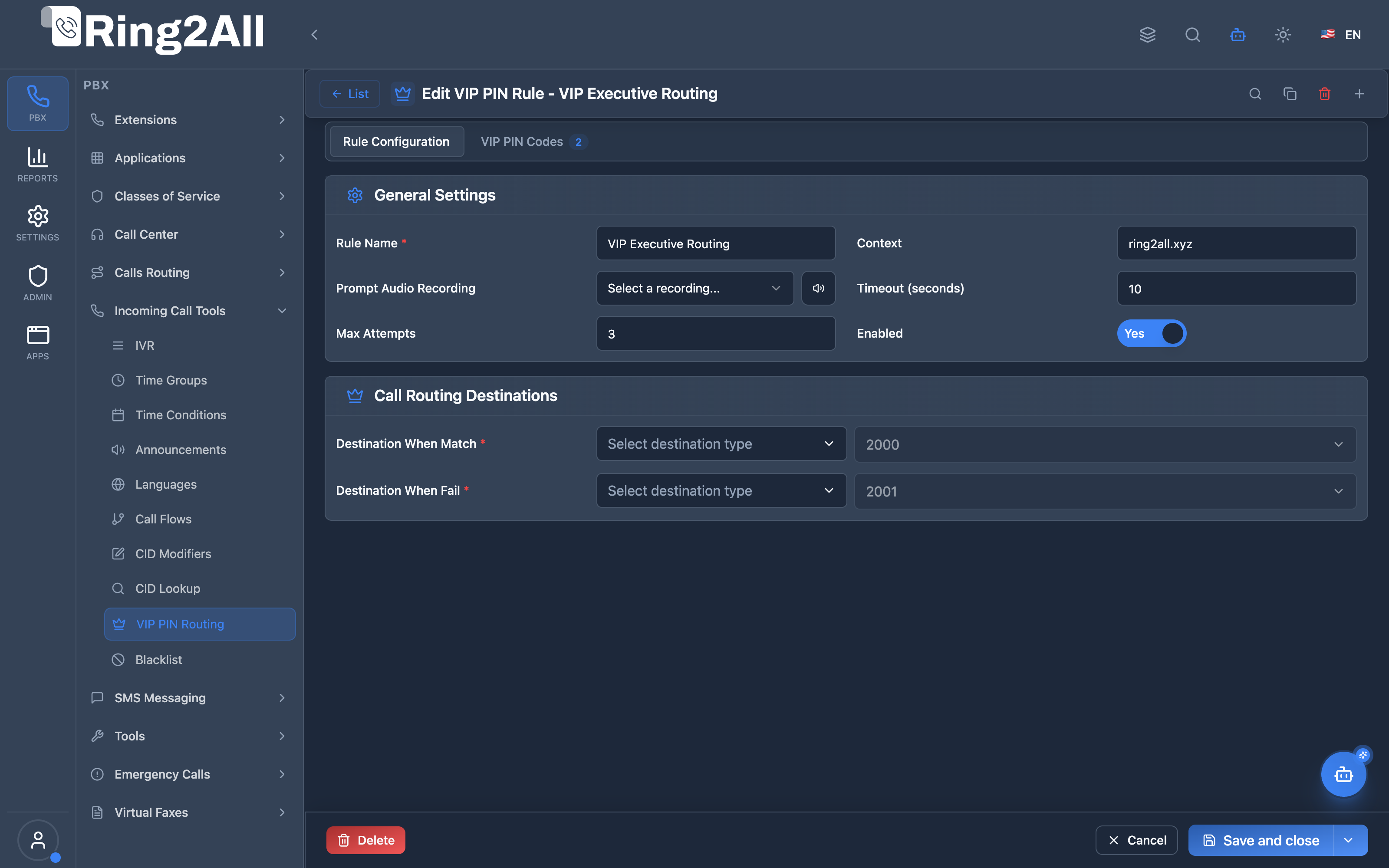
VIP PIN Rule Configuration Form (General Tab)
Section titled “VIP PIN Rule Configuration Form (General Tab)”Configures voice prompt, timeout seconds, maximum attempts, match destination (VIP queue/extension), and fallback destination.
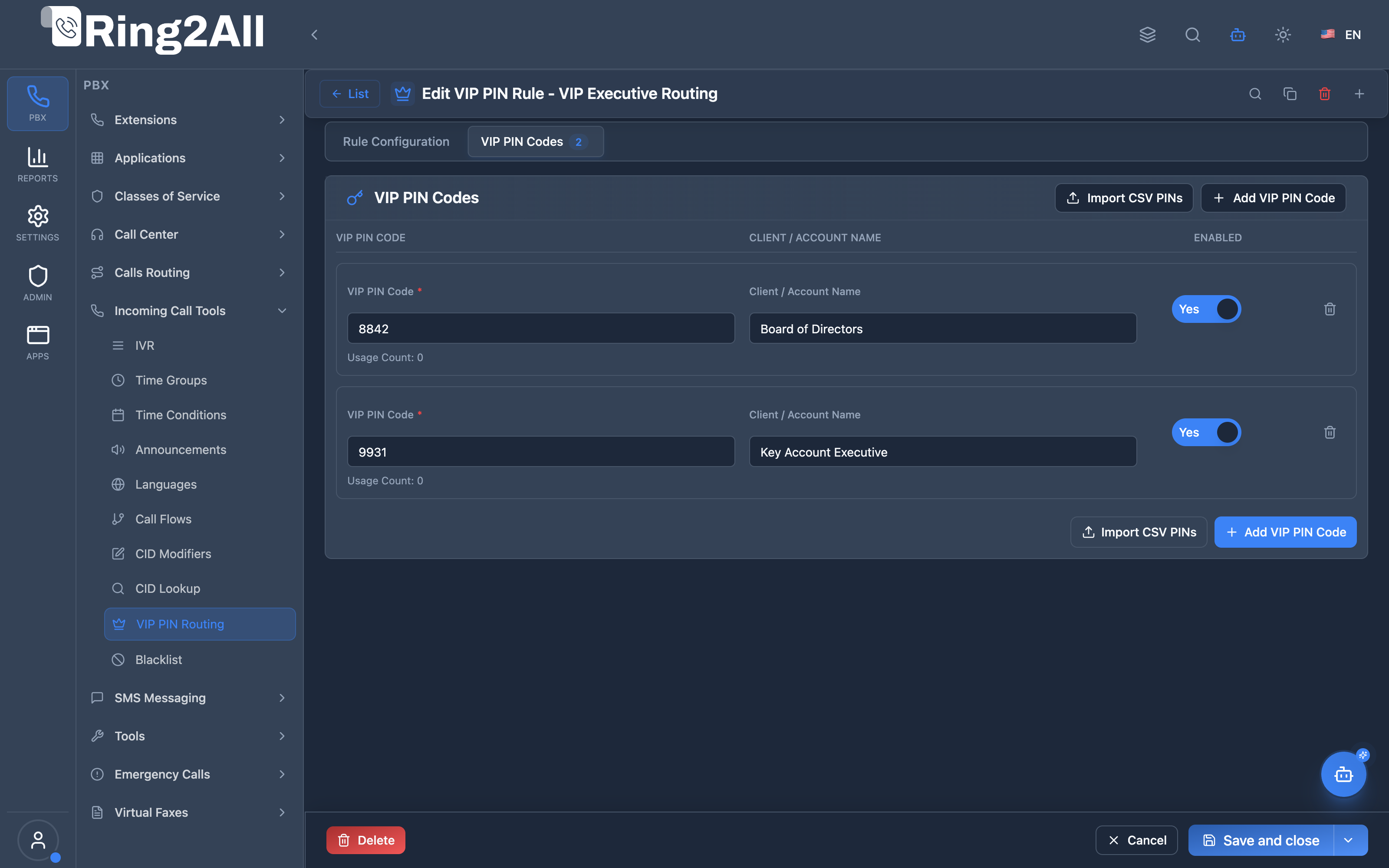
VIP PIN Codes Management Tab
Section titled “VIP PIN Codes Management Tab”Displays the authorized secret PIN numbers, client labels (e.g. Board Member, Key Account), usage counts, and status.
1. Module Overview (Technical)
Section titled “1. Module Overview (Technical)”What is VIP PIN Routing?
Section titled “What is VIP PIN Routing?”VIP PIN Routing (formerly known as Authentication Codes) is an inbound call gatekeeper and priority access routing system. When an incoming call arrives at a VIP PIN rule, the PBX prompts the caller to enter a secret DTMF PIN code.
- Match Destination: If the caller enters a valid PIN recognized in the database, the call is immediately transferred to a priority VIP destination (such as a VIP Call Center Queue, Key Account Manager Extension, or Executive Ring Group).
- Fail Destination: If the caller enters an invalid PIN or exceeds the configured maximum attempts, the call is smoothly routed to a fallback destination (such as the Main Public IVR, standard support queue, or voicemail).
[!IMPORTANT] Distinction Between VIP PIN Routing and Authorization Codes:
- VIP PIN Routing (
Incoming Call Tools): Inbound gatekeeper that verifies caller PINs before allowing access to VIP queues or private agents.- Authorization Codes (
Class of Service): Outbound dialing restriction codes that require agents to input a PIN before placing long-distance or international outbound calls.
Architecture Flow
Section titled “Architecture Flow”┌─────────────────────────────────────────────────────────────────────────┐│ VIP PIN Routing Architecture │├─────────────────────────────────────────────────────────────────────────┤│ ││ 1. Inbound Call arrives from DID / Inbound Route / IVR ││ │ ││ ▼ ││ ┌──────────────────────────────────────────────────────────────────┐ ││ │ Telephony Server Lua Gatekeeper (vip_pin_routing.lua) │ ││ │ │ ││ │ a. Play prompt: custom recording or "enter_auth_code.wav" │ ││ │ b. Capture DTMF digits with timeout & attempt constraints │ ││ │ c. Query PostgreSQL: public.vip_pin_codes WHERE code = entered │ ││ │ d. Increment usage counters & update last_caller timestamp │ ││ └──────────────────────────────────────────────────────────────────┘ ││ │ ││ ├── PIN Validated? ──────────────────────────────────────────► ││ │ YES → Route to Match Destination ││ │ (e.g., VIP Queue 800, Executive Extension 100) ││ │ ││ └── Invalid or Max Attempts Exceeded ────────────────────────► ││ NO → Route to Fail Destination ││ (e.g., Main Menu IVR, General Support Queue 500) ││ │└─────────────────────────────────────────────────────────────────────────┘PostgreSQL Database Schema
Section titled “PostgreSQL Database Schema”The module is powered by two core tables:
public.vip_pin_rules: Stores the gatekeeper rule configuration, including context name, timeouts, max attempts, prompt audio, and match/fail destination targets.public.vip_pin_codes: Stores the numeric PIN codes assigned to clients, partners, or VIP callers, along with usage metrics (used_count,last_used_at,last_caller).
2. Module Overview (Commercial & Business Value)
Section titled “2. Module Overview (Commercial & Business Value)”Business Value
Section titled “Business Value”VIP PIN Routing allows enterprises, contact centers, and service providers to deliver tier-1 white-glove treatment to high-value customers without requiring dedicated public phone numbers for every tier:
| Without VIP PIN Routing | With VIP PIN Routing |
|---|---|
| High-value clients wait in standard public queues | VIP clients bypass wait times with their personal PIN |
| Multiple expensive DIDs needed for private access | Single DID with secure PIN gatekeeper access |
| No visibility into who is calling private desks | Full usage analytics and caller ID tracking per PIN |
| Risk of unauthorized public access | Bank-grade DTMF PIN security gate |
Key Use Cases
Section titled “Key Use Cases”- Enterprise VIP & Premium Support: Key account holders enter a 4-digit PIN to bypass general support queues and connect directly with dedicated account managers.
- After-Hours Emergency Engineer Line: Field technicians and critical clients access on-call engineering ring groups outside normal business hours.
- Executive Office Gatekeeper: Direct access to executive assistants or private conference rooms protected by individualized PINs.
3. Module Overview (End User & Administrator Experience)
Section titled “3. Module Overview (End User & Administrator Experience)”Administrator Portal (/pbx/incoming-tools/vip-pin-routing)
Section titled “Administrator Portal (/pbx/incoming-tools/vip-pin-routing)”The Ring2All Web Portal provides an intuitive interface for managing VIP PIN rules:
- List View: Displays all active VIP PIN rules, context strings, number of active PIN codes, match/fail destinations, and quick toggle switches.
- Rule Configuration Tab: Set rule name, audio prompts, maximum DTMF attempts, timeouts, and multi-module match/fail routing.
- VIP PIN Codes Tab: Add, edit, or delete individual PINs with labels (e.g. client names) and view real-time usage statistics.
- CSV Bulk Import: Upload CSV files containing hundreds of customer PINs with duplicate detection modes (
skip,update,replace).
4. Configuration Fields Reference
Section titled “4. Configuration Fields Reference”| Field Name | Type | Description |
|---|---|---|
| Rule Name | String (Required) | Unique descriptive name for the rule (e.g. VIP Gold Client Gate). |
| Context | String (Auto) | Dialplan context prefix (e.g. vip_gold_client_gate). |
| Prompt Audio Recording | Select (Optional) | Custom audio recording asking caller to enter their PIN. Defaults to system TTS prompt. |
| Timeout (seconds) | Integer (1-60) | Duration to wait for caller DTMF input. Default: 10 seconds. |
| Max Attempts | Integer (1-10) | Maximum allowed incorrect PIN entries before failover. Default: 3 attempts. |
| Valid PIN Match Destination | Destination Pair | Destination module and target when PIN is valid (e.g. Queue: 800). |
| Invalid / Failed Destination | Destination Pair | Destination module and target when attempts fail (e.g. IVR: 100). |
| Enabled | Boolean Toggle | Activates or disables the rule in the telephony dialplan. |
5. VIP PIN Code Management & CSV Import
Section titled “5. VIP PIN Code Management & CSV Import”Adding VIP PIN Codes
Section titled “Adding VIP PIN Codes”Inside each rule, administrators can define specific PINs:
- PIN Code: Numeric string (e.g.
7890,445566). - Label / Client Name: Descriptive name (e.g.
Acme Corp - Platinum SLA). - Enabled: Status toggle per code.
CSV Import Specification
Section titled “CSV Import Specification”To bulk-import PINs, upload a .csv file with the following column structure:
code,label,enabled1234,Acme Corp,true5678,Beta Industries,true9988,Delta Airlines,false6. Telephony Routing & Telephony Server Lua Execution
Section titled “6. Telephony Routing & Telephony Server Lua Execution”When a call is routed to a VIP PIN rule:
- Telephony Server executes
main/xml_handlers/routing/vip_pin_routing.lua. - The session answers and plays the configured prompt audio.
- The engine listens for DTMF digits (terminated by
#or timeout). - If matched in
public.vip_pin_codes, it sets session variables (vip_pin_result="success",vip_pin_code_id="<id>") and transfers to the match destination. - If invalid after max attempts, it sets
vip_pin_result="failed"and transfers to the fail destination.
7. Model Context Protocol (MCP) AI Integration
Section titled “7. Model Context Protocol (MCP) AI Integration”Ring2All exposes native Model Context Protocol (MCP) tools for VIP PIN Routing (Inbound VIP Gatekeeper Rules & PIN Codes), allowing AI agents, VIP account managers, and automated customer success bots to inspect gatekeeper rules, verify active member PIN codes, enroll high-value accounts, and dynamically manage access privileges programmatically with domain-level isolation.
Available MCP Tools
Section titled “Available MCP Tools”| Tool Name | Description | Key Parameters |
|---|---|---|
list_vip_pin_rules |
Lists all VIP PIN Routing Rules configured in the domain, displaying rule name, prompt audio, max attempts, timeout, and match/fail destinations. | search (optional string) |
get_vip_pin_rule_status |
Retrieves full configuration and member VIP PIN codes (including labels, usage count, and active status) for a specific VIP PIN rule. | name (required string) |
create_vip_pin_rule |
Provisions a new VIP PIN Gatekeeper rule with custom match (VIP Queue/Extension) and failover destinations. Strictly validates rule name and context uniqueness per domain. | name, matchDestinationModule, matchDestinationValue, failDestinationModule, failDestinationValue, timeout, maxAttempts, promptRecordingName, description |
add_vip_pin_code |
Enrolls a new authorized customer DTMF PIN code with an account label into an existing VIP PIN rule. | ruleName, code (numeric PIN), label (e.g. “Acme Corp Platinum”) |
delete_vip_pin_code |
Revokes and removes an authorized PIN code from a VIP PIN rule, immediately disabling priority bypass. | ruleName, code |
delete_vip_pin_rule |
Safely removes a VIP PIN rule and all associated member codes from the PBX domain. | name (required string) |
Protection Guards & Integrity
Section titled “Protection Guards & Integrity”- Numeric PIN Validation: Enrolled PIN codes must be strictly numeric strings (
0-9) corresponding to telephone keypad digits. - Name & Context Uniqueness: Every rule name and generated dialplan context is validated for uniqueness within the tenant domain.
- Immediate Inbound Revocation: PIN code creation and deletion update PostgreSQL directly and are checked dynamically during the Telephony Server Lua session, taking effect instantly without reload delays.
AI Agent Operational Examples
Section titled “AI Agent Operational Examples”Auditing VIP PIN Rule and Active Member Codes
Section titled “Auditing VIP PIN Rule and Active Member Codes”{ "tool": "get_vip_pin_rule_status", "arguments": { "name": "Gold Partner Gate" }}Enrolling a Platinum Client Authorization PIN
Section titled “Enrolling a Platinum Client Authorization PIN”{ "tool": "add_vip_pin_code", "arguments": { "ruleName": "Gold Partner Gate", "code": "7890", "label": "Acme Corp - Platinum SLA" }}Recommended Natural Language Prompts
Section titled “Recommended Natural Language Prompts”- “List all VIP PIN gatekeeper rules and their configured destinations.”
- “Show me all authorized PIN codes for the ‘Gold Partner Gate’ rule.”
- “Add PIN 4455 for ‘Beta Industries’ to the ‘Executive VIP Gate’ rule.”
- “Revoke and delete PIN 1234 from the VIP Gold Gate.”
8. Common Scenarios & Examples
Section titled “8. Common Scenarios & Examples”Scenario A: VIP Client Bypass to Call Center Queue
Section titled “Scenario A: VIP Client Bypass to Call Center Queue”- Rule Name:
Gold Partner Gate - Prompt:
prompt_enter_partner_pin.wav - Match Destination:
Queue: VIP Gold (800) - Fail Destination:
Queue: Standard Support (500) - Result: Gold partners enter their 4-digit code and skip 15-minute queue wait times.
9. Limitations & Important Notes
Section titled “9. Limitations & Important Notes”- PIN codes must be strictly numeric (DTMF digits
0-9). - Rule context names are unique per PBX domain.
- Deleting a VIP PIN rule cascades and deletes all associated member codes.
10. Troubleshooting Tips
Section titled “10. Troubleshooting Tips”- Caller hears fast busy: Ensure the match and fail destinations exist and are active.
- PIN not recognized: Check if the code is enabled and verify DTMF RFC2833 payload negotiation on the trunk gateway.
- Database connection error: Verify ODBC data source
ss_telephonyis online.
11. Glossary
Section titled “11. Glossary”- DTMF: Dual-Tone Multi-Frequency (touch-tone telephone signaling).
- DID: Direct Inward Dialing (public telephone number).
- IVR: Interactive Voice Response.
- Failover Destination: Secondary call path executed when primary criteria are not met.