

Logging Settings Module Documentation
Table of Contents
Section titled “Table of Contents”- Navigation & Access
- Screenshots & Visual Interface
- Module Overview (Technical)
- Module Overview (Commercial/Business)
- Module Overview (End User/Administrator)
- User Roles & Key Capabilities
- Configuration Tabs
- Settings Reference
- Common Scenarios & Examples
- Limitations & Important Notes
- Troubleshooting Tips
- Glossary
- Model Context Protocol (MCP) AI Integration
Navigation & Access
Section titled “Navigation & Access”To access the Logging Settings configuration module:
- Log in to the Ring2All Web Portal (
https://<domain-or-ip>/login). - In the left navigation sidebar, expand Settings.
- Under PBX, click Log Settings (
/settings/pbx/log-files/edit). - Configure global logging verbosity, logfile rotation sizes, log level filters (DEBUG, INFO, NOTICE, WARNING, ERR, CRIT), and click Save Changes in the bottom action bar.
Screenshots & Visual Interface
Section titled “Screenshots & Visual Interface”Logging Configuration Form
Section titled “Logging Configuration Form”Unified log configuration interface allowing administrators to control console verbosity, disk logging policies, file size rotation thresholds, colorization modes, and module-specific log overrides.
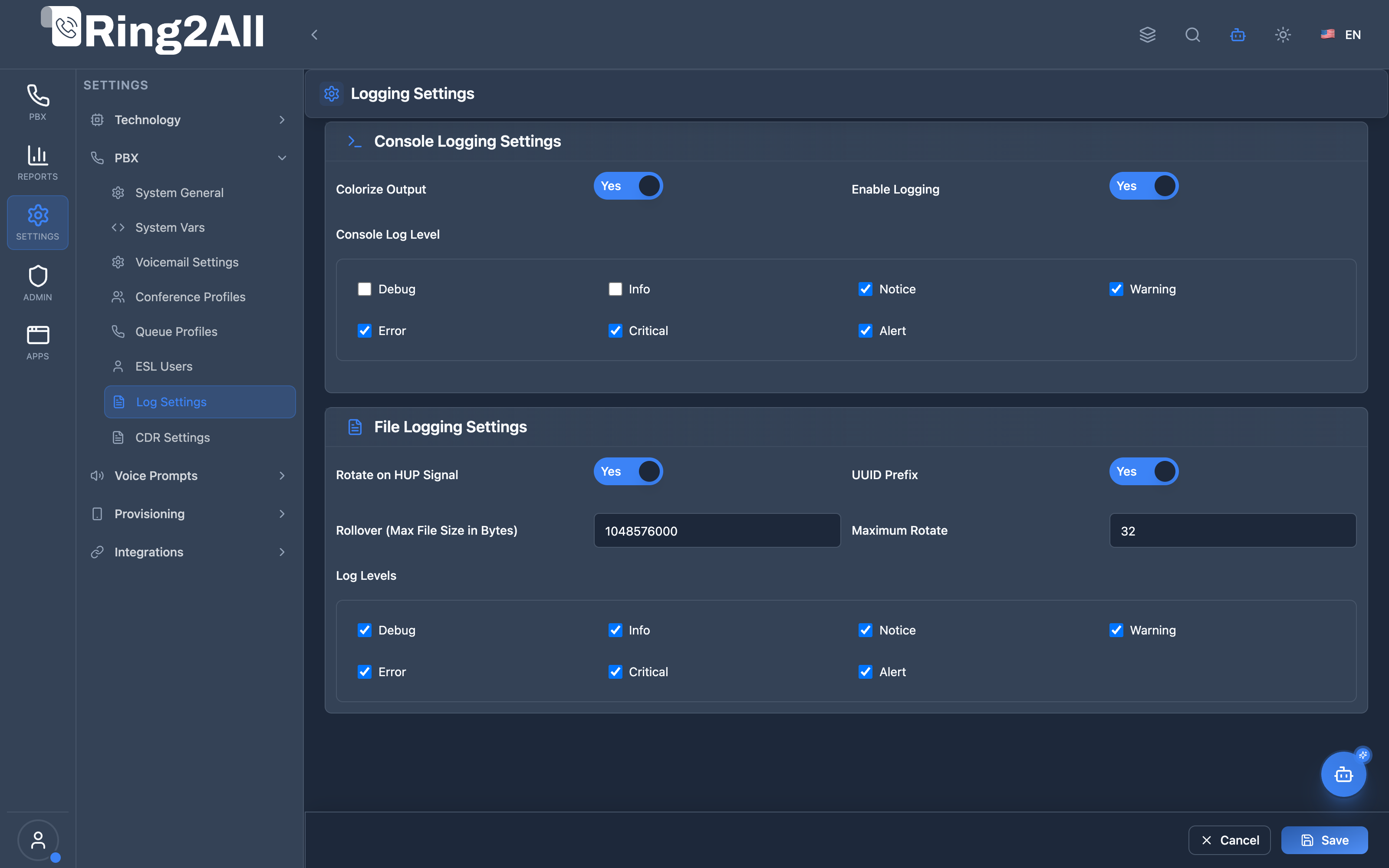
1. Module Overview (Technical)
Section titled “1. Module Overview (Technical)”What Is Logging Settings?
Section titled “What Is Logging Settings?”Logging Settings is a Telephony Server logging configuration module that manages console output and file logging. It configures log levels, colorization, file rotation, and module-specific mappings.
Architecture
Section titled “Architecture”┌─────────────────────────────────────────────────────────────────┐│ Logging Settings Architecture │├─────────────────────────────────────────────────────────────────┤│ ││ Admin Panel ││ ┌──────────────────────────────────────────────────────────┐ ││ │ Logging Settings │ ││ │ │ ││ │ Tabs: │ ││ │ ├─ Console Logging │ ││ │ │ ├─ Colorize Output │ ││ │ │ ├─ Console Log Level │ ││ │ │ └─ Console Mappings │ ││ │ │ │ ││ │ └─ File Logging │ ││ │ ├─ Rotate on HUP │ ││ │ └─ File Logging Profiles │ ││ │ │ ││ └──────────────────────────────────────────────────────────┘ ││ │ ││ ▼ Generates XML ││ ┌──────────────────────────────────────────────────────────┐ ││ │ console.conf.xml logfile.conf.xml │ ││ │ │ ││ │ <configuration name="console.conf"> │ ││ │ <param name="colorize" value="true"/> │ ││ │ <param name="loglevel" value="info"/> │ ││ │ </configuration> │ ││ │ │ ││ └──────────────────────────────────────────────────────────┘ ││ │ ││ ▼ Loaded by Telephony Server ││ ┌──────────────────────────────────────────────────────────┐ ││ │ Telephony Server Logging │ ││ │ │ ││ │ Console → Terminal output │ ││ │ File → /var/log/freeswitch/freeswitch.log │ ││ │ │ ││ └──────────────────────────────────────────────────────────┘ ││ │└─────────────────────────────────────────────────────────────────┘2. Module Overview (Commercial/Business)
Section titled “2. Module Overview (Commercial/Business)”Business Value
Section titled “Business Value”Logging Settings provides centralized log management:
| Without Logging Settings | With Logging Settings |
|---|---|
| Edit XML files | Web interface |
| Default levels | Custom per-module |
| Manual rotation | Automatic rotation |
| No filtering | Targeted logging |
Use Cases
Section titled “Use Cases”-
Troubleshooting
- Enable debug for specific modules
- Track call issues
-
Production Optimization
- Reduce log noise
- Manage log file size
-
Compliance
- Log retention policies
- UUID tracking
-
Monitoring Integration
- Log rotation for logrotate
- Structured output
Feature Highlights
Section titled “Feature Highlights”| Feature | Benefit |
|---|---|
| Console Logging | Terminal output control |
| File Logging | Persistent log files |
| Log Levels | Filter by severity |
| Mappings | Per-module levels |
| Rotation | Size-based rollover |
| UUID Prefix | Session tracking |
3. Module Overview (End User/Administrator)
Section titled “3. Module Overview (End User/Administrator)”What Can You Do?
Section titled “What Can You Do?”- Configure console log levels
- Enable/disable colorized output
- Create file logging profiles
- Set log file rotation
- Configure per-module log levels
- Enable UUID prefixes for session tracking
- Preview generated XML
Logging Settings Interface
Section titled “Logging Settings Interface”┌─────────────────────────────────────────────────────────────────┐│ Logging Settings │├─────────────────────────────────────────────────────────────────┤│ ││ Configure Telephony Server console and file logging ││ ││ [Console Logging] [File Logging] ││ ───────────────────────────────────────────────────────────── ││ ││ Console Logging Settings ││ ││ Colorize Output: ✓ ││ Enables ANSI color highlighting in console output. ││ ││ Console Log Level: [Debug] [Info] [Notice] [Warning] [Error] ││ ☐ Debug ││ ✓ Info ││ ✓ Notice ││ ✓ Warning ││ ✓ Error ││ ✓ Critical ││ ✓ Alert ││ ││ Console Mappings ││ Configure which log levels are displayed for specific targets. ││ ││ [+ Add Mapping] ││ ││ ┌───────────────────────────────────────────────────────────┐ ││ │ Mapping Name │ Log Levels │ ││ ├────────────────────┼────────────────────────────────────┤ ││ │ all │ info, notice, warning, err │ ││ │ mod_sofia │ debug, info, notice, warning, err │ ││ │ mod_lua │ warning, err │ ││ └───────────────────────────────────────────────────────────┘ ││ ││ [View XML] [Save] ││ │└─────────────────────────────────────────────────────────────────┘File Logging Tab
Section titled “File Logging Tab”┌─────────────────────────────────────────────────────────────────┐│ Logging Settings │├─────────────────────────────────────────────────────────────────┤│ ││ [Console Logging] [File Logging] ││ ───────────────────────────────────────────────────────────── ││ ││ File Logging Settings ││ ││ Rotate on HUP Signal: ✓ ││ Log file reopened on HUP signal for external rotation. ││ ││ File Logging Profiles ││ ││ [+ Add Profile] ││ ││ ▼ Profile: mainlog ││ ├─ Log File Path: [/var/log/freeswitch/freeswitch.log] ││ ├─ Rollover (Bytes): [10485760 ] (10MB rollover) ││ ├─ Maximum Rotate: [5 ] (keep 5 files) ││ ├─ UUID Prefix: ✓ ││ └─ Mappings: ││ ├─ all → info, notice, warning, err, crit, alert ││ └─ mod_sofia → debug, info, notice, warning, err ││ ││ [View XML] [Download console.conf.xml] [Download logfile.conf.xml]││ ││ [Save] ││ │└─────────────────────────────────────────────────────────────────┘Quick Tips
Section titled “Quick Tips”[!TIP] Debug Module: Add mapping for specific module with debug level.
[!TIP] UUID Prefix: Enable to track logs by call session.
[!NOTE] Restart Required: Log configuration changes need FS reload.
🎯 User Roles & Key Capabilities
Section titled “🎯 User Roles & Key Capabilities”| Role | Permissions | Key Capabilities |
|---|---|---|
| Super Administrator | Full Access (read, write, export_xml) |
Manage global Telephony Server logging profiles (console.conf.xml, logfile.conf.xml), configure disk rotation limits (10MB-100MB), and set debug verbosity. |
| PBX / DevOps Engineer | Operational Configuration (read, write) |
Enable module-specific debug overrides (e.g. mod_sofia, mod_conference), configure UUID session prefixes, and inspect rotated logs. |
| Security Auditor | Read & Inspection (read) |
Audit log retention limits, verify console colorization, and check file rotation policies against compliance standards. |
| Tenant Administrator | Restricted Read | View tenant-assigned logging parameters in multi-tenant environments. |
4. Configuration Tabs
Section titled “4. Configuration Tabs”Console Logging Tab
Section titled “Console Logging Tab”| Field | Description |
|---|---|
| Colorize Output | ANSI color highlighting |
| Console Log Level | Visible log levels |
| Console Mappings | Per-target level overrides |
File Logging Tab
Section titled “File Logging Tab”| Field | Description |
|---|---|
| Rotate on HUP | External rotation support |
| File Logging Profiles | Log file configurations |
Profile Settings
Section titled “Profile Settings”| Field | Description |
|---|---|
| Profile Name | Identifier |
| Log File Path | File location |
| Rollover | Max size before rotation (bytes) |
| Maximum Rotate | Files to keep |
| UUID Prefix | Session UUID in logs |
| Mappings | Per-module log levels |
5. Settings Reference
Section titled “5. Settings Reference”Log Levels
Section titled “Log Levels”| Level | Severity | Use Case |
|---|---|---|
| Debug | Lowest | Development, troubleshooting |
| Info | Low | Informational messages |
| Notice | Normal | Normal conditions |
| Warning | Medium | Potential issues |
| Error | High | Errors occurred |
| Critical | Very High | Critical conditions |
| Alert | Highest | Immediate action needed |
Common Mappings
Section titled “Common Mappings”| Mapping | Purpose |
|---|---|
| all | Default for all modules |
| mod_sofia | SIP signaling |
| mod_lua | Lua scripts |
| mod_dptools | Dialplan tools |
| mod_xml_curl | XML curl requests |
Rollover Sizes
Section titled “Rollover Sizes”| Bytes | Human Readable |
|---|---|
| 1048576 | 1 MB |
| 5242880 | 5 MB |
| 10485760 | 10 MB |
| 52428800 | 50 MB |
| 104857600 | 100 MB |
6. Common Scenarios & Examples
Section titled “6. Common Scenarios & Examples”Scenario 1: Debug SIP Issues
Section titled “Scenario 1: Debug SIP Issues”- Go to Console Logging
- Add Mapping: mod_sofia = debug, info, notice, warning, err
- Save
- Monitor console for SIP debug
Scenario 2: Production Logging
Section titled “Scenario 2: Production Logging”- Go to File Logging
- Set Rollover = 10485760 (10MB)
- Set Maximum Rotate = 10
- Enable Rotate on HUP
- Set “all” mapping = warning, err, crit, alert
- Save
Scenario 3: Call Tracking
Section titled “Scenario 3: Call Tracking”- Go to File Logging
- Enable UUID Prefix
- Save
- Logs now include session UUID
Scenario 4: Minimal Console
Section titled “Scenario 4: Minimal Console”- Go to Console Logging
- Disable Debug, Info, Notice
- Keep only Warning, Error, Critical, Alert
- Save
7. Limitations & Important Notes
Section titled “7. Limitations & Important Notes”Technical Notes
Section titled “Technical Notes”[!NOTE] XML Generation: Creates console.conf.xml and logfile.conf.xml.
[!NOTE] HUP Signal: Used by logrotate for external rotation.
[!WARNING] Debug in Production: Avoid debug level in production (high volume).
Best Practices
Section titled “Best Practices”- Production: Use Warning+ levels only
- Debug Temporarily: Turn off debug after troubleshooting
- Set Rotation: Prevent disk full issues
- UUID for Tracking: Enable for call troubleshooting
- Logrotate Integration: Enable Rotate on HUP
Log File Locations
Section titled “Log File Locations”| Distribution | Default Path |
|---|---|
| Debian/Ubuntu | /var/log/freeswitch/freeswitch.log |
| CentOS/RHEL | /var/log/freeswitch/freeswitch.log |
| Custom | Configure in profile |
8. Troubleshooting Tips
Section titled “8. Troubleshooting Tips”Common Issues
Section titled “Common Issues”| Symptom | Possible Cause | Solution |
|---|---|---|
| No logs | Profile disabled | Enable profile |
| Disk full | No rotation | Set rollover and maximum |
| Too verbose | Debug enabled | Reduce log levels |
| No colors | Colorize off | Enable Colorize Output |
| Logs too quiet | Levels too strict | Add info, notice levels |
Check Log Configuration
Section titled “Check Log Configuration”# View current log levelfs_cli -x "console loglevel"
# Switch console level temporarilyfs_cli -x "console loglevel debug"
# Check log filetail -f /var/log/freeswitch/freeswitch.logView Generated XML
Section titled “View Generated XML”Use “View XML” button to preview configuration before saving.
9. Glossary
Section titled “9. Glossary”| Term | Definition |
|---|---|
| Log Level | Message severity filter |
| Mapping | Per-module log level |
| Rollover | Size-based file rotation |
| HUP Signal | Unix signal for log rotation |
| UUID Prefix | Session ID in log lines |
| Colorize | ANSI terminal colors |
Model Context Protocol (MCP) AI Integration
Section titled “Model Context Protocol (MCP) AI Integration”The Ring2All PBX platform integrates deep AI assistance via the Model Context Protocol (MCP). The Logging Settings module allows the PBX AI Copilot to safely query engine logging levels, check log rotation thresholds, and inspect file storage policies to diagnose troubleshooting verbosity without direct console access.
Available MCP Tools
Section titled “Available MCP Tools”| Tool Name | Operation Type | RBAC Risk Level | Description |
|---|---|---|---|
get_logging_settings |
Read / Query | low |
Retrieves PBX core logging settings, console log level (DEBUG, INFO, NOTICE, WARNING, ERR), file rotation, and retention policies. |
Tool Input Schemas & Parameters
Section titled “Tool Input Schemas & Parameters”1. get_logging_settings
Section titled “1. get_logging_settings”{ "name": "get_logging_settings", "description": "Get PBX core logging settings, console log level (DEBUG, INFO, NOTICE, WARNING, ERR), file rotation, and retention policies.", "inputSchema": { "type": "object", "properties": {} }}Natural Language Prompts
Section titled “Natural Language Prompts”| User Request | Invoked MCP Tool | Expected AI Response |
|---|---|---|
| “What is our current Telephony Server console logging verbosity?” | get_logging_settings |
Returns active console log levels (e.g. INFO, NOTICE, WARNING, ERR, CRIT). |
| “Check our log file rotation size and retention settings.” | get_logging_settings |
Details maximum file rollover size (e.g. 10MB) and number of rotated archives preserved (e.g. 5). |
| “Is UUID session prefixing enabled on our telephony logs?” | get_logging_settings |
Reports whether each log line includes the unique call session UUID for correlation. |
Multi-Tenant & Security Safeguards
Section titled “Multi-Tenant & Security Safeguards”- Tenant Isolation: Logging profiles are partitioned by
tenant_idand associateddomain_id. - Disk Protection: Logfile rollover thresholds are enforced to prevent disk fill-up during verbose debugging.
- Credential Protection: Log streams exclude raw authentication passwords; sensitive credentials are automatically sanitized.
- Audit Logging: All changes to logging configurations are recorded in the platform security audit logs.
Documentation last updated: January 2026