

SIP Profiles Module Documentation
Table of Contents
Section titled “Table of Contents”- Navigation & Access
- Screenshots & Visual Interface
- Module Overview (Technical)
- Module Overview (Commercial/Business)
- Module Overview (End User/Administrator)
- User Roles & Key Capabilities
- Configuration Categories
- Common Settings Reference
- Common Scenarios & Examples
- Limitations & Important Notes
- Troubleshooting Tips
- Glossary
- Model Context Protocol (MCP) AI Integration
Navigation & Access
Section titled “Navigation & Access”To access the SIP Profiles (SIP Settings) configuration module:
- Log in to the Ring2All Web Portal (
https://<domain-or-ip>/login). - In the left navigation sidebar, expand Settings.
- Under Technology, click SIP Settings (
/settings/technology/sip). - To modify an existing profile (such as
internal,external, orwebrtc), click on the profile row or the Edit action button (/settings/technology/sip/:id).
Screenshots & Visual Interface
Section titled “Screenshots & Visual Interface”SIP Profiles Directory & Status Overview
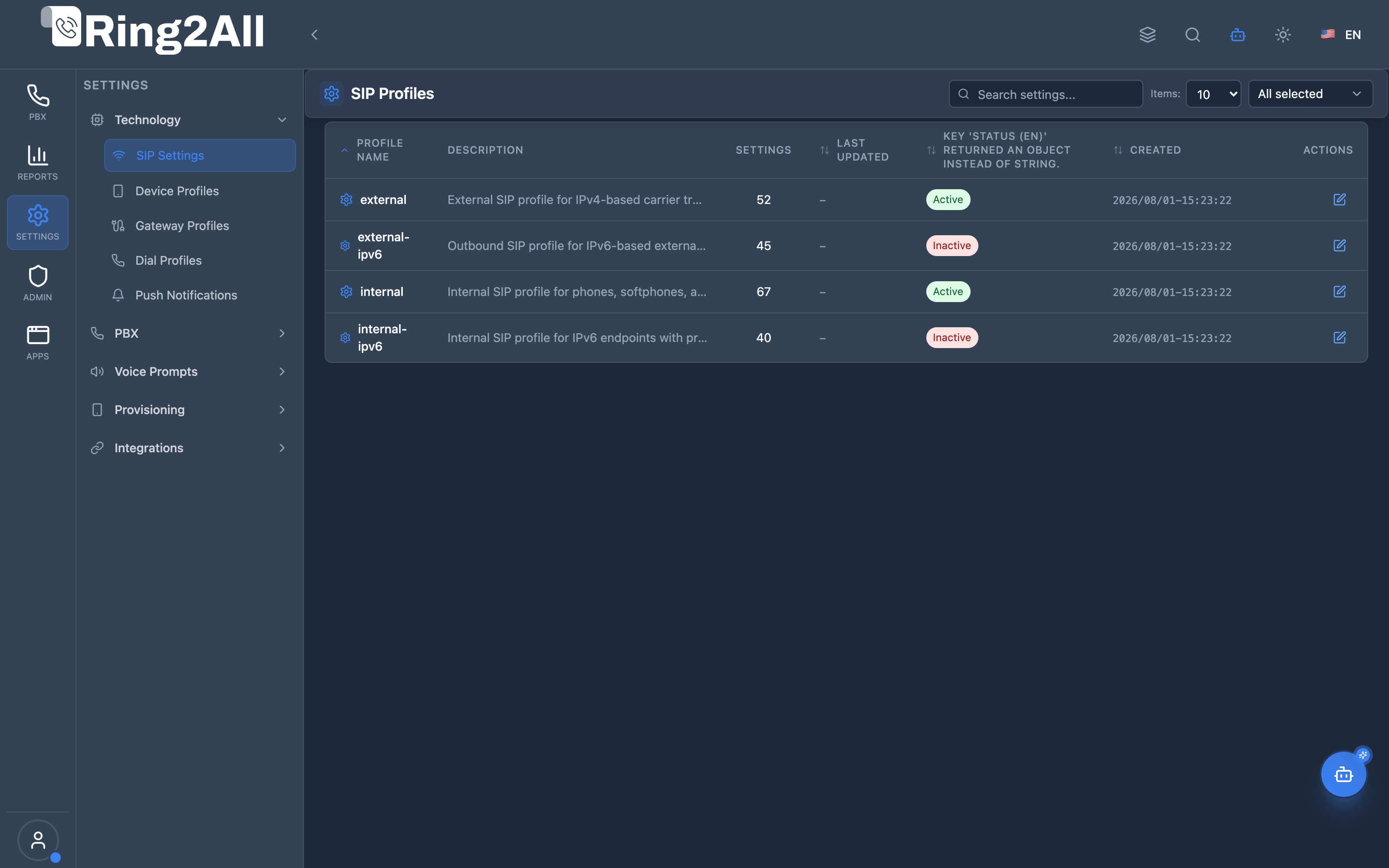
Section titled “SIP Profiles Directory & Status Overview”Centralized inventory of Telephony Server Sofia SIP profiles, showing profile names, bindings, categories, active RTP media IP bindings, SIP ports, and operational runtime status.
SIP Profile Configuration & Parameter Management
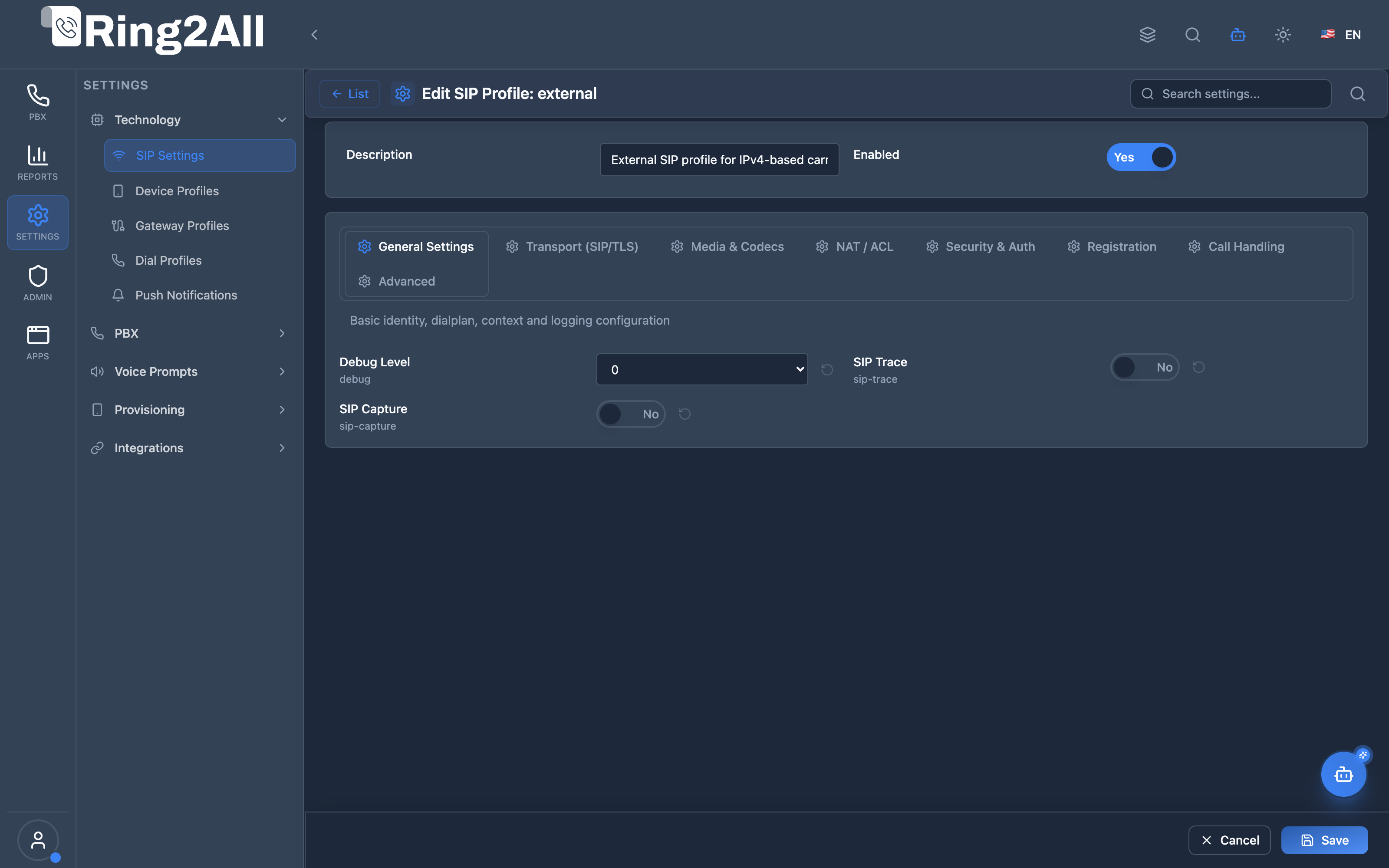
Section titled “SIP Profile Configuration & Parameter Management”Full-featured configuration interface providing granular control over Sofia SIP stack parameters including SIP bind IP, port, TLS/WSS encryption, NAT traversal, codec negotiation, ACL filters, and timer parameters.
1. Module Overview (Technical)
Section titled “1. Module Overview (Technical)”What Are SIP Profiles?
Section titled “What Are SIP Profiles?”SIP Profiles is a Telephony Server configuration module that manages SIP profile settings. SIP profiles define how Telephony Server handles SIP signaling, including transport protocols, codecs, NAT handling, security, and registration behavior.
Architecture
Section titled “Architecture”┌─────────────────────────────────────────────────────────────────┐│ SIP Profiles Architecture │├─────────────────────────────────────────────────────────────────┤│ ││ Admin Panel ││ ┌──────────────────────────────────────────────────────────┐ ││ │ SIP Profiles Page │ ││ │ │ ││ │ Profiles: [internal] [external] [custom] │ ││ │ │ ││ │ Categories: │ ││ │ ├─ General Settings │ ││ │ ├─ Transport (SIP/TLS) │ ││ │ ├─ Media & Codecs │ ││ │ ├─ NAT / ACL │ ││ │ ├─ Security & Auth │ ││ │ ├─ Registration │ ││ │ ├─ Call Handling │ ││ │ └─ Advanced │ ││ │ │ ││ └──────────────────────────────────────────────────────────┘ ││ │ ││ ▼ Configuration saved ││ ┌──────────────────────────────────────────────────────────┐ ││ │ public.sip_profiles │ ││ │ public.sip_profile_settings │ ││ │ │ ││ └──────────────────────────────────────────────────────────┘ ││ │ ││ ▼ Telephony Server XML generated ││ ┌──────────────────────────────────────────────────────────┐ ││ │ Telephony Server mod_sofia │ ││ │ │ ││ │ <profile name="internal"> │ ││ │ <param name="sip-port" value="5060"/> │ ││ │ <param name="rtp-timeout-sec" value="300"/> │ ││ │ ... │ ││ │ </profile> │ ││ │ │ ││ └──────────────────────────────────────────────────────────┘ ││ │└─────────────────────────────────────────────────────────────────┘2. Module Overview (Commercial/Business)
Section titled “2. Module Overview (Commercial/Business)”Business Value
Section titled “Business Value”SIP Profiles provides centralized SIP configuration:
| Without SIP Profiles | With SIP Profiles |
|---|---|
| Manual XML editing | Web interface |
| CLI configuration | Category-based UI |
| Error-prone edits | Validated settings |
| Server access needed | Browser-based |
Use Cases
Section titled “Use Cases”-
Transport Configuration
- Configure SIP ports
- Enable TLS encryption
-
NAT Handling
- Configure STUN/TURN
- Set external IP
-
Codec Management
- Configure codec preferences
- Enable/disable codecs
-
Security Setup
- Configure authentication
- Set registration policies
Feature Highlights
Section titled “Feature Highlights”| Feature | Benefit |
|---|---|
| Web Interface | No CLI needed |
| Categories | Organized settings |
| Default Values | Easy reset |
| Multiple Profiles | Internal/External |
| Search | Find settings fast |
| Validation | Prevent errors |
3. Module Overview (End User/Administrator)
Section titled “3. Module Overview (End User/Administrator)”What Can You Do?
Section titled “What Can You Do?”- Create and manage SIP profiles
- Configure SIP transport settings
- Set media and codec preferences
- Configure NAT traversal
- Set security parameters
- Manage registration behavior
- Configure call handling options
SIP Profiles Interface
Section titled “SIP Profiles Interface”┌─────────────────────────────────────────────────────────────────┐│ SIP Profiles │├─────────────────────────────────────────────────────────────────┤│ ││ [+ Create SIP Profile] ││ ││ ┌───────────────────────────────────────────────────────────┐ ││ │ Profile │ Description │ Settings │ Status │ ││ ├─────────────┼───────────────────┼──────────┼─────────────┤ ││ │ internal │ Internal SIP │ 45 │ 🟢 Enabled │ ││ │ external │ External/Trunks │ 52 │ 🟢 Enabled │ ││ │ secure │ TLS-only profile │ 48 │ 🟢 Enabled │ ││ └───────────────────────────────────────────────────────────┘ ││ │└─────────────────────────────────────────────────────────────────┘Profile Edit View
Section titled “Profile Edit View”┌─────────────────────────────────────────────────────────────────┐│ Edit SIP Profile: internal │├─────────────────────────────────────────────────────────────────┤│ ││ Profile Name: [internal ] ││ Description: [Internal SIP for extensions ] ││ Enabled: ✓ ││ ││ 🔍 [Search settings... ] ││ ││ ▼ General Settings (12 parameters) ││ ├─ context: [default ] [↺ Reset] ││ ├─ dialplan: [XML ] [↺ Reset] ││ └─ user-agent: [Ring2All ] [↺ Reset] ││ ││ ▼ Transport (SIP/TLS) (15 parameters) ││ ├─ sip-port: [5060 ] [↺ Reset] ││ ├─ sip-ip: [auto ] [↺ Reset] ││ ├─ tls: [false ] [↺ Reset] ││ └─ tls-cert-dir: [/etc/certs ] [↺ Reset] ││ ││ ▶ Media & Codecs (8 parameters) ││ ▶ NAT / ACL (10 parameters) ││ ▶ Security & Auth (7 parameters) ││ ▶ Registration (6 parameters) ││ ▶ Call Handling (5 parameters) ││ ▶ Advanced (12 parameters) ││ ││ [Save] [Cancel] ││ │└─────────────────────────────────────────────────────────────────┘Quick Tips
Section titled “Quick Tips”[!TIP] Reset to Default: Click ↺ to reset a parameter to its default value.
[!TIP] Search: Use search to find specific settings across categories.
[!CAUTION] Restart Required: Profile changes require Telephony Server reload.
🎯 User Roles & Key Capabilities
Section titled “🎯 User Roles & Key Capabilities”| Role | Permissions | Key Capabilities |
|---|---|---|
| Super Administrator | Full Access (read, write, delete, restart) |
Manage Sofia SIP profiles (internal, external), modify network bind addresses, configure TLS certificates, and restart Sofia profiles. |
| PBX / VoIP Engineer | Operational Management (read, write) |
Configure SIP timers, adjust NAT IP rewrites, modify codec lists (OPUS, PCMU, G729), and inspect live profile registration state. |
| Support Specialist | Read & Diagnostic (read, status) |
View active bind ports, inspect Sofia status metrics, and execute live SIP trace diagnostics without mutating XML configurations. |
| Tenant Administrator | Restricted Read | View assigned technology profile settings in a multi-tenant PBX partition. |
4. Configuration Categories
Section titled “4. Configuration Categories”General Settings
Section titled “General Settings”| Purpose | Common Parameters |
|---|---|
| Basic profile behavior | context, dialplan, user-agent |
Transport (SIP/TLS)
Section titled “Transport (SIP/TLS)”| Purpose | Common Parameters |
|---|---|
| SIP signaling layer | sip-port, sip-ip, tls, tls-cert-dir |
Media & Codecs
Section titled “Media & Codecs”| Purpose | Common Parameters |
|---|---|
| Audio/video settings | codec-prefs, rtp-timer-name |
NAT / ACL
Section titled “NAT / ACL”| Purpose | Common Parameters |
|---|---|
| NAT traversal | ext-rtp-ip, ext-sip-ip, apply-inbound-acl |
Security & Auth
Section titled “Security & Auth”| Purpose | Common Parameters |
|---|---|
| Authentication | challenge-realm, auth-calls |
Registration
Section titled “Registration”| Purpose | Common Parameters |
|---|---|
| Device registration | accept-blind-reg, disable-register |
Call Handling
Section titled “Call Handling”| Purpose | Common Parameters |
|---|---|
| Call behavior | rtp-timeout-sec, hold-music |
Advanced
Section titled “Advanced”| Purpose | Common Parameters |
|---|---|
| Expert settings | debug, sip-trace, nonce-ttl |
5. Common Settings Reference
Section titled “5. Common Settings Reference”Essential Parameters
Section titled “Essential Parameters”| Parameter | Default | Description |
|---|---|---|
| context | default | Dialplan context |
| sip-port | 5060 | SIP UDP/TCP port |
| sip-ip | auto | Listen IP address |
| rtp-ip | auto | RTP media IP |
| user-agent | Telephony Server | SIP user agent |
TLS Settings
Section titled “TLS Settings”| Parameter | Default | Description |
|---|---|---|
| tls | false | Enable TLS |
| tls-cert-dir | Certificate directory | |
| tls-version | tlsv1.2 | TLS version |
| tls-bind-params | TLS binding options | |
| ws-binding | 127.0.0.1:5066 | WebSocket (plain WS) — localhost only for Nginx proxy |
| wss-binding | (disabled) | WSS — disabled, TLS handled by Nginx on port 443 |
NAT Settings
Section titled “NAT Settings”| Parameter | Default | Description |
|---|---|---|
| ext-rtp-ip | External RTP IP | |
| ext-sip-ip | External SIP IP | |
| local-network-acl | Local network ACL | |
| NDLB-force-rport | Force rport |
Timeout Settings
Section titled “Timeout Settings”| Parameter | Default | Description |
|---|---|---|
| rtp-timeout-sec | 300 | RTP inactivity timeout |
| rtp-hold-timeout-sec | 1800 | Hold timeout |
| session-timeout | 1800 | Session timeout |
6. Common Scenarios & Examples
Section titled “6. Common Scenarios & Examples”Scenario 1: Enable TLS
Section titled “Scenario 1: Enable TLS”- Edit SIP profile
- Expand “Transport (SIP/TLS)”
- Set tls = true
- Configure tls-cert-dir
- Save and reload
Scenario 2: Configure NAT for Cloud
Section titled “Scenario 2: Configure NAT for Cloud”- Edit profile
- Expand “NAT / ACL”
- Set ext-rtp-ip = public IP
- Set ext-sip-ip = public IP
- Save and reload
Scenario 3: Change SIP Port
Section titled “Scenario 3: Change SIP Port”- Edit profile
- Expand “Transport”
- Change sip-port
- Save and reload
Scenario 4: Enable Debug
Section titled “Scenario 4: Enable Debug”- Edit profile
- Expand “Advanced”
- Set debug = true
- Save and reload
- Check logs
Scenario 5: WebRTC Configuration
Section titled “Scenario 5: WebRTC Configuration”WebRTC uses Nginx as a TLS proxy to Telephony Server:
Browser → wss://domain/ws (Nginx, port 443) → ws://127.0.0.1:5066 (Telephony Server, plain WS)- Edit internal profile
- Expand “Transport (SIP/TLS)”
- Set
ws-binding=127.0.0.1:5066(localhost only) - Disable
wss-binding(Nginx handles TLS termination) - Save and reload
[!NOTE] No TLS certificates are needed on Telephony Server for WebRTC. Nginx handles all WSS connections on port 443 and forwards them as plain WebSocket to Telephony Server on localhost.
7. Limitations & Important Notes
Section titled “7. Limitations & Important Notes”Technical Notes
Section titled “Technical Notes”[!NOTE] Profile Restart: Changes require
sofia profile <name> restart.
[!NOTE] Two Profiles: Typically “internal” and “external” profiles.
[!WARNING] TLS Certificates: Must be valid and accessible.
Best Practices
Section titled “Best Practices”- Backup First: Export profile before major changes
- Test Changes: Use debug mode
- Document Changes: Track what you modified
- Monitor After: Watch for registration issues
- Use Defaults: Only change what you need
Common Profiles
Section titled “Common Profiles”| Profile | Purpose |
|---|---|
| internal | Extensions, internal devices |
| external | Gateways, trunks |
| secure | TLS-only connections |
8. Troubleshooting Tips
Section titled “8. Troubleshooting Tips”Common Issues
Section titled “Common Issues”| Symptom | Possible Cause | Solution |
|---|---|---|
| No registrations | Wrong SIP port | Check sip-port setting |
| One-way audio | NAT issues | Configure ext-rtp-ip |
| TLS fails | Bad certificates | Check tls-cert-dir |
| Timeouts | Short timeout values | Increase rtp-timeout-sec |
| Auth failures | Wrong challenge-realm | Check security settings |
Diagnostic Commands
Section titled “Diagnostic Commands”Telephony Server CLI:
# Show profile statusfs_cli -x "sofia status profile internal"
# View profile settingsfs_cli -x "sofia profile internal gwlist"
# Restart profilefs_cli -x "sofia profile internal restart reloadxml"
# Enable SIP tracefs_cli -x "sofia profile internal siptrace on"
Check Profile Settings
Section titled “Check Profile Settings”SELECT sp.name, sps.setting_name, sps.setting_valueFROM public.sip_profiles spJOIN public.sip_profile_settings sps ON sp.id = sps.sip_profile_idWHERE sp.name = 'internal';9. Glossary
Section titled “9. Glossary”| Term | Definition |
|---|---|
| SIP Profile | Telephony Server SIP endpoint configuration |
| mod_sofia | Telephony Server SIP module |
| TLS | Transport Layer Security |
| NAT | Network Address Translation |
| RTP | Real-time Transport Protocol |
| ACL | Access Control List |
| ext-rtp-ip | External RTP IP for NAT |
Model Context Protocol (MCP) AI Integration
Section titled “Model Context Protocol (MCP) AI Integration”The Ring2All PBX platform integrates deep AI assistance via the Model Context Protocol (MCP). The Sofia SIP technology stack exposes intelligent tools that permit the PBX AI Copilot to safely query profile parameters, inspect real-time SIP engine socket status, and diagnose registration or port binding conflicts.
Available MCP Tools
Section titled “Available MCP Tools”| Tool Name | Operation Type | RBAC Risk Level | Description |
|---|---|---|---|
list_sip_profiles |
Read / Query | low |
Lists all base Sofia SIP profiles (e.g. internal, external) with their IP bindings, SIP ports, TLS bindings, and status. |
get_sip_profile_status |
Live Engine Diagnostic | low |
Retrieves real-time runtime status, SIP URIs, registered endpoints count, and socket metrics directly from Telephony Server CLI (sofia status profile <name>). |
Tool Input Schemas & Parameters
Section titled “Tool Input Schemas & Parameters”1. list_sip_profiles
Section titled “1. list_sip_profiles”{ "name": "list_sip_profiles", "description": "List all base Sofia SIP profiles (internal, external, etc.) running on the PBX core engine with bind ports and TLS settings.", "inputSchema": { "type": "object", "properties": { "search": { "type": "string", "description": "Filter profile by name or description (e.g. 'internal', 'external')." } } }}2. get_sip_profile_status
Section titled “2. get_sip_profile_status”{ "name": "get_sip_profile_status", "description": "Get live runtime status and registration metrics of a Sofia SIP Profile directly from Telephony Server CLI.", "inputSchema": { "type": "object", "properties": { "profile": { "type": "string", "description": "Sofia SIP profile name (e.g. 'internal', 'external')." } }, "required": ["profile"] }}Natural Language Prompts
Section titled “Natural Language Prompts”| User Request | Invoked MCP Tool | Expected AI Response |
|---|---|---|
| “Show me all active Sofia SIP profiles and their bind ports.” | list_sip_profiles |
Returns table of profiles (internal on 5060, external on 5080) with TLS ports and operational states. |
| “Check if the internal SIP profile is currently running in Telephony Server.” | get_sip_profile_status({ profile: "internal" }) |
Reports live Telephony Server CLI status, active registrations count, and RTP binding IP. |
| “Are there any errors on the external SIP trunk profile?” | get_sip_profile_status({ profile: "external" }) |
Details profile status, external NAT IP, and detects if the socket is bound or in error. |
Multi-Tenant & Security Safeguards
Section titled “Multi-Tenant & Security Safeguards”- Strict Domain Isolation: Sofia base profiles operate at the core engine level; access is restricted to authorized administrative tenants and roles.
- Sanitized Parameter Execution: Profile names are strictly filtered (
[a-zA-Z0-9_\-]) before dispatching commands to Telephony Event Socket (ESL), preventing command injection. - Read-Only Diagnostics: Status tools perform diagnostic queries only; destructive profile restarts require elevated Super Admin permissions with explicit confirmation.
- Audit Logging: Every AI query into SIP profile telemetry is logged with user ID, tenant ID, and timestamp.
Documentation last updated: January 2026