

Speed Dials Module Documentation
Table of Contents
Section titled “Table of Contents”- Module Overview (Technical)
- Module Overview (Commercial/Business)
- Module Overview (End User/Administrator)
- Configuration Fields Reference
- Call Flow / Logic Explanation
- Import/Export Feature
- Common Scenarios & Examples
- Model Context Protocol (MCP) AI Integration
- Limitations & Important Notes
- Troubleshooting Tips
- Glossary
1. Module Overview (Technical)
Section titled “1. Module Overview (Technical)”What Are Speed Dials?
Section titled “What Are Speed Dials?”Speed Dials are shortcut codes that map to full destination numbers. Users dial a short code (like 202) and the system automatically dials the full number (like +1-555-123-4567).
Architecture
Section titled “Architecture”┌─────────────────────────────────────────────────────────────────┐│ Speed Dial System │├─────────────────────────────────────────────────────────────────┤│ ││ User dials: 202 (speed dial code) ││ │ ││ ▼ ││ ┌──────────────────────────────────────────────────────────┐ ││ │ Speed Dial Lookup │ ││ │ SELECT * FROM speed_dials │ ││ │ WHERE speed_code = '202' AND enabled = true │ ││ └──────────────────────────────────────────────────────────┘ ││ │ ││ ▼ ││ ┌──────────────────────────────────────────────────────────┐ ││ │ Found: destination = '+15551234567' │ ││ │ │ ││ │ Check Class of Service (if specified): │ ││ │ ├─ CoS specified → Verify caller has permission │ ││ │ └─ CoS empty → Inherit from caller's extension │ ││ │ │ ││ └──────────────────────────────────────────────────────────┘ ││ │ ││ ▼ ││ Dial +1-555-123-4567 using normal outbound routing ││ │└─────────────────────────────────────────────────────────────────┘Destination Formats
Section titled “Destination Formats”| Format | Example | Description |
|---|---|---|
| E.164 | +15551234567 |
Full international number |
| Extension | 1001 |
Internal extension |
| SIP URI | user/1000 |
Direct SIP addressing |
| Local | 5551234567 |
Local number format |
🎯 User Roles & Key Capabilities
Section titled “🎯 User Roles & Key Capabilities”| User Role | Key Capabilities & Permissions |
|---|---|
| PBX Super Admin | Full management across all tenant domains: configure speed codes, assign destination endpoints, enforce CoS profiles, and perform bulk CSV imports/exports. |
| Domain Administrator | Create, edit, and maintain company-wide speed dial shortcuts, preventing extension dialing collisions within their domain. |
| Call Center Agent / Operator | Quickly reach external suppliers, partners, or internal transfer queues by dialing assigned 2-to-4 digit speed codes. |
| Standard Extension User | Utilize speed dial codes from physical SIP phones, WebRTC softphones, or Switchboard without memorizing complex 10-digit PSTN numbers. |
2. Module Overview (Commercial/Business)
Section titled “2. Module Overview (Commercial/Business)”Business Value
Section titled “Business Value”Speed Dials simplify dialing for frequently called numbers:
| Without Speed Dials | With Speed Dials |
|---|---|
| Dial +1-555-123-4567 | Dial 202 |
| Remember long numbers | Remember short codes |
| Error-prone dialing | Consistent, accurate |
Use Cases
Section titled “Use Cases”-
Frequently Called Numbers
- Main office: 201
- IT Support: 202
- CEO Mobile: 203
-
Vendor/Partner Hotlines
- Supplier A: 301
- Supplier B: 302
- Bank: 303
-
Emergency Services
- Building Security: *911
- Fire Department: *9411
-
International Offices
- London Office: 401
- Tokyo Office: 402
- Sydney Office: 403
Feature Highlights
Section titled “Feature Highlights”| Feature | Benefit |
|---|---|
| Short Codes | Easy to remember (202, *801) |
| CoS Restriction | Limit who can use each speed dial |
| CSV Import | Bulk upload speed dials |
| CSV Export | Backup or migrate settings |
| Flexible Destinations | E.164, extensions, SIP URIs |
3. Module Overview (End User/Administrator)
Section titled “3. Module Overview (End User/Administrator)”What Can You Do?
Section titled “What Can You Do?”- Create speed dial codes mapped to full numbers
- Restrict speed dials by Class of Service
- Import speed dials from CSV files
- Export speed dials to CSV for backup
Navigation
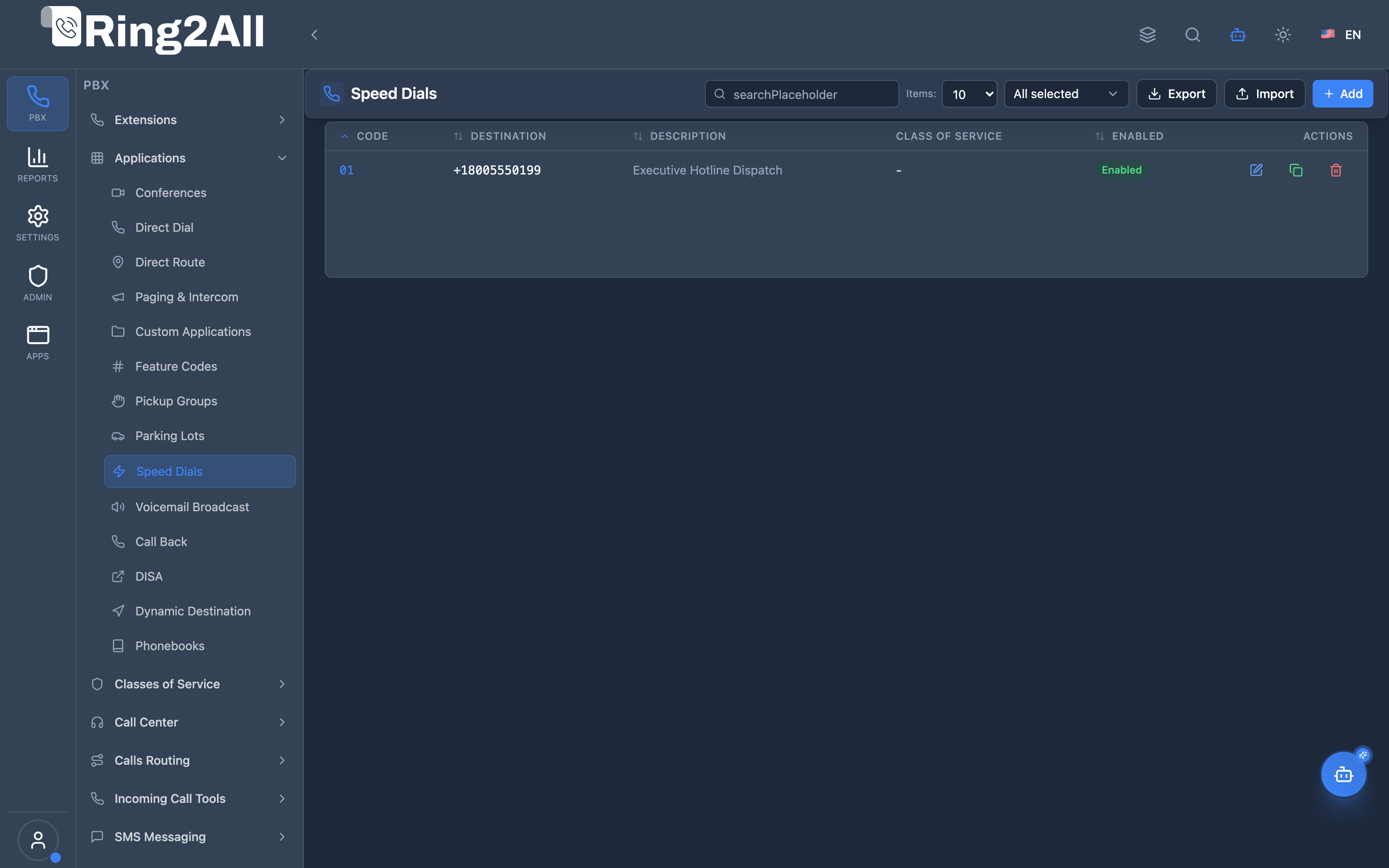
Section titled “Navigation”- Navigate to PBX → Applications → Speed Dials in the main sidebar.
- The list view displays all configured quick dial sequences, showing Code, Destination, Description, Class of Service, and Status (
Enabled), alongside tools for bulk Export and Import of CSV files. - Click the + Add button in the top-right toolbar to define a new speed dial entry.
- Click any existing row or the edit icon to update the speed dial code, destination, or assigned Class of Service permissions.
Administrator Workflow
Section titled “Administrator Workflow”┌─────────────────────────────────────────────────────────────────┐│ Creating a Speed Dial │├─────────────────────────────────────────────────────────────────┤│ ││ 1. General Information ││ ├─ Speed Dial Code: 01 (or 202, *801) ││ ├─ Destination Number: +18005550199 ││ └─ Description: "Executive Hotline Dispatch" ││ ││ 2. Access Control (Optional) ││ └─ Class of Service (CoS): None or Selected Profile ││ ││ 3. Enable and Save ││ └─ Enabled: ✓ ││ ││ Result: Users dial 01 → System routes to +18005550199 ││ │└─────────────────────────────────────────────────────────────────┘Quick Tips
Section titled “Quick Tips”[!TIP] Use Meaningful Codes: 201-299 for departments, 301-399 for vendors, etc.
[!TIP] Descriptions: Always add a description for easy identification later.
[!CAUTION] Code Conflicts: Speed dial codes must not conflict with extensions or feature codes.
4. Configuration Fields Reference
Section titled “4. Configuration Fields Reference”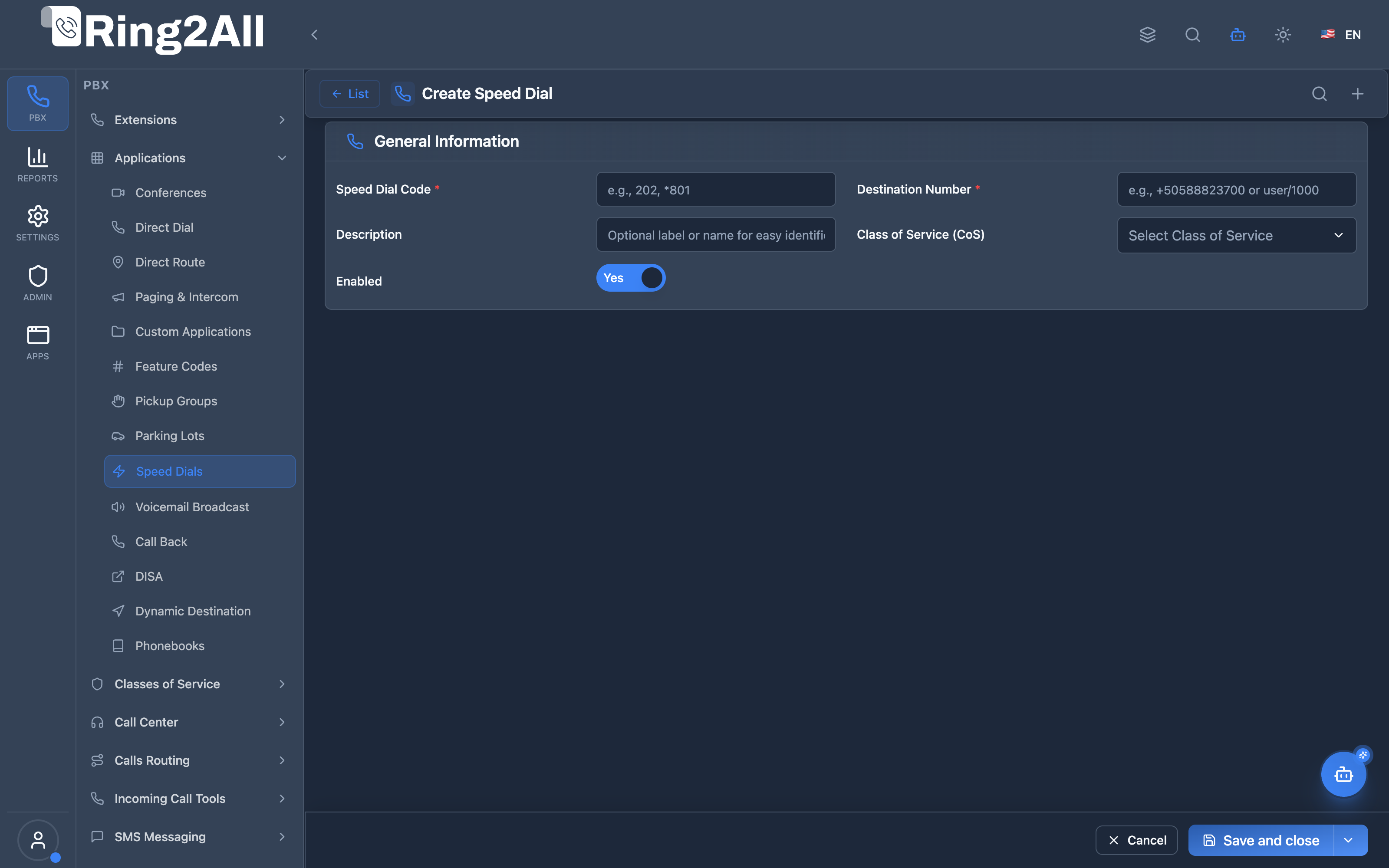
General Information Section
Section titled “General Information Section”| Field | Description | User-Friendly Tooltip | Example | Required |
|---|---|---|---|---|
| Speed Dial Code * | Short numeric or feature code sequence | Short code to dial for rapid connection | 01, 202, *801 |
Yes |
| Destination Number * | Full target telephone number, extension, or URI | Full phone number or SIP URI to dial | +18005550199, user/1000 |
Yes |
| Description | Label or friendly identifier | Optional label or name for easy identification | Executive Hotline Dispatch |
No |
| Class of Service (CoS) | Restrict speed dial usage by caller Class of Service | Select Class of Service to restrict who can dial this shortcut | Standard, Executive, None |
No |
| Enabled | Master switch to activate or deactivate the speed dial | Enable or disable this speed dial entry | Yes / No (toggle) |
Yes |
Code Format Options
Section titled “Code Format Options”| Format | Example | Notes |
|---|---|---|
202 |
Numeric only | Standard speed dial |
*801 |
With asterisk | Feature code style |
#55 |
With hash | Less common |
Destination Format Options
Section titled “Destination Format Options”| Format | Example | Use Case |
|---|---|---|
+15551234567 |
E.164 | International standard |
5551234567 |
Local | Domestic calls |
1001 |
Extension | Internal routing |
user/1000 |
SIP URI | Direct SIP |
5. Call Flow / Logic Explanation
Section titled “5. Call Flow / Logic Explanation”Speed Dial Flow
Section titled “Speed Dial Flow”┌─────────────────────────────────────────────────────────────────┐│ Speed Dial Flow │├─────────────────────────────────────────────────────────────────┤│ ││ 1. User dials 202 ││ │ ││ ▼ ││ 2. Dialplan checks speed_dials table ││ SELECT * FROM speed_dials ││ WHERE speed_code = '202' ││ AND domain_id = [domain] ││ AND enabled = true ││ │ ││ ├─ Found → Continue ││ └─ Not Found → Normal dialplan (may fail) ││ │ ││ ▼ ││ 3. Check Class of Service (if set) ││ ├─ CoS specified → Check if caller has this CoS ││ │ ├─ Yes → Continue ││ │ └─ No → "Not authorized" ││ └─ CoS empty → Inherit from caller's extension ││ │ ││ ▼ ││ 4. Replace destination ││ ├─ Original: 202 ││ └─ New: +15551234567 ││ │ ││ ▼ ││ 5. Route call through normal outbound dialing ││ ├─ Apply dialrules ││ ├─ Select trunk ││ └─ Bridge call ││ │└─────────────────────────────────────────────────────────────────┘6. Import/Export Feature
Section titled “6. Import/Export Feature”CSV Export
Section titled “CSV Export”Purpose: Backup speed dials or migrate to another system.
Process:
- Click “Export” button
- System generates CSV file
- Download file to your computer
CSV Format:
speed_code,destination,description,class_of_service,enabled202,+15551234567,Main Office,,true203,+15559876543,IT Support,Standard,true*801,user/1000,Internal Transfer,,trueCSV Import
Section titled “CSV Import”Purpose: Bulk upload speed dials from spreadsheet.
Import Modes:
| Mode | Behavior |
|---|---|
| Skip Existing | Ignore codes that already exist |
| Update Existing | Update existing codes with new data |
| Replace Existing | Delete existing and insert new |
Process:
- Click “Import” button
- Select CSV file
- Choose import mode
- Preview counts
- Click “Import” to execute
CSV Template:
speed_code,destination,description,class_of_service,enabled201,+15551111111,Reception,,true202,+15552222222,Sales,,true203,+15553333333,Support,Standard,trueImport Results:
- Created: New speed dials added
- Updated: Existing speed dials modified
- Skipped: Already existed (skip mode)
- Errors: Invalid rows
7. Common Scenarios & Examples
Section titled “7. Common Scenarios & Examples”Scenario 1: Company Directory
Section titled “Scenario 1: Company Directory”Setup:
| Code | Destination | Description |
|---|---|---|
| 201 | +15551001 | Reception |
| 202 | +15551002 | Sales Department |
| 203 | +15551003 | Support |
| 204 | +15551004 | Accounting |
| 205 | +15551005 | HR |
Scenario 2: Executive Quick Dial
Section titled “Scenario 2: Executive Quick Dial”Setup with CoS restriction:
| Code | Destination | Description | CoS |
|---|---|---|---|
| *100 | +1555CEO1234 | CEO Mobile | Executive |
| *101 | +1555CFO1234 | CFO Mobile | Executive |
| *102 | +1555CTO1234 | CTO Mobile | Executive |
Result: Only users with “Executive” CoS can dial these.
Scenario 3: International Offices
Section titled “Scenario 3: International Offices”Setup:
| Code | Destination | Description |
|---|---|---|
| 401 | +442071234567 | London Office |
| 402 | +81312345678 | Tokyo Office |
| 403 | +61298765432 | Sydney Office |
| 404 | +4989123456 | Munich Office |
Scenario 4: Bulk Import from Spreadsheet
Section titled “Scenario 4: Bulk Import from Spreadsheet”CSV file (speed_dials.csv):
speed_code,destination,description,class_of_service,enabled501,+18005551234,Vendor Helpdesk,,true502,+18005554567,Bank Customer Service,,true503,+18005557890,Insurance Claims,,true504,+18005550001,Legal Hotline,Legal,trueImport steps:
- Click Import
- Select
speed_dials.csv - Mode: “Update Existing”
- Click Import
8. Model Context Protocol (MCP) AI Integration
Section titled “8. Model Context Protocol (MCP) AI Integration”Ring2All exposes dedicated Model Context Protocol (MCP) tools for Speed Dials, enabling autonomous Copilots and AI workflows to search directory shortcuts, inspect speed code assignments, and programmatically provision or update speed dial targets while enforcing strict domain-wide number uniqueness.
Available MCP Tools
Section titled “Available MCP Tools”| Tool Name | Description | Key Parameters |
|---|---|---|
list_speed_dials |
Lists all speed dials defined in the domain, including speed codes, target destinations, descriptions, and Class of Service restrictions. | search (optional string) |
get_speed_dial_status |
Retrieves full routing and permission details for a specific speed code. | speedCode (required) |
create_speed_dial |
Provisions a new speed dial shortcut in the domain, linking a short code to an internal extension, external PSTN number, or SIP URI. | speedCode, destination, description, classOfServicesId, enabled |
update_speed_dial |
Updates the destination number, description, Class of Service profile, or active status of a speed dial. | speedCode, newDestination, description, classOfServicesId, enabled |
delete_speed_dial |
Deletes a speed dial shortcut and removes its entry from the domain dialplan. | speedCode (required) |
Strict Domain Numbering Safeguards
Section titled “Strict Domain Numbering Safeguards”Whenever create_speed_dial or update_speed_dial is called by an AI agent, Ring2All executes validateNumberUniqueness(speedCode, domainId, 'speed_dials'). The system checks sip_extensions, public.dialplan_registry, and public.direct_routes. A speed code can never conflict with existing user extensions, feature codes, direct dials, or conference numbers in the same domain.
AI Agent Operational Examples
Section titled “AI Agent Operational Examples”Querying Speed Dials by Keyword
Section titled “Querying Speed Dials by Keyword”{ "tool": "list_speed_dials", "arguments": { "search": "Support" }}Provisioning an Emergency Escalation Speed Code
Section titled “Provisioning an Emergency Escalation Speed Code”{ "tool": "create_speed_dial", "arguments": { "speedCode": "299", "destination": "+18005550199", "description": "Tier-3 Emergency On-Call Vendor", "enabled": true }}Recommended Natural Language Prompts
Section titled “Recommended Natural Language Prompts”- “List all speed dial codes currently configured and their target telephone numbers.”
- “Create a speed dial code 205 pointing to the regional manager at +1-555-0188 with description ‘Regional Director’.”
- “Update speed code 202 to route to +1-555-0144 instead.”
9. Limitations & Important Notes
Section titled “9. Limitations & Important Notes”Technical Limitations
Section titled “Technical Limitations”[!WARNING] Code Uniqueness: Speed dial codes must be unique within a domain.
[!WARNING] Code Conflicts: Avoid codes that match extensions, feature codes, or emergency numbers.
[!IMPORTANT] CoS Inheritance: If CoS is empty, the caller’s own CoS determines dial permissions.
Best Practices
Section titled “Best Practices”- Organize by Range: 201-299 for internal, 301-399 for vendors
- Document Everything: Use description field for clarity
- Use E.164: Full international format for reliability
- Regular Backups: Export periodically for disaster recovery
- CoS for Sensitive: Restrict executive/private numbers by CoS
Reserved Ranges to Avoid
Section titled “Reserved Ranges to Avoid”| Range | Common Use |
|---|---|
| 911 | Emergency |
| *67, *72, etc. | Feature codes |
| 1001-9999 | Extensions |
10. Troubleshooting Tips
Section titled “10. Troubleshooting Tips”Common Issues
Section titled “Common Issues”| Symptom | Possible Cause | Solution |
|---|---|---|
| Code not recognized | Speed dial disabled | Enable the entry |
| “Not authorized” | CoS restriction | Check user’s CoS |
| Wrong number dialed | Typo in destination | Verify destination |
| Import fails | Invalid CSV format | Check headers/format |
| Conflict error | Code already exists | Use unique code |
Diagnostic SQL
Section titled “Diagnostic SQL”List all speed dials:
SELECT speed_code, destination, description, cos.name as class_of_service, enabledFROM public.speed_dials sdLEFT JOIN public.class_of_services cos ON sd.class_of_services_id = cos.idWHERE sd.domain_id = [domain_id]ORDER BY speed_code;Check for duplicate codes:
SELECT speed_code, COUNT(*) as countFROM public.speed_dialsWHERE domain_id = [domain_id]GROUP BY speed_codeHAVING COUNT(*) > 1;11. Glossary
Section titled “11. Glossary”| Term | Definition |
|---|---|
| Speed Dial | A short code that maps to a full destination number |
| Speed Code | The short number users dial (e.g., 202) |
| Destination | The full number or URI to call |
| E.164 | International phone number format (+country code + number) |
| SIP URI | SIP addressing format (user/ext or sip:user@domain) |
| Class of Service | Permission level that restricts dialing |
| CSV | Comma-Separated Values file format for import/export |
| Inherit CoS | Using the caller’s Class of Service for permissions |
Documentation last updated: January 2026