

Conferences Module Documentation
Table of Contents
Section titled “Table of Contents”- Module Overview (Technical)
- Module Overview (Commercial/Business)
- Module Overview (End User/Administrator)
- Configuration Fields Reference
- Call Flow / Logic Explanation
- Common Scenarios & Examples
- Model Context Protocol (MCP) AI Integration
- Limitations & Important Notes
- Troubleshooting Tips
- Glossary
1. Module Overview (Technical)
Section titled “1. Module Overview (Technical)”What Are Conferences?
Section titled “What Are Conferences?”The Conferences module provides audio and video conferencing capabilities within the PBX. It consists of two main components:
- Conference Rooms — Virtual meeting spaces with specific extensions, PINs, and behaviors
- Conference Profiles — Reusable templates defining audio/video settings and DTMF controls
Architecture
Section titled “Architecture”┌─────────────────────────────────────────────────────────────────┐│ Conference System │├─────────────────────────────────────────────────────────────────┤│ ││ ┌──────────────────────────────────────────────────────────┐ ││ │ CONFERENCE PROFILES │ ││ │ (Reusable templates for audio/video/DTMF settings) │ ││ │ ├─ default │ ││ │ ├─ video-enabled │ ││ │ └─ moderator-only │ ││ └──────────────────────────────────────────────────────────┘ ││ │ ││ ▼ ││ ┌──────────────────────────────────────────────────────────┐ ││ │ CONFERENCE ROOMS │ ││ │ (Individual meeting spaces) │ ││ │ ├─ Extension: 8000 → Sales Weekly │ ││ │ ├─ Extension: 8001 → Engineering Standup │ ││ │ └─ Extension: 8002 → Board Meeting │ ││ └──────────────────────────────────────────────────────────┘ ││ │ ││ ▼ ││ ┌──────────────────────────────────────────────────────────┐ ││ │ Telephony Server mod_conference │ ││ │ ├─ Audio mixing │ ││ │ ├─ Video layout │ ││ │ ├─ Recording │ ││ │ └─ DTMF controls │ ││ └──────────────────────────────────────────────────────────┘ ││ │└─────────────────────────────────────────────────────────────────┘Telephony Server Integration
Section titled “Telephony Server Integration”- Module:
mod_conference - Dialplan: Conference extension triggers
conferenceapplication - Commands:
conference list,conference [name] kick all, etc. - Events: Conference events published via ESL for real-time monitoring
2. Module Overview (Commercial/Business)
Section titled “2. Module Overview (Commercial/Business)”Business Value
Section titled “Business Value”Integrated conferencing eliminates the need for third-party services:
| External Service | Built-In Conferences |
|---|---|
| Monthly fees per user/room | No additional cost |
| Separate dial-in numbers | Uses PBX extensions |
| Limited integration | Full CDR, recording, presence |
| Data leaves your network | Everything stays internal |
Use Cases
Section titled “Use Cases”-
Recurring Team Meetings
- Permanent room with extension 8000
- Wait for moderator to start
- Auto-record for minutes
-
Customer Calls
- Participant PIN for security
- Announce participant count
- End when moderator leaves
-
Webinars & Training
- Mute on entry for attendees
- Moderator controls for Q&A
- Video layouts for presentations
-
Executive Board Meetings
- Separate moderator/participant PINs
- Recording to secure location
- Lock conference after start
Feature Highlights
Section titled “Feature Highlights”| Feature | Benefit |
|---|---|
| Moderator PIN | Control who can start/manage meetings |
| Wait for Moderator | Hold participants in music until host joins |
| Mute on Entry | Reduce background noise in large meetings |
| Video Modes | Support for video conferences with layouts |
| Recording | Automatic or on-demand recording |
| DTMF Controls | Participants can mute/unmute via keypad |
3. Module Overview (End User/Administrator)
Section titled “3. Module Overview (End User/Administrator)”What Can You Do?
Section titled “What Can You Do?”Conference Rooms:
- Create permanent or scheduled conference rooms
- Assign extension numbers for dialing
- Set moderator and participant PINs
- Configure audio, video, and recording settings
Conference Profiles:
- Create reusable templates for common settings
- Define DTMF key mappings (0=mute, #=hangup, etc.)
- Set default audio quality and video layouts
- System profiles cannot be deleted
Navigation
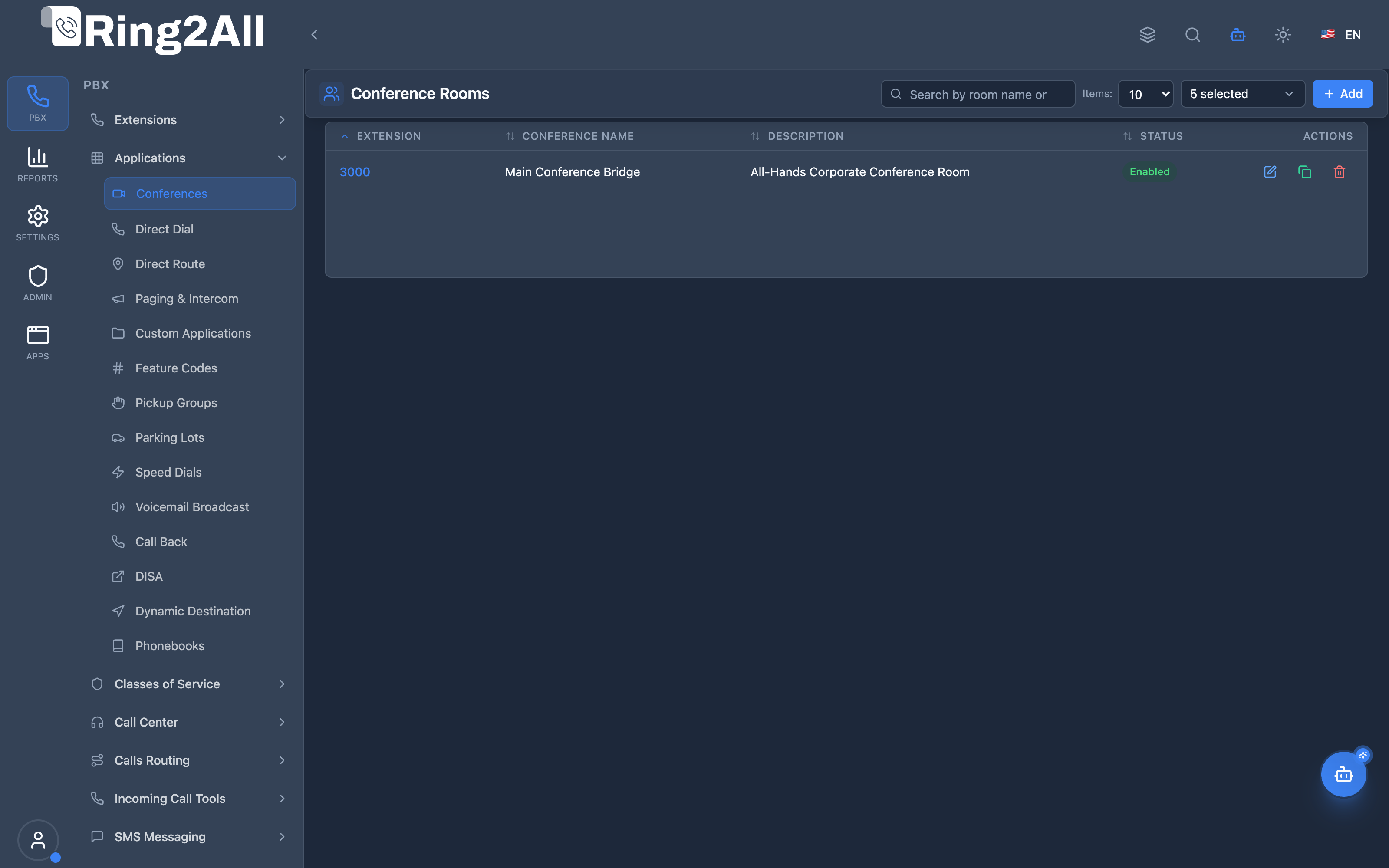
Section titled “Navigation”- Navigate to PBX → Applications → Conferences in the main sidebar.
- The list view presents all active conference rooms, detailing their assigned Extension number, Conference Name, Description, and active Status (Enabled/Disabled).
- Click the + Add button in the upper toolbar to configure a new conference room.
- Click any row or the edit icon to reconfigure an existing conference bridge or modify security PINs.
User Workflow
Section titled “User Workflow”┌─────────────────────────────────────────────────────────────────┐│ Creating a Conference Room │├─────────────────────────────────────────────────────────────────┤│ ││ Step 1: Basic Information ││ ├─ Extension: 8000 ││ ├─ Name: "Weekly Sales Meeting" ││ ├─ Description: "Every Monday 9 AM" ││ └─ Language: English ││ ││ Step 2: Access & Security ││ ├─ Moderator PIN: 1234 ││ ├─ Participant PIN: 5678 ││ └─ Wait for Moderator: ✓ ││ ││ Step 3: Audio & Behavior ││ ├─ Max Participants: 25 ││ ├─ Mute on Entry: ✓ ││ ├─ Announce Name: ✓ ││ └─ End on Moderator Exit: ✓ ││ ││ Step 4: Recording ││ ├─ Recording Enabled: ✓ ││ ├─ Format: WAV ││ └─ Announce Recording: ✓ ││ ││ Step 5: Save → Extension 8000 is ready ││ │└─────────────────────────────────────────────────────────────────┘
┌─────────────────────────────────────────────────────────────────┐│ Joining a Conference │├─────────────────────────────────────────────────────────────────┤│ ││ User dials 8000 ││ │ ││ ▼ ││ "Enter your PIN, followed by pound" ││ │ ││ ▼ ││ User enters 1234# (moderator PIN) ││ │ ││ ├─ If first → Conference starts, music stops ││ └─ If not first → Joins existing conference ││ │ ││ ▼ ││ "There are now 3 people in this conference" ││ │ ││ ▼ ││ User is now in the conference ││ ├─ Press 0 to mute/unmute ││ ├─ Press # to leave ││ └─ Press * to access menu ││ │└─────────────────────────────────────────────────────────────────┘Quick Tips
Section titled “Quick Tips”[!TIP] Use Profiles: Create a profile for common settings (audio quality, DTMF keys) and apply it to multiple rooms.
[!TIP] Moderator PIN Only: If you only set a moderator PIN (no participant PIN), anyone can join but only PIN holders can moderate.
[!CAUTION] Max Members = 0: A value of 0 means unlimited—be careful with resource usage for large conferences.
4. Configuration Fields Reference
Section titled “4. Configuration Fields Reference”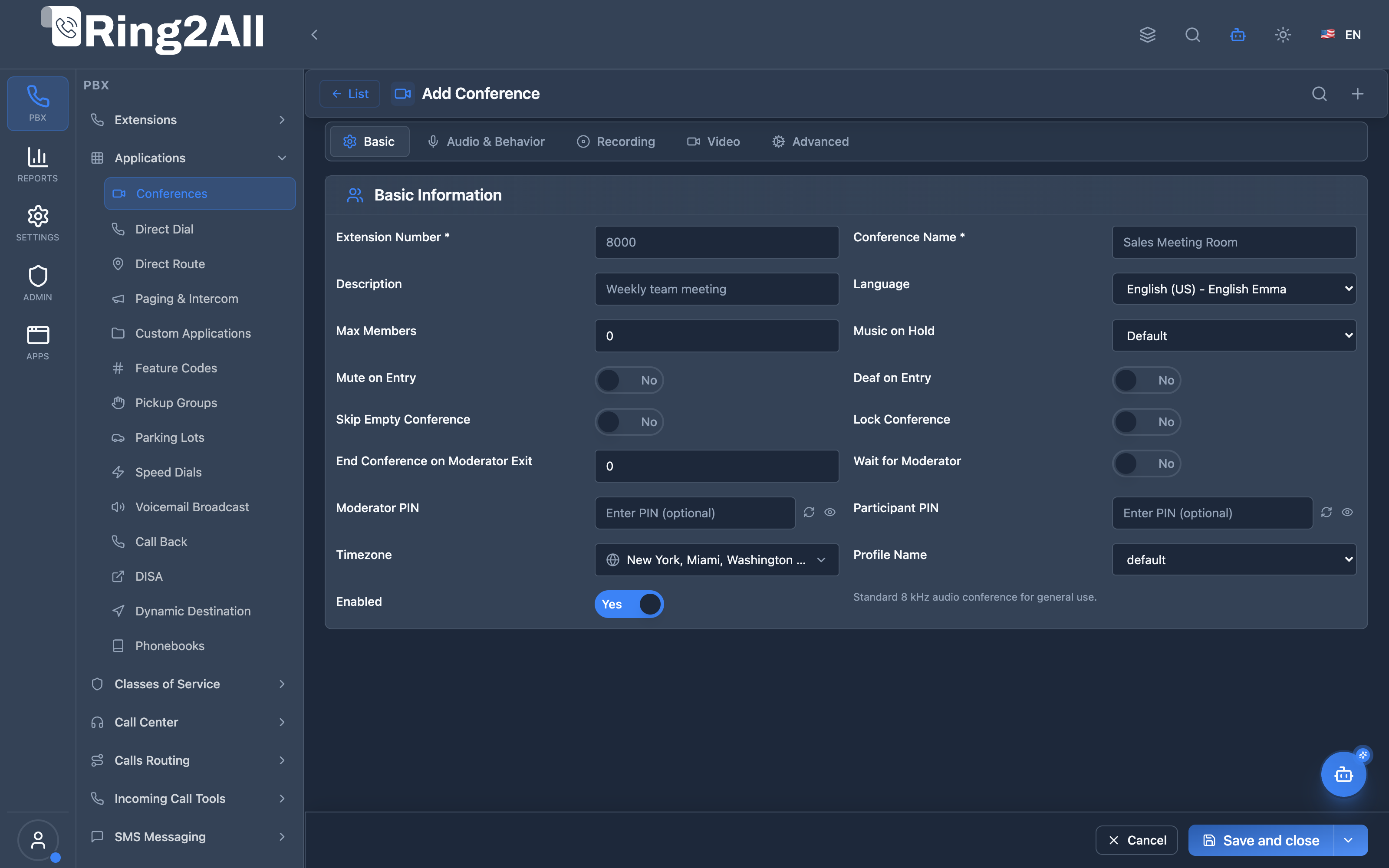
The Conference Room configuration uses a unified single-screen 4-column layout structured into three purpose-built FormBoxes, completely eliminating legacy tabs and disconnected ghost fields.
4.1 General Information FormBox (ConferenceGeneralInfoBox)
Section titled “4.1 General Information FormBox (ConferenceGeneralInfoBox)”| Field | Technical Description | User-Friendly Tooltip | Example | Notes |
|---|---|---|---|---|
| Extension Number * | Dialable number assigned to the conference bridge. Maps to public.conferences.extension. |
The dialable number callers dial to join this meeting room. | 3000, 8000 |
Must be numeric and unique within the domain. Required. Immutable in edit mode. |
| Conference Name * | Identifying label stored in public.conferences.name. |
Human-readable room title displayed in directories and reports. | Main Conference Bridge, Executive Boardroom |
Required. |
| Description | Contextual meeting details in public.conferences.description. |
Optional description of the conference’s purpose. | Weekly team standup & sprint planning |
Optional. |
| Conference Profile | Links to public.conference_profiles.id. Specifies FreeSWITCH mod_conference parameters. |
Select the conference template defining audio quality, video MCU layout, and DTMF controls. | default, wideband-video |
Inherits audio mixing, video canvas, and floor control rules. |
| Language | Voice prompt language for room announcements (language). |
Dialect and voice persona used for IVR prompts and join announcements. | en-us-emma, es-us-paloma |
Governs “Enter your PIN” and join/leave announcements. |
| Enabled | Master activation toggle in public.conferences.enabled. |
Instantly enable or disable this conference room without deleting it. | true |
Disabled rooms return fast busy tone immediately. |
4.2 Security & Access FormBox (ConferenceSecurityBox)
Section titled “4.2 Security & Access FormBox (ConferenceSecurityBox)”| Field | Technical Description | User-Friendly Tooltip | Example | Notes |
|---|---|---|---|---|
| Moderator PIN | Master authentication PIN in public.conferences.pin. |
Secret passcode unlocking host controls, un-muting, and conference floor control. | 1234 |
Optional. Keypad entry followed by #. Includes dynamic random PIN generator button. |
| Participant PIN | Standard attendee passcode in public.conferences.member_pin. |
Passcode required for regular attendees to enter the conference room. | 5678 |
Optional. If left empty, callers with no PIN enter as standard members. Includes random PIN generator button. |
| Wait for Moderator | Hold toggle in public.conferences.wait_mod. |
Hold participants in music until a moderator joins with their PIN. | true |
Ensures discussions do not begin without the host present. |
4.3 Conference Behavior FormBox (ConferenceBehaviorBox)
Section titled “4.3 Conference Behavior FormBox (ConferenceBehaviorBox)”| Field | Technical Description | User-Friendly Tooltip | Example | Notes |
|---|---|---|---|---|
| Max Members | Participant threshold in public.conferences.max_members. |
Maximum simultaneous callers allowed in the conference (0 for unlimited). | 0 (unlimited), 25 |
0 disables the participant limit. |
| Music on Hold | Hold music stream playlist in public.conferences.moh_sound. |
Audio stream played before conference begins or while waiting for moderator. | default |
Configured under Voice > Music on Hold. |
| Mute on Entry | Automatic mute flag in public.conferences.mute. |
Attendees join the room with their microphones muted by default. | false |
Recommended for all-hands or webinar conferences. |
| Deaf on Entry | Audio isolation toggle in public.conferences.deaf. |
Callers cannot hear room audio until un-deafed by the moderator. | false |
Ideal for proctored waiting rooms or breakout sessions. |
| Lock Conference | Lock state toggle in public.conferences.locked. |
Prevents additional participants from joining the active bridge. | false |
Can also be toggled dynamically during the call by the moderator via DTMF. |
| Skip Empty Conference | Empty room optimization toggle in public.conferences.skip_empty. |
Optimizes audio playback when joining an empty conference room. | true |
Reduces introductory prompt latency for the first caller. |
| End on Moderator Exit | Auto-terminate toggle in public.conferences.end_mod. |
Automatically terminate the conference when the host disconnects. | true |
Prevents unauthorized lingering after the host leaves. |
ℹ️ Video MCU & Floor Controls: Native Video MCU layouts (grid, speaker, canvas size, FPS) and DTMF floor control keypad mappings are governed centrally through Settings > PBX > Conference Profiles, ensuring full FreeSWITCH 1.11+ compliance without cluttering individual room setups.
5. Call Flow / Logic Explanation
Section titled “5. Call Flow / Logic Explanation”Conference Join Flow
Section titled “Conference Join Flow”┌─────────────────────────────────────────────────────────────────┐│ Conference Join Flow │├─────────────────────────────────────────────────────────────────┤│ ││ 1. User dials conference extension (8000) ││ │ ││ ▼ ││ 2. Dialplan matches: conference [name] [profile] ││ │ ││ ▼ ││ 3. Check if participant PIN is required ││ ├─ Yes → Prompt for PIN ││ │ ├─ Correct → Continue ││ │ └─ Wrong → "Goodbye" + Hangup ││ └─ No → Continue ││ │ ││ ▼ ││ 4. Check if moderator PIN provided matches ││ ├─ Yes → Mark as moderator ││ └─ No → Mark as participant ││ │ ││ ▼ ││ 5. Check wait_for_moderator flag ││ ├─ Yes + No moderator yet → Play MOH, wait ││ └─ No or Moderator exists → Join conference ││ │ ││ ▼ ││ 6. Apply member settings ││ ├─ Mute on entry? ││ ├─ Deaf on entry? ││ └─ Announce name? ││ │ ││ ▼ ││ 7. Play enter sound / announce count ││ │ ││ ▼ ││ 8. User is now in conference ││ ├─ Audio mixed with other participants ││ └─ DTMF controls active ││ │└─────────────────────────────────────────────────────────────────┘DTMF Control Reference
Section titled “DTMF Control Reference”| Key | Default Action | Behavior |
|---|---|---|
0 |
Mute/Unmute | Toggle microphone |
1 |
Volume down (talk) | Decrease your mic level |
2 |
Volume reset (talk) | Reset mic to default |
3 |
Volume up (talk) | Increase your mic level |
4 |
Volume down (listen) | Decrease speaker level |
5 |
Volume reset (listen) | Reset speaker to default |
6 |
Volume up (listen) | Increase speaker level |
7 |
Energy down | More sensitive to voice |
8 |
Energy reset | Default sensitivity |
9 |
Energy up | Less sensitive to voice |
* |
Deaf + Mute | Can’t hear or be heard |
# |
Hangup | Leave conference |
6. Common Scenarios & Examples
Section titled “6. Common Scenarios & Examples”Scenario 1: Weekly Team Meeting
Section titled “Scenario 1: Weekly Team Meeting”Setup:
Extension: 8000Name: Engineering StandupModerator PIN: 1234 (team lead)Participant PIN: (none - anyone can join)Wait for Moderator: YesMute on Entry: No (small team)End on Moderator Exit: YesExperience:
- Team members dial 8000, hear music until lead joins
- Lead enters 1234#, meeting starts
- When lead hangs up, all participants are disconnected
Scenario 2: Large Webinar
Section titled “Scenario 2: Large Webinar”Setup:
Extension: 9000Name: Product Launch WebinarMax Members: 200Moderator PIN: 4567Participant PIN: 7890Mute on Entry: YesAnnounce Name: OffRecording: EnabledExperience:
- Attendees join muted (can’t interrupt)
- Moderator can unmute for Q&A
- Recording saved automatically
Scenario 3: Board Meeting (Secure)
Section titled “Scenario 3: Board Meeting (Secure)”Setup:
Extension: 8888Name: Board MeetingModerator PIN: 9999 (CEO only)Participant PIN: 1111Wait for Moderator: YesRecording: Enabled (to secure path)Lock Conference: (manual via DTMF)Experience:
- Members wait for CEO
- CEO can lock conference after all join
- Recording goes to restricted folder
7. Model Context Protocol (MCP) AI Integration
Section titled “7. Model Context Protocol (MCP) AI Integration”Ring2All exposes complete management and live bridge supervision of Conference Rooms via the Model Context Protocol (MCP). AI copilots, automated assistants, and administrative agents can query room configurations, inspect active callers in real time, and programmatically provision bridges while adhering to strict multi-tenant domain constraints.
Available MCP Tools
Section titled “Available MCP Tools”| Tool Name | Operation | Description | Access Level |
|---|---|---|---|
list_conferences |
Query | List all audio conference rooms configured for the active domain with PIN and status metadata. | Read-Only |
get_conference_status |
Telemetry & Live State | Inspect room configuration alongside live Telephony Server bridge participants (talking status, muted, deaf, volume). | Read-Only |
create_conference |
Provisioning | Create a new conference room with custom participant/moderator PINs, member limits, and recording policies. | Admin / Superadmin |
update_conference |
Management | Modify settings, PINs, member quotas, or status of an existing conference bridge. | Admin / Superadmin |
delete_conference |
Deprovisioning | Remove a conference room (safely prevented if callers are currently connected). | Superadmin |
Tool Definitions & Parameter Reference
Section titled “Tool Definitions & Parameter Reference”create_conference
Section titled “create_conference”Provisions an audio bridge room within the domain.
{ "name": "create_conference", "description": "Create a new audio conference bridge room with customizable attendee/moderator PINs, member limits, and recording options.", "inputSchema": { "type": "object", "properties": { "extension": { "type": "string", "description": "The conference room extension number (e.g. '3000')." }, "name": { "type": "string", "description": "The name of the conference room (e.g. 'Executive Board Bridge')." }, "description": { "type": "string", "description": "Optional notes or room purpose." }, "participantPin": { "type": "string", "description": "Optional PIN required for participants to enter." }, "moderatorPin": { "type": "string", "description": "Optional PIN conferring moderator controls." }, "maxMembers": { "type": "number", "description": "Maximum concurrent participants allowed (default: 50)." }, "recordEnabled": { "type": "boolean", "description": "Whether to record conference sessions." }, "waitForModerator": { "type": "boolean", "description": "Hold participants in MOH until moderator enters." }, "muteOnEntry": { "type": "boolean", "description": "Mute participant audio upon entering." } }, "required": ["extension", "name"] }}Safety Safeguards & Number Uniqueness
Section titled “Safety Safeguards & Number Uniqueness”- Domain Number Collision Prevention: Before creating or updating any conference room, the platform calls
validateNumberUniqueness(extension, domainId, 'conference_rooms')againstpublic.dialplan_registry. If the extension is already assigned to a SIP Extension, IVR, Ring Group, Queue, Feature Code, or Parking Lot, the MCP tool immediately fails with a descriptive conflict error (e.g.,Number 3000 is already in use by Extension "Conference Room Phone"). - Active Call Deletion Protection:
delete_conferenceexecutesassertCanDeleteConferenceto query Telephony Server live channels. If members are currently active on the bridge, deletion is blocked to prevent abruptly dropping live conversations. - Multi-Tenant Context Scoping: Queries and actions automatically bind to the user’s authenticated
tenant_idanddomain_id.
Example AI Assistant Prompts & Workflow
Section titled “Example AI Assistant Prompts & Workflow”Example 1: Creating a Protected Executive Bridge
Section titled “Example 1: Creating a Protected Executive Bridge”Admin Prompt:
“Create a new conference bridge at extension 3500 named ‘Board of Directors’ with participant PIN 4567, moderator PIN 9876, wait for moderator enabled, and recording turned on.”
AI Tool Execution:
{ "tool": "create_conference", "arguments": { "extension": "3500", "name": "Board of Directors", "participantPin": "4567", "moderatorPin": "9876", "waitForModerator": true, "recordEnabled": true }}MCP Response:
{ "success": true, "data": { "id": 18, "extension": "3500", "name": "Board of Directors", "participantPin": "4567", "moderatorPin": "9876", "message": "Conference room 3500 (Board of Directors) created successfully." }}Example 2: Live Room Diagnostic & Participant Inspection
Section titled “Example 2: Live Room Diagnostic & Participant Inspection”Admin Prompt:
“Who is currently in the conference room 3000?”
AI Tool Execution:
{ "tool": "get_conference_status", "arguments": { "extension": "3000" }}MCP Response:
{ "success": true, "data": { "room": { "id": 4, "extension": "3000", "name": "Sales Team Weekly", "enabled": true }, "liveStatus": { "active": true, "memberCount": 3, "members": [ { "id": 1, "callerId": "1001", "name": "John Doe", "role": "moderator", "talking": true, "muted": false }, { "id": 2, "callerId": "1004", "name": "Alice Smith", "role": "participant", "talking": false, "muted": true }, { "id": 3, "callerId": "1008", "name": "Carlos Gomez", "role": "participant", "talking": false, "muted": false } ] } }}8. Limitations & Important Notes
Section titled “8. Limitations & Important Notes”Technical Limitations
Section titled “Technical Limitations”[!WARNING] Video Conferencing Resources: Video conferences use significant CPU. Plan for ~1 CPU core per 4-6 video participants.
[!WARNING] Recording Storage: Large conferences can generate significant disk usage. Monitor storage and implement rotation.
[!IMPORTANT] Codec Compatibility: Not all endpoints support video codecs. VP8 has widest compatibility; H.264 may require licensing.
Best Practices
Section titled “Best Practices”- Use Profiles: Don’t duplicate settings across rooms—use profiles
- Set Max Members: Prevent resource exhaustion by setting realistic limits
- PIN Security: Use different PINs for different access levels
- Test Recording: Verify recording path is writable before go-live
- Announce Recording: Many jurisdictions require recording notification
Security Considerations
Section titled “Security Considerations”[!CAUTION] PIN Disclosure: Treat moderator PINs like passwords—they grant control of the conference.
[!CAUTION] Recording Path: Ensure recording directory has proper permissions and is not publicly accessible.
9. Troubleshooting Tips
Section titled “9. Troubleshooting Tips”Common Issues
Section titled “Common Issues”| Symptom | Possible Cause | Solution |
|---|---|---|
| “Conference not found” | Extension not in dialplan | Verify conference exists and is enabled |
| Music plays forever | No moderator + wait_for_moderator | Have moderator join with correct PIN |
| Recording not created | Path not writable | Check directory permissions |
| Video not working | Profile video mode = none | Enable video mode in room or profile |
| DTMF not working | Wrong caller_controls profile | Verify DTMF mappings in profile |
| Echo issues | Multiple devices in same room | Mute all but one physical device |
Diagnostic Commands
Section titled “Diagnostic Commands”Check active conferences:
fs_cli -x "conference list"See conference members:
fs_cli -x "conference 8000 list"Mute a participant:
fs_cli -x "conference 8000 mute [member_id]"Kick all participants:
fs_cli -x "conference 8000 kick all"Start/stop recording:
fs_cli -x "conference 8000 record /path/to/file.wav"fs_cli -x "conference 8000 stop"Diagnostic SQL
Section titled “Diagnostic SQL”List conferences:
SELECT extension, name, enabled, moderator_pin, participant_pinFROM public.conferencesWHERE domain_id = [domain_id]ORDER BY extension;Check conference profile:
SELECT name, is_system, enabledFROM public.conference_profilesWHERE id = [profile_id];10. Glossary
Section titled “10. Glossary”| Term | Definition |
|---|---|
| Conference Room | Virtual meeting space identified by an extension number |
| Conference Profile | Reusable template defining audio/video/DTMF settings |
| Moderator | Participant with control rights (entered moderator PIN) |
| Participant | Regular attendee (entered participant PIN or no PIN) |
| Wait for Moderator | Hold participants in music until a moderator joins |
| Mute on Entry | Automatically mute microphone when joining |
| Deaf on Entry | Block audio to participant (they can’t hear) |
| Energy Level | Voice activation threshold—higher means less sensitivity to quiet sounds |
| DTMF | Dual-Tone Multi-Frequency—keypad tones for in-call control |
| Video Layout | Visual arrangement of participant video streams (grid, spotlight, etc.) |
| MOH | Music on Hold—audio played while waiting |
| mod_conference | Telephony Server module providing conferencing functionality |
| ESL | Event Socket Library—API for external conference control |
Documentation last updated: January 2026