

Phonebooks Module Documentation
Table of Contents
Section titled “Table of Contents”- Module Overview (Technical)
- Module Overview (Commercial/Business)
- Module Overview (End User/Administrator)
- Configuration Fields Reference
- Compatible Phone Brands & Auto-Detection
- CSV Import Specification
- Common Scenarios & Examples
- Model Context Protocol (MCP) AI Integration
- Limitations & Important Notes
- Troubleshooting Tips
- Glossary
1. Module Overview (Technical)
Section titled “1. Module Overview (Technical)”What Are Phonebooks?
Section titled “What Are Phonebooks?”Phonebooks are centralized corporate directories that dynamically deliver contact lists to IP desktop phones, DECT handsets, and softphone clients.
The Ring2All Phonebook subsystem features an intelligent Content Negotiation Engine: when an IP phone queries its assigned HTTP phonebook URL, the backend inspects the client’s User-Agent header and automatically synthesizes the proprietary XML, CSV, or JSON directory format expected by that specific manufacturer model (e.g. Yealink, Grandstream, Cisco, Polycom, Fanvil, Snom).
Architecture
Section titled “Architecture”┌─────────────────────────────────────────────────────────────────┐│ Phonebook System Architecture │├─────────────────────────────────────────────────────────────────┤│ ││ IP Phone Backend Web Service ││ ┌──────────────────┐ ┌─────────────────────┐ ││ │ Yealink T46U │ │ Phonebook Engine │ ││ │ │◄──HTTP Request───►│ │ ││ │ [Directory Key] │ User-Agent: │ 1. Match Hash Code │ ││ │ │ Yealink/T46U │ 2. Detect Device │ ││ │ │ │ 3. Assemble Data │ ││ │ │◄──XML Response────│ 4. Render Format │ ││ │ │ (Yealink XML) │ │ ││ └──────────────────┘ └─────────────────────┘ ││ │ ││ Directory Sources: ▼ ││ ┌────────────────────────────────────────────────────────────┐ ││ │ │ ││ │ Internal PBX Modules External CSV Contacts │ ││ │ ├─ Active Extensions ├─ Customers & VIPs │ ││ │ ├─ Call Center Queues ├─ Suppliers & Vendors │ ││ │ ├─ Ring Groups ├─ Remote Branches │ ││ │ ├─ Conference Bridges └─ Custom External Lists │ ││ │ ├─ Feature Star Codes │ ││ │ └─ Speed Dial Shortcodes │ ││ │ │ ││ └────────────────────────────────────────────────────────────┘ ││ │└─────────────────────────────────────────────────────────────────┘2. Module Overview (Commercial/Business)
Section titled “2. Module Overview (Commercial/Business)”Business Value
Section titled “Business Value”Manual management of phone address books is inefficient and prone to errors. When new personnel join or department numbers change, traditional PBXs require re-provisioning each desk phone individually.
| Without Ring2All Phonebooks | With Ring2All Phonebooks |
|---|---|
| Manual contact entry on every phone | One central directory published via HTTP |
| Outdated numbers when extensions change | Real-time directory sync straight from PBX database |
| Vendor lock-in requiring brand-specific tools | Multi-vendor auto-detection (23+ hardware brands) |
| Separate spreadsheets for external clients | Unified internal extensions + external CSV contacts |
Use Cases
Section titled “Use Cases”- Company-Wide Enterprise Directory: Automatically publishes all internal staff extensions, ring groups, and conference bridges to all desk phones.
- Departmental Contact Lists: Filter directories so customer support phones receive vendor and VIP client numbers, while executive suites receive private boardroom shortcodes.
- External Client Books: Import CRM contact lists so incoming and outgoing phone displays show company names and client details directly on handset screens.
- Feature Code Quick Access: Distribute star codes (
*88,*91,*72) to phones with human-readable labels so employees don’t need to memorize system commands.
3. Module Overview (End User/Administrator)
Section titled “3. Module Overview (End User/Administrator)”What Can You Do?
Section titled “What Can You Do?”- Create Internal Directories dynamically populated from PBX Extensions, Queues, Ring Groups, Conferences, Feature Codes, and Speed Dials.
- Create External Directories imported from external CSV contact spreadsheets.
- Provide a single secure, auto-generated HTTP URL configured once into phone templates.
- Preview raw phone-specific XML formats directly in the administrative interface.
- Search, filter, export, and manage contact entries seamlessly.
Navigation
Section titled “Navigation”- In the main navigation bar, select PBX Engine → Applications → Phonebooks (or navigate directly to
/pbx/applications/phonebooks). - The list view displays all configured directories, including Description, Directory Type (Internal/External), Unique URL, and active Status (Enabled/Disabled).
- Click the + Add button in the upper toolbar to build a new phonebook.
- Click any existing record row or edit button to update included modules or import new contact batches.
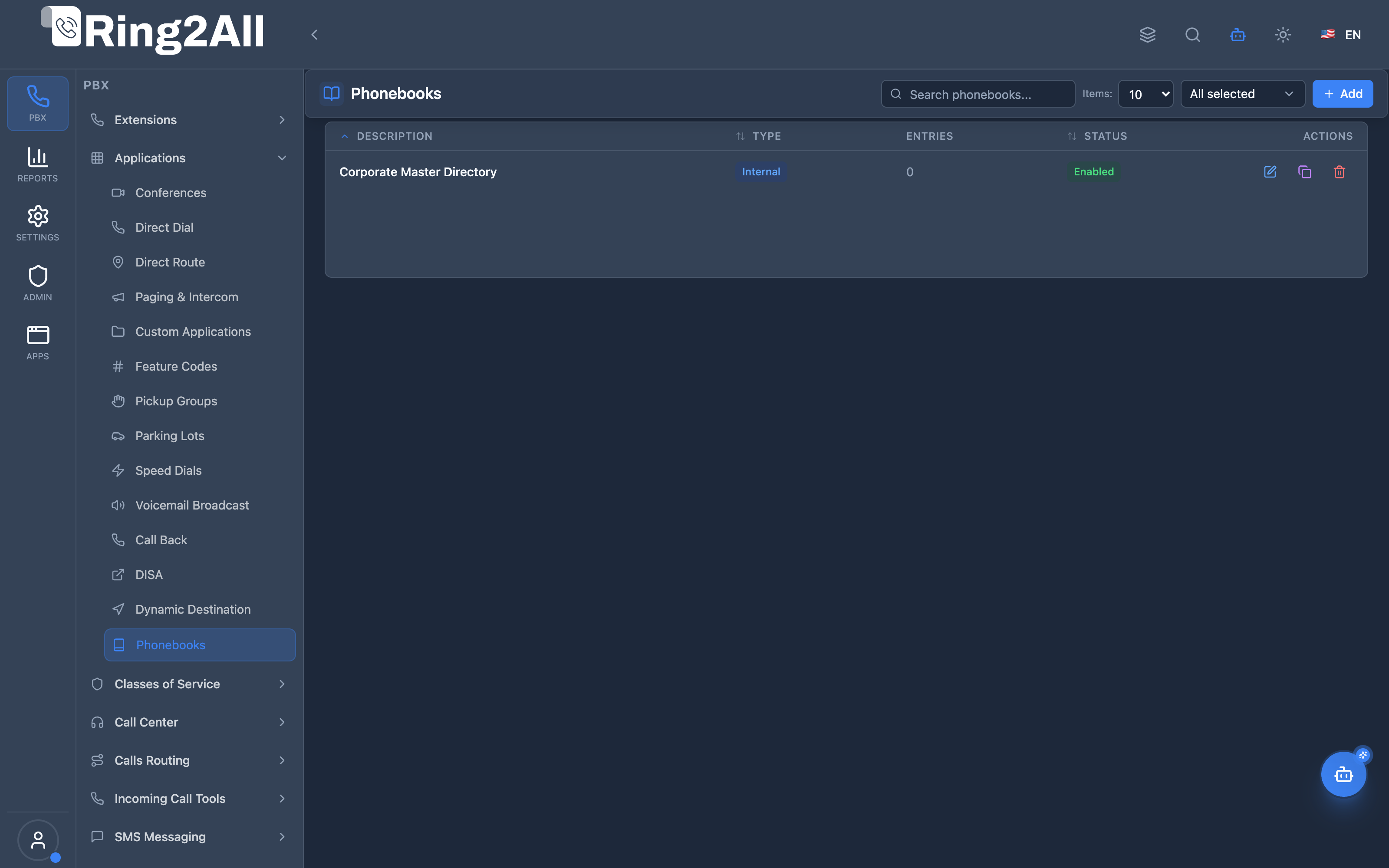
Administrator Workflow
Section titled “Administrator Workflow”┌─────────────────────────────────────────────────────────────────┐│ Creating a Corporate Phonebook │├─────────────────────────────────────────────────────────────────┤│ ││ Step 1: General Information ││ ├─ Description: "Corporate Master Directory" ││ ├─ Type: Internal ││ ├─ URL: (Auto-generated unique hash endpoint) ││ └─ Enabled: Active ││ ││ Step 2: Select PBX Modules to Include ││ ├─ Extensions: All active company extensions ││ ├─ Queues: Sales Queue, Support Queue ││ ├─ Ring Groups: Tier 1 Dispatch ││ ├─ Conferences: Executive Boardroom ││ └─ Speed Dials: External Emergency Hotline ││ ││ Step 3: Save and Copy URL ││ ├─ Click "Copy URL" button ││ └─ Paste into Auto-Provisioning template for Yealink/Cisco ││ ││ Result: IP phones automatically fetch updated XML on reboot ││ │└─────────────────────────────────────────────────────────────────┘Quick Tips
Section titled “Quick Tips”[!TIP] One URL for All Models: The backend detects the handset’s brand from the
User-Agentheader. You can assign the identical URL to Yealink, Grandstream, and Polycom phones—each receives its proprietary XML dialect automatically.
[!TIP] Real-Time Extension Updates: Internal phonebooks evaluate active extensions dynamically. When an administrator renames or adds an extension, phones fetch the new record on their next scheduled poll without modifying the phonebook configuration.
[!CAUTION] URL Confidentiality: The unique code in the phonebook URL acts as an access token. Do not publish directory URLs on unauthenticated public websites.
4. Configuration Fields Reference
Section titled “4. Configuration Fields Reference”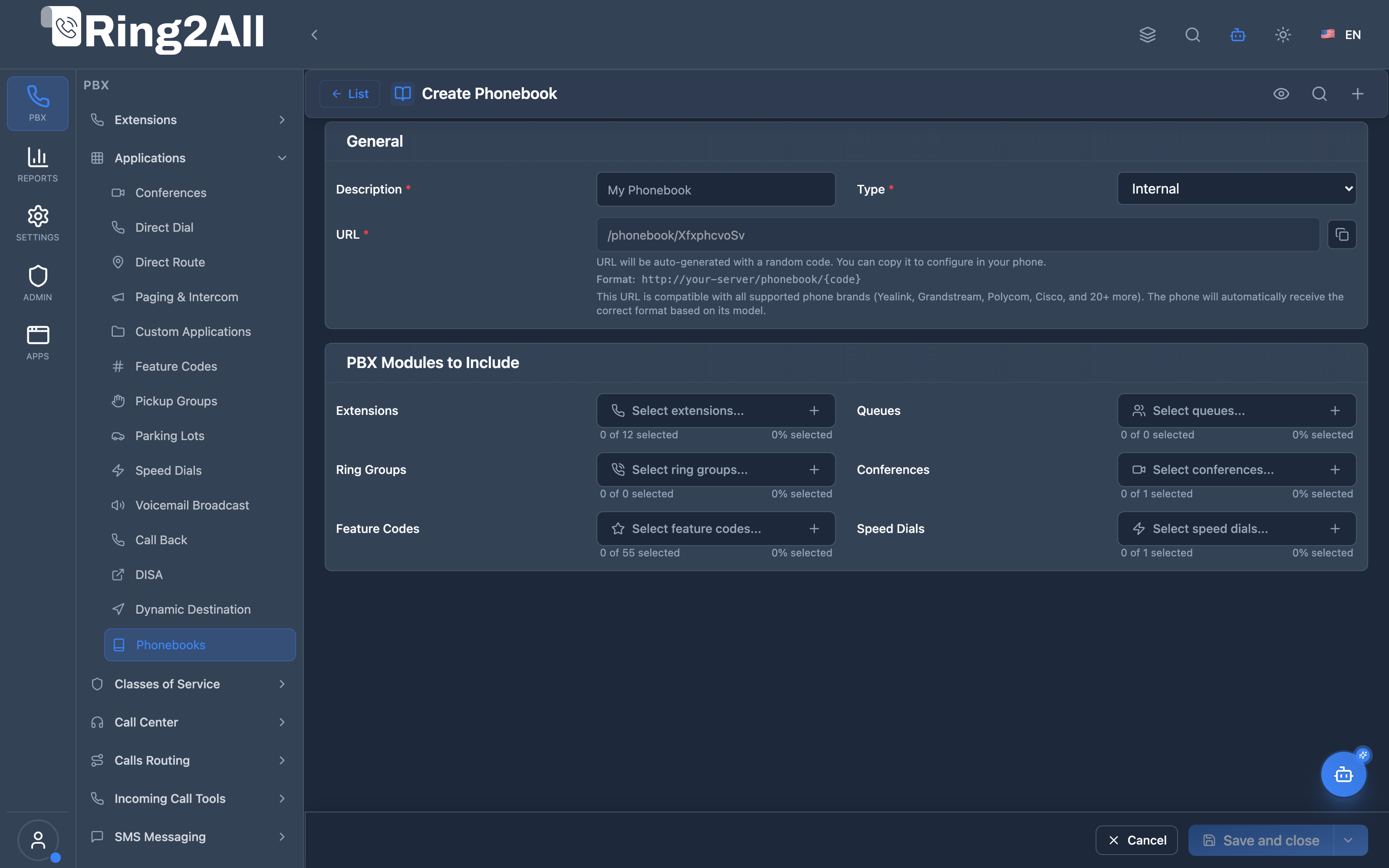
General Information Box
Section titled “General Information Box”| Field | Description | UI Tooltip | Example | Notes |
|---|---|---|---|---|
| Description * | Human-readable directory name | Descriptive label for this corporate address book | Corporate Master Directory |
Required. |
| Type * | Directory source classification | Choose Internal (PBX modules) or External (CSV imported contacts) | Internal |
Dropdown: Internal or External. Required. |
| URL * | Auto-generated secure directory endpoint | Unique HTTP URL providing phone-compatible directory XML | http://192.168.10.31:3000/api/phonebooks/xml/sec_948f2a |
Features a dedicated “Copy URL” button. Compatible with 23+ hardware phone brands. |
| Enabled | Operational toggle | Activate or deactivate phonebook XML generation | Enabled / Disabled |
Toggle. Default: Enabled. |
PBX Modules to Include Box (Internal Phonebooks)
Section titled “PBX Modules to Include Box (Internal Phonebooks)”When Type is set to Internal, the system displays multi-select pickers to choose specific PBX entities:
| Entity Selector | Description | UI Tooltip | Notes |
|---|---|---|---|
| Extensions | SIP user extensions to include | Extensions to include in this phonebook | Multi-select modal showing Extension number and Caller ID Name. |
| Queues | Call center queues to include | Queues to include in this phonebook | Includes Queue display name and virtual dial extension. |
| Ring Groups | Ring groups to include | Ring groups to include in this phonebook | Includes group extension number and description. |
| Conferences | Conference bridges to include | Conferences to include in this phonebook | Includes bridge extension and room name. |
| Feature Codes | System star codes to include | Feature codes to include in this phonebook | Includes active feature codes (*88, *72, etc.). |
| Speed Dials | Fast dial shortcodes to include | Speed dials to include in this phonebook | Includes shortcode number and destination label. |
Imported Contacts Box (External Phonebooks)
Section titled “Imported Contacts Box (External Phonebooks)”When Type is set to External, the administrative form renders an embedded contact data grid:
| Control | Description | Purpose |
|---|---|---|
| Search Contacts | Real-time text search input | Filter contacts by First Name, Last Name, Phone, or Organization. |
| Items Per Page | Pagination limit dropdown | Display 10, 25, 50, or 100 contacts per page. |
| Import CSV Button | Action toolbar modal opener | Opens file upload modal for CSV contact ingestion. |
| Export Button | Action toolbar CSV downloader | Exports current contacts to a standard .csv file. |
| Preview Format | Top header action button | Inspect raw XML output for Yealink, Grandstream, Cisco, and Polycom formats. |
5. Compatible Phone Brands & Auto-Detection
Section titled “5. Compatible Phone Brands & Auto-Detection”The Ring2All Phonebook engine contains built-in rendering templates for over 23 major hardware vendors and softphones:
| Vendor Category | Supported Brands & Series | Native Output Format |
|---|---|---|
| Tier 1 Enterprise | Yealink (T2x, T3x, T4x, T5x, CP9xx), Polycom / Poly (VVX, SoundPoint), Cisco (SPA5xx, CP-78xx, CP-88xx) | Yealink XML, Polycom Directory XML, Cisco XML Directory |
| Telecom & SMB | Grandstream (GXP, GRP, WP series), Fanvil (X, V series), Snom (D3xx, D7xx) | Grandstream AddressBook XML, Fanvil IPPhoneBook, Snom IPPhoneDirectory |
| Wireless / DECT | Gigaset Pro, Panasonic (KX-TGP), Flyingvoice, Spectralink | Vendor XML / CSV |
| Intercom & Paging | CyberData, Algo Communication, 2N, AudioCodes | Device XML / Plaintext |
| Softphone / Mobile | Ring2All WebRTC Portal, Linphone, Zoiper, Bria | REST JSON Directory / Switchboard API |
Auto-Detection in Action
Section titled “Auto-Detection in Action”When a phone issues an HTTP GET request, the engine checks the User-Agent string:
GET /api/phonebooks/xml/sec_948f2a HTTP/1.1Host: 192.168.10.31:3000User-Agent: Yealink SIP-T46U 66.86.0.15The system recognizes Yealink and delivers:
<?xml version="1.0" encoding="UTF-8"?><YealinkIPPhoneDirectory> <Title>Corporate Master Directory</Title> <DirectoryEntry> <Name>Alice Smith</Name> <Telephone>1001</Telephone> </DirectoryEntry> <DirectoryEntry> <Name>Sales Priority Queue</Name> <Telephone>8001</Telephone> </DirectoryEntry></YealinkIPPhoneDirectory>6. CSV Import Specification
Section titled “6. CSV Import Specification”For External phonebooks, contacts can be imported in bulk using comma-separated values (CSV).
Sample CSV Template
Section titled “Sample CSV Template”firstName,lastName,phoneNumber,mobileNumber,organization,emailJohn,Doe,+15551234567,+15559876543,Acme Corp,jdoe@acme.comJane,Smith,+15552345678,,Global Logistics,jsmith@globallogistics.comRobert,Johnson,+15553456789,+15558765432,VIP Client,rjohnson@client.comColumn Rules
Section titled “Column Rules”| Field | Required | Description | Validation |
|---|---|---|---|
firstName |
Optional | Contact’s given name | Text up to 64 chars |
lastName |
Optional | Contact’s family name | Text up to 64 chars (At least one name required) |
phoneNumber |
Required | Work / Landline phone number | Valid E.164 or numeric string |
mobileNumber |
Optional | Cell / Secondary phone number | Valid E.164 or numeric string |
organization |
Optional | Business / Company label | Text up to 100 chars |
email |
Optional | Contact email address | Valid RFC 5322 email syntax |
7. Common Scenarios & Examples
Section titled “7. Common Scenarios & Examples”Scenario 1: All-Hands Corporate Address Book
Section titled “Scenario 1: All-Hands Corporate Address Book”- Type: Internal
- Included Entities: All Extensions, All Call Center Queues, All Ring Groups.
- Use Case: Pushed to every office workstation so any employee can search for colleagues by first or last name using their phone keypad.
Scenario 2: Remote Warehouse DECT Directory
Section titled “Scenario 2: Remote Warehouse DECT Directory”- Type: Internal
- Included Entities: Shipping Extensions (
1040–1055), Security Ring Group (7000), Gate Intercom (8010). - Use Case: Eliminates clutter for warehouse floor staff, giving them immediate access to operational extensions.
Scenario 3: Executive VIP External Contacts
Section titled “Scenario 3: Executive VIP External Contacts”- Type: External
- Source: Imported CSV containing board members, key legal counsel, and banking partners.
- Use Case: Configured exclusively on executive suite phones to provide instant dialing of external private mobile numbers without exposing numbers to the entire company.
8. Model Context Protocol (MCP) AI Integration
Section titled “8. Model Context Protocol (MCP) AI Integration”Ring2All exposes native Model Context Protocol (MCP) tools for Phonebooks, enabling AI assistants and Copilots to query directories, search contacts across multiple internal and external address books, and programmatically provision corporate directories or individual contact records with domain isolation.
Available MCP Tools
Section titled “Available MCP Tools”| Tool Name | Description | Key Parameters |
|---|---|---|
list_phonebooks |
Lists all phonebook directories configured in the domain, including directory types (internal/external), URLs, and descriptions. | query (optional string) |
get_phonebook_status |
Retrieves configuration details, provisioning URL endpoints, and contact counts for a phonebook. | identifier (required, name or ID) |
search_phonebook_contacts |
Searches contacts across phonebooks by first/last name, phone number, email address, or organization. | query (required), phonebookName (optional) |
create_phonebook |
Provisions a new corporate directory (internal auto-synced or external custom list). | name, type (‘internal’ or ‘external’), url |
add_phonebook_contact |
Adds a new contact entry into an external phonebook. | phonebookName, firstName, lastName, phoneNumber, mobileNumber, organization, email |
delete_phonebook_contact |
Removes a contact from an external phonebook by name or telephone number. | phonebookName, contactQuery |
delete_phonebook |
Deletes a phonebook directory and its associated contacts from the domain. | identifier (required) |
AI Agent Operational Examples
Section titled “AI Agent Operational Examples”Searching Contacts Across Company Directories
Section titled “Searching Contacts Across Company Directories”{ "tool": "search_phonebook_contacts", "arguments": { "query": "Logistics", "phonebookName": "Corporate Master Directory" }}Programmatically Adding an External Partner Contact
Section titled “Programmatically Adding an External Partner Contact”{ "tool": "add_phonebook_contact", "arguments": { "phonebookName": "Key Vendors", "firstName": "Marcus", "lastName": "Vance", "phoneNumber": "+15554320199", "organization": "Global Freight Logistics", "email": "mvance@globalfreight.com" }}Recommended Natural Language Prompts
Section titled “Recommended Natural Language Prompts”- “Find the phone number for John Doe or search for anyone with the last name Smith in our phonebooks.”
- “Add a new external vendor contact ‘Acme Supplies’ with number +1-800-555-0144 to the Vendors phonebook.”
- “List all phonebook directories configured on this PBX and show their device provisioning URLs.”
9. Limitations & Important Notes
Section titled “9. Limitations & Important Notes”[!NOTE] No Manual Phone Re-Flashing: Phones automatically re-poll directory XML upon scheduled refresh intervals (typically every 12 to 24 hours or upon device reboot).
[!NOTE] Dual Endpoint Capability: Both
/api/phonebooks/xml/{hash}(for IP phones) and/api/phonebooks/json/{hash}(for WebRTC softphones) are supported out of the box.
[!WARNING] Phone Memory Limits: Some entry-level IP phones have hardware limitations (e.g., maximum 500 or 1000 XML entries). For large organizations with 2000+ extensions, create targeted departmental phonebooks rather than loading one massive list into budget hardware.
10. Troubleshooting Tips
Section titled “10. Troubleshooting Tips”| Symptom | Probable Cause | Diagnostic & Resolution |
|---|---|---|
| Phone displays “XML Format Error” | Unrecognized User-Agent or invalid character in name | Test URL via curl specifying user-agent: curl -A "Yealink" http://.... Verify no unescaped XML characters (&, <, >) exist in imported names. |
| Directory on phone is empty | No PBX modules selected or phonebook disabled | Ensure Enabled toggle is active and at least one extension or queue is checked in the module selector. |
| URL cannot be reached from phone | Network firewall blocking HTTP/HTTPS port | Ensure IP phone subnet has routing access to the PBX web service port (e.g. port 80/443/3000). |
| Contact updates not appearing on phone | Handset local caching | Reboot the phone or press the Update softkey on the phone’s directory menu to bypass cache. |
Diagnostic SQL Queries
Section titled “Diagnostic SQL Queries”Verify Phonebook Record & Hash:
SELECT id, description, type, url, enabled, updated_atFROM public.phonebooksWHERE domain_id = [domain_id];Count Imported External Entries:
SELECT phonebook_id, COUNT(*) AS total_contactsFROM public.phonebook_entriesGROUP BY phonebook_id;11. Glossary
Section titled “11. Glossary”| Term | Definition |
|---|---|
| Phonebook | Centralized XML or JSON contact directory published over HTTP to IP endpoints. |
| Content Negotiation | Server capability to detect device model via User-Agent and format the response specifically for that vendor. |
| Internal Phonebook | Directory populated in real time directly from active PBX extensions and routing entities. |
| External Phonebook | Directory assembled from uploaded CSV contact files containing external numbers and business partners. |
| LDAP / Remote XML | Industry-standard protocol specifications utilized by IP telephony handsets to fetch external contacts. |