

MCP Tool Roles Module Documentation
Table of Contents
Section titled “Table of Contents”- Navigation & Access
- Screenshots & Visual Interface
- 🎯 User Roles & Key Capabilities
- Module Overview (Technical)
- Module Overview (Commercial/Business)
- Module Overview (End User/Administrator)
- The 5 Official System MCP Tool Roles
- Configuration Sections
- Settings Reference
- Common Scenarios & Examples
- Model Context Protocol (MCP) AI Integration
- Limitations & Important Notes
- Troubleshooting Tips
- Glossary
Navigation & Access
Section titled “Navigation & Access”To access the MCP Tool Roles governance module:
- Log in to the Ring2All Web Portal (
https://<domain-or-ip>/login). - In the left navigation sidebar, expand Admin.
- Under Administration, click MCP Tool Roles (
/mcp-roles). - To create a new MCP tool role profile, click the + Add MCP Role button (
/mcp-roles/new). - To view, edit, or duplicate an existing MCP tool role profile, click on the profile row or the action controls (
/mcp-roles/:id).
Screenshots & Visual Interface
Section titled “Screenshots & Visual Interface”MCP Tool Roles List View
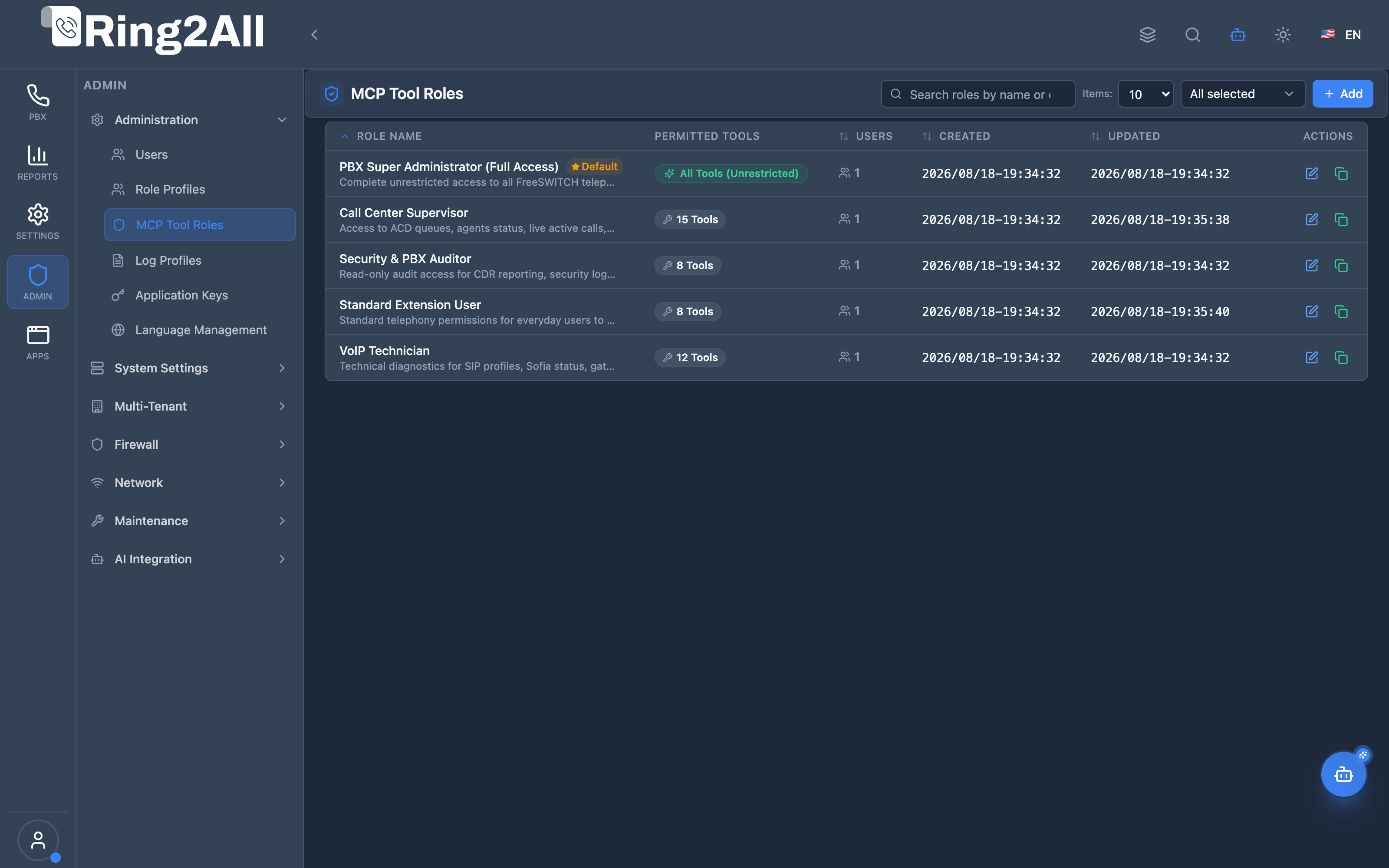
Section titled “MCP Tool Roles List View”The MCP Tool Roles list view displays all configured AI governance profiles (PBX Super Administrator, Call Center Supervisor, VoIP Technician, Standard Extension User, Security & PBX Auditor), listing authorized tool counts, default profile designations, active statuses, and administrative actions.
MCP Tool Role Configuration Form & Tool Catalog
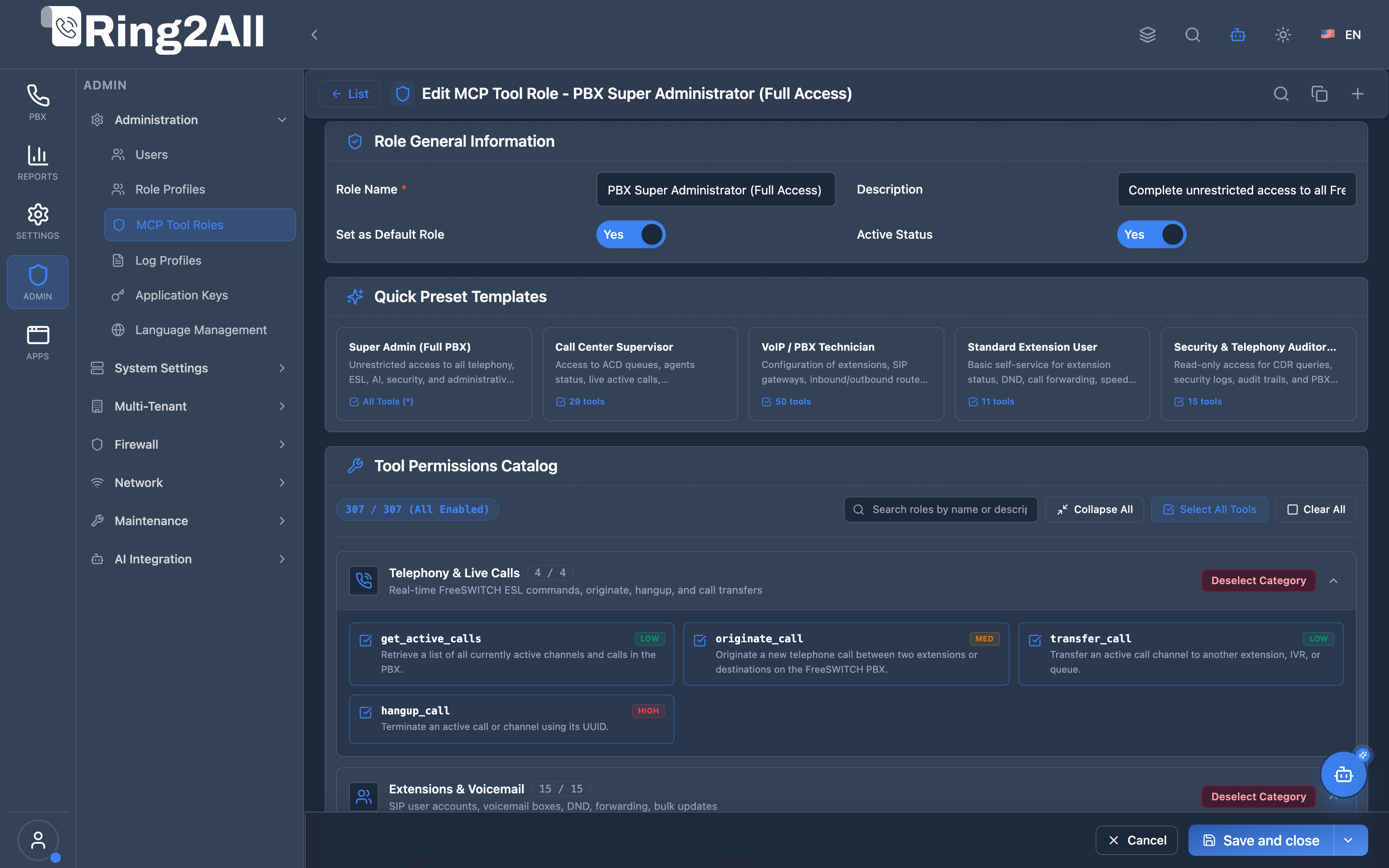
Section titled “MCP Tool Role Configuration Form & Tool Catalog”The MCP tool role configuration editor allows system administrators to assign granular execution rights over specific telephony tools (Telephony Event Socket (ESL) commands, CDR querying, eavesdropping, queue management) with bulk category selection, search filtering, and active status toggles.
🎯 User Roles & Key Capabilities
Section titled “🎯 User Roles & Key Capabilities”MCP Tool Roles establish zero-trust boundaries over autonomous AI capabilities across organizational tiers:
| Role | Key Capabilities & Operational Scope |
|---|---|
| PBX Super Administrator | Unrestricted access (*) to all Telephony Server telephony commands, Kamailio binrpc APIs, CDR metrics, queue controls, and user administration via AI Copilot. |
| Call Center Supervisor | Authorized to interact with ACD queue tools, agent state toggles, live active call eavesdropping, barge-in commands, and queue callback metrics. |
| VoIP / PBX Technician | Authorized to inspect SIP gateways, register extensions, modify outbound/inbound routes, adjust time groups, and reboot SIP endpoints via provisioning tools. |
| Standard Extension User | Self-service capabilities limited strictly to personal extension status, DND toggling, personal forwarding, personal voicemail, and phonebook lookups. |
| Security & Telephony Auditor | Strictly read-only tool capabilities: queries CDR records, audits log profile activity, reviews firewall status, and analyzes system health without execution or modification powers. |
1. Module Overview (Technical)
Section titled “1. Module Overview (Technical)”What Are MCP Tool Roles?
Section titled “What Are MCP Tool Roles?”MCP Tool Roles provides the AI Governance & Authorization Layer for the Model Context Protocol (MCP) server integrated into the Ring2All PBX platform.
While Role Profiles govern what a human user can see and click in the web frontend, and Log Profiles control what actions get audited, MCP Tool Roles strictly govern what programmatic telephony commands an AI Agent, Assistant, or Copilot can execute when acting on behalf of an authenticated user.
The Four Pillars of Access Control
Section titled “The Four Pillars of Access Control” ┌─────────────────────────────────────────────────┐ │ USER ACCOUNT │ │ (Auth: Argon2id, JWT, MFA, Multi-Tenant) │ └────────┬────────────────┬────────────────┬──────┘ │ │ │ ┌────────────────▼───┐ ┌─────────▼──────────┐ ┌──▼────────────────┐ │ ROLE PROFILE │ │ LOG PROFILE │ │ MCP TOOL ROLE │ │ (RBAC Modules) │ │ (Audit & Notif.) │ │ (AI Tools RBAC) │ ├────────────────────┤ ├────────────────────┤ ├───────────────────┤ │ • Read / List │ │ • Log Create │ │ • Telephony Event Socket (ESL) │ │ • Create / Insert │ │ • Log Edit │ │ • Kamailio binrpc │ │ • Edit / Update │ │ • Log Delete │ │ • RTPEngine QoS │ │ • Delete / Destroy │ │ • Push / Email Not.│ │ • CDRs & Telephony│ └────────────────────┘ └────────────────────┘ └───────────────────┘Authorization Architecture & Runtime Validation
Section titled “Authorization Architecture & Runtime Validation”Whenever an AI Assistant (e.g. Platform Copilot, Voice Agent, or Extensions Chatbot) requests a tool call via the Model Context Protocol (tools/call), the backend server intercepts the request and verifies the caller’s assigned MCP Tool Role:
export async function assertUserCanExecuteTool(  userId: number | string,  toolName: string,  db: KyselyDatabase): Promise<void> {  const user = await db    .selectFrom('users as u')    .leftJoin('mcp_roles as r', 'r.id', 'u.mcp_role_id')    .select(['r.allowed_tools as allowedTools', 'r.status as status'])    .where('u.id', '=', userId)    .executeTakeFirst();
  if (!user || user.status !== 'active') {    throw new ForbiddenError('User has no active MCP Tool Role assigned');  }
  const tools: string[] = typeof user.allowedTools === 'string'    ? JSON.parse(user.allowedTools)    : (user.allowedTools || []);
  // Super Administrator wildcard (*) or explicit tool permission  if (tools.includes('*') || tools.includes(toolName)) {    return; // Authorized  }
  throw new ForbiddenError(`MCP tool '${toolName}' is not allowed for user's role`);}
Database Storage
Section titled “Database Storage”- Table:
ss_admin.mcp_roles - Key Columns:
id: Auto-incrementing primary integer identifier.uuid: Universally unique identifier.tenant_id: Multi-tenant ownership (NULL for global system profiles).name: Display name of the MCP role profile.description: Detailed description of the profile’s operational scope.allowed_tools: JSONB array of permitted tool slugs (or["*"]).is_default: Boolean indicating the default profile for newly provisioned users.status: Lifecycle state (active/inactive).
2. Module Overview (Commercial/Business)
Section titled “2. Module Overview (Commercial/Business)”Why AI Tool Governance Matters
Section titled “Why AI Tool Governance Matters”Deploying generative AI into a mission-critical telecommunications softswitch introduces serious risks if tools lack granular authorization:
- Preventing Unauthorized Eavesdropping: Supervisors should be able to whisper or listen into calls, but standard extension users must never be allowed to bridge into third-party calls.
- Preventing Accidental Outages: Network technicians can restart Sofia SIP profiles or reload gateways, but sales representatives using an AI assistant should only be able to place outbound calls and query their voicemail.
- Compliance & Privacy (GDPR / HIPAA / PCI-DSS): Financial and healthcare environments require proof that AI chatbots cannot query call recordings or CDR metadata without audited authorization.
MCP Tool Roles ensure enterprise telephony operators can deliver powerful AI assistants with zero fear of privilege escalation.
3. Module Overview (End User/Administrator)
Section titled “3. Module Overview (End User/Administrator)”Who Configures MCP Tool Roles?
Section titled “Who Configures MCP Tool Roles?”- SuperAdmin: Can create, clone, edit, and assign MCP tool roles across all domains and tenants.
- Tenant Administrator: Can view and select allowed tool profiles for tenant users based on platform provisioning.
User Account Binding
Section titled “User Account Binding”Every user in the PBX can be assigned a specific MCP Tool Role from the Users module (/users/:id ➔ Security & Access). If no role is selected, the platform automatically applies the role designated with is_default = true.
4. The 5 Official System MCP Tool Roles
Section titled “4. The 5 Official System MCP Tool Roles”The platform includes five pre-configured system roles out of the box:
| Role Name | Scope of Allowed Tools | Description |
|---|---|---|
| PBX Super Administrator (Full Access) | ["*"] |
Unrestricted access to execute all telephony commands, Telephony Server CLI commands, security threat diagnostics, and call modifications. |
| Call Center Supervisor | 15 Tools | Queue monitoring, live call barge-in, eavesdropping, whisper coaching, agent status toggles, recording playback, and CDR stats. |
| VoIP Technician | 14 Tools | Sofia SIP profile inspection/rescanning, gateway diagnostics, SIP registrations, channel variable inspection, MOS quality metrics, and PBX CLI execution. |
| Standard Extension User | 8 Tools | Self-service capabilities: originate calls, transfer active calls, hangup calls, presence status, personal voicemail playback, and company phonebook search. |
| Security & PBX Auditor | 12 Tools | CDR investigation, security events review, blocked IP listing, call quality MOS inspection, system health, and quarantining compromised extensions. |
5. Configuration Sections
Section titled “5. Configuration Sections”General Information Box
Section titled “General Information Box”- Profile Name: Descriptive label identifying the profile’s tier and audience.
- Description: Purpose statement summarizing the operational permissions granted.
- Default Profile: Checkbox to designate this profile as the automatic fallback for new user accounts.
- Status: Toggle between
ActiveandInactive.
Allowed Tools Catalog Box
Section titled “Allowed Tools Catalog Box”Organized into categorized tool groups with individual toggles and group select-all switches:
- Call Management & Dialplan Routing:
originate_call,transfer_call,hangup_call,get_active_calls,simulate_dialplan_route. - Supervision & Coaching:
eavesdrop_call,whisper_call,barge_call. - Queue & Agent Operations:
list_queues,get_queue_status,list_queue_agents,set_agent_status. - SIP & Infrastructure Diagnostics:
get_sofia_status,get_sip_profile_status,rescan_sip_profile,list_registrations,list_gateways,get_gateway_status,execute_fs_cli. - Quality & Performance:
inspect_call_quality_mos,get_fs_uptime,get_system_memory,get_system_status,analyze_server_health. - Security & Auditing:
diagnose_pbx_security_threats,list_audit_logs,list_security_events,list_blocked_ips,quarantine_compromised_extension. - Personal & Voicemail:
get_my_presence,get_my_extension_status,get_my_voicemails,list_recordings,play_recording,search_phonebook.
6. Settings Reference
Section titled “6. Settings Reference”| Field | Type | Default | Required | Description |
|---|---|---|---|---|
| Name | Text | "" |
Yes | Unique name for the MCP Tool Role profile. |
| Description | Text | "" |
No | Operational description explaining the profile’s permissions. |
| Is Default | Boolean | false |
No | If true, automatically assigned to new users without an explicit role. |
| Status | Select | active |
Yes | Lifecycle status (active or inactive). |
| Allowed Tools | Array (JSONB) | [] |
Yes | List of tool names or ["*"] for complete system access. |
7. Common Scenarios & Examples
Section titled “7. Common Scenarios & Examples”Scenario 1: Creating a “Tier 1 Helpdesk” MCP Role
Section titled “Scenario 1: Creating a “Tier 1 Helpdesk” MCP Role”A support technician needs to check if an extension is registered and view active calls, but must never run raw CLI commands or eavesdrop on private calls:
- Navigate to Admin ➔ Administration ➔ MCP Tool Roles.
- Click + Add MCP Role.
- Name:
Tier 1 Helpdesk Support. - Check the following tools:
get_active_callslist_registrationsget_registration_detailsget_my_extension_statusinspect_call_quality_mos
- Leave
execute_fs_cli,eavesdrop_call, andbarge_callunchecked. - Click Save Changes.
Scenario 2: Assigning the Role to a User
Section titled “Scenario 2: Assigning the Role to a User”- Navigate to Admin ➔ Administration ➔ Users.
- Edit user
sarah.connor(/users/2). - In the Security & Access section, locate the MCP Tool Role dropdown.
- Select
Tier 1 Helpdesk Support. - Click Save Changes. All AI Assistant interactions by Sarah will now be restricted to those 5 tools.
Model Context Protocol (MCP) AI Integration
Section titled “Model Context Protocol (MCP) AI Integration”The Ring2All PBX platform provides self-governing MCP tools that allow administrators and automated scripts to audit and inspect MCP Tool Roles.
MCP Tools Reference
Section titled “MCP Tools Reference”| Tool Name | Operation | Description | Risk Level |
|---|---|---|---|
list_mcp_roles |
Read | Lists all MCP Tool Roles governing AI Copilot access, allowed tools counts, and assigned users. | Low |
get_mcp_role_status |
Read | Retrieves the exact tool whitelist, categories, and assigned user accounts for a specific MCP role. | Low |
JSON Schema Definitions
Section titled “JSON Schema Definitions”list_mcp_roles
Section titled “list_mcp_roles”{ "name": "list_mcp_roles", "description": "Lists all MCP Tool Roles governing AI Copilot access and allowed telephony tools.", "parameters": { "type": "object", "properties": { "search": { "type": "string", "description": "Filter by MCP role name or tool category" } } }}get_mcp_role_status
Section titled “get_mcp_role_status”{ "name": "get_mcp_role_status", "description": "Retrieves detailed allowed tool whitelists and assigned users for an MCP Tool Role.", "parameters": { "type": "object", "properties": { "role_id": { "type": "number", "description": "Internal numeric MCP Tool Role identifier" }, "name": { "type": "string", "description": "MCP Tool Role name (e.g. 'Call Center Supervisor', 'VoIP Technician')" } } }}Natural Language Prompt Examples
Section titled “Natural Language Prompt Examples”English
Section titled “English”- “List all configured MCP Tool Roles and their active statuses.”
- “Show the exact list of allowed tools for the ‘VoIP / PBX Technician’ MCP role.”
- “Check which users are assigned to the ‘Super Administrator’ AI governance role.”
Spanish
Section titled “Spanish”- “Muestra todos los roles de herramientas MCP y cuántas herramientas tienen permitidas.”
- “Consulta la lista de herramientas habilitadas para el rol MCP ‘Call Center Supervisor’.”
- “¿Qué usuarios tienen asignado el rol de IA ‘Auditor de Seguridad’?”
Enterprise Safeguards & Guardrails
Section titled “Enterprise Safeguards & Guardrails”- Real-Time Revocation: Any modification to an MCP Tool Role takes effect immediately on the very next tool call made by any connected AI session.
- Fail-Safe Deny: If a user account lacks an active MCP role, the backend automatically denies 100% of tool execution attempts.
- Protected Presets: Predefined system MCP presets cannot be deleted or renamed.
8. Limitations & Important Notes
Section titled “8. Limitations & Important Notes”- Real-Time Revocation: Modifying an MCP Tool Role takes effect immediately on the very next tool call made by any connected AI session.
- Protected Roles: Default system profiles cannot be deleted. Administrators can clone them to create customized variations.
- Fail-Safe Deny: If a user account has no MCP role or an inactive role assigned, the MCP server automatically denies 100% of tool execution attempts.
9. Troubleshooting Tips
Section titled “9. Troubleshooting Tips”Tool Call Fails with “ForbiddenError”
Section titled “Tool Call Fails with “ForbiddenError””- Check the user’s assigned role in
/users/:id. - Ensure the specific tool requested is included in
allowed_tools. - Verify the MCP role’s status is set to
active.
AI Assistant Reports Command Unavailable
Section titled “AI Assistant Reports Command Unavailable”- If the AI says “I do not have permission to inspect SIP profiles,” verify whether
get_sip_profile_statusis enabled for the user’s role.
10. Glossary
Section titled “10. Glossary”| Term | Definition |
|---|---|
| MCP (Model Context Protocol) | Open protocol developed by Anthropic allowing AI models to securely connect to external tools and data sources. |
| Platform Copilot | Ring2All’s integrated AI assistant providing natural language diagnostics and PBX management. |
| ESL (Event Socket Layer) | Telephony Server TCP socket interface used to monitor events and execute telephony commands. |
| Barge-in | Telephony feature allowing a supervisor to join a live two-party call as a three-way conference. |
| Whisper | Telephony coaching feature allowing a supervisor to speak to an internal agent without the external caller hearing. |
Documentation last updated: September 2026